eDrawings Pro: Professional 2D & 3D CAD Collaboration for Engineers on the Go
Empower your mobile workflow with precision measurement, powerful markup tools, and immersive AR visualization for native SolidWorks®, DWG, and DXF files.
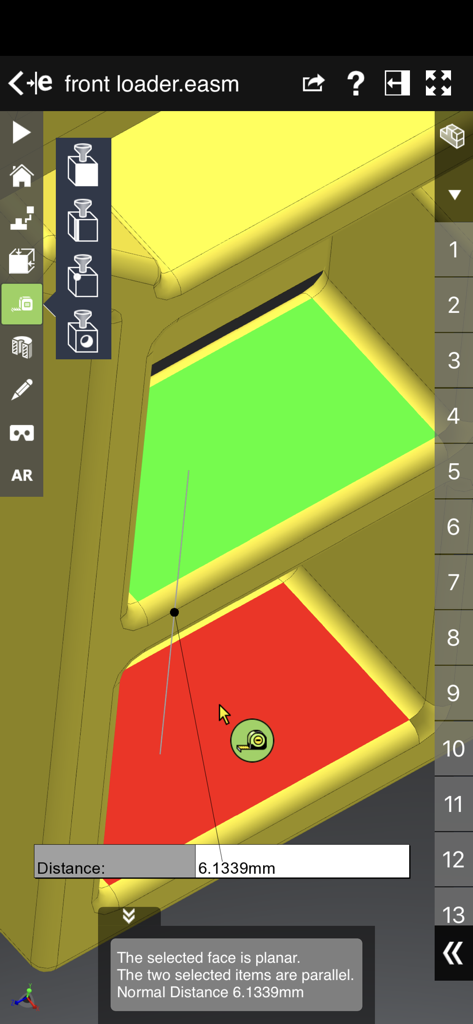
A 3D CAD model measurement interface in the eDrawings Pro app showing distance between parallel faces.
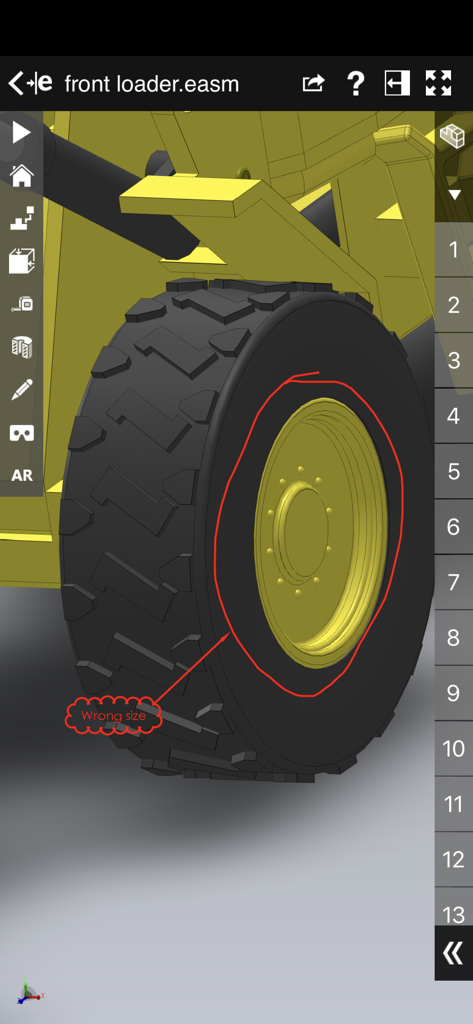
3D CAD model of a front loader wheel with a red markup annotation in eDrawings Pro
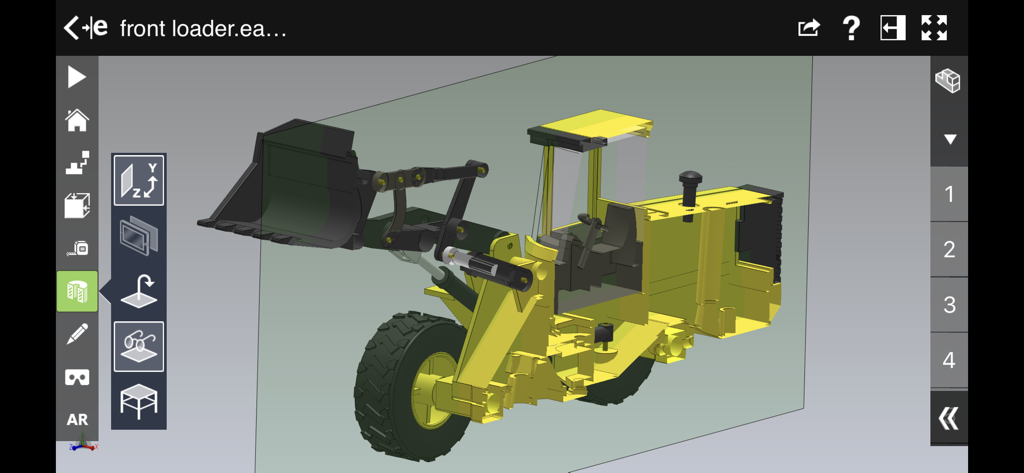
A 3D CAD model of a front loader showing a cross section view within the eDrawings Pro interface
Design Collaboration Without Limits
The tools that make this app stand out, trusted by 369K+ users.
📐
Immersive AR Visualization
Bring your 3D designs into the real world at 1:1 scale to verify spatial fit and showcase projects in situ.
✍️
Seamless Team Collaboration
Accelerate design cycles with integrated markup tools, allowing you to annotate, save, and share feedback instantly.
📏
Precision Engineering Tools
Access high-accuracy measurements and dynamic cross-sectioning to inspect every detail of your complex assemblies.
Review Analysis
Insights from user reviews.
Sentiment Score
16%
Negative
Summary
The eDrawings app faces significant user dissatisfaction, primarily stemming from its inability to reliably open and render SolidWorks files, particularly larger assemblies, which frequently causes crashes and freezes. Many users express that the app offers poor value for money, labeling it a "scam" due to its high price and unreliable performance, especially with recent versions like 2024 SP02 and 30.0.5019. While a few users value its role as a mobile companion for design review, core functionalities like measurement tools are criticized for inaccuracy and lack of features such as PDF export or unit conversion.
Common Themes
File Opening & Crashing(27)
Price & Value for Money(7)
Limited Features(7)
Measurement Tools(5)
Performance(3)
Desktop Complement(2)
File Integration(1)
About the app
Everything you need to know about eDrawings Pro.
Description
eDrawings® Pro is the professional 2D and 3D CAD collaboration app for the iPad, iPhone and iPod Touch that can view native SolidWorks® files (part, assembly, drawings), eDrawings files and DraftSight® (DWG™, DXF™) files. You can easily view models and access configurations, drawing sheets, and exploded views for eDrawings files published from SolidWorks and all other supported CAD software.
Markup! Measure! Section! eDrawings® Pro takes you to the next level of 2D and 3D collaboration with more functionality, including dynamic cross section views, measurements, markups & annotations and the unique ability to share it all by email!
eDrawings includes Augmented Reality (AR). This allows you to view your 3D models in 1:1 scale into the real world. By simply activating the device’s camera, you can bring your virtual 3D designs in a real context and see them in situ, sitting on your desk or on your conference room table or even in the palm of your hand, through your iPad, Pad mini, iPhone or iPod Touch’s screen. Move around the room and see your design from any perspective.
With an intuitive user interface, eDrawings® Pro enables you to dynamically view cross sections of your models in XY, YZ, or ZX directions from both sides and easily drag the cross section plane on screen or with a convenient slider. You can also measure distances in your designs, with easy-to-use selection filters for faces, edges, vertices and holes.
With eDrawings® Pro you can create markups on your drawings, including text notes, freehand notations, dimensions, cross-section views, photos and camera snapshots.
You can share your marked up eDrawings files with others for review and further comments. All markups with history are saved within the eDrawings file.
Features:
* Intuitive and easy-to-use user interface
* Visualize your 3D models in real context with Augmented Reality (AR)
* Open 3D (EASM, EPRT, SLDASM, SLDPRT, IGES, IGS, JT, STEP, STP, IFC), 2D (EDRW, SLDDRW, DWG, DXF) and associated files from any source: email attachments, cloud storage services (Dropbox™, SkyDrive®, Google Drive, YouSendIt®, and others), web and FTP sites, networks, and iTunes® File Sharing.
* Zoom, pan, and rotate your 3D and 2D CAD data using multi-touch
* Browse your assembly components tree, model configurations and drawing sheets
* Hide, show, or make components transparent
* Select View mode: standard orthogonal views, shaded with edges, perspective view
* Play animated 3D standard views as well as 2D drawing views
* View your designs in full screen and double tap to fit it on screen
* Double tap zooms to drawing views
* Markup your designs and send to others and read others’ markups
* Measure your design data
* View cross sections of your 3D designs, even in AR mode
* Adapt the scale of your 3D model in AR mode
* Freeze the background in AR mode with viewpoint lock to prolong AR experience without holding up your device.
* Sample files included
For more information, visit:
http://www.edrawingsviewer.com
Latest Version
33.4.0038
Size
192.8 MB
First Released
Aug 31, 2012
Take Your Designs From the Desktop to the Field
Empower your engineering workflow with professional-grade 3D visualization, AR, and markup tools. Download eDrawings Pro today and start collaborating with precision on your iPad or iPhone.
App information, icons, screenshots, and descriptions displayed on this page are sourced from the Apple App Store and are the property of their respective developers. Download estimates and rankings are based on MWM's proprietary models and may not reflect actual figures. This page is provided for informational and analytical purposes only.
Believe this page infringes your intellectual property? File a dispute