
This page is not an official page of the app or its developer, but an independent editorial publication created for informational and commentary purposes. Unless expressly stated otherwise, neither the app nor its developer is affiliated with, endorsed by, sponsored by, authorized by, or otherwise officially connected with MWM, Apple, Google Play, the app publisher, or the app's developer, and nothing on this page implies that the app was developed using MWM's services. Any trademarks, logos, screenshots, and other content remain the property of their respective owners.


Enhance Photo / Video Easily
Forget complex edits: this app makes visual perfection instant, right on your device.
Downloads
750k+User Rating
Total Ratings
12.2KPublisher
Category
Photo & VideoLocales
16Latest Version
7.8.1Size
181.7 MBFirst Released
Feb 8, 2022An analysis of core functionalities tailored for effortless visual content improvement on iPhone.
App Evaluation: Enhance Photo / Video Easily
Intuitive Quality Enhancement
The app provides a straightforward method to significantly improve the visual quality of photos and videos, directly addressing the user's need for quick and easy enhancements without complex steps.
Privacy-Focused On-Device Processing
This tool processes all visual content directly on the user's iPhone, ensuring that private photos and videos are never sent to external servers, which is a key priority for privacy-conscious individuals.
Diverse Enhancement Options
It allows users to leverage up to eight different image enhancement algorithms, offering versatility to achieve various aesthetic improvements or correct specific issues without requiring manual editing expertise.
Complimentary Core Enhancements
The app features a free 'normal high quality conversion' option that can be used unlimited times, enabling users to experience core enhancement capabilities without any cost barrier.
Optimized Resolution Handling
It includes intelligent resolution management, optimizing images between 100-500px for good quality and downscaling larger images to 1024px before enhancement to ensure efficient processing and good visual results.
Advanced Feature Preview
The tool offers a free preview of its special high-quality conversion results, allowing users to assess the benefits of advanced features before committing to a Pro Edition purchase.
Frequently Asked Questions
Everything you need to know about Enhance Photo / Video Easily
What does the "Enhance Photo / Video Easily" app do?
The "Enhance Photo / Video Easily" app improves the quality of photos and videos. It offers eight different image enhancement types directly on your device.
Is the "Enhance Photo / Video Easily" app free to use?
Yes, normal high-quality conversion in "Enhance Photo / Video Easily" is free and unlimited. Saving special high-quality conversions requires the Pro Edition, but you can check conversion results for free.
Does "Enhance Photo / Video Easily" send photos to a server?
No, the "Enhance Photo / Video Easily" app performs all conversions directly on your device. It does not send any photos or videos to a server.
How long does "Enhance Photo / Video Easily" take to process an image?
The "Enhance Photo / Video Easily" app processes images on-device, taking approximately 5 to 30 seconds. Processing time varies depending on the original image size and resolution.
What iPhone models support the "Enhance Photo / Video Easily" app?
"Enhance Photo / Video Easily" supports iPhone XS or higher models. Older devices, specifically iPhone 8 or earlier, are not compatible with the app.
How does "Enhance Photo / Video Easily" handle high-resolution images?
The "Enhance Photo / Video Easily" app reduces images exceeding 1024 pixels to 1024 pixels before enhancement. For optimal quality, images between 100 and 500px are recommended.
How many types of enhancement does "Enhance Photo / Video Easily" offer?
The "Enhance Photo / Video Easily" app offers 8 different types of image enhancement. These include "High", "Super", "Amazing", "Excellent", "Extremity", "Fast", "Fast(Anime)", and "Fastest".
Can "Enhance Photo / Video Easily" unblur videos?
Yes, "Enhance Photo / Video Easily" can unblur and clear videos. The app supports enhancing both photos and videos to improve their quality.
Does "Enhance Photo / Video Easily" upscale images?
Yes, "Enhance Photo / Video Easily" upscales images. For example, it can convert a 320x400 image to 1280x1600, providing multiple upscaling options.
The following screenshots and description are sourced directly from the app's official store listing and are the property of the app developer.
App Store
Screenshots

See how the app's intuitive split-screen comparison reveals image improvements and select from various enhancement modes like 'Super' or 'Amazing'.
Photo Clarity Unveiled

Users can explore diverse upscaling options, indicated by selected modes such as 'Super', to achieve crisp details and superior image resolution.
Upscale Image Quality

This tool brings video clarity to the forefront, showcasing a dramatic resolution increase from '320x400' to '1280x1600' using advanced enhancement options like 'Amazing' and 'Ultra'.
Video Perfection Achieved
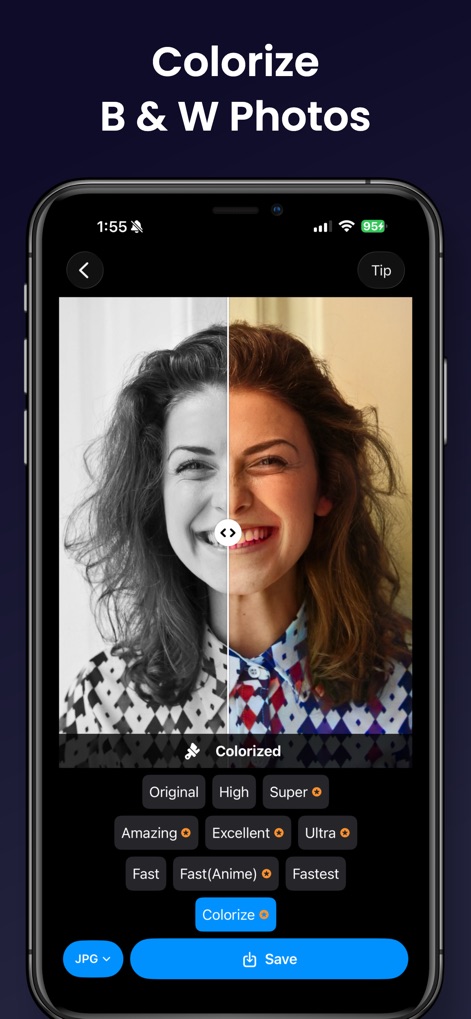
See how the app effortlessly transforms monochrome images into vibrant scenes with its specialized 'Colorize' function, breathing new life into old black and white photos.
Restore Photo Hues

The app expertly refines digital artwork, eliminating pixelation and smoothing lines for illustrations, with dedicated modes like 'Fast(Anime)' for specialized enhancement.
Illustration Enhancement
Description
Download
More Like This
Apps with similar features and user experience

EPIK - AI Photo & Video Editor
SNOW Corporation

Citrus: AI 1 Tap Perfect Photo
Wemagine.ai LLP

SnapEdit: Photo Editor AI
SilverAI Joint Stock Company

Background Eraser 〜 Stickers
handyCloset Inc.

PhotoScan by Google Photos
Google LLC

Magic Eraser - Remove Object
Creatix Technology Global Limited

Magic Eraser Background Editor
Honk Honk Punch Pty Ltd

ProKnockOut-Cut Paste Photos
Shenzhen Qianhai Happy Tour Network Technology Co., Ltd.

Background Eraser - Remove BG*
SHANTANU PTE. LTD.
This page is not an official page of the app or its developer, but an independent editorial publication created for informational and commentary purposes. Unless expressly stated otherwise, neither the app nor its developer is affiliated with, endorsed by, sponsored by, authorized by, or otherwise officially connected with MWM, Apple, Google Play, the app publisher, or the app's developer, and nothing on this page implies that the app was developed using MWM's services. Any trademarks, logos, screenshots, and other content remain the property of their respective owners.