
This page is not an official page of the app or its developer, but an independent editorial publication created for informational and commentary purposes. Unless expressly stated otherwise, neither the app nor its developer is affiliated with, endorsed by, sponsored by, authorized by, or otherwise officially connected with MWM, Apple, Google Play, the app publisher, or the app's developer, and nothing on this page implies that the app was developed using MWM's services. Any trademarks, logos, screenshots, and other content remain the property of their respective owners.


Entrust Identity
Security, once a digital cage, becomes absolute freedom. Users gain mastery over access and transactions, turning potential threats into mere background noise.
Downloads
2.5M+User Rating
Total Ratings
459Publisher
Category
BusinessLocales
9Latest Version
26.1.0Size
58.0 MBFirst Released
Aug 5, 2010Evaluating the core functionalities and benefits for employee and consumer users within Entrust IAM ecosystems.
Entrust Identity App Features: An Analytical Overview
Strong Authentication
The app provides robust, next-generation authentication methods that securely replace traditional hardware tokens, ensuring safe access to corporate resources and sensitive data.
Employee Self-Service Password Management
It allows employees to independently manage password resets and account unlocks directly from the mobile application, significantly improving user experience and reducing the burden on IT departments.
Secure Transaction Verification
This tool features the ability to verify and confirm the details of online transactions, such as logins or financial operations, using a secure one-time passcode generated within the application.
Multi-Organizational Identity & OTP Management
The app enables users to create and activate multiple digital identities and unique one-time passcode soft tokens for use with various organizations that utilize Entrust Identity IAM platforms.
Frequently Asked Questions
Everything you need to know about Entrust Identity
What is the Entrust Identity mobile application?
The Entrust Identity mobile application is a platform providing strong identity credentials for employee and consumer users. It offers authentication, transaction verification, and advanced password reset capabilities.
Does the Entrust Identity app replace hardware tokens?
Yes, the Entrust Identity mobile application provides authentication and transaction verification capabilities that replace traditional hardware tokens for users.
Can I manage multiple identities within the Entrust Identity app?
Yes, the Entrust Identity application allows users to create and activate unique one-time passcode soft token applications for use with different organizations.
How does the Entrust Identity app help with transaction verification?
The Entrust Identity app protects online transactions by receiving confirmation directly to the mobile application. Users confirm details and enter a secure, one-time passcode to complete the transaction.
What details does Entrust Identity display during transaction verification?
During transaction verification, the Entrust Identity app displays details such as Identity, User ID, application, browser, IP address, location, and operating system.
Can employees reset their passwords using the Entrust Identity application?
Yes, the Entrust Identity application includes advanced password reset capabilities, enabling employees to manage and reset their passwords directly from the mobile app.
What are the password requirements for resetting an employee password in Entrust Identity?
Password requirements include being at least 15 characters long, containing uppercase, lowercase, and digits, and not matching user ID, alias, name, or previous passwords from a blocklist.
Does the Entrust Identity app display one-time passcodes?
Yes, the Entrust Identity app displays unique one-time passcodes (soft tokens) for various identities, such as "Entrust" and "VPN" tokens.
Is there a timer for the one-time passcodes in the Entrust Identity app?
Yes, the Entrust Identity app displays a countdown timer for each one-time passcode, indicating its validity period. For example, a 20-second timer is visible.
The following screenshots and description are sourced directly from the app's official store listing and are the property of the app developer.
App Store
Screenshots

This view showcases the organized list of security tokens like 'Entrust' and 'VPN', along with the accessible 'Add Identity' button for new configurations.
Identity Overview
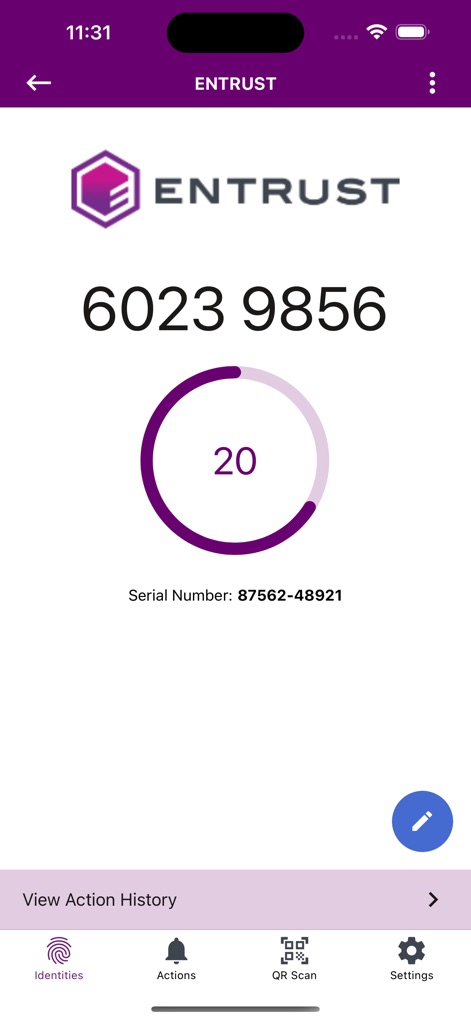
Users observe the active one-time passcode, accompanied by a dynamic countdown timer, and can easily access the 'View Action History' for audit trails.
Live Token View
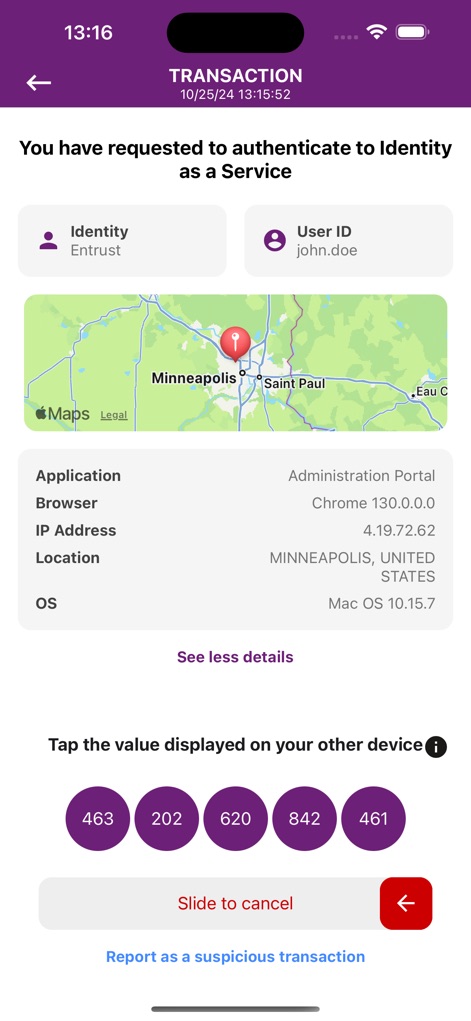
The app presents detailed transaction information, including the user's location on a map, and provides interactive numbered buttons for secure confirmation or the 'Slide to cancel' option.
Transaction Validation

Employees manage their passwords using clear input fields, guided by a robust list of password strength requirements and blacklist checks for enhanced security.
Secure Password Reset
Description
Download
More Like This
Apps with similar features and user experience

WatchGuard AuthPoint
WatchGuard Technologies Inc.

Multifactor
MULTIFAKTOR, OOO

Smart Log On
Acceptto Corporation

Kavach Authentication
Tirender Wig

Aladdin 2FA
Aladdin R.D. ZAO

RSA Authenticator (SecurID)
RSA Security

Google Smart Lock
Google LLC

FortiToken Mobile
Fortinet, Inc

X5 Ключ
Closed Joint Stock Company"Trade House"Perekrestok
This page is not an official page of the app or its developer, but an independent editorial publication created for informational and commentary purposes. Unless expressly stated otherwise, neither the app nor its developer is affiliated with, endorsed by, sponsored by, authorized by, or otherwise officially connected with MWM, Apple, Google Play, the app publisher, or the app's developer, and nothing on this page implies that the app was developed using MWM's services. Any trademarks, logos, screenshots, and other content remain the property of their respective owners.