EventCode+ XQ QR Ticket System
Download on App Store

This page is not an official page of the app or its developer, but an independent editorial publication created for informational and commentary purposes. Unless expressly stated otherwise, neither the app nor its developer is affiliated with, endorsed by, sponsored by, authorized by, or otherwise officially connected with MWM, Apple, Google Play, the app publisher, or the app's developer, and nothing on this page implies that the app was developed using MWM's services. Any trademarks, logos, screenshots, and other content remain the property of their respective owners.


Logo of EventCode+ XQ QR Ticket System
Download on App Store

EventCode+ XQ QR Ticket System

Design custom tickets on your Mac and run high-speed digital check-ins with your iPhone. Take full control of your event data and your door with offline-capable scanning and multi-device sync for the ultimate prosumer experience.

Key Figures

Downloads

7K+

User Rating

5.0/5

Total Ratings

0

Publisher

White Marten GmbH

Category

Productivity

Locales

2

Latest Version

2.2.0

Size

15.4 MB

First Released

Sep 4, 2020
Features

Take Total Control of Your Ticketing

Design, distribute, and validate tickets on your own terms. Eliminate expensive per-ticket commissions and enjoy a professional, offline-ready ecosystem for your iPhone, iPad, and Mac.

Zero Commission Fees

Keep 100% of your event revenue. Stop paying a 'platform tax' for every attendee and manage your ticketing system with no third-party overhead.

Custom Professional Design

Maintain your brand identity with custom logos, layouts, and seating plans. Design high-quality PDF tickets on your Mac and export them for your guests instantly.

The following screenshots and description are sourced directly from the app's official store listing and are the property of the app developer.

App Store

Screenshots
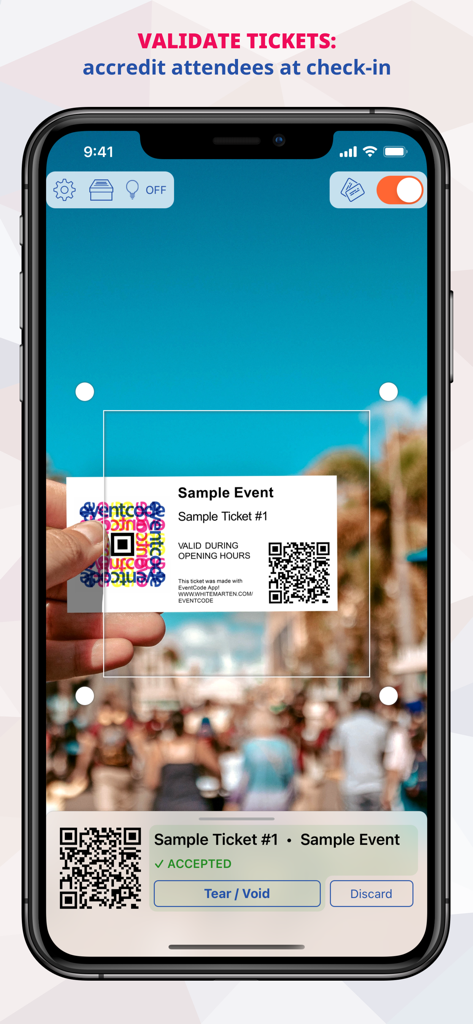
EventCode+ XQ QR Ticket System - EventCode+ XQ app interface scanning a QR code on a ticket to validate attendee check-in.
EventCode+ XQ app interface scanning a QR code on a ticket to validate attendee check-in.

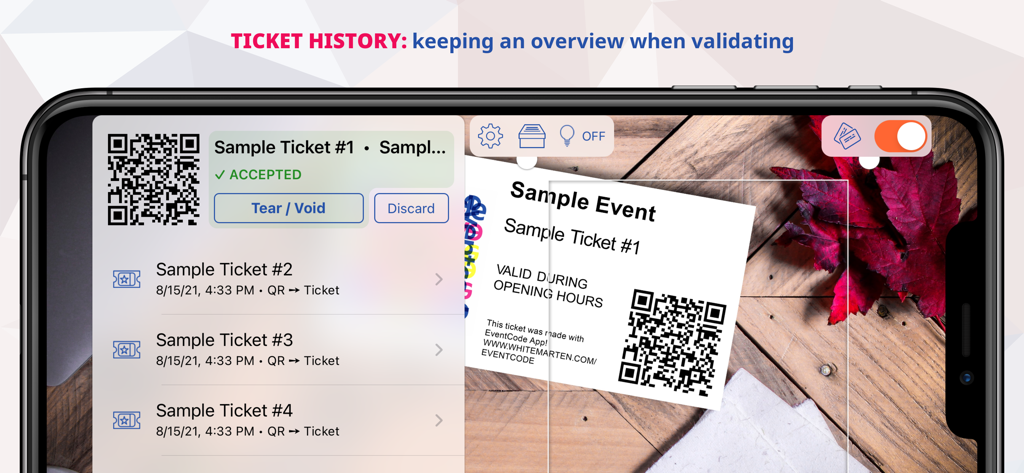
EventCode+ XQ QR Ticket System - Smartphone screen showing ticket validation history and QR code scanning for events
Smartphone screen showing ticket validation history and QR code scanning for events

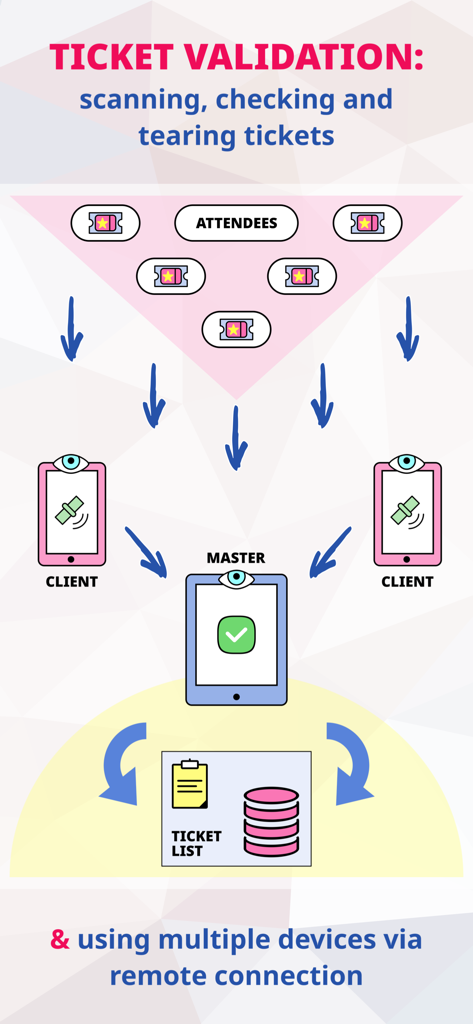
EventCode+ XQ QR Ticket System - Diagram showing ticket validation flow using multiple devices in master and client mode
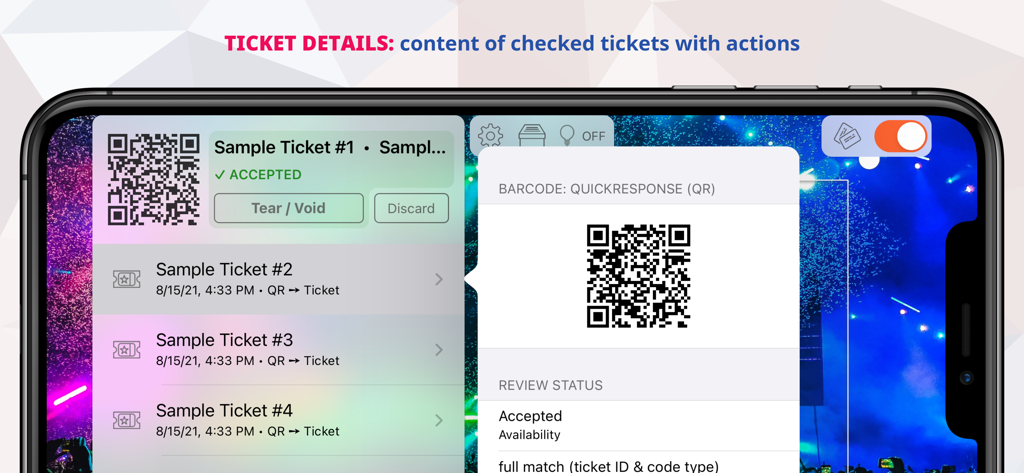
Diagram showing ticket validation flow using multiple devices in master and client mode

EventCode+ XQ QR Ticket System - A smartphone screen showing the ticket details and validation status within the EventCode plus XQ app including options to tear or void tickets
A smartphone screen showing the ticket details and validation status within the EventCode plus XQ app including options to tear or void tickets

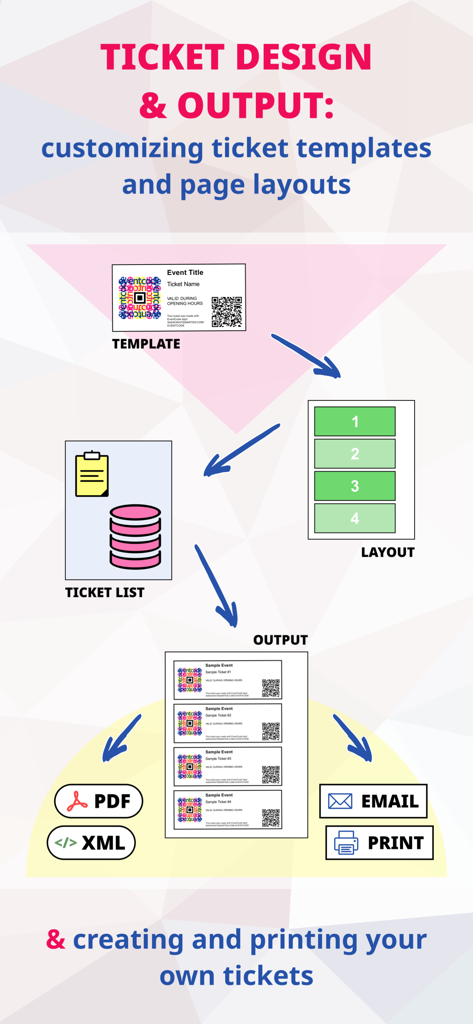
EventCode+ XQ QR Ticket System - Infographic showing the ticket design process from choosing templates and layouts to exporting as PDF or email.
Infographic showing the ticket design process from choosing templates and layouts to exporting as PDF or email.

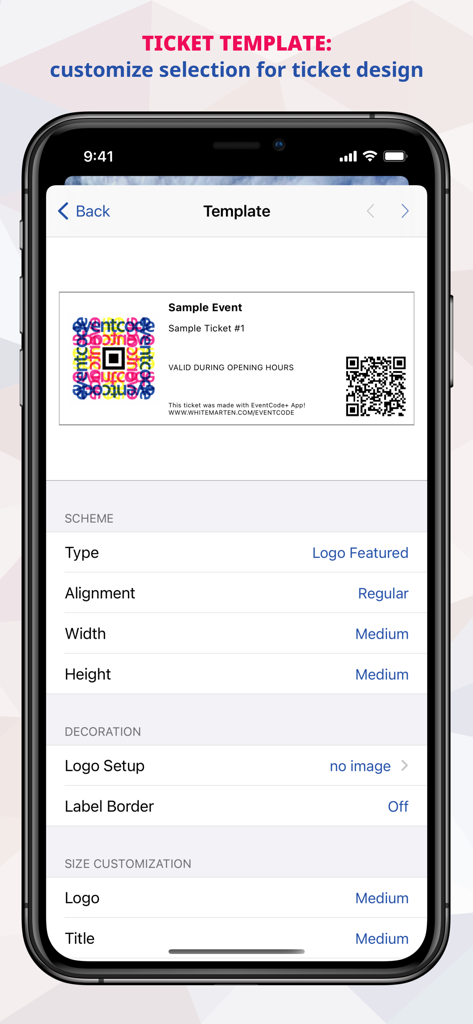
EventCode+ XQ QR Ticket System - EventCode+ XQ app interface for customizing ticket templates and design settings on an iPhone
EventCode+ XQ app interface for customizing ticket templates and design settings on an iPhone

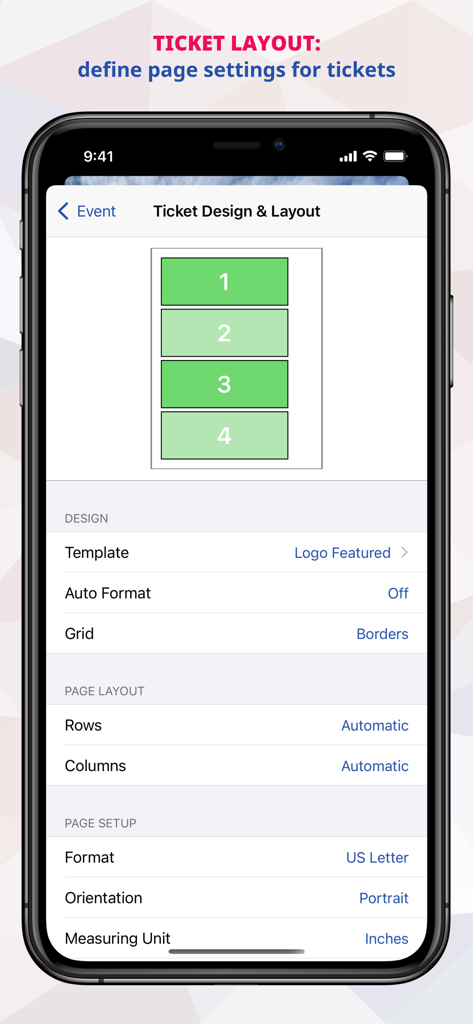
EventCode+ XQ QR Ticket System - A mobile interface for designing ticket layouts and page settings in the EventCode plus XQ app
A mobile interface for designing ticket layouts and page settings in the EventCode plus XQ app

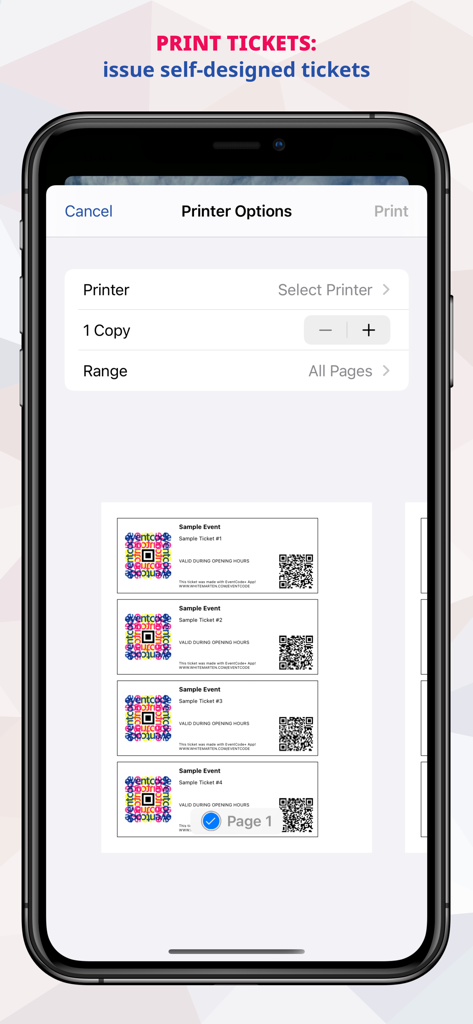
EventCode+ XQ QR Ticket System - Smartphone screen showing printer settings and a preview of four custom tickets with QR codes
Smartphone screen showing printer settings and a preview of four custom tickets with QR codes

EventCode+ XQ QR Ticket System - Graphic displaying various ticket types and validation methods for event management

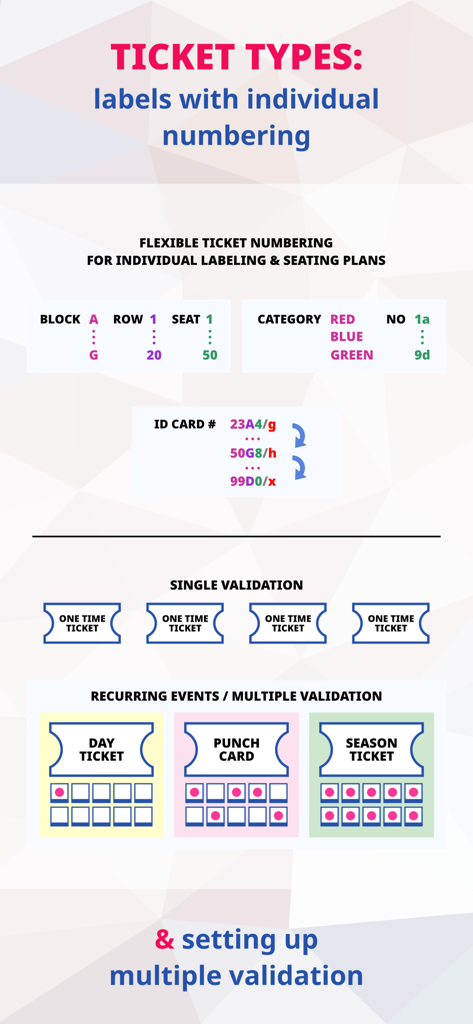
Graphic displaying various ticket types and validation methods for event management

Description

*** This app is also available for macOS. Find it on the Mac App Store! *** Feature Overview The best ticketing app for easy creation of your own tickets as well as electronic check-in, attendance check and validation at the entrance on the day of the event – directly with your smartphone & tablet device (Apple iPhone, iPad, iPod). Design, print and validate your own digital tickets with the mobile EventCode+ XQ Ticket System! Create new events adding tickets and attendees. Print or email the completed tickets. On the day of the event, scan the tickets with one or more iOS & Mac devices and check them for validity. Possible applications are (for example) design and management of tickets for soccer matches, clubs, private parties, cabaret, theater, exhibitions, performances and much more. Ticket Generator, Designer & Editor - creating events with optional start and end dates and adding tickets for attendees - customizing ticket layouts, choosing from multiple templates, page sizes and design options with custom logos and a variety of barcode types - individual labeling, dating and extended ticket numbering for implementing seating plans (e.g. blocks, rows, categories) - creating, previewing and exporting printable tickets in PDF format with individual barcodes - exporting ticket lists in CSV, JSON and XML format for external processing - importing tickets lists from external data sources (formatted as CSV, JSON or XML) - exporting attendance lists in CSV, JSON and XML format - exporting tickets as emails with PDF attachment Ticket Validation & Attendance Check - switching to validation mode for accreditation & entry check - conducting attendance checks and compiling attendance lists - scanning/verifying ticket barcodes with history logging and the ability to tear tickets digitally at check-in - validating tickets multiple times for season tickets, punch cards, day tickets and more - connecting multiple devices using Bluetooth/Wi-Fi for ticket scanning & validation in remote master/client mode Barcode Detection / Barcode Generator - detecting linear (one-dimensional) barcodes and 2D barcodes - Barcodes can be captured directly with the camera or imported from saved photos and images which are stored in the photo library - automatic scan processing for fast sequential capturing - alternatively: manual scan processing with preview and apply for pinpoint capturing - supported barcode formats (capturing): Code 39, Code 93, Code 128, Interleaved 2 of 5 (ITF), ITF-14, EAN-8, EAN-13, ISBN-10, ISBN-13, UPC-E, UPC-A, PDF417, QuickResponse (QR), DataMatrix, Aztec - supported barcode content types: Wi-Fi Network, Bank Transfer, Crypto Currency (such as Bitcoin), Calendar Event, Contact, Geo Location, E-Mail, Phone Number, Text Message, Websites/URL, Ticket - recording a history of detected barcodes - exporting history entries to CSV, JSON and XML files - performing content actions, such as opening URLs in a browser, adding contacts the Contacts App, adding events to the Calendar App, copying values to clipboard, dialing phone numbers, sending text messages, searching for results on the web (e.g. on Amazon or Google) - configuring custom online services for sending web queries with scanned values - customizing your individual barcode detection workflow with many useful options like playing sounds, ignoring duplicates and limiting the number of history entries - creating custom barcodes as PNG, JPEG or PDF in QR (QuickResponse), DataMatrix, PDF417, Code 128, Aztec format iOS/iPadOS Features - Full Dark Mode Support - Universal App for iPhone & iPad - iOS File App Support - Support for Camera with LED Torch Light

Download

Download on App Store

This page is not an official page of the app or its developer, but an independent editorial publication created for informational and commentary purposes. Unless expressly stated otherwise, neither the app nor its developer is affiliated with, endorsed by, sponsored by, authorized by, or otherwise officially connected with MWM, Apple, Google Play, the app publisher, or the app's developer, and nothing on this page implies that the app was developed using MWM's services. Any trademarks, logos, screenshots, and other content remain the property of their respective owners.








