
This page is not an official page of the app or its developer, but an independent editorial publication created for informational and commentary purposes. Unless expressly stated otherwise, neither the app nor its developer is affiliated with, endorsed by, sponsored by, authorized by, or otherwise officially connected with MWM, Apple, Google Play, the app publisher, or the app's developer, and nothing on this page implies that the app was developed using MWM's services. Any trademarks, logos, screenshots, and other content remain the property of their respective owners.


Frame.io
Opinionated feedback on video projects was once a logistical nightmare; this app turns it into a streamlined, mobile operation.
Downloads
500k+User Rating
Total Ratings
1.7KPublisher
Category
Photo & VideoLocales
2Latest Version
26.6.0Size
101.6 MBFirst Released
May 31, 2016Key Features for Creative Professionals on the Go
Frame.io Mobile App Evaluation
Rich & Anchored Commenting
This tool offers rich commenting capabilities, including anchored comments, links, attachments, emojis, and drawing annotations, facilitating clear and effective feedback.
Mobile Collaboration & Review
The app allows users to collaborate, review, and manage projects from any location, enhancing remote workflows and stakeholder engagement.
Robust Mobile File & Folder Management
The app provides comprehensive file and folder management functionalities, mirroring desktop capabilities, allowing for renaming, moving, copying, bulk modifications, and full folder path navigation on mobile.
Advanced Asset Management & Metadata
The app provides advanced asset management, allowing users to group, tag, and sort assets using both standard and custom metadata fields, which can be edited directly in the player.
Precise Mobile Review Tools
It provides precise tools for reviewing assets on mobile devices, including scrolling, scrubbing, zooming, and commenting with high responsiveness, crucial for detailed feedback.
Granular Playback and Inspection
It enables granular control over media playback, including pinch-and-zoom up to 400% for detailed inspection, adjustable playback speed, and quick navigation between assets.
Customizable Sharing Options
The app allows users to curate and send professional-looking shares directly from their mobile devices, with full control over settings like title, description, and visibility.
Comprehensive Mobile Search
This tool features robust search functionality on mobile, enabling quick location of assets, folders, and projects, significantly improving workflow efficiency.
The following screenshots and description are sourced directly from the app's official store listing and are the property of the app developer.
App Store
Screenshots
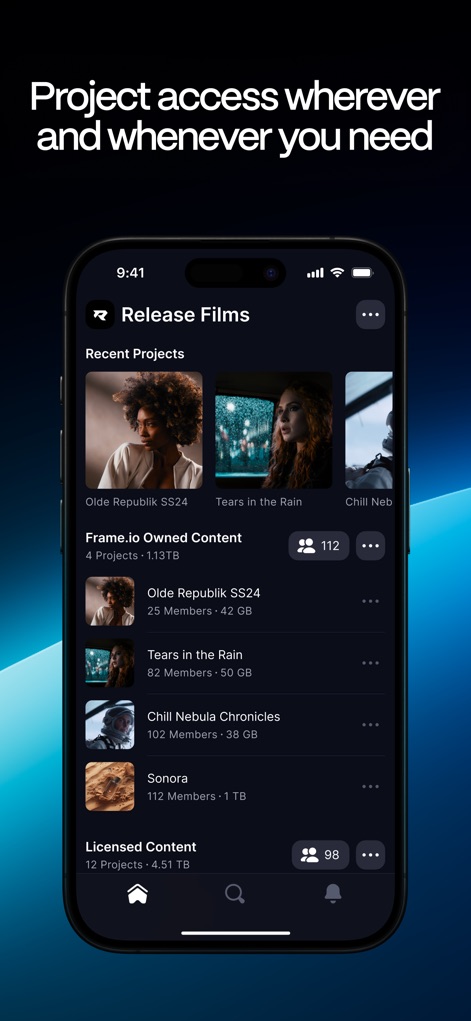
This interface allows users to quickly access their diverse project portfolio and view essential details like project members and data utilization.
Project Portfolio Access

The app presents critical project updates, displaying video asset thumbnails and their current "Need Review" status for rapid assessment.
Snapshot Review Insights

Users can leverage dynamic anchored comments and include attached files or links for comprehensive and context-rich feedback.
Advanced Feedback Features
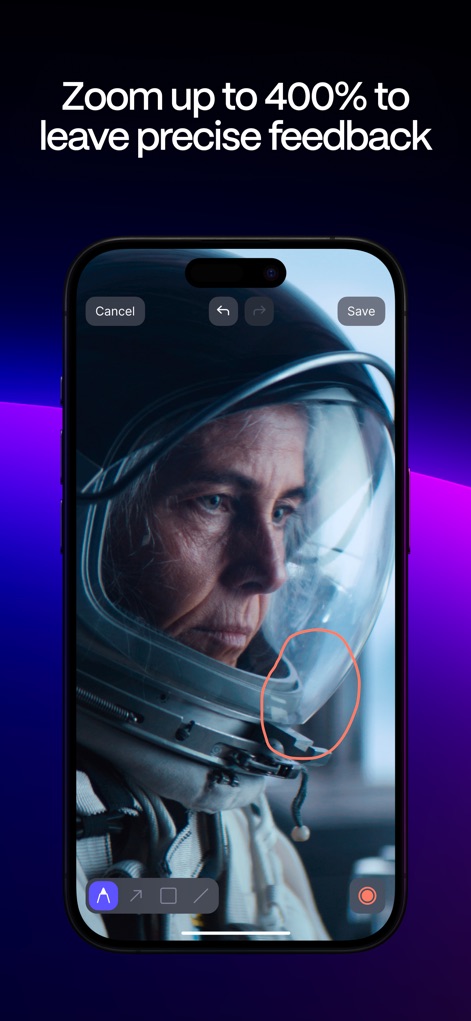
The tool supports highly precise feedback by enabling users to zoom in up to 400% and draw specific annotations directly onto the visual content.
Detailed Visual Annotation

Users can fully customize the appearance and visible fields of their share links, then effortlessly send them to collaborators.
Configurable Share Options
Description
Download
More Like This
Top-ranked apps in the same category

CapCut: Photo & Video Editor
BYTEDANCE PTE. LTD.

Instagram, Inc.

YouTube
Google LLC

Canva: AI Photo & Video Editor
Canva Pty Ltd

Snapchat
Snap, Inc.

快手
Beijing Kwai Technology Co., Ltd.

Edits: Video Editor
Instagram, Inc.

Meitu- AI Photo & Video Editor
Xiamen Meitu Technology Co., Ltd.

Google Photos: Backup & Edit
Google LLC
This page is not an official page of the app or its developer, but an independent editorial publication created for informational and commentary purposes. Unless expressly stated otherwise, neither the app nor its developer is affiliated with, endorsed by, sponsored by, authorized by, or otherwise officially connected with MWM, Apple, Google Play, the app publisher, or the app's developer, and nothing on this page implies that the app was developed using MWM's services. Any trademarks, logos, screenshots, and other content remain the property of their respective owners.