
This page is not an official page of the app or its developer, but an independent editorial publication created for informational and commentary purposes. Unless expressly stated otherwise, neither the app nor its developer is affiliated with, endorsed by, sponsored by, authorized by, or otherwise officially connected with MWM, Apple, Google Play, the app publisher, or the app's developer, and nothing on this page implies that the app was developed using MWM's services. Any trademarks, logos, screenshots, and other content remain the property of their respective owners.


Freenotes®: AI Notes Taking
Forget note-taking; the app delivers a new breed of productivity that elevates thought into instant action.
Downloads
7.5M+User Rating
Total Ratings
640.7KPublisher
Category
ProductivityLocales
27Latest Version
3.29.1Size
565.5 MBFirst Released
Sep 5, 2023An evaluation of key functionalities for tech-savvy students and diligent professionals.
Freenotes®: AI Notes Taking - Core Feature Analysis
AI Study Companion
It provides an AI study companion that clarifies concepts, defines terms, and verifies the accuracy of handwritten notes, transforming passive review into active recall for enhanced learning.
AI Chat with PDF
This tool features an AI Chat with PDF capability, enabling users to directly query their imported documents for instant answers and deeper understanding.
Seamless Video Learning
The app offers seamless video learning by allowing Picture-in-Picture (PiP) note-taking while watching online videos and instantly capturing relevant screenshots directly into notes.
AI Summary
It provides an AI Summary function that quickly extracts key points and action items from lengthy recordings or documents, significantly boosting efficiency.
Active Recall Tape
This tool includes an Active Recall Tape feature that allows users to hide specific parts of their notes to test memory and improve study efficacy.
Quick Search via OCR
The app enables quick search through handwritten scripts using highly accurate Optical Character Recognition (OCR), streamlining information retrieval.
PDF Annotation
It facilitates comprehensive PDF annotation, allowing users to highlight, underline, and add comments to documents with various custom pen styles.
Apple Pencil Pro Support
The app provides Apple Pencil Pro support, delivering a low-latency writing experience that closely mimics the feel of real paper.
Organize Notes
This tool features advanced note organization capabilities, enabling users to categorize and manage their notes by projects, courses, or topics with automated library organization.
Infinite Canvas
It offers an infinite canvas for sketching ideas or mind mapping, providing an expansive digital whiteboard that grows as users create.
Frequently Asked Questions
Everything you need to know about Freenotes®: AI Notes Taking
What is Freenotes®: AI Notes Taking?
Freenotes®: AI Notes Taking is a digital note-taking solution combining realistic handwriting with AI features for study and work. It offers PDF annotation, organization, and efficient learning tools across devices.
Can Freenotes AI summarize notes?
Yes, Freenotes AI provides instant summaries of content. Users can take a screenshot or upload documents like PDFs or photos to receive AI-generated summaries and answers to questions.
Does Freenotes convert handwritten notes to searchable text?
Yes, Freenotes converts handwritten notes into searchable text. Its advanced handwriting OCR (Optical Character Recognition) allows users to quickly find specific notes or keywords within their handwritten content.
Can I annotate PDFs in Freenotes?
Yes, Freenotes supports annotating PDF files. Users can annotate, mark up, and highlight large PDF files, and select text for translation or word look-up directly within the app.
Can I take notes while watching videos with Freenotes?
Yes, Freenotes allows users to take notes while watching videos. It utilizes Picture-in-Picture (PiP) for online videos like YouTube, enabling users to capture relevant screenshots directly into their notes.
Does Freenotes have a Dark Mode?
Yes, Freenotes offers a Dark Mode feature. This mode provides visual comfort for users by optimizing the interface for low-light environments.
How does Freenotes help with active recall?
Freenotes assists with active recall using its tape tool. This tool allows users to mark key information for memorization and then test themselves by toggling the visibility of the marked content.
The following screenshots and description are sourced directly from the app's official store listing and are the property of the app developer.
App Store
Screenshots

See how the app supports natural handwritten input with Apple Pencil Pro and offers a comprehensive digital drawing tool palette for creative expression.
Seamless Handwriting Integration
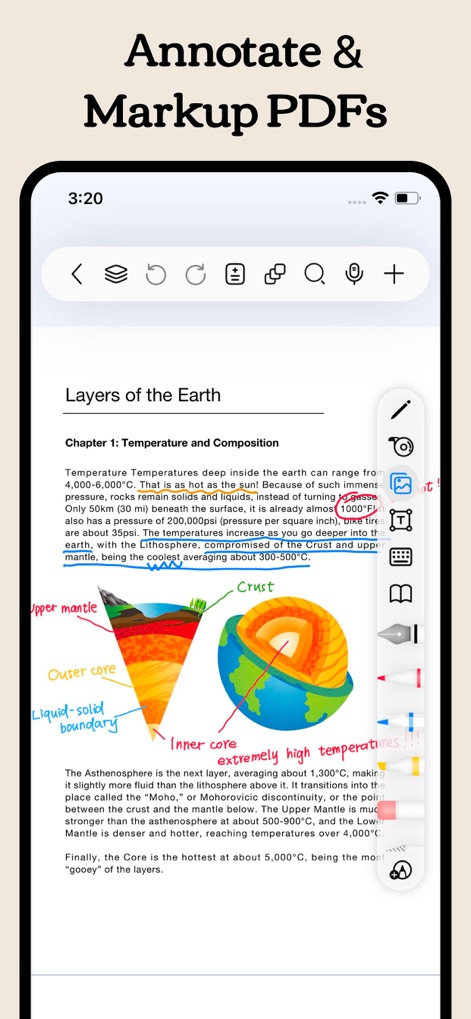
Discover how this tool allows users to highlight key sections and add detailed markups directly onto imported PDF documents for enhanced study.
Effortless PDF Annotation

Explore the extensive template library, featuring over 100 options including elegant index notebooks and practical monthly planners, to suit any organizational need.
Diverse Template Collection
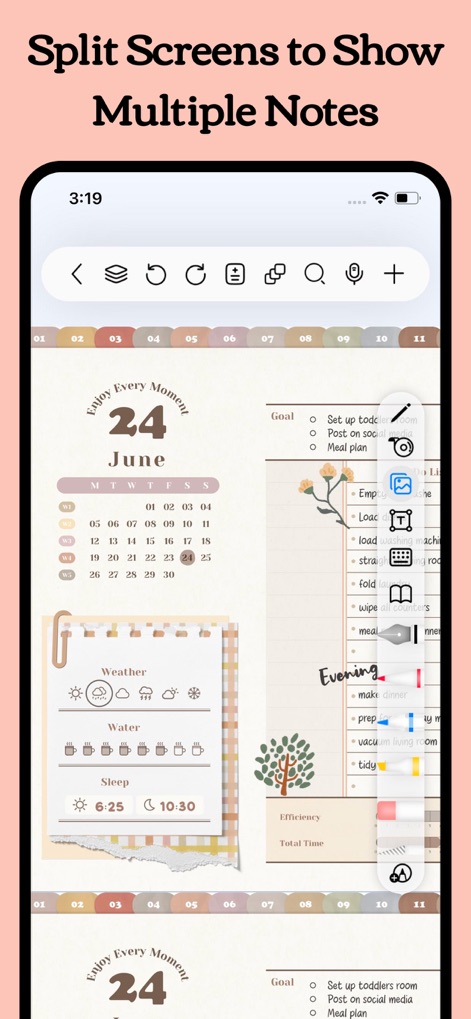
Enhance multitasking with the app's split-screen view, enabling simultaneous work on a detailed monthly calendar and a separate organized task list.
Productive Split-Screen Views

Experience optimal visual comfort with the app's dedicated dark mode, ideal for studying intricate diagrams and detailed text in various lighting conditions.
Comfortable Dark Interface
Description
Download
More Like This
Apps with similar features and user experience

Notion: Notes, Tasks, AI
Notion Labs, Incorporated

Structured - Daily Planner
unorderly GmbH

Google Tasks: Get Things Done
Google LLC

TickTick:To-Do List & Calendar
Appest Limited

Noteful: Notes & PDF Markup
Noteful Technologies Ltd

Todoist: To Do List & Calendar
Doist Inc.

To do list MinimaList & Widget
Inner Grow Limited

monday.com - Work Platform
monday.com Ltd.

Prodrafts - Infinite Notes
EMMO Corp.
This page is not an official page of the app or its developer, but an independent editorial publication created for informational and commentary purposes. Unless expressly stated otherwise, neither the app nor its developer is affiliated with, endorsed by, sponsored by, authorized by, or otherwise officially connected with MWM, Apple, Google Play, the app publisher, or the app's developer, and nothing on this page implies that the app was developed using MWM's services. Any trademarks, logos, screenshots, and other content remain the property of their respective owners.