GPS Tracks

GPS Tracks

Download on App Store
Logo of GPS Tracks

GPS Tracks: The Professional Navigation Toolkit for Technical Explorers

Replace your handheld GPS with high-precision tracking, offline USGS and NOAA charts, and advanced MGRS support. Engineered for field professionals, hunters, and serious adventurers who demand total reliability and data accuracy in the wild.

Download on App Store

Publisher

David Morneault

Category

Navigation

Downloads

1M+

User Rating

4.7/5

Total Ratings

23K+

Locales

8

Precision in Every View

Discover the interface used by 1M+ users.
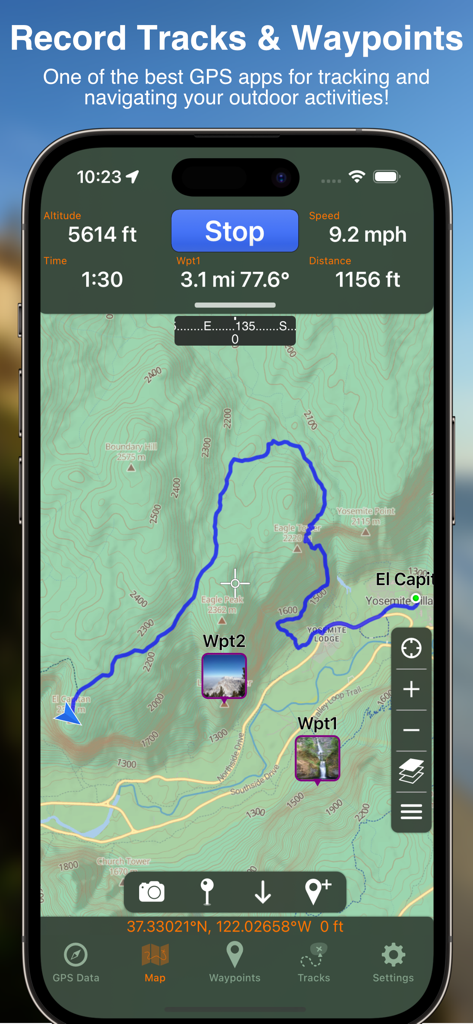
Interface of the GPS Tracks app showing a topographic map with a blue track and custom waypoints.

Interface of the GPS Tracks app showing a topographic map with a blue track and custom waypoints.

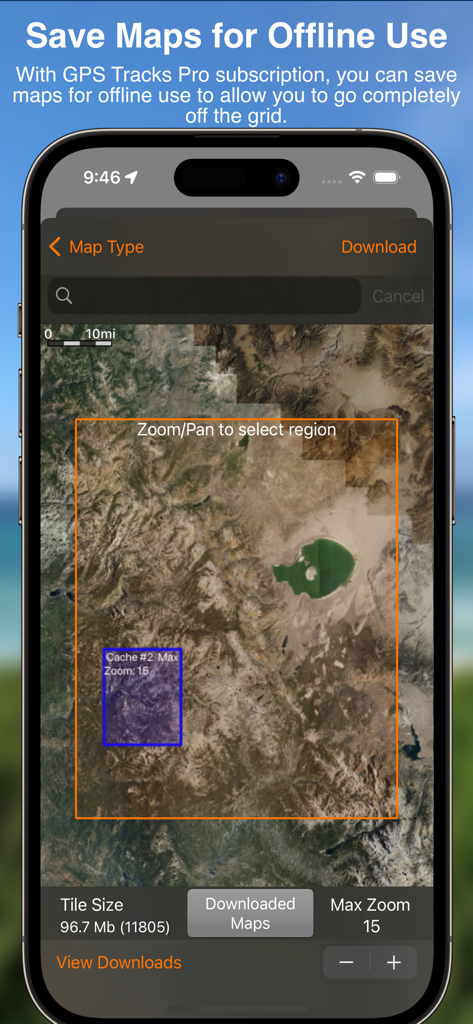
GPS Tracks app interface for selecting and downloading satellite maps for offline use

GPS Tracks app interface for selecting and downloading satellite maps for offline use

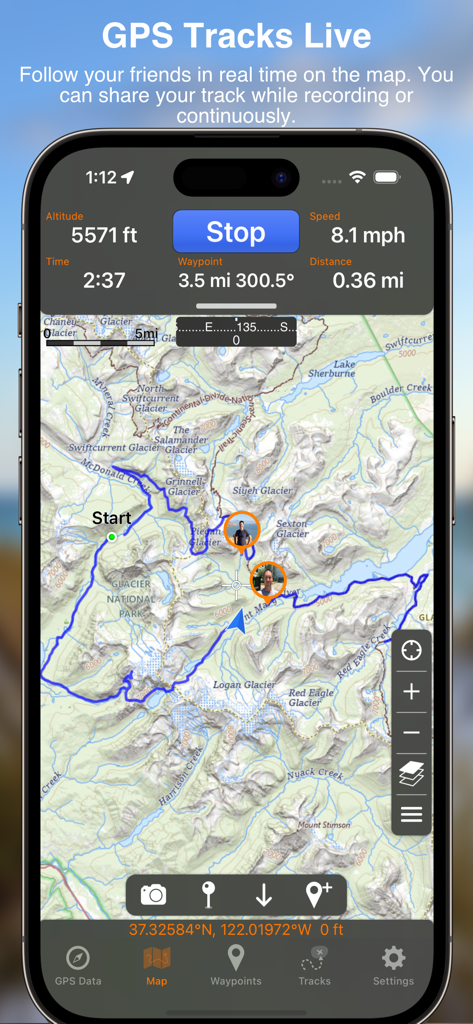
GPS Tracks app interface showing live location sharing and real time navigation data on a topographic map

GPS Tracks app interface showing live location sharing and real time navigation data on a topographic map

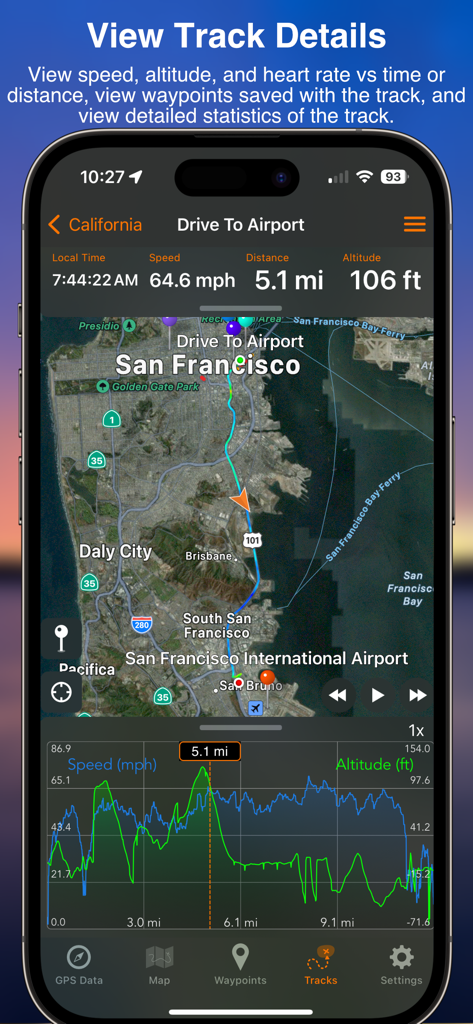
iPhone screenshot of GPS Tracks app showing detailed navigation statistics and an elevation graph for a recorded route

iPhone screenshot of GPS Tracks app showing detailed navigation statistics and an elevation graph for a recorded route

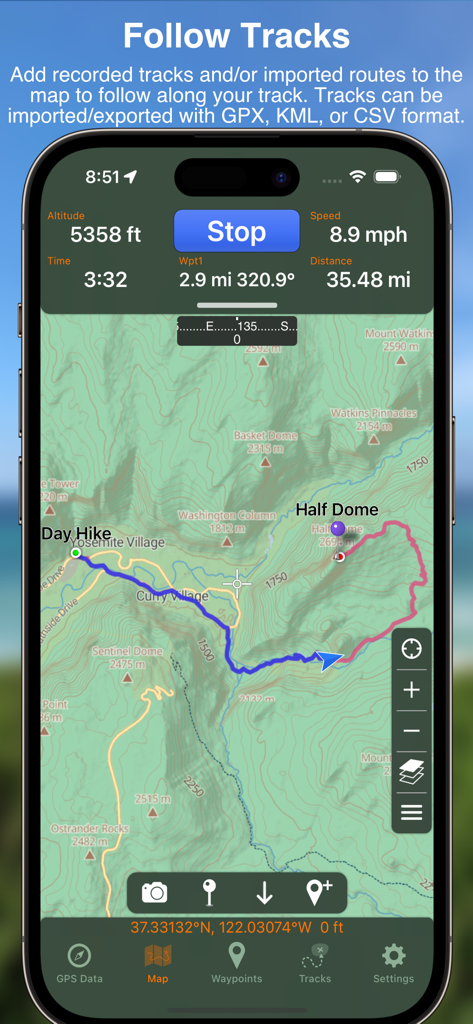
GPS Tracks app interface displaying a topographic map of Yosemite with an active hiking route and real-time altitude data

GPS Tracks app interface displaying a topographic map of Yosemite with an active hiking route and real-time altitude data

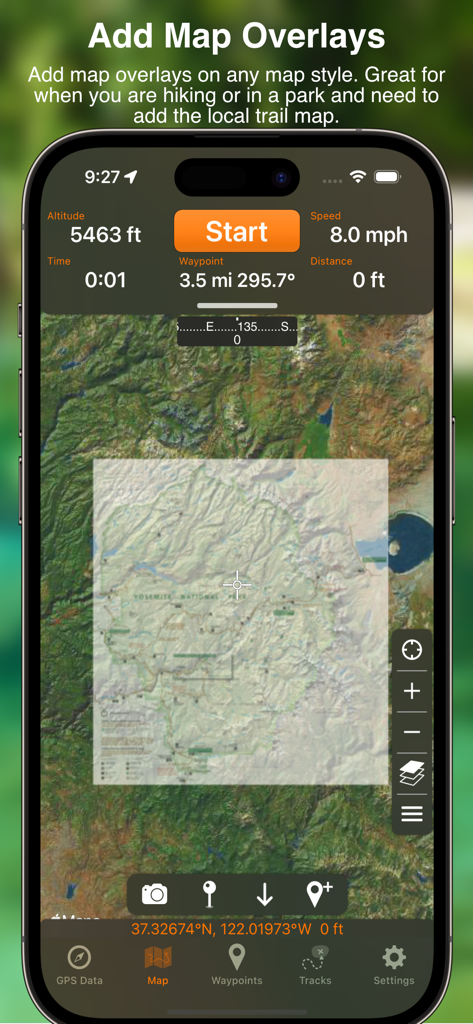
iPhone screen showing the GPS Tracks app with a custom map overlay of Yosemite National Park over a satellite background.

iPhone screen showing the GPS Tracks app with a custom map overlay of Yosemite National Park over a satellite background.

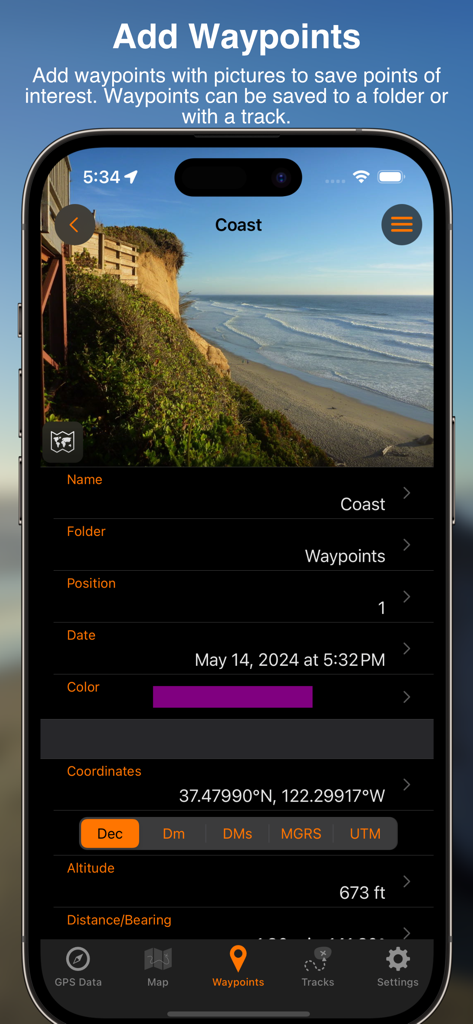
Adding a coastal waypoint with photo and coordinates in the GPS Tracks app

Adding a coastal waypoint with photo and coordinates in the GPS Tracks app

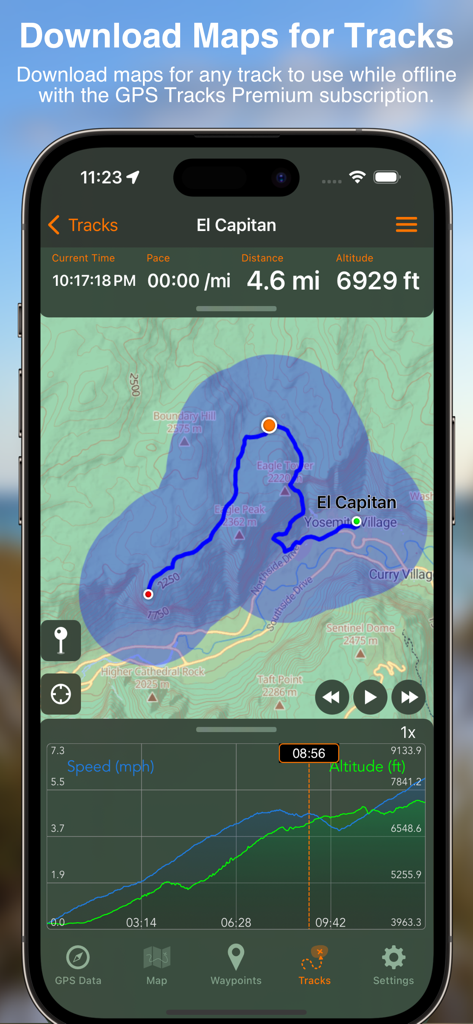
A smartphone screen displaying a topographic map of El Capitan with a recorded hiking track and altitude data within the GPS Tracks app

A smartphone screen displaying a topographic map of El Capitan with a recorded hiking track and altitude data within the GPS Tracks app

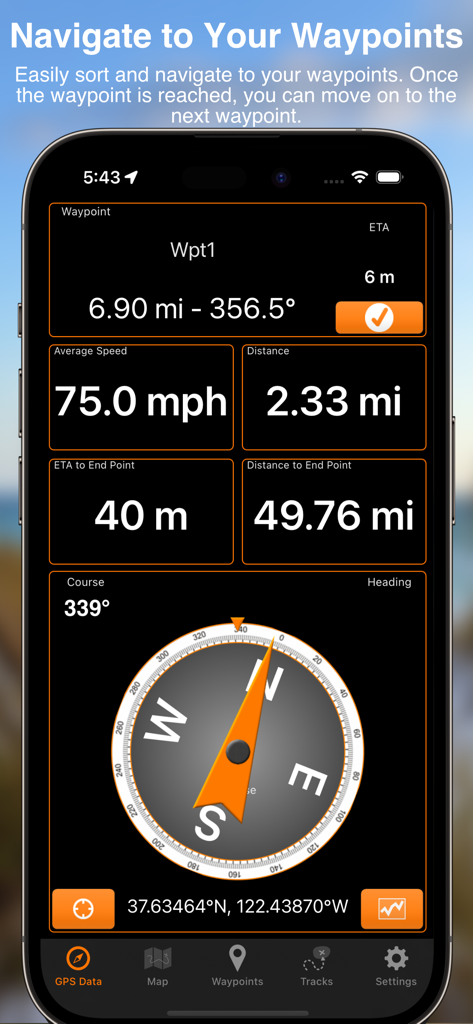
GPS Tracks app dashboard displaying waypoint navigation data including speed, distance, and a compass.

GPS Tracks app dashboard displaying waypoint navigation data including speed, distance, and a compass.

Professional-Grade Navigation for Critical Missions

The tools that make this app stand out, trusted by 1M+ users.

🧭

Military-Grade Precision

Navigate with MGRS, UTM, and Decimal coordinates. Use waypoint averaging and over 220 datums for professional-level accuracy in any environment.

🗺️

Technical Offline Maps

Access USGS Topo, NOAA Nautical, and FAA charts without a signal. Save high-resolution maps for remote backcountry exploration or offshore navigation.

Seamless Apple Ecosystem

Track missions via Apple Watch Ultra, monitor stats with Live Activities, and sync technical data across Mac, iPad, and iPhone instantly.

About the app

Everything you need to know about GPS Tracks.

Description

"One of the better GPS apps for sporting enthusiasts for the iPhone..." - Bryan Wolfe, AppAdvice.com Do you want to track your hiking, biking, walking, running? Do you want to track your outdoor activities? Do you need to navigate to waypoints? Do you want to store your favorite destinations? GPS Tracks is an ideal app for your outdoor navigational needs, it makes navigating to a specific point and tracking your outdoor activities very simple. It will keep track of your activities and allow you to easliy navigate to coordinates. Use Applications - • Great for hiking offline, running, walking, and biking to track your route! • Great for photographers who need to track location data for their pictures! • Great for hunters and fishermen who need to store specific locations! • Great for golfing to find the distance to the pin! • Great for military navigational applications! Features Live Activities & Widgets • Live Activity for tracking • Live Activity for navigating to waypoints • Lock Screen & Home Screen widget for distance today • Lock Screen & Home Screen widget for current location • Home Screen widget for last track and add new waypoint Track • Track your location/route of your activity • Store favorite locations • Take GPS static observations to average current location for more accurate waypoints • Easily navigate to waypoints with the waypoint guide on the compass • Add fully editable waypoints on the fly to your current track either manually or from you favorite locations • Add a vector as a waypoint with angle and distance • Convert between four sets of coordinates (Decimal, DMS, MGRS, UTM) anytime • Glide Ratio is viewable and tracked during recording • Use degrees or mils for the compass • Add MGRS Grid overlay to map • Create routes to follow manually before you start your track • GPS Tracks uses WGS84 datum, over 220 datums available with an In-App purchase. Measure • Map measuring tools allow you to measure area and distance on the map • Draw or drop pins to measure Apple Watch App • Track your activity directly with your Apple Watch without your iPhone • Will save your workouts to the Health app from the watch (only the watch app uses HealthKit) Connect • iCloud syncing (will sync between Mac, iPad, and iPhone version) • Import/Export to Dropbox, iCloud Drive, or iTunes File Sharing • Send locations to the Navigon/TomTom/Google app or the default Maps app for driving directions • Share your location with friends with a text message (SMS) or email with a direct link to your location on a map • Import and export tracks/coordinates in a GPX, KML, BIN, CSV, or NMEA format • Email exported files • Export track with photos to KMZ file to export your photos taken during the track Review History • View your track on the map with the ability to replay the route • View detailed statistics of the track • View the waypoints saved with each track • Change track color There are many other great features. GPS Tracks Pro & Premium (Auto-Renewing Yearly Subscription In-App Purchase) • Use Street, Terrain, Satellite, USGS, NOAA nautical charts, FAA charts, and many other alternate map sources • Save maps for offline use • Add map overlays of local trails or area boundaries from images, files, or directly from your camera • Use custom Map Tile Server URLs • Print Maps in PDF • GPS Tracks Live - location sharing with friends which allows you to see your friends tracks live on the map • Weather at waypoints • Elevation profiles for tracks • Subscription syncs via iCloud to other devices Privacy Policy and Terms of Use - http://www.dmsoftwaresolutions.com/privacyPolicyTermsOfUse.html Continued use of GPS running in the background can dramatically decrease battery life.

Latest Version

5.0.5

Size

78.1 MB

First Released

May 26, 2011

Turn Your iPhone into Professional-Grade GPS Equipment

Join over 1 million technical enthusiasts and professionals who trust GPS Tracks for mission-critical accuracy, offline USGS/NOAA charts, and advanced MGRS navigation. Your next mission starts here.

Download on App Store
FAQ

Frequently Asked Questions

Everything you need to know about GPS Tracks

What is the GPS Tracks app?

GPS Tracks is an iOS application designed for tracking outdoor activities like hiking, biking, and running. It also provides features for navigation, waypoint management, and map usage, including offline capabilities.

Can I use GPS Tracks without an internet connection?

Yes, GPS Tracks supports offline use. Users can download maps for offline access, a feature included with GPS Tracks Pro & Premium subscriptions.

Does GPS Tracks provide real-time location sharing?

Yes, GPS Tracks offers real-time track sharing with friends through its 'GPS Tracks Live' feature. This allows users to see their friends' tracks live on the map, requiring a Pro & Premium subscription.

Does the GPS Tracks app have a Range Finder feature?

Yes, GPS Tracks includes a Range Finder feature. This tool allows users to measure distance, elevation, and angle between any two points directly on the map. It requires a subscription.

Can GPS Tracks display elevation profiles for recorded activities?

Yes, GPS Tracks Pro & Premium allows users to view elevation profiles for their recorded tracks. This feature provides detailed insights into the altitude changes along a route.

How do I save a waypoint in GPS Tracks?

Yes, GPS Tracks allows users to record their current location as a waypoint. Users can add details like name, folder, coordinates, and even capture a photo for each saved waypoint.

Is GPS Tracks a free application to use?

GPS Tracks offers free basic functionality, but advanced features like offline maps, real-time sharing, and the Range Finder require an upgrade to GPS Tracks Pro & Premium, which is a subscription service.

Does GPS Tracks sync data across different Apple devices?

Yes, GPS Tracks supports iCloud syncing. This enables seamless synchronization of data, including subscriptions, across multiple Apple devices like Mac, iPad, and iPhone.

Does GPS Tracks have an Apple Watch application?

Yes, GPS Tracks includes a dedicated Apple Watch app. It allows users to track their activity directly from the watch without needing their iPhone and saves workouts to the Health app.

Does GPS Tracks impact iPhone battery life?

Continued use of GPS running in the background, as with any GPS application, can significantly reduce your iPhone's battery life. The app provides this disclaimer.

What coordinate systems does GPS Tracks support?

GPS Tracks allows users to convert between four sets of coordinates: Decimal, DMS (Degrees, Minutes, Seconds), MGRS (Military Grid Reference System), and UTM (Universal Transverse Mercator).

Can I import GPX files into GPS Tracks?

Yes, GPS Tracks can import tracks and coordinates. It supports various formats including GPX, KML, BIN, CSV, and NMEA, from sources like Dropbox, iCloud Drive, or local device storage.

Can I add custom map overlays in GPS Tracks?

Yes, GPS Tracks supports map overlays. Users can add map overlays of local trails or area boundaries from images, files, or directly from their camera, a feature of Pro & Premium.

Can I navigate to waypoints using GPS Tracks?

Yes, GPS Tracks enables navigation to saved waypoints. It provides a waypoint guide on the compass, showing distance, bearing, average speed, and estimated time to arrival.

App information, icons, screenshots, and descriptions displayed on this page are sourced from the Apple App Store and are the property of their respective developers. Download estimates and rankings are based on MWM's proprietary models and may not reflect actual figures. This page is provided for informational and analytical purposes only.

Believe this page infringes your intellectual property? File a dispute