iCue
iCue
Download on App Store

This page is not an official page of the app or its developer, but an independent editorial publication created for informational and commentary purposes. Unless expressly stated otherwise, neither the app nor its developer is affiliated with, endorsed by, sponsored by, authorized by, or otherwise officially connected with MWM, Apple, Google Play, the app publisher, or the app's developer, and nothing on this page implies that the app was developed using MWM's services. Any trademarks, logos, screenshots, and other content remain the property of their respective owners.


Logo of iCue
Download on App Store

iCue

Deliver flawless takes with the power of Prompter People on your iOS device. Featuring speech-driven scrolling, Apple Watch control, and hardware mirroring for the ultimate professional workflow.

Key Figures

Downloads

105K+

User Rating

3.0/5

Total Ratings

0

Publisher

Sunshine Valley Systems

Category

Photo & Video

Locales

1

Latest Version

7.5.11

Size

109.7 MB

First Released

Nov 21, 2011
Features

Elevate Your Production Quality

Transform your iPad or iPhone into a broadcast-grade teleprompter designed for solo creators and media professionals who demand perfection.

Total Wireless Control

Stay in the flow by controlling your script with an Apple Watch, Bluetooth keyboard, or even your voice while you are in front of the lens.

Professional Hardware Ready

Achieve the perfect 'eye contact' look with built-in mirroring for reflective rigs and external monitor support for studio setups.

The following screenshots and description are sourced directly from the app's official store listing and are the property of the app developer.

App Store

Screenshots
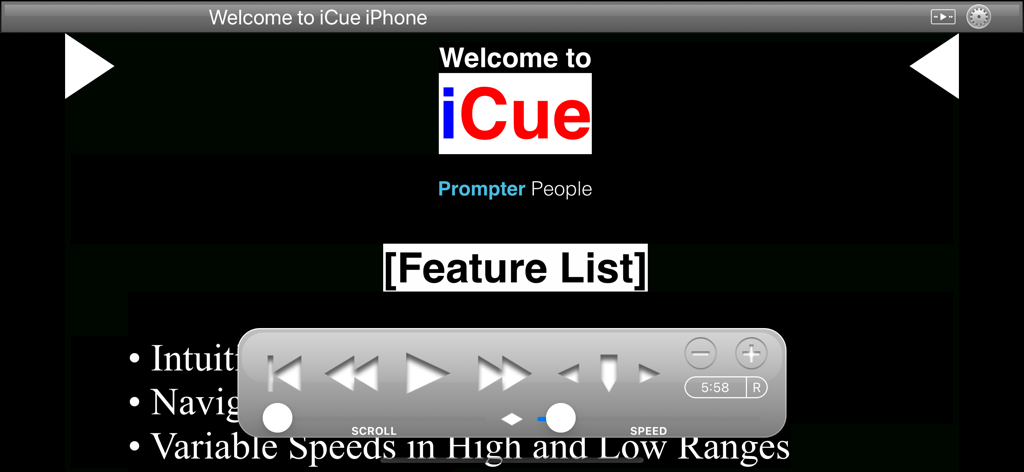
iCue - Welcome screen of the iCue teleprompter app with floating playback control panel
Welcome screen of the iCue teleprompter app with floating playback control panel

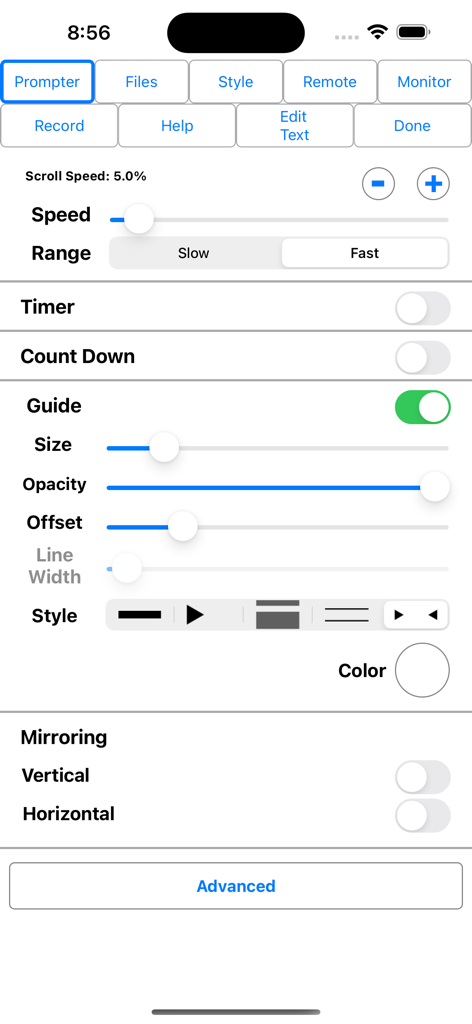
iCue - The iCue teleprompter app settings menu showing scroll speed controls, guide customization, and display mirroring options.
The iCue teleprompter app settings menu showing scroll speed controls, guide customization, and display mirroring options.

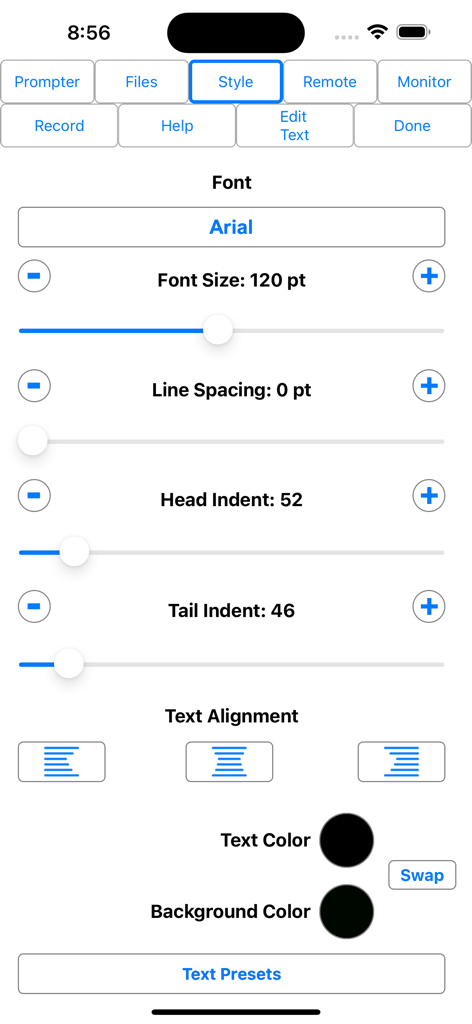
iCue - iCue teleprompter app text style settings menu with options for font size and color
iCue teleprompter app text style settings menu with options for font size and color

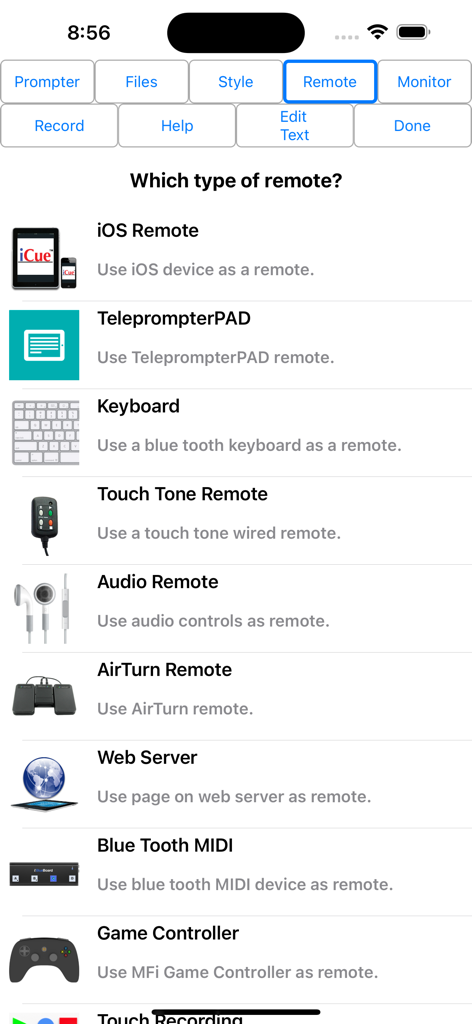
iCue - A list of remote control options in the iCue teleprompter app including iOS remote keyboard and game controller
A list of remote control options in the iCue teleprompter app including iOS remote keyboard and game controller

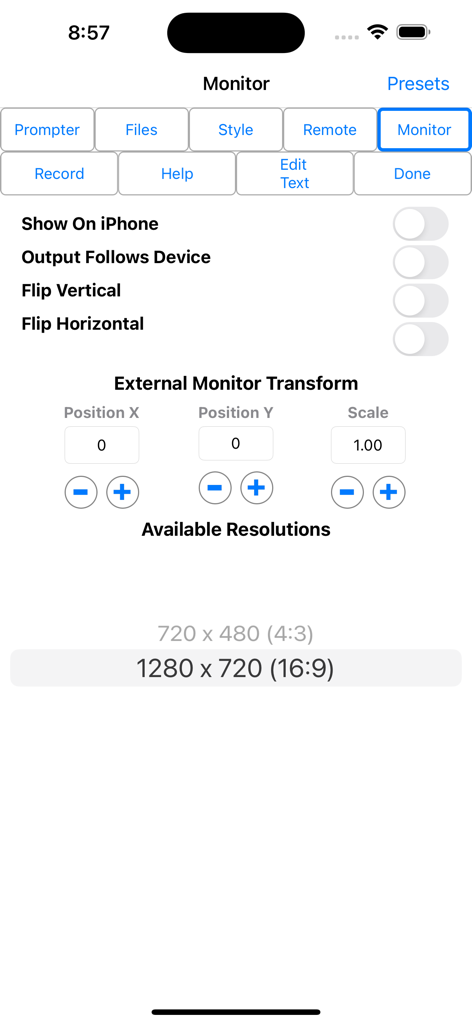
iCue - iCue teleprompter monitor settings screen showing external monitor transform and resolution options

iCue teleprompter monitor settings screen showing external monitor transform and resolution options

Description

iCue from Prompter People turns your iPad and iPhone into a full featured teleprompter. Go to www.prompterpeople.com to see a full range of teleprompter systems for your iPad. Check out iCue Remote, the free remote for iCue. Easily configure the appearance of the text content to suit your presentation requirements including... • Font • Font Size • Text Color • Background Color • Head and Tail Indent • Line Spacing • Text Style Prompter features include: • Import File Types: iCue (.iCue), Text (.txt), Rich Text (.rtf), Word (.docx) and HTML • Export File Types: iCue (.iCue), Text (.txt), Rich Text (.rtf) and HTML • Five Marker Styles: Bar, Marker, Two Line, Inverted, Two Markers • Scroll Speed: Variable with two speed ranges. • Display mirroring for using a reflective teleprompter • Countdown: Two styles • Bidirectional Timer • External Monitor Support • Built-in user manual • Customizable title bar to give access to the features that are important to your workflow. • More... • File Sharing iCue offers a variety of file sharing methods to assist in moving files between devices as well as a computer. - iTunes File Sharing: Copy files to and from iCue using iTunes. - Email Files: Email files from iCue and open files from other apps such as Mail. - iOS File Sharing: Send files directly from one iCue to another. - Web Server: Host a web page that can be used from any computer to upload and download files. - Web Server Browser: Use built-in browser to load web page from another web server to download files or the entire database from another iCue. - AirDrop: Use Apple's AirDrop to send files. - iCloud: Upload and download files from iCloud Drive. - Dropbox: Upload and download files from your Dropbox account. - Google Drive: Upload and download files from your Google Drive account. - iOS Remote Sharing: Send files and databases between host and peers. • Remote Control iCue has a variety different remote options. - iOS Remote: Use another iOS device running iCue or iCue Remote to control iCue. Synchronize multiple devices. - Blue Tooth Keyboard: Assign keys of a blue tooth keyboard to control prompter features. - Touch Tone Remote: Use touch tone signals playing into the microphone line-in to control prompter features. - Audio Remote: Use the headphone in-line remote or other audio remote to control prompter features. - AirTurn Remote: Use wireless remotes from www.airturn.com to control prompter features. - Web Server Remote: Use a web page hosted on the network to control the prompter features. - Apple Watch: Use the Apple Watch to remotely control prompter functions. - Bluetooth MIDI: Use IK Multimedia's iRig Blueboard to control prompter functions. - Game Controller: Use MFi game controllers to control prompter functions. - Touch Recording: Record and playback your interactions with the prompter. - Speech Recognition: Use your speech to control the script using key words or the text content of the script. - Key Commands: Configure key combinations to control most prompter features. Key Commands are available at all times. • Recording - Use either camera. - Movable video preview overlaying the script. - Share your video in a variety of ways. • Monitor Out Use an external monitor connected to the dock connector or AppleTV to display the prompter content. - Choose output resolution from supported resolutions. - Configure output to match device, or device to match output. - Adjust transform and mirroring for external display independently of device. - Works great with AppleTV and AirPlay. Coupled with a Prompter People iPad prompter iCue is perfect for video production, public speaking, electronic news gathering, music, school, business presentations and more!

Download

Download on App Store

This page is not an official page of the app or its developer, but an independent editorial publication created for informational and commentary purposes. Unless expressly stated otherwise, neither the app nor its developer is affiliated with, endorsed by, sponsored by, authorized by, or otherwise officially connected with MWM, Apple, Google Play, the app publisher, or the app's developer, and nothing on this page implies that the app was developed using MWM's services. Any trademarks, logos, screenshots, and other content remain the property of their respective owners.








