
This page is not an official page of the app or its developer, but an independent editorial publication created for informational and commentary purposes. Unless expressly stated otherwise, neither the app nor its developer is affiliated with, endorsed by, sponsored by, authorized by, or otherwise officially connected with MWM, Apple, Google Play, the app publisher, or the app's developer, and nothing on this page implies that the app was developed using MWM's services. Any trademarks, logos, screenshots, and other content remain the property of their respective owners.


IKEA Home smart
This app hands users the reins: effortlessly command your home's mood, sound, and air quality without the usual smart home headache.
Downloads
1M+User Rating
Total Ratings
18.7KPublisher
Category
LifestyleLocales
35Latest Version
1.65.0Size
204.7 MBFirst Released
Oct 22, 2022Evaluating core functionalities for user-centric smart home automation.
Key Features Analysis: IKEA Home smart App
Unified Device Control
The app provides centralized control over various smart home products, including lighting, speakers, blinds, and air quality devices, enhancing user convenience.
Third-Party Voice Assistant Integration
It allows users to integrate with popular voice assistants like Apple Home, Amazon Alexa, and Google Home, offering hands-free control and increased accessibility.
Personalized Scene Automation
This tool features the ability to create and automate personalized 'Scenes' by combining multiple smart devices, improving ambiance and daily routines.
Physical Remote Control Compatibility
The app supports control via IKEA's physical remotes, making smart home management accessible and easy for all household members, including less tech-savvy individuals.
Quick Home Overview & Access
It provides an intuitive home screen for a fast overview of the entire smart home, enabling quick control of products, rooms, and scenes.
Room-Based Device Organization
The app allows for the organization of smart products into rooms, providing efficient access and management of devices.
Frequently Asked Questions
Everything you need to know about IKEA Home smart
What is the IKEA Home smart app?
The IKEA Home smart app, with a DIRIGERA hub, creates a smart home environment. It controls smart lighting, speakers, blinds, and air quality products, enhancing daily routines and home comfort.
What products can I control with the IKEA Home smart app?
You can control IKEA smart lighting, speakers, blinds, and air quality products using the IKEA Home smart app. It allows individual or group control of these smart home devices.
Does the IKEA Home smart app require a hub?
Yes, the IKEA Home smart app requires the DIRIGERA hub to create and manage your smart home system. The hub enables communication between the app and IKEA smart products.
Can I create scenes with the IKEA Home smart app?
Yes, the IKEA Home smart app allows users to create custom 'Scenes' by combining two or more smart products. These scenes can be triggered by schedules, a shortcut button, or directly from the app.
What smart home platforms integrate with IKEA Home smart?
The IKEA Home smart app integrates with Apple Home, Amazon Alexa, and Google Home. This allows users to control their smart home devices using voice assistants.
Can I control my IKEA Home smart devices remotely?
Yes, the IKEA Home smart app offers a 'Control Anywhere' feature. This allows users to stay connected and control their smart home system from anywhere using their mobile device.
How can I personalize the IKEA Home smart app?
Users can personalize the IKEA Home smart app by choosing custom icons, names, and colours for rooms and products. You can also create personal scenes tailored to your preferences.
Does the IKEA Home smart app allow for dimming lights and changing colors?
Yes, the IKEA Home smart app allows you to dim smart lights and change their colours. It also provides controls for adjusting blinds and speaker volume.
How do I get an overview of my home in the IKEA Home smart app?
The IKEA Home smart app features a home screen that provides a fast overview of your entire home. From here, you can quickly control products, access rooms, and manage scenes.
Can I organize my smart products into rooms in the IKEA Home smart app?
Yes, the IKEA Home smart app allows users to organize smart products into designated rooms. This feature provides fast access and easier control of specific devices within your home.
The following screenshots and description are sourced directly from the app's official store listing and are the property of the app developer.
App Store
Screenshots

Observe how the app provides a comprehensive home overview through colorful room cards and simplifies navigation with an intuitive bottom bar.
Home Overview
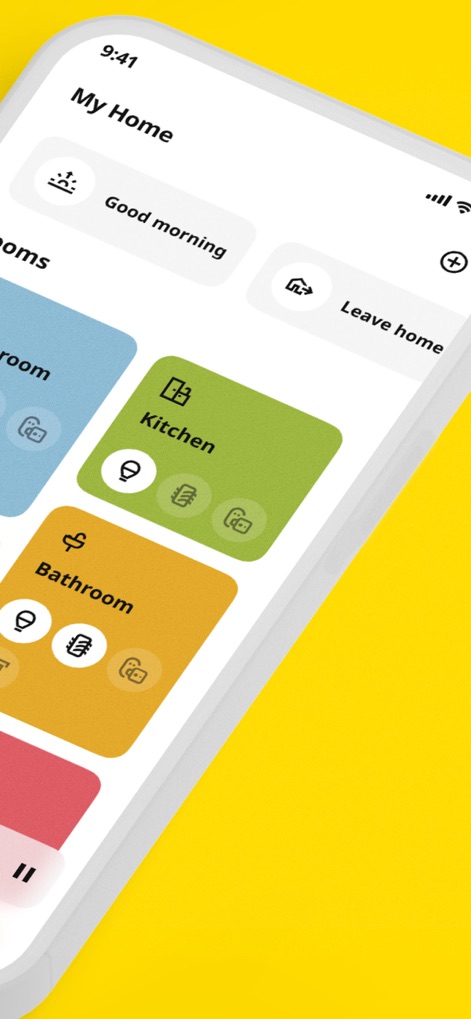
This screen demonstrates easy access to individual rooms via customizable room cards, alongside convenient quick action shortcuts for common routines.
Personalized Home Hub

Discover how the app enables users to create and manage personal scenes from a configurable list, complete with flexible scheduling options for automated convenience.
Scene Management

Observe the app's capability for granular control over individual devices, showcasing interfaces for light dimming and color adjustments, and device-specific modes for air purifiers.
Device Control
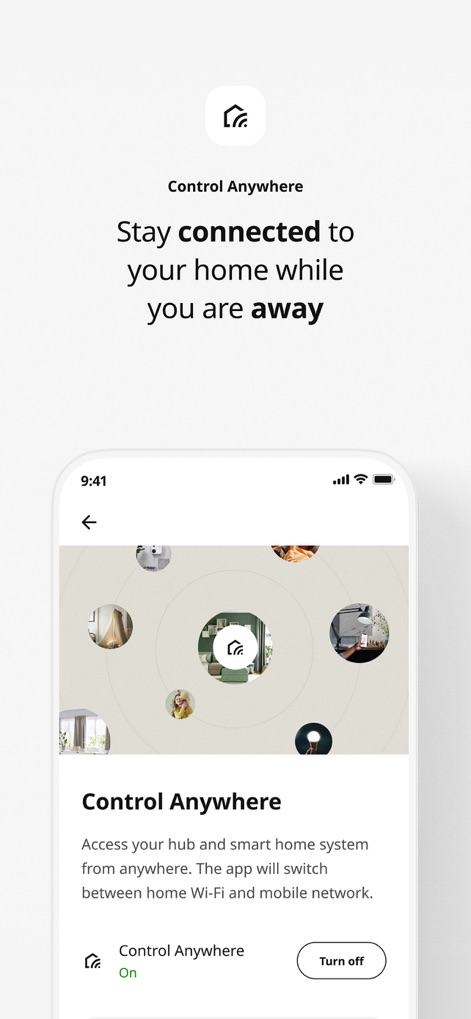
This view highlights the app's robust remote access capabilities, featuring a clear 'Control Anywhere' activation toggle and a visual circular map for managing devices.
Remote Access

Examine the app's integrated music playback functionality, presenting clear controls for track management and a dedicated volume adjustment slider for speakers.
Music Playback

This screen showcases the app's flexible room organization system with customizable room cards, each displaying quick access icons for grouped devices.
Room Organization
Description
Download
More Like This
Apps with similar features and user experience

小米音箱
Beijing Xiaomi Co., Ltd

Starlink
Space Exploration Technologies Corp.

Bambu Handy
Shanghai Lunkuo Technology Co., Ltd

DREO
HESUNG INNOVATION LIMITED

My Verisure
Securitas Direct

Whisker
Automated Pet Care Products Inc.

geeni
Merkury Innovations LLC

ADT+
ADT LLC

X-Sense Home Security
X-Sense USA LLC.
This page is not an official page of the app or its developer, but an independent editorial publication created for informational and commentary purposes. Unless expressly stated otherwise, neither the app nor its developer is affiliated with, endorsed by, sponsored by, authorized by, or otherwise officially connected with MWM, Apple, Google Play, the app publisher, or the app's developer, and nothing on this page implies that the app was developed using MWM's services. Any trademarks, logos, screenshots, and other content remain the property of their respective owners.