
This page is not an official page of the app or its developer, but an independent editorial publication created for informational and commentary purposes. Unless expressly stated otherwise, neither the app nor its developer is affiliated with, endorsed by, sponsored by, authorized by, or otherwise officially connected with MWM, Apple, Google Play, the app publisher, or the app's developer, and nothing on this page implies that the app was developed using MWM's services. Any trademarks, logos, screenshots, and other content remain the property of their respective owners.


ImgPlay: GIF Maker & Meme
No more static feeds. This app hands users the power to dominate digital expression, transforming any media into dynamic, shareable content.
Downloads
7.5M+User Rating
Total Ratings
193.0KPublisher
Category
Photo & VideoLocales
15Latest Version
6.5.3Size
244.6 MBFirst Released
Jun 23, 2015Key features and their impact on content creation for social media.
ImgPlay: App Evaluation
One-Tap Social Sharing & Multi-Format Support
It offers one-tap sharing to platforms like Instagram, TikTok, and WhatsApp, alongside support for multiple export formats (GIF, MP4, APNG, WebP) to maximize compatibility and streamline distribution.
Versatile Media-to-GIF Conversion
The app provides versatile conversion capabilities, allowing users to transform videos, Live Photos, burst shots, still images, and screen recordings into high-quality GIFs, catering to diverse content sources.
High-Quality & Optimized Export
The app ensures clean, sharp GIF output using dithering technology and provides file size optimization tools, crucial for fast loading and sharing while maintaining visual fidelity.
Platform-Specific Canvas Ratios
It allows users to select canvas ratios specifically tailored for popular platforms like Instagram, TikTok, and X, ensuring content is perfectly optimized for social sharing and visibility.
Advanced Meme Creation Tools
This tool includes an advanced meme maker with multiple text areas and an auto-text canvas that adapts to captions, simplifying the creation of engaging and shareable memes.
AI Background Removal
This tool features instant AI-powered background removal, enabling users to isolate subjects for cleaner, more professional GIF and sticker creations without manual editing.
Custom Stickers & Visual Filters
It supports custom stickers using user's own images and PNGs with 23 unique motion effects, alongside 45 filters and full visual adjustments, enabling extensive personalization and styling.
Granular Animation Control
The app offers precise control over GIF animation with adjustable playback speed, various loop settings (infinite, 1, 3, 5), and direction options, enhancing creative expression.
Animated Text Effects & Custom Fonts
It allows users to import their own fonts or utilize over 20 built-in animated text effects, providing dynamic typographic options for enhancing visual communication.
Frame-Level Editing
It provides comprehensive frame-level editing capabilities, allowing users to view, reorder, and remove individual frames, offering granular control over the final animation sequence.
Frequently Asked Questions
Everything you need to know about ImgPlay: GIF Maker & Meme
What is ImgPlay?
ImgPlay is a GIF Maker app that converts videos, Live Photos, burst shots, still images, and screen recordings into high-quality GIFs. It provides tools for creating animations and memes.
Can ImgPlay convert videos to GIFs?
Yes, ImgPlay can convert videos to GIFs with precise trimming. It also transforms Live Photos, burst shots, and screen recordings into seamless animations.
Does ImgPlay offer AI features for editing GIFs?
Yes, ImgPlay includes cutting-edge AI technology for GIF editing. It features AI background removal to instantly remove backgrounds from your creations.
Can I create memes using the ImgPlay app?
Yes, ImgPlay includes an Advanced Meme Maker with multiple text areas and an auto-text canvas. You can also use custom stickers and import fonts.
What export formats does ImgPlay support for GIFs?
ImgPlay supports exporting creations as GIF, MP4, APNG, or WebP formats. It also offers customized resolutions and file size optimization.
Is ImgPlay free to use or does it have a subscription?
ImgPlay offers ImgPlay Premium to unlock all GIF editing features and remove watermarks. Subscription options include weekly, monthly, or yearly plans.
Can I share my GIFs directly to social media from ImgPlay?
Yes, ImgPlay provides one-tap sharing to major platforms like Instagram, TikTok, Reels, X, and Facebook. It also allows quick sharing via iMessage.
Does ImgPlay allow frame-level editing for animations?
Yes, ImgPlay provides frame-level editing. Users can view, edit, reorder, and remove individual frames, or combine different media types within a single project.
What camera modes does ImgPlay offer for content creation?
ImgPlay offers four camera modes for capturing new content. These modes are hands-free, normal, stop-motion, and boomerang, providing versatile creation options.
Can I customize backgrounds in ImgPlay?
Yes, ImgPlay provides tools for background customization. You can add colored or patterned backgrounds and apply various borders to frame your GIF perfectly.
The following screenshots and description are sourced directly from the app's official store listing and are the property of the app developer.
App Store
Screenshots
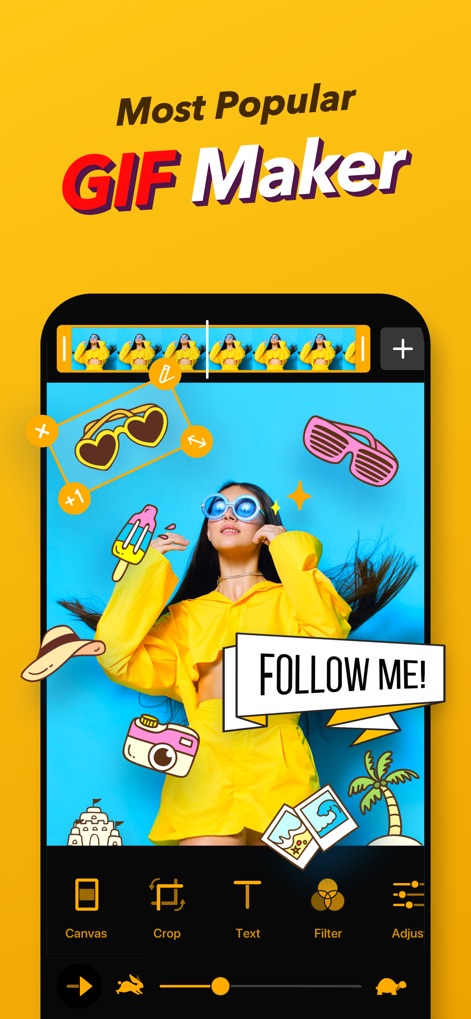
See how the app's intuitive editing interface allows users to combine media and add customizable text and stickers for engaging GIFs.
Dynamic GIF Creation
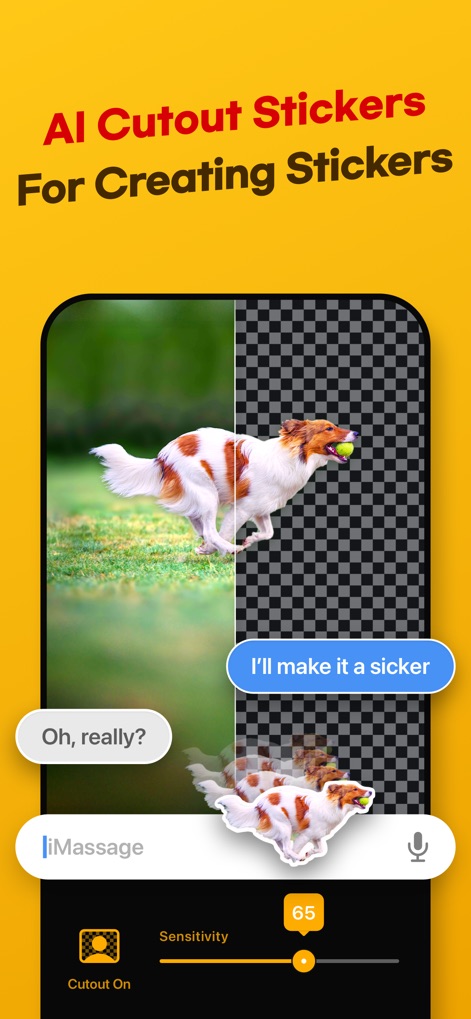
Observe the app's powerful AI background removal feature and the precision offered by the sensitivity slider for creating custom stickers.
AI-Powered Cutouts

Discover the advanced meme maker, featuring a dedicated meme canvas and multiple text areas to personalize popular templates.
Effortless Meme Crafting

Explore the app's dedicated stop-motion camera mode, enabling users to animate objects with frame-by-frame control and easy retake options.
Creative Stop Motion

Witness the app's robust export options, including file size optimization tools and versatile loop settings, perfect for social media sharing.
Social Sharing Optimization

Users can effortlessly browse and discover trending GIFs using the integrated search bar and convenient category tags for quick access.
Discover Trending GIFs

This tool provides an advanced meme maker with multi-panel layouts and comprehensive visual enhancement tools like filters and adjustments.
Meme Content Creation
Description
Download
More Like This
Apps with similar features and user experience

quickLive-Video2Live Wallpaper
Changshu Chuang Shi Media Technology Co., Ltd.

Live - LivePhoto maker
Beyond Trading

Patternator Video Wallpapers
Bazaart Ltd.
GIF Maker & Editor Pro
Chengdu Siwen Culture Media Co., Ltd.
Gif Maker-meme & video to gifs
姿凤 陈

Mematic - The Meme Maker
Trilliarden Entertainment GmbH

Video to Live ◦
Anish Modan

Boomerang - Video Maker
Video Bakery Ltd.

Easy Video Speed Editor
Osawa Shunsuke
This page is not an official page of the app or its developer, but an independent editorial publication created for informational and commentary purposes. Unless expressly stated otherwise, neither the app nor its developer is affiliated with, endorsed by, sponsored by, authorized by, or otherwise officially connected with MWM, Apple, Google Play, the app publisher, or the app's developer, and nothing on this page implies that the app was developed using MWM's services. Any trademarks, logos, screenshots, and other content remain the property of their respective owners.