
This page is not an official page of the app or its developer, but an independent editorial publication created for informational and commentary purposes. Unless expressly stated otherwise, neither the app nor its developer is affiliated with, endorsed by, sponsored by, authorized by, or otherwise officially connected with MWM, Apple, Google Play, the app publisher, or the app's developer, and nothing on this page implies that the app was developed using MWM's services. Any trademarks, logos, screenshots, and other content remain the property of their respective owners.


iSwap Faces Pro
Join the #1 face-swapping community since 2009. Transform any photo into a hilarious masterpiece in under a minute and share the laughs instantly on Instagram, TikTok, and Snapchat.
Downloads
454K+User Rating
Total Ratings
4K+Publisher
Category
Photo & VideoLocales
1Latest Version
6.0Size
26.9 MBFirst Released
Feb 27, 2009Create Instant Comedy with Every Click
Turn ordinary photos into hilarious masterpieces. Whether it's a family dinner or a night out with friends, iSwap Faces Pro is the ultimate tool for quick, meme-worthy fun.
Simpler Than Photoshop
No design skills? No problem. Our intuitive masking tool lets anyone swap faces in under 60 seconds for instant gratification.
Perfect Color Matching
Fine-tune color and brightness on the fly to make your swaps look shockingly real—or hilariously surreal.
Frequently Asked Questions
Everything you need to know about iSwap Faces Pro
How do you use iSwap Faces Pro to swap faces?
iSwap Faces Pro allows users to take a picture or load a photo, then place masks over two faces. The application automatically performs the face swap.
Is iSwap Faces Pro easy to use for face swapping?
Yes, iSwap Faces Pro makes face swapping easy. Users can perform a face switch in under a minute by simply placing masks over the desired faces.
Can iSwap Faces Pro swap faces from two different photos?
Yes, iSwap Faces Pro supports swapping faces between two separate photos. This functionality is listed as a new feature.
Does iSwap Faces Pro offer color and brightness adjustments for faces?
Yes, iSwap Faces Pro provides the functionality to adjust both the color and brightness of the swapped faces for better integration.
Where can users share images created with iSwap Faces Pro?
Users can share their swapped face creations directly to social media platforms such as Facebook, Instagram, and Twitter from within the iSwap Faces Pro application.
What devices are compatible with the iSwap Faces Pro app?
iSwap Faces Pro is compatible with Apple devices, specifically iPhone and iPad. Users can utilize photos from their library or take new pictures.
The following screenshots and description are sourced directly from the app's official store listing and are the property of the app developer.
App Store
Screenshots

A three step demonstration showing a face swap between a father and daughter wearing Santa hats

Before and after comparison of a man and woman swapping faces using the iSwap Faces Pro app
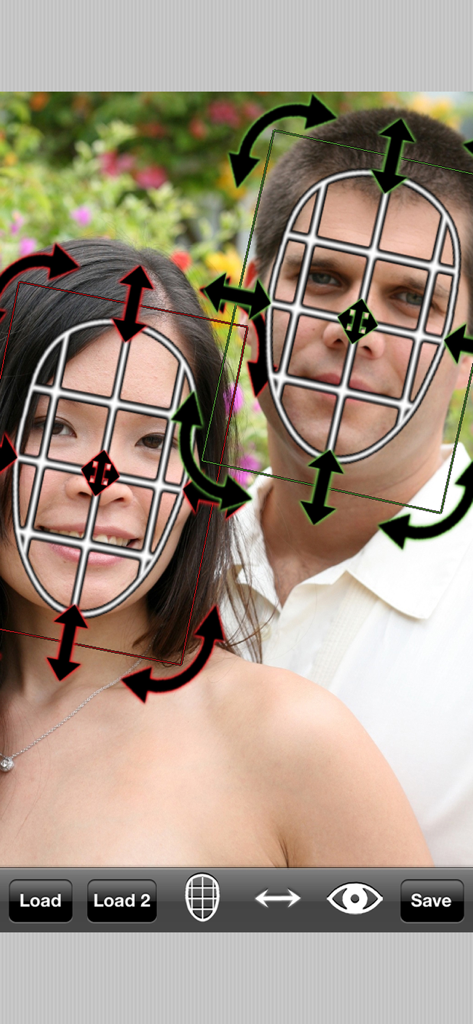
Manual face mask adjustment interface in the iSwap Faces Pro app with rotation and scale arrows

Three step guide for swapping faces in the iSwap Faces Pro app
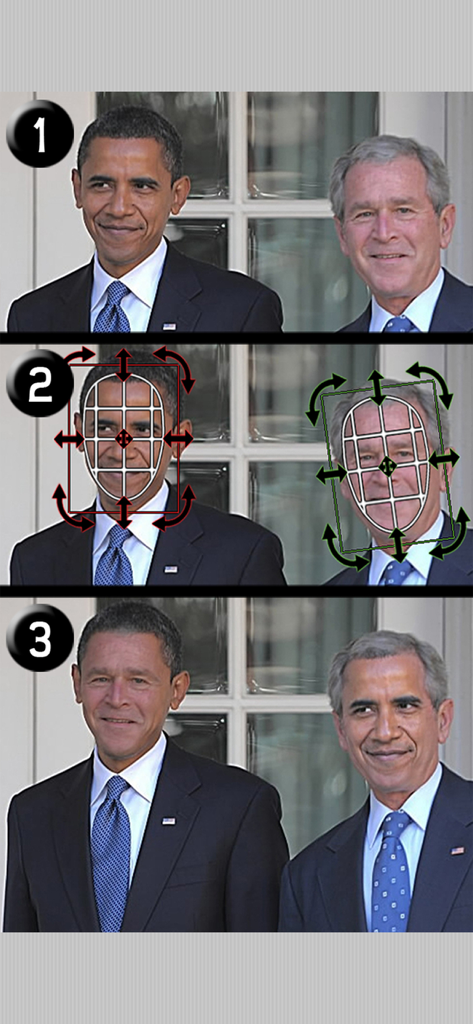
A three step demonstration showing how to place masks and swap faces in the app
Description
Download
More Like This
Top-ranked apps in the same category

CapCut: Photo & Video Editor
BYTEDANCE PTE. LTD.

Instagram, Inc.

YouTube
Google LLC

Canva: AI Photo & Video Editor
Canva Pty Ltd

Snapchat
Snap, Inc.

快手
Beijing Kwai Technology Co., Ltd.

Edits: Video Editor
Instagram, Inc.

Meitu- AI Photo & Video Editor
Xiamen Meitu Technology Co., Ltd.

Google Photos: Backup & Edit
Google LLC
This page is not an official page of the app or its developer, but an independent editorial publication created for informational and commentary purposes. Unless expressly stated otherwise, neither the app nor its developer is affiliated with, endorsed by, sponsored by, authorized by, or otherwise officially connected with MWM, Apple, Google Play, the app publisher, or the app's developer, and nothing on this page implies that the app was developed using MWM's services. Any trademarks, logos, screenshots, and other content remain the property of their respective owners.