
This page is not an official page of the app or its developer, but an independent editorial publication created for informational and commentary purposes. Unless expressly stated otherwise, neither the app nor its developer is affiliated with, endorsed by, sponsored by, authorized by, or otherwise officially connected with MWM, Apple, Google Play, the app publisher, or the app's developer, and nothing on this page implies that the app was developed using MWM's services. Any trademarks, logos, screenshots, and other content remain the property of their respective owners.


KMPlayer
KMPlayer delivers true command over your digital media; it's less a player, more a media mastering suite.
Downloads
2.5M+User Rating
Total Ratings
12.1KPublisher
Category
EntertainmentLocales
42Latest Version
36.03.242Size
137.1 MBFirst Released
Mar 14, 2014An analytical overview of KMPlayer's core functionalities and their impact on digital media enthusiasts.
KMPlayer: A Comprehensive Media Solution for Avid Consumers
Broad Media Format Compatibility
The app supports a wide array of video, audio, and subtitle formats, ensuring compatibility with virtually any media file encountered by users.
High-Resolution Media Playback
The app provides flawless playback of high-resolution video, music, and subtitle files, catering to users who demand superior visual and auditory experiences.
Integrated Network & Cloud Storage
The app provides seamless integration with various network protocols (FTP, UPNP, SMB, WebDav) and popular cloud storage services (Google Drive, Dropbox, OneDrive), allowing users to access their media libraries from anywhere.
Comprehensive Subtitle Customization
This tool features extensive subtitle settings, enabling users to change color, size, and position for optimal readability and personalization.
URL Streaming Playback
It allows users to play videos directly from web URLs, supporting streaming content without prior download.
Customizable Equalizer
The app provides a powerful equalizer that allows users to create and save separate audio profiles for music and video, tailoring the sound to their preferences.
Color Control Settings
This tool features comprehensive color controls, allowing users to adjust brightness, light intensity, hue, saturation, and gamma for an optimized viewing experience.
Quick Settings Access
It allows users to quickly access and set player options through a dedicated quick button, enhancing usability and control.
Advanced Bookmarking
It allows users to add bookmarks to specific time points within media, enabling easy navigation and replay of cherished sections.
Section Repetition
The app provides a section repeat function, allowing users to loop a specific segment of video or audio from point A to point B.
Frequently Asked Questions
Everything you need to know about KMPlayer
What are the key features of the KMPlayer app?
KMPlayer is a media player supporting high-resolution video, music, and subtitles. It includes bookmarking, subtitle settings, play speed adjustments, color controls, section repeat, equalizer, URL playback, and network/cloud access.
What video and music formats does KMPlayer support?
KMPlayer supports video and music formats such as AVI, MP3, WAV, MOV, MP4, WMV, FLAC, MKV, and others. It also supports various subtitle formats including SRT, SSA/ASS, and SMI.
Can I bookmark specific parts of a video in KMPlayer?
Yes, KMPlayer allows users to add bookmarks to specific time points within media. This feature enables playback of cherished sections later.
Does KMPlayer allow customization of subtitles?
Yes, KMPlayer offers comprehensive subtitle settings. Users can change the color, size, and position of subtitles to suit their preferences.
Does KMPlayer include an equalizer for audio adjustments?
Yes, KMPlayer has an equalizer feature. Users can turn on the EQ to adjust music sounds and save separate equalizer settings for both music and video.
Does KMPlayer support cloud storage and network protocols?
Yes, KMPlayer supports cloud services like Google Drive, Dropbox, and OneDrive. It also provides network support for FTP, UPNP, SMB, and WebDav.
Can I transfer files wirelessly with KMPlayer?
Yes, KMPlayer offers a "Sharing via Wi-Fi" feature. This allows users to easily transfer files between their phone and PC when connected to the same wireless network.
What audio/video codecs are not supported by KMPlayer?
Due to policy, KMPlayer does not support certain codecs. These include DTS, EAC3, TrueHD, and Divx.
What permissions does the KMPlayer app require?
KMPlayer requires storage space permission. This allows the app to access photos, music, and videos stored on the device.
Can KMPlayer play videos directly from a URL?
Yes, KMPlayer supports URL Playing. Users can enter a URL to stream and play any videos available on the web.
Can I zoom in on videos while playing in KMPlayer?
Yes, KMPlayer includes a "Zoom & Move" feature. This allows users to zoom in and move the video screen during playback.
The following screenshots and description are sourced directly from the app's official store listing and are the property of the app developer.
App Store
Screenshots
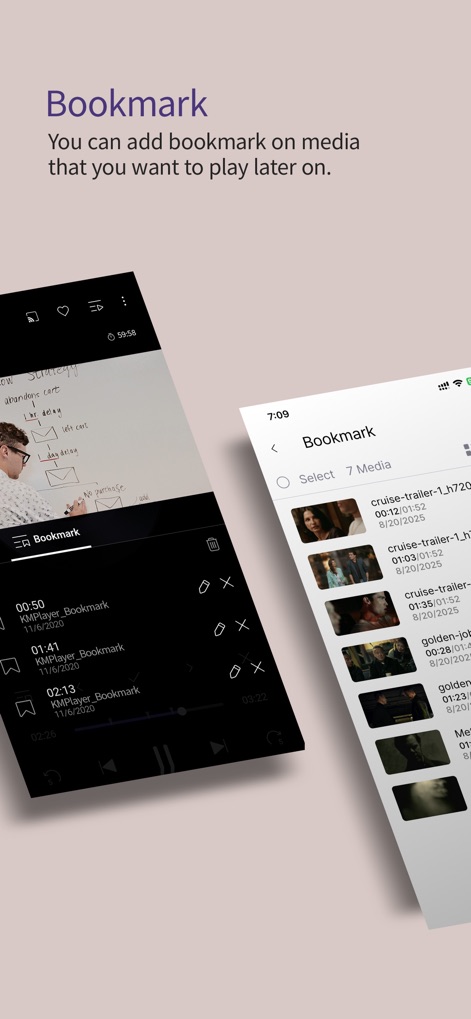
Users can effortlessly save specific time points within media and organize their list of bookmarked content for quick access.
Bookmark Key Moments

Discover how the app enables intuitive pinch-to-zoom gestures for dynamic video resizing and precise visual adjustment during playback.
Dynamic Playback Control

This tool provides extensive customization options, including a vibrant color palette selection and precise subtitle placement controls for an optimized viewing experience.
Custom Subtitle Experience

Fine-tune audio with dedicated frequency sliders for precise sound shaping and an intuitive preamp control to boost overall audio output.
Refined Audio Fidelity
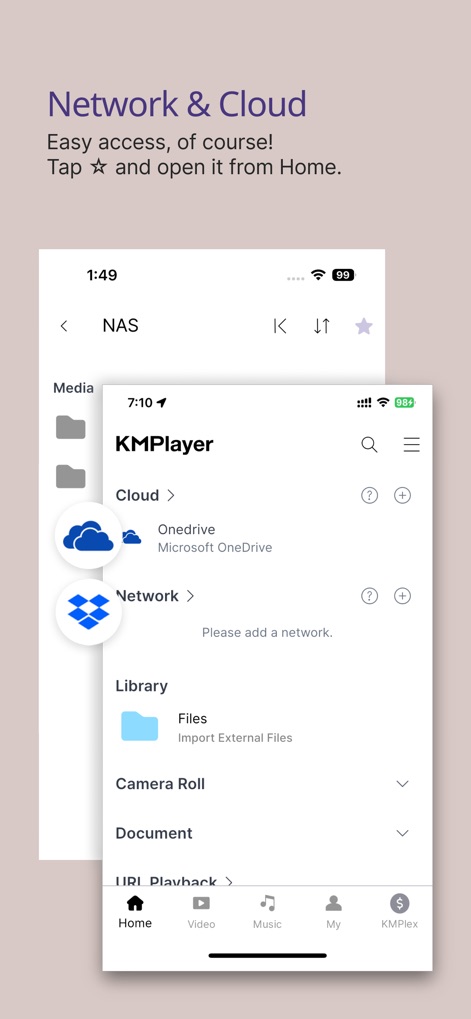
Access media effortlessly with direct cloud storage integrations like OneDrive and robust support for various network protocols.
Seamless Media Access
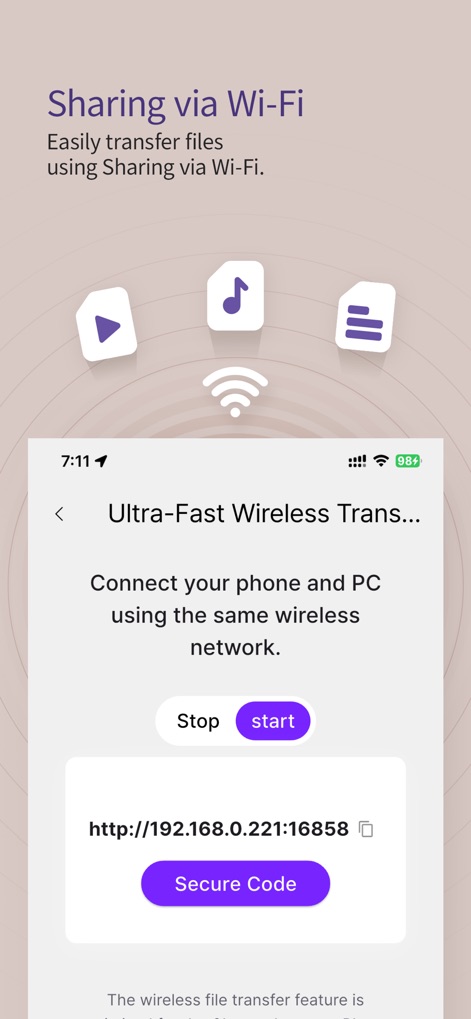
Facilitate quick file transfers using the provided local IP address display and ensure secure connections with the integrated secure code generation.
Effortless File Transfer
Description
Download
More Like This
Apps with similar features and user experience

网易爆米花-智能媒体库,全能云盘网盘播放器
Guangzhou NetEase Computer System Co.Ltd

Immich
Hau Tran

飞牛
Guangzhou TR Intelligent Manufacturing Technology Co., Ltd.

nPlayer
Newin Inc.

MiraPlay
悦 刘

NipaPlay
荣广 梁

VidHub -Video Library & Player
Nanjing Oumi Software Development Co., Ltd.

Fast Player - video player
化媚 席

zFuse - Media Player
s-joys Technology Co., Ltd.
This page is not an official page of the app or its developer, but an independent editorial publication created for informational and commentary purposes. Unless expressly stated otherwise, neither the app nor its developer is affiliated with, endorsed by, sponsored by, authorized by, or otherwise officially connected with MWM, Apple, Google Play, the app publisher, or the app's developer, and nothing on this page implies that the app was developed using MWM's services. Any trademarks, logos, screenshots, and other content remain the property of their respective owners.