
This page is not an official page of the app or its developer, but an independent editorial publication created for informational and commentary purposes. Unless expressly stated otherwise, neither the app nor its developer is affiliated with, endorsed by, sponsored by, authorized by, or otherwise officially connected with MWM, Apple, Google Play, the app publisher, or the app's developer, and nothing on this page implies that the app was developed using MWM's services. Any trademarks, logos, screenshots, and other content remain the property of their respective owners.


Labscope
Microscopy is complex. This app makes it simple. It transforms your ZEISS microscope into a mobile imaging powerhouse.
Downloads
25k+User Rating
Total Ratings
30Publisher
Category
ProductivityLocales
12Latest Version
4.6.1Size
274.3 MBFirst Released
Oct 16, 2019An Analytical Overview of Core Functionalities and User Impact
Labscope: A Digital Revolution for ZEISS Microscopy
Digital Image and Video Acquisition
It provides capabilities for capturing high-quality digital images and recording videos of microscopic samples.
Digital Classroom and Educational Tool
The app provides features to create high-quality digital classroom systems, enhancing interactive learning experiences.
Wireless Microscope Connectivity
The app allows users to transform their ZEISS microscope and camera into a WiFi-enabled imaging system.
Remote Microscope Control
It provides software control capabilities for compatible ZEISS microscopes.
File Management and Sharing
This tool enables users to save captured data to Windows networks and facilitate easy sharing.
Integrated Image Analysis
The app integrates tools for comprehensive image analysis, supporting quantitative measurements and scientific evaluation.
Image Annotation and Report Generation
This tool features the ability to create detailed annotations on images and generate comprehensive reports.
Advanced Image Processing
The app offers integrated image processing functionalities for refining and analyzing microscopic visuals.
The following screenshots and description are sourced directly from the app's official store listing and are the property of the app developer.
App Store
Screenshots
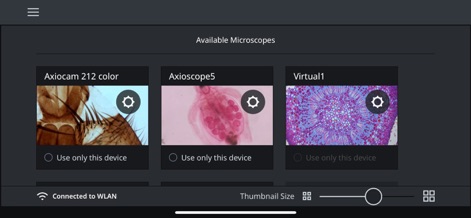
Users can effortlessly choose from various "Available Microscopes" like the "Axiocam 212 color" and fine-tune their display with the "Thumbnail Size" slider.
Microscope Connectivity
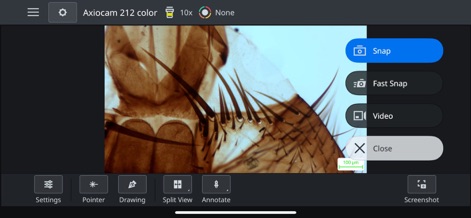
The app enables real-time "Snap" and "Video" capture of microscopic samples, augmented by interactive tools such as "Annotate" and "Split View" during observation.
Real-time Imaging
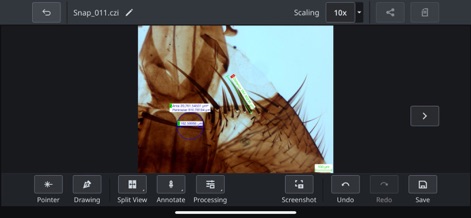
Precise image analysis is facilitated through detailed "Area" and "Perimeter" measurements, alongside robust "Processing" features for in-depth data interpretation.
Advanced Analysis
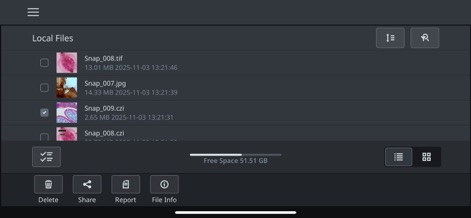
The tool provides clear organization of "Local Files" and seamless functionality to "Share" images or generate comprehensive "Reports" from collected data.
Efficient Data Management
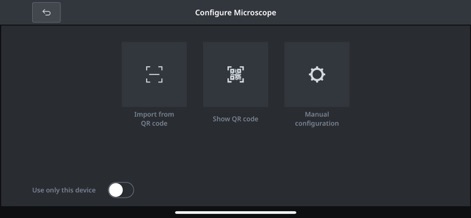
Microscope configuration is streamlined, offering convenient methods such as "Import from QR code" or a flexible "Manual configuration" option for quick deployment.
Seamless Setup
Description
Download
More Like This
Top-ranked apps in the same category

ChatGPT
OpenAI OpCo, LLC

Google Gemini
Google LLC

Grok
X.AI Corporation

Gmail - Email by Google
Google LLC

千问 - 阿里最强大模型官方AI助手
Shanghai Zhixin Puhui Technology Co., Ltd.

Google Drive
Google LLC

Microsoft Authenticator
Microsoft Corporation

Google Sheets
Google LLC

Google Docs
Google LLC
This page is not an official page of the app or its developer, but an independent editorial publication created for informational and commentary purposes. Unless expressly stated otherwise, neither the app nor its developer is affiliated with, endorsed by, sponsored by, authorized by, or otherwise officially connected with MWM, Apple, Google Play, the app publisher, or the app's developer, and nothing on this page implies that the app was developed using MWM's services. Any trademarks, logos, screenshots, and other content remain the property of their respective owners.