
This page is not an official page of the app or its developer, but an independent editorial publication created for informational and commentary purposes. Unless expressly stated otherwise, neither the app nor its developer is affiliated with, endorsed by, sponsored by, authorized by, or otherwise officially connected with MWM, Apple, Google Play, the app publisher, or the app's developer, and nothing on this page implies that the app was developed using MWM's services. Any trademarks, logos, screenshots, and other content remain the property of their respective owners.


LIFELENZ
Shift chaos? Obsolete. The app offers users unmatched command over their work life, turning schedules and earnings into clear, actionable data.
Downloads
750k+User Rating
Total Ratings
620Publisher
Category
BusinessLocales
2Latest Version
1.73.06Size
45.3 MBFirst Released
Aug 16, 2018An overview of LIFELENZ's functionalities, tailored for flexible workforce management.
LIFELENZ Core Features Analysis
Estimated Earnings Transparency
It allows users to view estimated earnings for their shifts, offering financial clarity and helping them track potential income.
Peer-to-Peer Shift Swapping
This tool enables users to initiate and manage shift swaps with colleagues, providing greater flexibility and fostering collaborative scheduling within teams.
Shift Acceptance & Rejection
This tool features the ability to accept or decline allocated shifts directly within the app, offering flexibility and control over one's work commitments.
Real-time Shift Notifications
The app provides instant notifications for new shift assignments and any alterations to existing schedules, ensuring users are always up-to-date and can react promptly.
Shift Visibility
The app provides a clear and consolidated view of all assigned work shifts, helping users stay organized and informed about their schedule.
Detailed Shift Information
It allows users to access comprehensive details for each shift, including location, specific tasks, and any special instructions, ensuring they are fully prepared.
Frequently Asked Questions
Everything you need to know about LIFELENZ
What is LIFELENZ?
LIFELENZ is an application that simplifies work roster management. It allows users to view, accept, reject, and swap shifts, receive notifications, and track estimated earnings.
How can I view my shifts in LIFELENZ?
Yes, LIFELENZ allows users to view shifts allocated to them directly from the main dashboard or the dedicated shifts section. This includes details like date, time, role, and location.
Does LIFELENZ provide detailed information about shifts?
Yes, LIFELENZ provides detailed information for each shift, including title, role, date, time, location, break times, estimated pay, and notes. It also shows colleagues working.
Can I accept or reject shifts using LIFELENZ?
Yes, LIFELENZ enables users to accept or reject shifts offered to them directly within the application. Shift offers appear on the dashboard for action.
Does LIFELENZ send notifications for new and changed shifts?
Yes, LIFELENZ sends notifications for new shifts and any changes to existing shifts. This ensures users are always informed about their work schedule updates.
How does LIFELENZ display estimated shift earnings?
LIFELENZ displays estimated shift earnings for individual shifts and provides an overview of total estimated pay for confirmed shifts on the dashboard.
Can I swap shifts with colleagues using LIFELENZ?
Yes, LIFELENZ facilitates swapping shifts with colleagues. The app description explicitly states this feature for managing work schedules flexibly.
Does LIFELENZ include a time clock function for employees?
Yes, LIFELENZ features a time clock function that displays shift status, tracks employees on shift, late, missing, or on break, and monitors compliance and overtime.
Can managers view daily and weekly operational reports in LIFELENZ?
Yes, LIFELENZ provides managers with a dashboard to view daily and weekly operational reports, including sales forecasts, labor hours, and shift status breakdowns.
How do employees manage their availability in LIFELENZ?
Employees manage their availability in LIFELENZ through the "My Availability" section on the dashboard. They can create time off requests and update their availability using a calendar interface.
The following screenshots and description are sourced directly from the app's official store listing and are the property of the app developer.
App Store
Screenshots
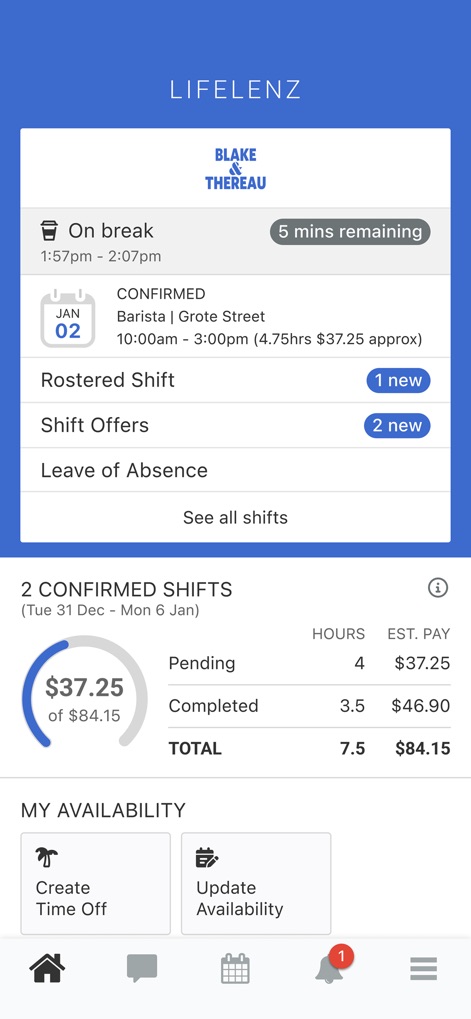
The app presents a clear dashboard view, highlighting current shift status with a '5 mins remaining' break timer and an 'estimated shift earnings' breakdown.
Dashboard Overview
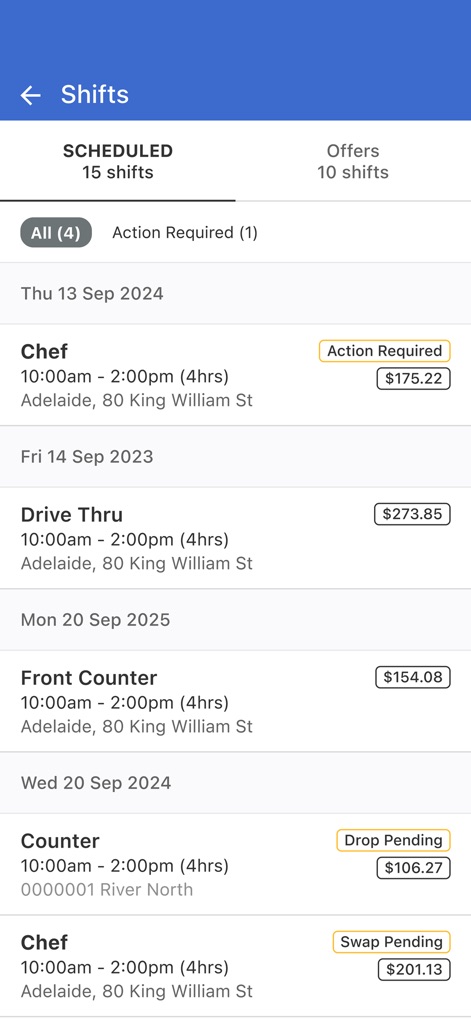
Users can effortlessly navigate scheduled and offered shifts, with clear labels such as 'Action Required' and 'Swap Pending' indicating their status and estimated earnings.
Manage Shifts

This screen provides comprehensive shift details, including an 'estimated pay' summary and a visual roster of 'Working with' colleagues.
Detailed Shift Info
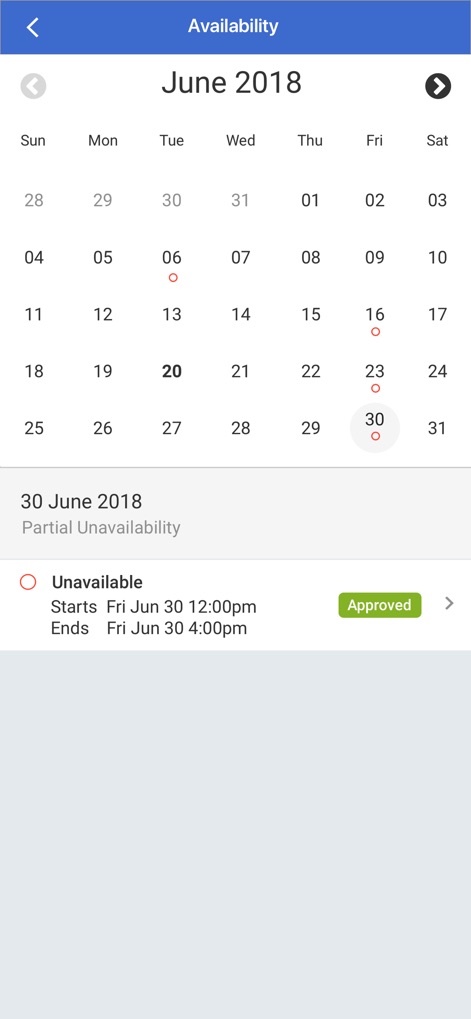
Users can easily manage their availability through an intuitive calendar view, allowing them to set and view 'unavailable' periods with 'Approved' statuses.
Calendar Availability
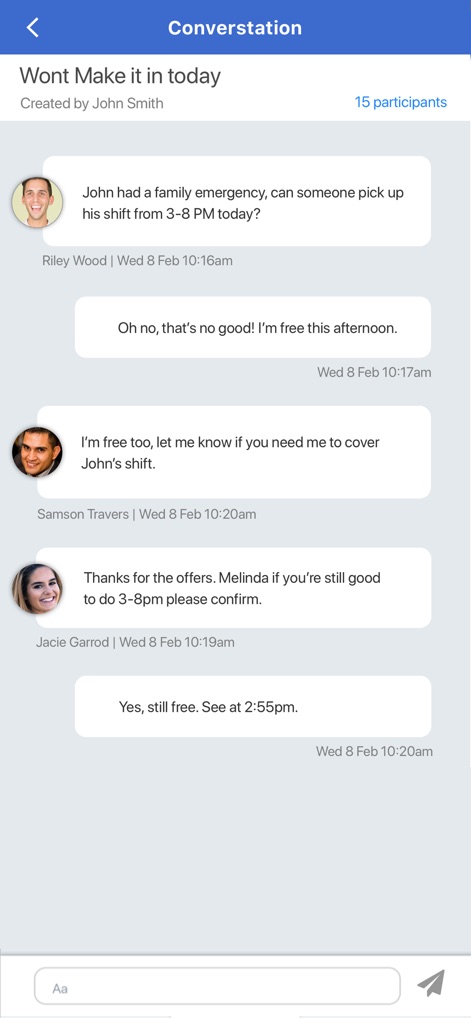
The app facilitates seamless internal communication, showcasing a group 'conversation' interface with individual messages and '15 participants' clearly indicated.
Team Communication Hub
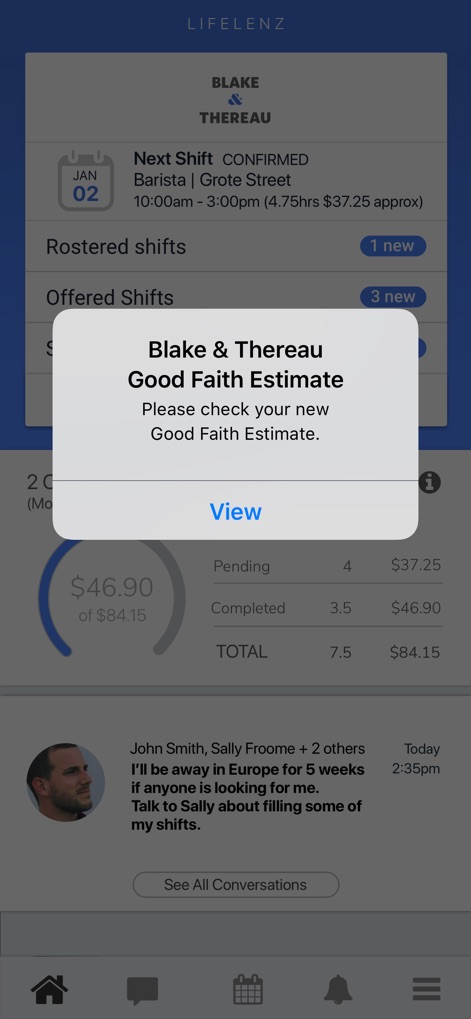
Critical information is presented via timely pop-ups, such as the 'Good Faith Estimate' notification, complementing the dashboard's display of 'Offered Shifts' and conversation summaries.
Key Alerts & Insights

This dashboard offers a comprehensive 'Day at a Glance', detailing metrics like 'Sales vs Forecast' and a 'Daily Activity Report' for operational oversight.
Daily Business Insights

The weekly dashboard provides critical 'Actuals vs Forecast' data for guest counts and labor hours, alongside a visual 'Guest Counts vs Labor Hours' graph for trend analysis.
Weekly Performance Metrics
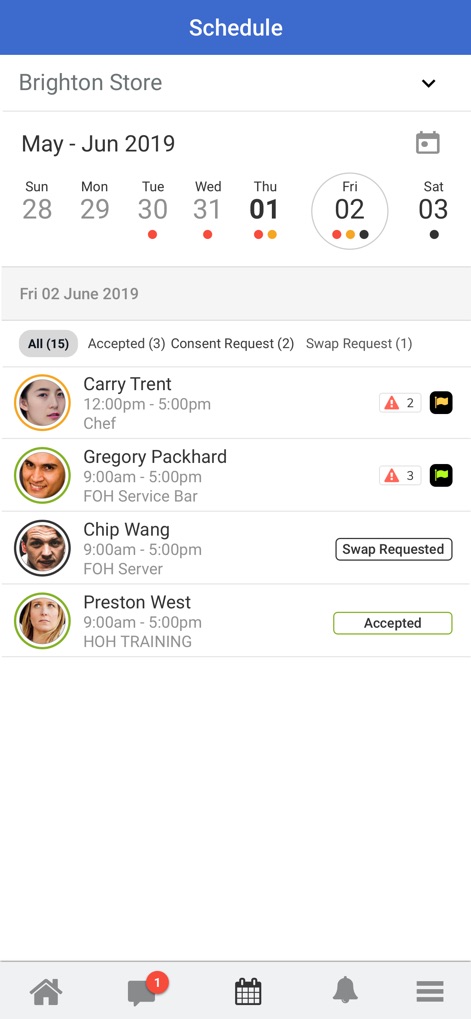
Managers can efficiently oversee the 'Schedule' for their store, viewing employee shifts with 'Accepted' and 'Swap Requested' statuses and specific shift details.
Store Schedule Management

The 'Time Clock' feature provides real-time oversight of employee shifts, highlighting 'Minor Breach in 15mins' warnings and 'OT in 5 mins' for proactive management.
Real-time Compliance
Description
Download
More Like This
Apps with similar features and user experience

Paylocity
Paylocity Corporation

Paychex Flex
Paychex Inc.

Paycom
Paycom Payroll, LLC

Gusto Mobile
Gusto, inc.

Amazon A to Z
AMZN Mobile LLC

TaxDome Client Portal
TaxDome LLC

MyWalmart
Walmart

BrightHR
Peninsula Online Services Limited

Waapi
Senior Sistemas S/A
This page is not an official page of the app or its developer, but an independent editorial publication created for informational and commentary purposes. Unless expressly stated otherwise, neither the app nor its developer is affiliated with, endorsed by, sponsored by, authorized by, or otherwise officially connected with MWM, Apple, Google Play, the app publisher, or the app's developer, and nothing on this page implies that the app was developed using MWM's services. Any trademarks, logos, screenshots, and other content remain the property of their respective owners.