
This page is not an official page of the app or its developer, but an independent editorial publication created for informational and commentary purposes. Unless expressly stated otherwise, neither the app nor its developer is affiliated with, endorsed by, sponsored by, authorized by, or otherwise officially connected with MWM, Apple, Google Play, the app publisher, or the app's developer, and nothing on this page implies that the app was developed using MWM's services. Any trademarks, logos, screenshots, and other content remain the property of their respective owners.


magicplan
Skip the guesswork. magicplan armors users with instant, detailed property intelligence from their pocket.
Downloads
10M+User Rating
Total Ratings
193.4KPublisher
Category
ProductivityLocales
5Latest Version
2026.14.0Size
316.2 MBFirst Released
Apr 9, 2011An Analytical Review for Property & Construction Professionals
Key Features of magicplan for Professional Use
Real-time Floor Plans
The app provides the ability to create precise floor plans instantly using a mobile device's camera, eliminating the need for manual measurements and speeding up initial project documentation.
Industry Integrations
The app offers direct integration with industry-standard platforms like Xactimate® and CoreLogic, streamlining workflows and data exchange for insurance claims and project management.
Comprehensive Reports
It allows users to generate comprehensive project reports, facilitating transparent communication with clients, insurance companies, and project stakeholders.
Price Lists & Estimates
This tool features integrated price lists and estimation capabilities, enabling professionals to quickly generate accurate project quotes and manage billing efficiently.
Forms & Checklists
The app offers customizable forms and checklists, standardizing data collection and ensuring all necessary information is captured for compliance and project requirements.
Photo Documentation
It enables users to attach photos directly to floor plans and project data, providing crucial visual evidence for assessments and progress tracking.
360° Panoramas
This tool provides 360° panorama capture, offering immersive visual documentation of spaces for detailed review and remote collaboration.
Contextual Notes
The app allows for the addition of contextual notes, ensuring important details and observations are recorded directly within project files.
Frequently Asked Questions
Everything you need to know about magicplan
How does magicplan create floor plans?
magicplan creates floor plans quickly using only a mobile device's camera. This eliminates the need for extra hardware and provides real-time floor plan generation for projects.
What are the main features of the magicplan app?
magicplan offers key features including real-time floor plans, photos, notes, objects & equipment, forms & checklists, 360° panoramas, reports, and price lists & estimates. It is an advanced floor plan app.
Does magicplan integrate with other professional tools?
Yes, magicplan integrates with other professional tools. It offers direct integration with Xactimate® (without ESX) and also integrates with CoreLogic.
Can magicplan generate reports and estimates?
Yes, magicplan generates reports and estimates. Its top features include creating reports and managing price lists, which enables professionals to create detailed estimates.
Is magicplan suitable for claims professionals?
Yes, magicplan is suitable for claims professionals. It enables them to capture essential details instantly, including forms for initial assessments like water damage, and generate necessary reports.
Does magicplan display project measurements like floor area?
Yes, magicplan displays project measurements. Users can view floor area, wall area, number of floors, and number of rooms for a project, as well as specific room measurements within floor plans.
Can users customize details in magicplan for their jobs?
Yes, users can customize magicplan for their specific jobs. The app allows for customization, such as tailoring forms and checklists to meet the unique requirements of various professional tasks.
Does magicplan allow users to manage photos for projects?
Yes, magicplan allows users to manage photos for projects. It provides a dedicated section for photos, which can be sorted and viewed by date or specific floor levels within a project.
Can magicplan export floor plan files?
Yes, magicplan can export floor plan files. Users can export their floor plans in various formats including ESX, PDF, and PNG for sharing or use with other applications.
Does magicplan include forms and checklists for projects?
Yes, magicplan includes forms and checklists for projects. These features enable professionals to capture comprehensive information, such as initial assessment details for water damage claims, directly within the app.
The following screenshots and description are sourced directly from the app's official store listing and are the property of the app developer.
App Store
Screenshots
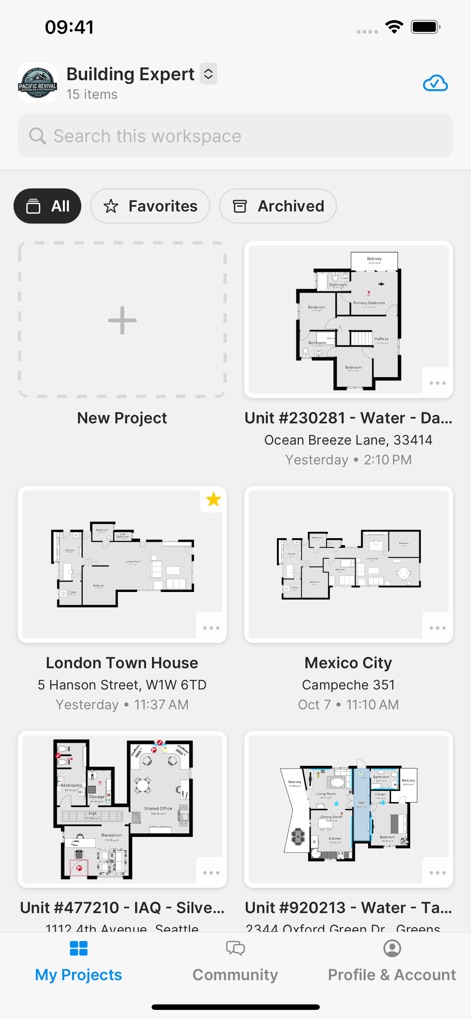
This initial screen provides users with an organized overview of their current and past projects, facilitating quick access and new project creation directly from the dashboard.
Project Overview Hub
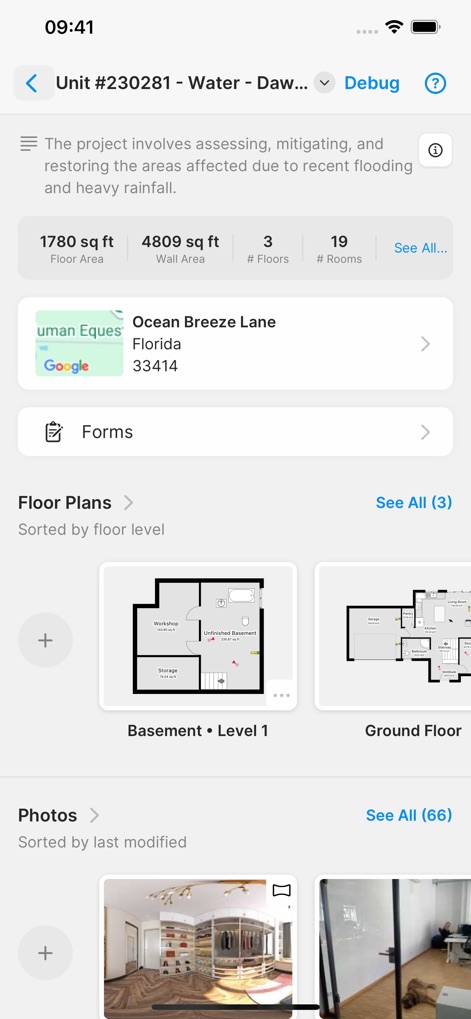
Delve into specific project details, including key metrics like square footage and number of rooms, alongside dedicated sections for managing floor plans and project photos.
Detailed Project Insights
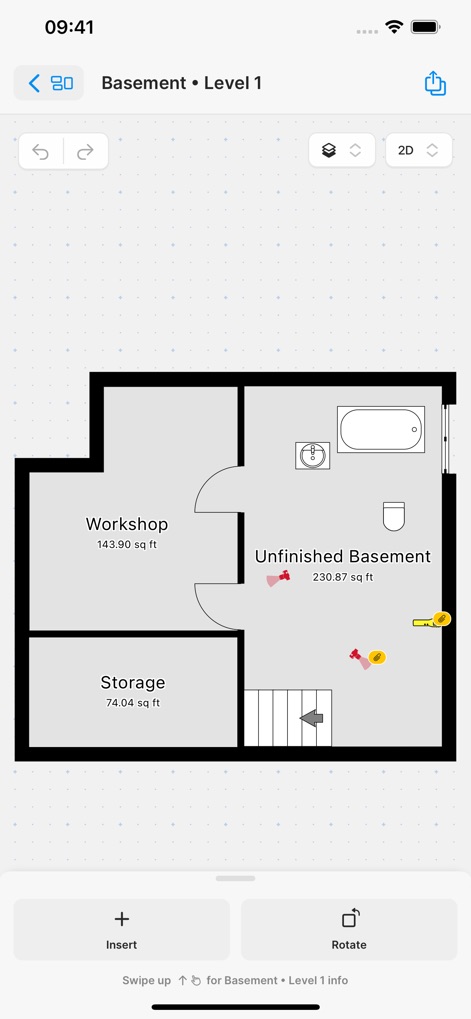
The app offers precise floor plan editing capabilities, showcasing detailed room measurements and labels, complemented by intuitive tools for inserting new elements and rotating the layout.
Precision Floor Planning

Users can efficiently manage project visuals through an organized image library, featuring date-based photo categorization and granular filtering options for specific project areas.
Visual Documentation Hub
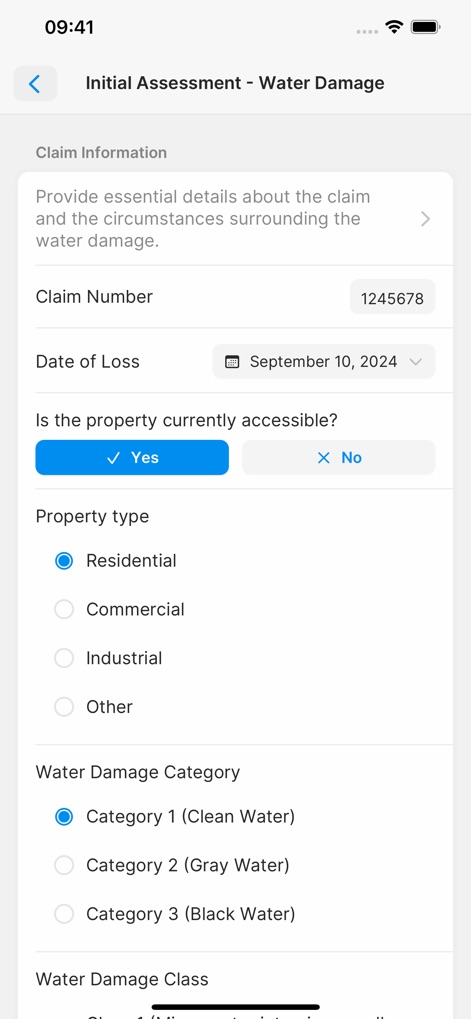
This tool streamlines on-site data capture with digital forms, providing structured input fields for critical claim information and clear options for categorizing property type and damage.
Streamlined Assessments
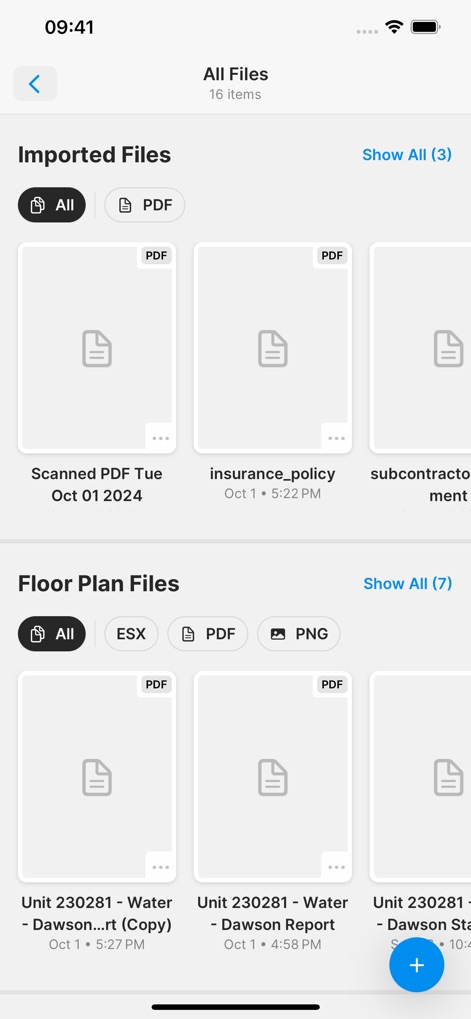
The app centralizes all project documents, providing a comprehensive library for various file types like imported PDFs, alongside organized access to generated floor plan files in multiple formats.
Integrated Document Hub
Description
Download
More Like This
Apps with similar features and user experience

Site Audit Pro
Veam Studios Ltd

Fieldwire - Construction App
Hilti Fieldwire, Inc.

SafetyCulture (iAuditor)
SafetyCulture Pty Ltd

BrightSafe On The Go
Peninsula Online Services Limited

Рососмотр
KALKUL.RU, OOO

Archipad ™
Bigsool

Archireport
ArchiReport SAS
iCertifi
iCertifi

Punch List & Site Audit Report
Rojao Inc
This page is not an official page of the app or its developer, but an independent editorial publication created for informational and commentary purposes. Unless expressly stated otherwise, neither the app nor its developer is affiliated with, endorsed by, sponsored by, authorized by, or otherwise officially connected with MWM, Apple, Google Play, the app publisher, or the app's developer, and nothing on this page implies that the app was developed using MWM's services. Any trademarks, logos, screenshots, and other content remain the property of their respective owners.