
This page is not an official page of the app or its developer, but an independent editorial publication created for informational and commentary purposes. Unless expressly stated otherwise, neither the app nor its developer is affiliated with, endorsed by, sponsored by, authorized by, or otherwise officially connected with MWM, Apple, Google Play, the app publisher, or the app's developer, and nothing on this page implies that the app was developed using MWM's services. Any trademarks, logos, screenshots, and other content remain the property of their respective owners.


Mail App for Outlook
Designed for professionals who demand speed and absolute privacy. Triage your inbox instantly with a native, rock-solid experience that keeps your data strictly on your device.
Downloads
1M+User Rating
Total Ratings
6K+Publisher
Category
ProductivityLocales
19Latest Version
20.0.15Size
31.3 MBFirst Released
Dec 15, 2020Email at the Speed of Thought
A lean, high-performance mail client built for professionals who value privacy and demand instant results in their workflow.
Blazing Fast Triage
Built on a native Swift codebase for instant syncing and zero lag, helping you reach Inbox Zero during your busiest hours.
Privacy-First Architecture
Your sensitive data never passes through our servers. Enjoy secure, all-HTTPS communications that keep your corporate info local and private.
Frequently Asked Questions
Everything you need to know about Mail App for Outlook
What is Mail App for Outlook?
Mail App for Outlook is a new application designed for quickly triaging your inbox. It uses Outlook's platform for instant sending and receiving messages and is built with a rock-solid Swift codebase.
Does Mail App for Outlook store user data on its servers?
No, Mail App for Outlook is privacy-aware and does not pass any user data on its servers. It ensures secure, all-HTTPS communications for instant synchronization.
Is Mail App for Outlook an official Microsoft product?
No, Mail App for Outlook is not related to the official Outlook App or any Microsoft products. It is an independent application.
How much does Mail App for Outlook cost?
Mail App for Outlook includes a renewable subscription costing $3.99 per week. The price may vary by location and promotional offers.
How do I manage my Mail App for Outlook subscription?
Users manage their Mail App for Outlook subscription in Account Settings after purchase. Subscriptions automatically renew unless canceled 24 hours before the period ends.
Can Mail App for Outlook search my entire email history?
No, Mail App for Outlook is not currently an archival utility for searching your entire email history. It is designed for triaging recent email.
How do I access support for Mail App for Outlook?
Users can reach support for Mail App for Outlook by using the in-app support option. This option is available within the application's settings.
What email folders are available in Mail App for Outlook?
Mail App for Outlook includes folders such as Inbox, Starred, Sent, Draft, Spam, Trash, Archive, and All Mail for organizing emails.
Does Mail App for Outlook support email actions like forwarding and replying?
Yes, Mail App for Outlook supports email actions such as Forward, Reply All, Reply, Label, Move To, Mark as Spam, Mark as Starred, and Mark as Unread.
Can I print emails from Mail App for Outlook?
Yes, Mail App for Outlook allows users to print emails. The action menu provides a "Print" option for selected messages.
Are there keyboard shortcuts in Mail App for Outlook?
Yes, Mail App for Outlook features rich keyboard shortcuts. These shortcuts enhance efficiency for managing emails within the application.
The following screenshots and description are sourced directly from the app's official store listing and are the property of the app developer.
App Store
Screenshots
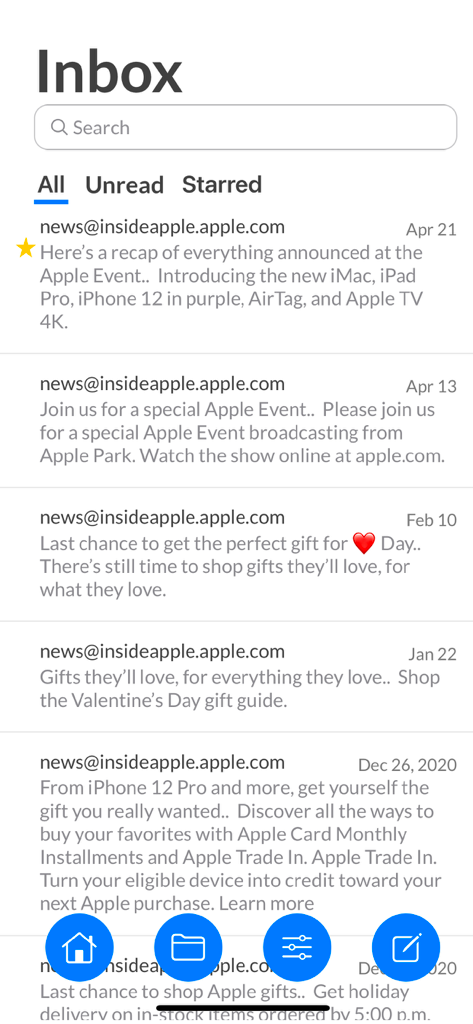
Inbox interface of Mail App for Outlook showing a list of recent emails and navigation menu
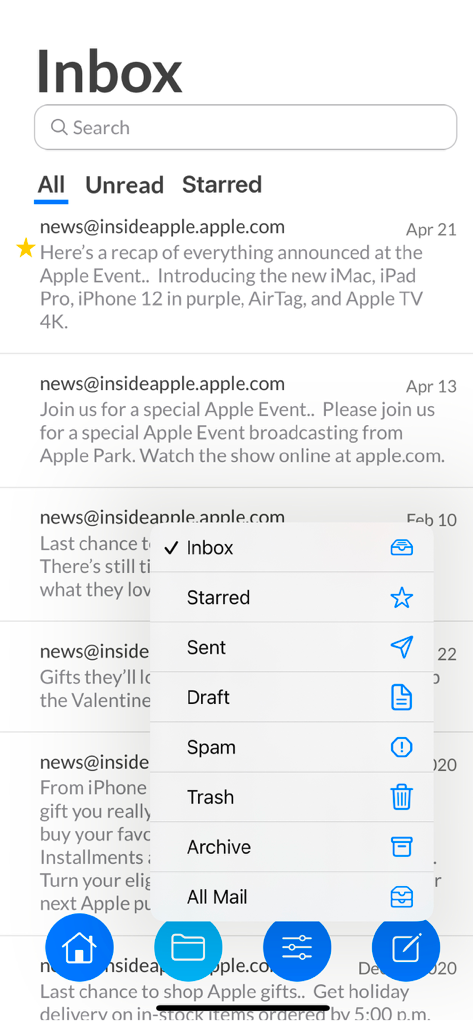
Inbox view of the Mail App for Outlook with an open folder navigation menu.
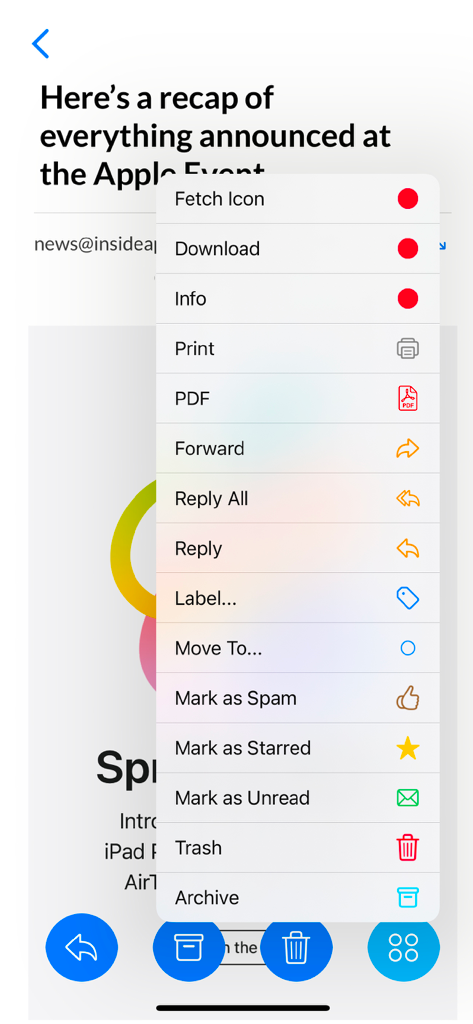
Email action menu in Mail App for Outlook showing options to reply, label, move, and archive messages
Description
Download
More Like This
Apps with similar features and user experience

Microsoft Outlook
Microsoft Corporation

Mail: Email, Cloud, Calendar
V Kontakte OOO

Yandex Mail: Email & Cloud
DIRECT CURSUS COMPUTER SYSTEMS TRADING LLC

Gmail - Email by Google
Google LLC

Yahoo Mail
Yahoo Inc.

Proton Mail - Encrypted Email
Proton AG

Email - Edison Mail
Edison Software Inc.

Zoho Mail - Email and Calendar
Zoho Corporation

GMX - Mail & Cloud
1&1 Mail & Media GmbH
This page is not an official page of the app or its developer, but an independent editorial publication created for informational and commentary purposes. Unless expressly stated otherwise, neither the app nor its developer is affiliated with, endorsed by, sponsored by, authorized by, or otherwise officially connected with MWM, Apple, Google Play, the app publisher, or the app's developer, and nothing on this page implies that the app was developed using MWM's services. Any trademarks, logos, screenshots, and other content remain the property of their respective owners.