Math Keyboard For Equations
Download on App Store

This page is not an official page of the app or its developer, but an independent editorial publication created for informational and commentary purposes. Unless expressly stated otherwise, neither the app nor its developer is affiliated with, endorsed by, sponsored by, authorized by, or otherwise officially connected with MWM, Apple, Google Play, the app publisher, or the app's developer, and nothing on this page implies that the app was developed using MWM's services. Any trademarks, logos, screenshots, and other content remain the property of their respective owners.


Logo of Math Keyboard For Equations
Download on App Store

Math Keyboard For Equations

Stop copy-pasting symbols. Type fractions, exponents, and Greek letters instantly in any app with a privacy-first keyboard designed for students and STEM professionals.

Key Figures

Downloads

1K+

User Rating

5.0/5

Total Ratings

0

Publisher

Shawn Boucke

Category

Utilities

Locales

1

Latest Version

1.4.1

Size

0.4 MB

First Released

Mar 20, 2025
Features

Effortless Math Typing, Anywhere

Transform your mobile device into a powerful STEM workstation with a custom keyboard designed for students, educators, and professionals.

Complete Mathematical Library

Access fractions, exponents, Greek letters, and calculus symbols instantly without ever leaving your current app.

Built for Speed & Efficiency

Stop wasting time copy-pasting symbols. Type complex equations directly into Slack, Notion, Discord, or mobile documents.

The following screenshots and description are sourced directly from the app's official store listing and are the property of the app developer.

App Store

Screenshots
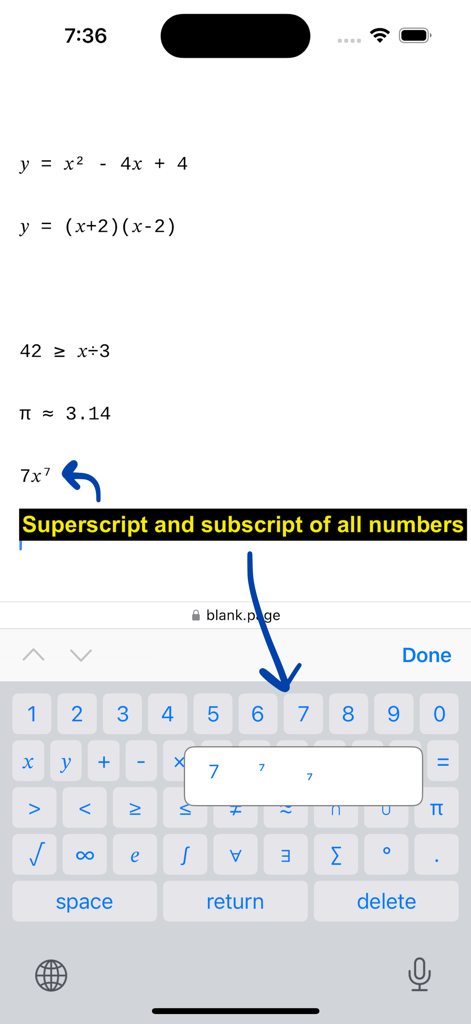
Math Keyboard For Equations - Math Keyboard app interface highlighting superscript and subscript options for typing equations on mobile
Math Keyboard app interface highlighting superscript and subscript options for typing equations on mobile

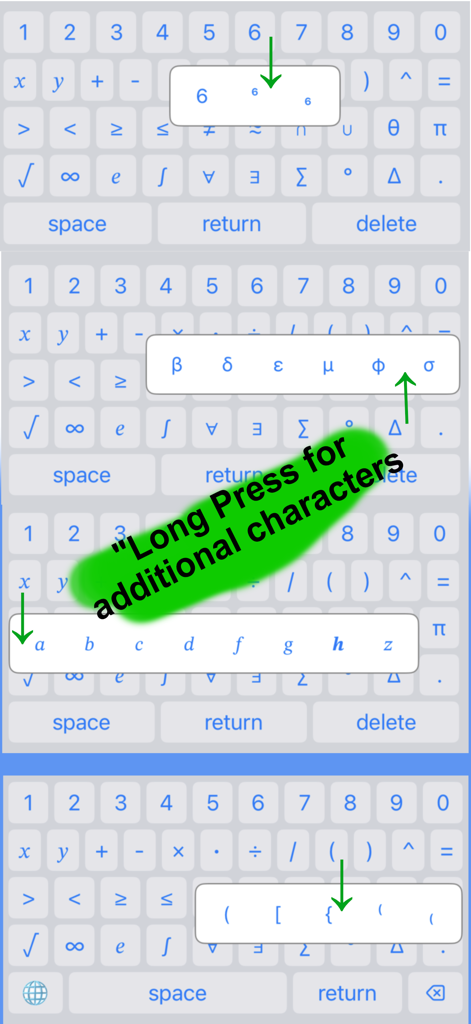
Math Keyboard For Equations - Math keyboard interface showing long press feature for additional symbols and variables
Math keyboard interface showing long press feature for additional symbols and variables

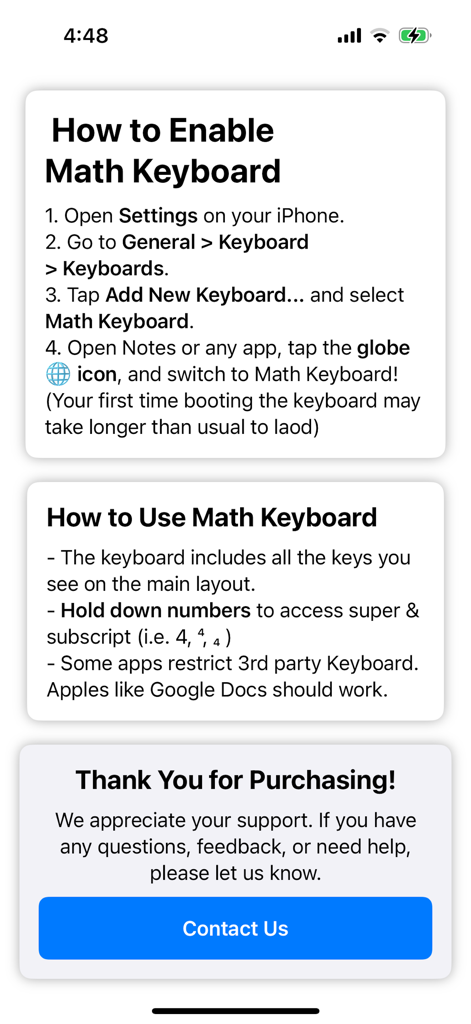
Math Keyboard For Equations - Onboarding screen showing steps to enable and use the Math Keyboard for Equations on iOS

Onboarding screen showing steps to enable and use the Math Keyboard for Equations on iOS

Description

Math Keyboard – Effortless Math Typing on the Go Tired of searching for special math symbols when typing equations? Math Keyboard makes it easy to write mathematical expressions anywhere, whether you're working in a Google Doc, helping a student with homework, or discussing equations on social media. With a thoughtfully designed layout, Math Keyboard gives you quick access to essential mathematical symbols, including: - Numbers & basic operators (+, −, ×, ÷) - Fractions, inequalities, and set notation - Superscripts & subscripts for exponents - Greek letters and calculus symbols Designed for students, educators, and professionals, this keyboard simplifies math input so you can focus on the problem, not finding the right key. No more copy-pasting symbols just type and go! Privacy Policy: Math Keyboard is committed to protecting your privacy. This Privacy Policy explains how your data is handled when you use the Math Keyboard app. 1. Information We Collect No Personal Data Collected Math Keyboard does not collect, store, or share any personal information. The app functions entirely on your device and does not transmit any data to external servers. No Keyboard Input Logging Math Keyboard does not record, store, or track what you type. All keystrokes remain private and are only sent to the active text field within your selected app. 2. Permissions & Full Access Why Does Math Keyboard Request "Full Access"? Some apps require "Allow Full Access" for third-party keyboards to function properly. If you enable this setting, Math Keyboard can be used across more apps. However, even with Full Access: We do not collect or transmit keystrokes We do not access any personal data No internet connection is used for keyboard operations Enabling Full Access is optional, and Math Keyboard will still function in many apps without it. 3. Data Sharing & Third Parties Math Keyboard: Does not share data with third parties Does not use analytics or tracking services Does not display ads or collect advertising data Your privacy is 100% respected at all times. 4. Children's Privacy Math Keyboard is safe for all ages. Since the app does not collect any data, there are no risks related to children's privacy. 5. Contact Us If you have any questions about this Privacy Policy, feel free to contact us: Email: appkeyboards@gmail.com We are committed to keeping Math Keyboard secure and private for all users. 6. Changes to This Policy We may update this Privacy Policy from time to time. Any updates will be posted on this page with a revised "Effective Date" at the top. By using Math Keyboard, you agree to this Privacy Policy. This policy ensures that you comply with Apple’s App Store privacy requirements while making it clear that your app does not collect any user data. Let me know if you need any tweaks!

Download

Download on App Store

This page is not an official page of the app or its developer, but an independent editorial publication created for informational and commentary purposes. Unless expressly stated otherwise, neither the app nor its developer is affiliated with, endorsed by, sponsored by, authorized by, or otherwise officially connected with MWM, Apple, Google Play, the app publisher, or the app's developer, and nothing on this page implies that the app was developed using MWM's services. Any trademarks, logos, screenshots, and other content remain the property of their respective owners.








