
This page is not an official page of the app or its developer, but an independent editorial publication created for informational and commentary purposes. Unless expressly stated otherwise, neither the app nor its developer is affiliated with, endorsed by, sponsored by, authorized by, or otherwise officially connected with MWM, Apple, Google Play, the app publisher, or the app's developer, and nothing on this page implies that the app was developed using MWM's services. Any trademarks, logos, screenshots, and other content remain the property of their respective owners.


Mimic XR
Turn your iPhone into a professional-grade mocap rig. Stream facial expressions and audio directly to your rigged characters via WiFi for instant, high-quality 3D animation without the manual keyframing.
Downloads
27K+User Rating
Total Ratings
0Publisher
Category
Developer ToolsLocales
1Latest Version
0.9.0Size
25.0 MBFirst Released
Sep 25, 2021Professional Facial Capture, Made for Indie Creators
Transform your iPhone into a high-end mocap rig. Stream expressions, sync audio, and bring your Blender characters to life in seconds—not hours.
Instant Blender Streaming
Connect seamlessly over WiFi to see your character mimic your every move in real-time. Stop wasting hours on manual keyframing and start acting.
TrueDepth Precision
Leverage Apple’s advanced camera hardware to capture subtle nuances. Achieve AAA-quality facial realism for your indie games or animated shorts.
Frequently Asked Questions
Everything you need to know about Mimic XR
What is Mimic XR?
Mimic XR is an app for real-time facial motion capture using Apple's TrueDepth camera. It streams facial expressions and voice to rigged characters in Blender over WiFi, enhancing 3D animation workflows.
How does Mimic XR capture facial motion data?
Mimic XR captures real-time facial motion using Apple's TrueDepth camera. It then streams this data wirelessly to Blender, providing instant visualization for 3D character animation.
Does Mimic XR integrate with Blender software?
Yes, Mimic XR provides seamless WiFi streaming to Blender for instant visualization. It also offers easy integration with Blender’s Video Editor, streamlining 3D animation workflows.
Can Mimic XR record audio and video simultaneously?
Yes, Mimic XR captures simultaneous audio and video recordings. This feature ensures perfect lip-sync and allows syncing live-action footage with your animated 3D character.
Is there a free trial period for Mimic XR?
Yes, Mimic XR offers an unlimited trial period. During this trial, recording time is limited to 5 seconds per capture. Unlimited recording requires purchase.
What are the pricing options for Mimic XR's unlimited recording?
Mimic XR provides unlimited recording time via a one-time payment of $24.99 or a weekly subscription of $4.99. Payments are charged to your Apple account.
How can I cancel my Mimic XR weekly subscription?
You manage or cancel your Mimic XR weekly subscription anytime through your App Store settings. Cancellation must occur at least 24 hours before the current period ends.
Where do I download the essential Blender plugin for Mimic XR?
You download the essential Blender plugin for Mimic XR directly from XR.Tools. This website also provides tutorials and updates on new features.
The following screenshots and description are sourced directly from the app's official store listing and are the property of the app developer.
App Store
Screenshots
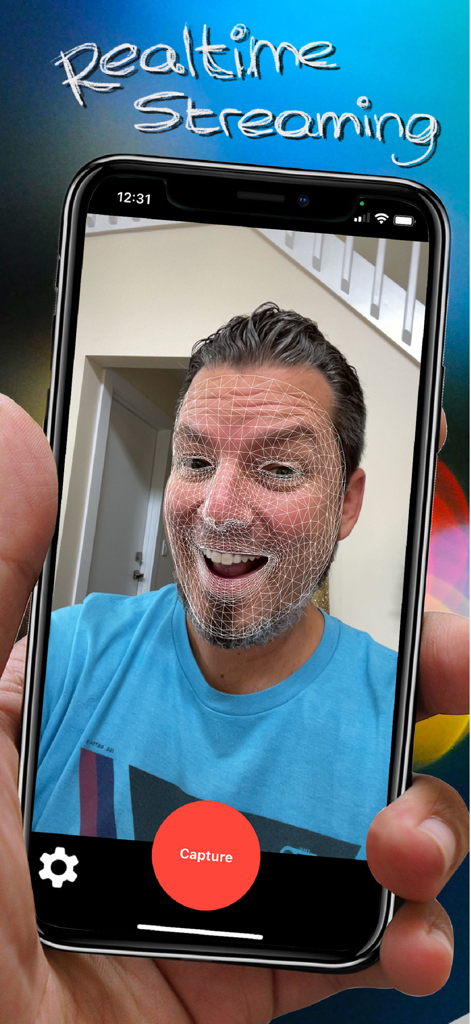
Real-time facial motion capture with 3D mesh overlay on iPhone
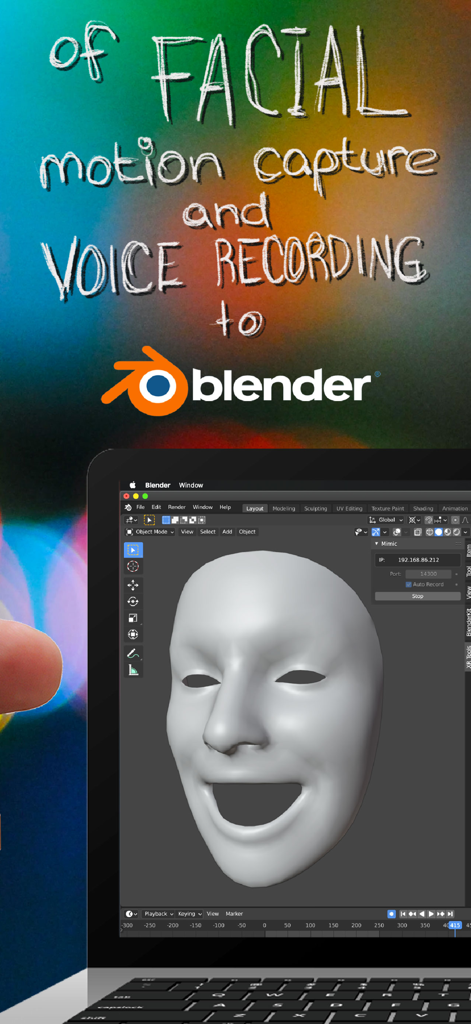
Real-time facial motion capture and voice recording from Mimic XR app to Blender 3D software
Description
Download
More Like This
Top-ranked apps in the same category

TestFlight
Apple Inc.

Replit: Vibe Code Apps
Replit, Inc

GitHub
GitHub

O-KAM Pro
Shenzhen VeePai IoT Intelligent Technology LLC

Apple Developer
Apple Inc.

Expo Go
650 Industries, Inc.

Scriptable
Simon Stovring

App Store Connect
Apple Inc.

Sekai: Create · Remix · Play
Versa AI, Inc.
This page is not an official page of the app or its developer, but an independent editorial publication created for informational and commentary purposes. Unless expressly stated otherwise, neither the app nor its developer is affiliated with, endorsed by, sponsored by, authorized by, or otherwise officially connected with MWM, Apple, Google Play, the app publisher, or the app's developer, and nothing on this page implies that the app was developed using MWM's services. Any trademarks, logos, screenshots, and other content remain the property of their respective owners.