
This page is not an official page of the app or its developer, but an independent editorial publication created for informational and commentary purposes. Unless expressly stated otherwise, neither the app nor its developer is affiliated with, endorsed by, sponsored by, authorized by, or otherwise officially connected with MWM, Apple, Google Play, the app publisher, or the app's developer, and nothing on this page implies that the app was developed using MWM's services. Any trademarks, logos, screenshots, and other content remain the property of their respective owners.


Minecraft Education
Users gain the power to craft understanding, transforming abstract lessons into tangible, interactive worlds.
Downloads
12.5M+User Rating
Total Ratings
121.7KPublisher
Category
EducationLocales
22Latest Version
1.21.132.1Size
1.2 GBFirst Released
Sep 6, 2018An analytical overview of the platform's core functionalities designed for K-12 learning environments.
Key Educational Features of Minecraft Education
Ready-to-Teach Lessons and Curriculum
The app offers a rich library of ready-to-teach lessons and standardized curriculum across various subjects, ensuring alignment with educational goals and ease of integration for educators.
Integrated Code Builder
This tool features an integrated Code Builder supporting block-based coding, JavaScript, and Python, fostering computational thinking and STEM skills directly within the game environment.
Development of 21st-Century Skills
The platform is designed to cultivate essential 21st-century skills, including problem-solving, collaboration, critical thinking, and digital citizenship, preparing students for future challenges.
Game-Based Learning with Real-World Content
The app delivers immersive game-based learning experiences through partnerships with organizations like NASA and the Nobel Peace Center, connecting educational content to real-world topics.
Multiplayer Collaboration Mode
It enables seamless real-time collaboration through its multiplayer mode, allowing students to work together on projects across diverse platforms and devices.
Microsoft Teams and Flipgrid Integration
The tool integrates with Microsoft Teams and Flipgrid, streamlining classroom management, assessment, and feedback processes for educators.
Creative Open-World Exploration
The app provides creative open worlds where users can explore, design, and construct, fostering imagination and project-based learning.
Immersive Reader for Accessibility
It includes Immersive Reader functionality, aiding players in reading and translating in-game text to support diverse learning needs and improve accessibility.
Frequently Asked Questions
Everything you need to know about Minecraft Education
What is Minecraft Education?
Minecraft Education is a game-based platform for schools and organizations. It inspires creative, inclusive learning by allowing users to explore blocky worlds to tackle subjects like reading, math, history, and coding, fostering critical thinking and problem-solving skills.
Is Minecraft Education suitable for all ages and skill levels?
Yes, Minecraft Education is designed for all types of learners. It offers lessons and a standardized curriculum. The platform requires no prior gaming experience, making it accessible for students at various skill levels.
Does Minecraft Education support coding?
Minecraft Education integrates Code Builder, a feature supporting block-based coding, JavaScript, and Python. It provides an intuitive interface for in-game execution, allowing users to program and bring worlds to life.
Can students collaborate in Minecraft Education?
Yes, Minecraft Education enables collaboration through its multiplayer mode. This feature allows students to work together in-game across various platforms, devices, and hybrid environments, promoting teamwork and shared learning.
How can schools or organizations acquire licenses for Minecraft Education?
Minecraft Education licenses are purchased with Admin access to a Microsoft 365 Admin Center account. Institutions should consult their Tech Lead for detailed information on academic licensing.
How long is a Minecraft Education subscription valid?
Each Minecraft Education subscription, when purchased via iTunes, lasts one year from the date of purchase. The subscription automatically renews unless auto-renewal is manually turned off.
How do I cancel auto-renewal for my Minecraft Education subscription?
To turn off auto-renewal for a Minecraft Education subscription purchased via iTunes, users must go to their Account Settings after purchase. Auto-renewal must be disabled at least 24 hours before the current period ends.
Does Minecraft Education offer accessibility features?
Yes, Minecraft Education includes features for accessible learning, such as the Immersive Reader. This tool helps players read and translate in-game text, fostering an inclusive environment for diverse learners.
Is there an in-game lesson library in Minecraft Education?
Yes, Minecraft Education features an in-game lesson library. It provides hundreds of ready-to-teach lessons, creative challenges, and blank canvas worlds, supporting various subjects and learning styles.
The following screenshots and description are sourced directly from the app's official store listing and are the property of the app developer.
App Store
Screenshots

Explore a rich 'In-Game Lesson Library' featuring interactive environments like this vibrant 'greenhouse setting' where players engage with educational content.
Lesson Library Exploration
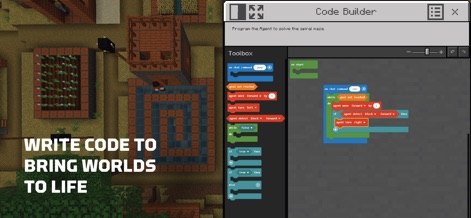
The app's 'Code Builder' provides an intuitive interface for users to implement 'block-based coding logic', bringing their virtual worlds to life and solving in-game challenges.
Build with Code
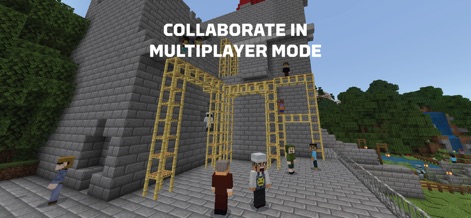
Users can engage in 'Multiplayer Mode' to foster collaboration, as demonstrated by several 'player characters constructing a large build' within a shared world.
Multiplayer Collaboration

This tool empowers students to 'solve real-world problems' by designing structures such as 'wind turbines' and integrating them into simulated environments with modern architecture.
Real-World Challenges
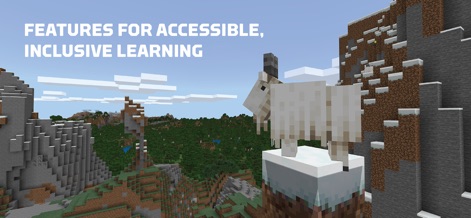
The app offers 'inclusive learning environments' across a variety of biomes, from 'mountainous landscapes with unique creatures' to support diverse educational experiences for all learners.
Inclusive Learning Worlds

Users can 'spark creativity' through engaging challenges, constructing impressive structures like this 'elaborate ancient-Egyptian city' with its distinctive 'architectural elements and water features'.
Creative Build Challenges
Description
Download
More Like This
Apps with similar features and user experience

eduki: Teaching materials
Lehrerkolleg LK GmbH
幼师贝壳(备课)-专业幼教资源平台
XUE HAI SHI BEI EDUCATION TECHNOLOGY CO., LTD.

Wayground
Quizizz Inc

Loquiz
Loquiz OU

Explain Everything Whiteboard
Promethean Ltd.

Kahoot! Play & Create Quizzes
Kahoot ASA

클래스카드
CLASSCARD, Inc.

希沃白板
Guangzhou Shirui Electronics Co., Ltd.
Puppet Pals 2: School Edition
Polished Play LLC
This page is not an official page of the app or its developer, but an independent editorial publication created for informational and commentary purposes. Unless expressly stated otherwise, neither the app nor its developer is affiliated with, endorsed by, sponsored by, authorized by, or otherwise officially connected with MWM, Apple, Google Play, the app publisher, or the app's developer, and nothing on this page implies that the app was developed using MWM's services. Any trademarks, logos, screenshots, and other content remain the property of their respective owners.