
This page is not an official page of the app or its developer, but an independent editorial publication created for informational and commentary purposes. Unless expressly stated otherwise, neither the app nor its developer is affiliated with, endorsed by, sponsored by, authorized by, or otherwise officially connected with MWM, Apple, Google Play, the app publisher, or the app's developer, and nothing on this page implies that the app was developed using MWM's services. Any trademarks, logos, screenshots, and other content remain the property of their respective owners.

MP3 Converter -Audio Extractor
Your videos conceal rich audio. This app tears through the visual, empowering users with total command to sculpt, clean, and repurpose pure sound.
Downloads
12.5M+User Rating
Total Ratings
374.7KPublisher
Category
MusicLocales
18Latest Version
6.15Size
112.9 MBFirst Released
Dec 4, 2017Key Features of MP3 Converter - Audio Extractor
A technical evaluation of core functionalities and user benefits.
Video to MP3 Conversion
The app provides seamless conversion of video files into MP3 audio, enabling users to extract audio content from various video sources.
Comprehensive Audio Post-Processing
It offers advanced post-processing capabilities, including voice removal, equalization, bass enhancement, and automatic gain control for professional-grade audio manipulation.
Intelligent Noise Reduction
This tool features an intelligent denoising function to significantly improve audio clarity and remove unwanted background noise.
Advanced Audio Trimming & Merging
It includes powerful tools for clipping and splicing multiple audio segments, allowing for precise editing and arrangement.
Broad Video Format Compatibility
The app supports a wide array of video formats for input, ensuring flexibility when converting various sources to MP3.
Extensive Audio Format Support
This tool supports a broad range of audio formats, offering flexibility for both input and output needs.
Unlimited Processing Duration
The Pro version removes time limits on processing, allowing for conversion and editing of lengthy audio and video files crucial for content creators.
Intuitive and Rapid Operation
This tool is designed for quick and straightforward use, ensuring efficiency in audio processing tasks.
Frequently Asked Questions
Everything you need to know about MP3 Converter -Audio Extractor
What is the primary function of the MP3 Converter -Audio Extractor app?
The MP3 Converter -Audio Extractor app converts any video into MP3 audio format. It saves the audio to your phone, enabling offline listening.
Does MP3 Converter -Audio Extractor support various video and audio formats?
Yes, the MP3 Converter -Audio Extractor app supports converting most video formats and handles a wide range of audio formats for output.
Can users edit audio within the MP3 Converter -Audio Extractor app?
Yes, the MP3 Converter -Audio Extractor app includes multiple audio clippers and splicers. It also offers post-processing functions like equalization, bass enhancement, and vocal removal.
How can I remove background noise from audio using MP3 Converter -Audio Extractor?
The MP3 Converter -Audio Extractor app features an intelligent denoising function. This allows users to reduce or eliminate unwanted background noise from their audio files.
What are the benefits of an MP3 Converter Pro Unlimited subscription?
An MP3 Converter Pro Unlimited subscription unlocks all features, including more format support, unlimited time limits, richer import/export modes, and removes all advertisements.
Is a one-time payment option available for MP3 Converter -Audio Extractor Pro Unlimited?
Yes, in addition to annual billing, a one-time payment option is offered for MP3 Converter Pro Unlimited, separate from the subscription plans.
How are subscriptions managed for MP3 Converter -Audio Extractor?
Subscriptions for MP3 Converter -Audio Extractor are managed by the user. Auto-renewal can be turned off in the user's iTunes Account Settings after purchase.
Can I import videos from my camera roll or iCloud into MP3 Converter -Audio Extractor?
Yes, MP3 Converter -Audio Extractor allows importing videos from your Camera Roll and iCloud. Other import options like WiFi Transfer are also available.
Does the MP3 Converter -Audio Extractor app provide a widget for quick access?
Yes, MP3 Converter -Audio Extractor includes a widget. This widget allows users to quickly import videos or play recent audio files directly.
What audio formats can MP3 Converter -Audio Extractor output?
The MP3 Converter -Audio Extractor app can output various audio formats, including MP3, M4A, WAV, AIFF, CAF, WMA, OGG, and ADX.
The following screenshots and description are sourced directly from the app's official store listing and are the property of the app developer.
App Store
Screenshots

Format Flexibility
This tool showcases extensive format compatibility with options like MP3, M4A, and WAV, alongside granular control over settings such as Audio Sample Rate and Bitrate.

Seamless Import & Convert
Users can effortlessly import media via quick access widgets for recent files or diverse methods such as WiFi Transfer and iCloud.
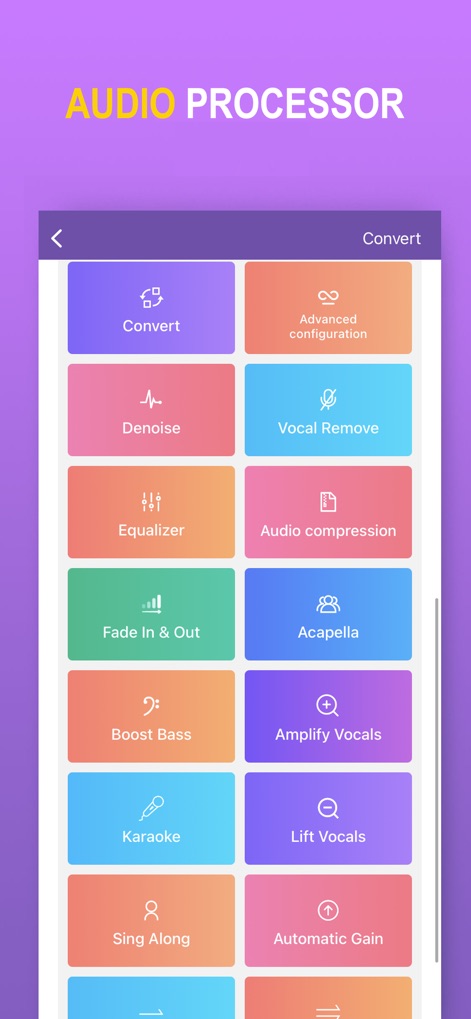
Masterful Audio Toolkit
The app provides a powerful suite of audio processing features, from dedicated buttons for Denoise and Vocal Removal to specialized effects like Boost Bass and Automatic Gain.

Precision Audio Editing
This tool offers precise control over extracted audio, evident in the intuitive waveform visualizer for trimming and the real-time Output Volume slider.
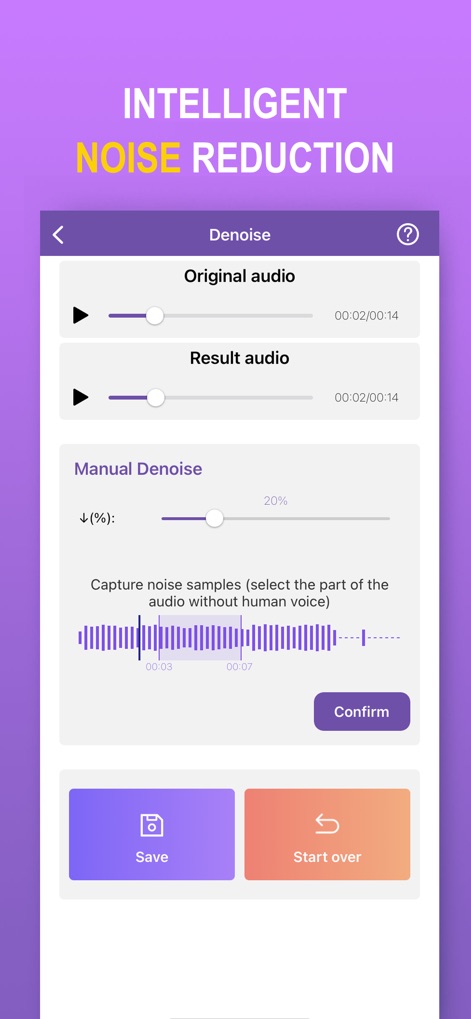
Smart Noise Elimination
Experience advanced noise reduction capabilities with dual play/seek bars for comparing original and denoised audio, complemented by a Manual Denoise slider for fine-tuning noise samples.
Description
Download
More Like This
Apps with similar features and user experience

Audio Editor - Music Mixer
妍 岳

MP3 Converter: Video to Audio
Fitness Labs SRL

Audio Editor: MP3 Converter
ZHN Co., Ltd.

MP3 Converter - video2mp3
ZHN Co., Ltd.

EZAudioCut - Audio Editor Lite
龙刚 李

Audio Extractor-Audio Editing
正军 刘

Audio Editor & Music Mixer
Wuhan Net Power Technology Co., Ltd

Audio Converter&Ringtone Maker
俊鹏 位
Audio Converter & Video to MP3
昱江 郭
This page is not an official page of the app or its developer, but an independent editorial publication created for informational and commentary purposes. Unless expressly stated otherwise, neither the app nor its developer is affiliated with, endorsed by, sponsored by, authorized by, or otherwise officially connected with MWM, Apple, Google Play, the app publisher, or the app's developer, and nothing on this page implies that the app was developed using MWM's services. Any trademarks, logos, screenshots, and other content remain the property of their respective owners.