
This page is not an official page of the app or its developer, but an independent editorial publication created for informational and commentary purposes. Unless expressly stated otherwise, neither the app nor its developer is affiliated with, endorsed by, sponsored by, authorized by, or otherwise officially connected with MWM, Apple, Google Play, the app publisher, or the app's developer, and nothing on this page implies that the app was developed using MWM's services. Any trademarks, logos, screenshots, and other content remain the property of their respective owners.


MyHyundai with Bluelink
Total control, from anywhere. It grants users command over their vehicle, even when miles away.
Downloads
2.5M+User Rating
Total Ratings
478.8KPublisher
Category
ProductivityLocales
1Latest Version
5.3.9Size
310.4 MBFirst Released
Jul 6, 2014Evaluating key features for the modern Hyundai owner seeking enhanced vehicle control and convenience.
MyHyundai with Bluelink: A Comprehensive Connectivity Analysis
Remote Engine Start & Presets
The app allows users to remotely start their vehicle and activate saved climate control presets, ensuring comfort before entry.
EV/PHEV Charging Control
It provides EV and PHEV owners with the ability to view charging status, manage charging schedules, and adjust settings directly from their device.
Remote Door Control
This tool features the capability to remotely lock or unlock the vehicle's doors, offering enhanced security and convenience.
Real-time Vehicle Status
The app allows users to check their vehicle's status, providing current information on key systems and alerts for peace of mind.
Vehicle Locator & Remote Alerts
It enables users to locate their parked car and remotely activate the horn and lights, aiding in finding the vehicle and deterring potential threats.
Service & Maintenance Hub
This tool features the ability to schedule car care service appointments and access maintenance information, streamlining vehicle upkeep.
POI Search & Send to Vehicle
The app provides functionality to search for Points of Interest and send them directly to the vehicle's navigation system for seamless travel planning.
Smartwatch Control
It allows users to control select vehicle features, such as remote start and door lock/unlock, directly from their Apple Watch for ultimate convenience.
Frequently Asked Questions
Everything you need to know about MyHyundai with Bluelink
How do I access Bluelink features in the MyHyundai app?
You access Bluelink features in the MyHyundai app using your MyHyundai.com ID, password, and PIN. An active Bluelink subscription is mandatory. You can conveniently log in with Touch ID or Face ID.
What Bluelink features are available with the MyHyundai app?
The MyHyundai app offers Bluelink features like remote vehicle start, lock/unlock, horn/lights activation, finding your car, and checking vehicle status. It also supports charging management for EV/PHEV and POI search/send with the Guidance package.
Can I remotely start my Hyundai vehicle using the MyHyundai app?
Yes, the MyHyundai app allows you to remotely start your vehicle. This feature requires an active Bluelink Remote Package subscription and a Bluelink-enabled vehicle. Screenshot #2 shows a 'Climate Start' button for this function.
Does the MyHyundai app support electric or hybrid vehicles?
Yes, the MyHyundai app supports hybrid, EV, fuel cell, and gas vehicles. For EV and PHEV vehicles, you can view charging status and manage charging schedules and settings remotely.
How do I schedule a service appointment for my Hyundai using the MyHyundai app?
Yes, you can schedule a car care service appointment directly through the MyHyundai app. Navigate to the 'Car Care' section, where you find options for 'Service Scheduling' and selecting a preferred dealer.
What vehicle information can I view in the MyHyundai app?
The MyHyundai app displays detailed vehicle status including battery charge, remaining range, door lock states, hood/trunk/window status, location, fuel range, and odometer readings. This information is accessible from the main dashboard.
Can I set alerts for my Hyundai vehicle using the MyHyundai app?
Yes, the MyHyundai app allows you to manage Bluelink Alert Settings. You can configure Speed Alerts, Valet Alerts, Curfew Alerts, and Geo-Fence Alerts to safeguard your vehicle and passengers based on custom parameters.
Does the MyHyundai app offer remote control features for Apple Watch?
Yes, the MyHyundai app supports Apple Watch. You can use voice commands or the smartwatch app menu to remotely start your vehicle, unlock/lock doors, activate the horn and lights, and find your car.
How do I find charging stations for my EV with the MyHyundai app?
The MyHyundai app allows you to quickly find nearby charging stations for your EV. You can search by zip code and send Points of Interest (POI) to your vehicle's navigation system directly from the app.
Is a Bluelink subscription required to use the MyHyundai app?
Yes, an active Bluelink subscription is required to use Bluelink features within the MyHyundai app. You can renew or upgrade your subscription packages (Remote or Guidance) via MyHyundai.com.
Can I manage multiple drivers with the MyHyundai app?
Yes, the MyHyundai app allows you to add additional drivers. As the primary Bluelink subscriber, you can invite secondary drivers to create their own unique Bluelink preferences and manage vehicle settings.
Where can I find technical assistance for the MyHyundai app?
For technical assistance concerning the MyHyundai app, you can directly contact the support team via email at AppsTeam@hmausa.com. This ensures direct communication with app specialists.
The following screenshots and description are sourced directly from the app's official store listing and are the property of the app developer.
App Store
Screenshots

This introductory visual highlights the effortless integration between users and their Hyundai, emphasizing the convenience of the app's connectivity.
Seamless Car Connection
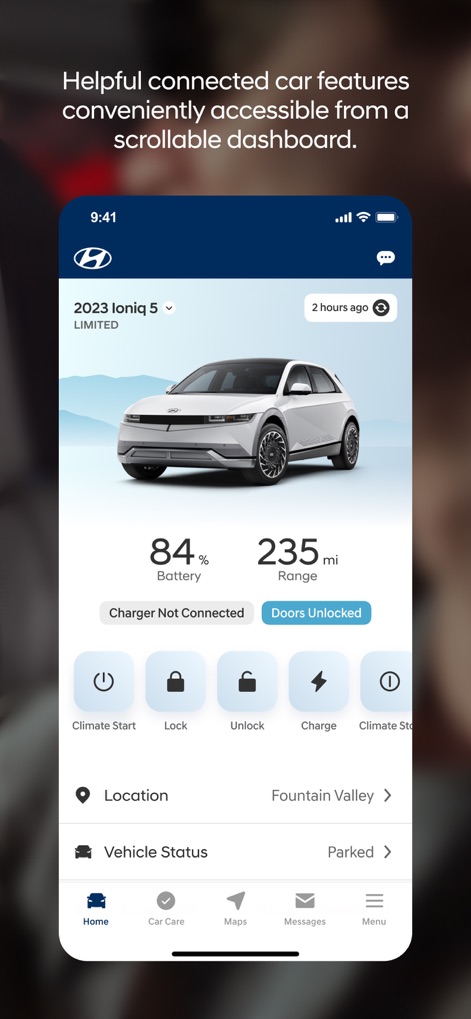
The app's intuitive dashboard presents a clear overview of vehicle status, showing key metrics like battery charge and providing instant access to remote control functions.
Dashboard Control

Users can monitor precise vehicle conditions through an interactive car diagram displaying open/closed components and review vital stats like fuel range and odometer readings.
Detailed Vehicle Health

This image emphasizes the app's comprehensive compatibility across various powertrain types and its ability to enhance every adventure for Hyundai owners.
Universal Vehicle Support

Owners can configure detailed security alerts, utilizing toggle switches to activate features like speed warnings and customizing geo-fence parameters for enhanced vehicle monitoring.
Advanced Security Alerts

The app provides an efficient charging station locator, featuring an interactive map with pinned locations and a search bar for quick access to nearby charging options.
Effortless Charging Locator

Users can manage their primary driver profile with detailed contact information and easily invite additional drivers to customize their Bluelink preferences.
Personalized Driver Profiles

The Car Care section offers a complete suite of vehicle management tools, including diagnostic reports for insights and direct service scheduling with dealerships.
Holistic Car Care

This feature streamlines dealership interactions, presenting a map view of nearby Hyundai dealers and providing detailed information including service scheduling options and reviews.
Simplified Dealer Services
Description
Download
More Like This
Apps with similar features and user experience

Toyota
Toyota Motor Sales, U.S.A., Inc.
myChevrolet
General Motors
My BMW
BMW NORTH AMERICA, LLC

Mercedes-Benz (USA/CA)
Mercedes-Benz USA LLC

LoJack
Spireon, Inc.
Tessie — For your Tesla
Tessie Technology LLC

Tesla
Tesla, Inc.

Ford™
Ford Motor Company

MyMazda
Mazda Motor Corporation
This page is not an official page of the app or its developer, but an independent editorial publication created for informational and commentary purposes. Unless expressly stated otherwise, neither the app nor its developer is affiliated with, endorsed by, sponsored by, authorized by, or otherwise officially connected with MWM, Apple, Google Play, the app publisher, or the app's developer, and nothing on this page implies that the app was developed using MWM's services. Any trademarks, logos, screenshots, and other content remain the property of their respective owners.