
This page is not an official page of the app or its developer, but an independent editorial publication created for informational and commentary purposes. Unless expressly stated otherwise, neither the app nor its developer is affiliated with, endorsed by, sponsored by, authorized by, or otherwise officially connected with MWM, Apple, Google Play, the app publisher, or the app's developer, and nothing on this page implies that the app was developed using MWM's services. Any trademarks, logos, screenshots, and other content remain the property of their respective owners.


Tesla
Authority is absolute. The app transforms your device into the definitive conduit for total command over your Tesla, anytime, anywhere.
Downloads
25M+User Rating
Total Ratings
156.1KPublisher
Category
LifestyleLocales
27Latest Version
4.55.0Size
870.2 MBFirst Released
Dec 10, 2012Tesla App: Driving Experience & Energy Management
A comprehensive analysis of key functionalities empowering Tesla owners with unparalleled control and insights.
Energy Monitoring & Management
The app provides comprehensive oversight and management of home energy generation, consumption, and grid interaction, crucial for energy product owners.
Advanced Summon Functionality
This tool features cutting-edge remote parking and retrieval capabilities, showcasing advanced technology and convenience.
Remote Charging Control
The app provides real-time oversight and control over the vehicle's charging status, ensuring optimal battery management.
Over-the-Air Software Updates
It allows users to ensure the vehicle always has the latest features and improvements without requiring a service visit, embodying cutting-edge tech.
Preconditioning Cabin
This tool ensures the vehicle's interior is at a comfortable temperature before entry, improving comfort and energy efficiency.
Vehicle Location & Tracking
The app enhances security by pinpointing the vehicle's location and allows tracking for peace of mind or recovery.
Remote Locking/Unlocking
It offers security and convenience by allowing remote access control over the vehicle's locking mechanism.
Energy Data Export
This tool allows users to analyze their energy consumption and production patterns for optimization and tracking.
Frequently Asked Questions
Everything you need to know about Tesla
Can I lock and unlock my Tesla using the Tesla app?
Yes, the Tesla app allows owners to lock and unlock their vehicle from afar. This remote control functionality is accessible directly through the app's interface.
Can I pre-condition my Tesla's interior temperature with the app?
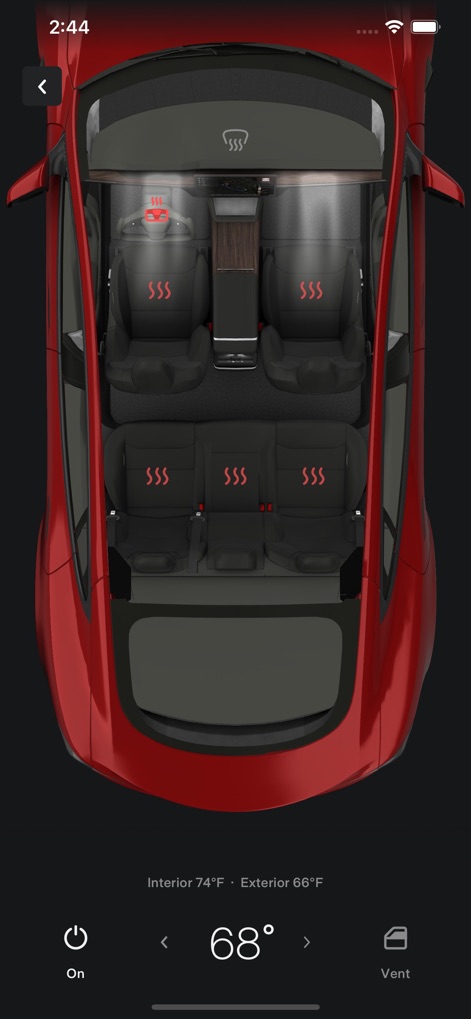
Yes, the Tesla app enables users to heat or cool their car before driving, even if it is in a garage. The app displays the interior and exterior temperatures.
Does the Tesla app help locate my vehicle?
Yes, the Tesla app allows users to locate their vehicle using directions or track its movement. It also provides the vehicle's current address.
How do I use the Summon feature in the Tesla app?
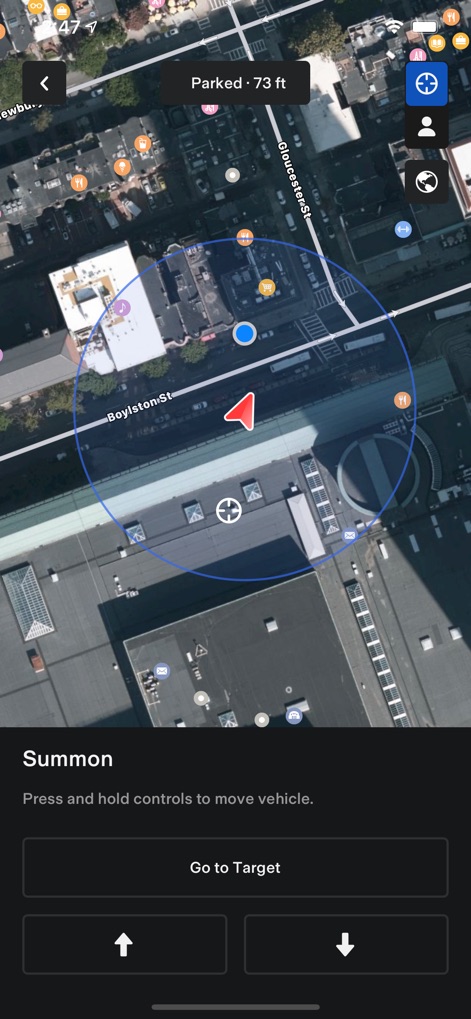
The Tesla app's Summon feature allows you to move your vehicle out of a garage or tight parking space by pressing and holding controls. This feature is available for vehicles with Autopilot.
What Powerwall data can I monitor with the Tesla app?
The Tesla app monitors Powerwall data, including energy stored from solar, energy used by the home, and energy exported to the grid. It also shows solar production and battery usage data.
Is Powerwall 2 required to use Powerwall features in the Tesla app?
Yes, Powerwall 2 is required to utilize the Powerwall features within the Tesla app. Without Powerwall 2, these specific functionalities are not available.
Can the Tesla app update my vehicle's software?
Yes, the Tesla app allows users to update their vehicle software from wherever they are. This ensures the vehicle always runs on the latest version.
The following screenshots and description are sourced directly from the app's official store listing and are the property of the app developer.
App Store
Screenshots

Vehicle Control Hub
The app provides an immediate overview of the vehicle's status, showcasing the elegant car model visual and intuitive access to key control categories like Climate and Summon.
Climate Comfort Controls
Users can precisely manage the vehicle's cabin environment, as seen with the detailed interior climate control graphic and the visual indicators for active seat heating.
Smart Summon Operations
This tool facilitates advanced vehicle interaction, displaying the car's precise location on a detailed map and enabling remote movement with intuitive summon control buttons.

Integrated Energy Ecosystem
The app offers a comprehensive view of the integrated energy ecosystem, clearly visualizing the flow with an interactive energy flow diagram and real-time Powerwall status.

Solar Performance Insights
Users gain deep insights into energy performance, featuring a detailed daily solar production graph and a transparent breakdown of energy usage percentages.
Description
Download
More Like This
Apps with similar features and user experience

Toyota
Toyota Motor Sales, U.S.A., Inc.

myChevrolet
General Motors

My BMW
BMW NORTH AMERICA, LLC

Mercedes-Benz (USA/CA)
Mercedes-Benz USA LLC

MyHyundai with Bluelink
Hyundai Motor America

LoJack
Spireon, Inc.

Tessie — For your Tesla
Tessie Technology LLC

Ford™
Ford Motor Company

MyMazda
Mazda Motor Corporation
This page is not an official page of the app or its developer, but an independent editorial publication created for informational and commentary purposes. Unless expressly stated otherwise, neither the app nor its developer is affiliated with, endorsed by, sponsored by, authorized by, or otherwise officially connected with MWM, Apple, Google Play, the app publisher, or the app's developer, and nothing on this page implies that the app was developed using MWM's services. Any trademarks, logos, screenshots, and other content remain the property of their respective owners.