
This page is not an official page of the app or its developer, but an independent editorial publication created for informational and commentary purposes. Unless expressly stated otherwise, neither the app nor its developer is affiliated with, endorsed by, sponsored by, authorized by, or otherwise officially connected with MWM, Apple, Google Play, the app publisher, or the app's developer, and nothing on this page implies that the app was developed using MWM's services. Any trademarks, logos, screenshots, and other content remain the property of their respective owners.


Naver Mail
Email management is a battlefield. Naver Mail equips users to dominate it, turning digital chaos into structured command.
Downloads
1M+User Rating
Total Ratings
2.7KPublisher
Category
ProductivityLocales
2Latest Version
3.1.5Size
46.1 MBFirst Released
Dec 31, 2012An analytical overview of key features for efficient and secure communication, tailored for tech-savvy users.
Naver Mail: A Comprehensive Email Solution
Unified Inbox for External Accounts
The app provides a consolidated platform for managing various email accounts, including external services like Gmail and Outlook, streamlining communication for users with multiple addresses.
Intelligent Mail Categorization
This tool features intelligent algorithms that automatically categorize incoming emails into smart mailboxes (e.g., promotions, billing, SNS), significantly reducing inbox clutter and aiding focus on critical messages.
Proactive Security Scanning
It allows users to benefit from proactive security measures, detecting and alerting them about potential virus or malware files before attachments are downloaded or sent, safeguarding their data and devices.
Dynamic Email Filtering
The app provides dynamic filtering capabilities, enabling users to quickly locate and prioritize emails based on criteria such as unread status, importance, attachments, or VIP senders, enhancing efficiency.
Threaded and Sender-Grouped Views
This tool features intuitive views that group related emails into conversations or by sender, simplifying the tracking of ongoing discussions and improving context for email exchanges.
Integrated Translation
It allows users to utilize a built-in translation function, simplifying the composition and understanding of foreign language emails, which is highly beneficial for international communication.
MYBOX File Attachment
The app provides seamless integration with Naver MYBOX, enabling users to attach files directly from their cloud storage, which enhances efficiency and simplifies the handling of large files.
Application Lock Security
This tool features an application password lock, adding an essential layer of privacy and security to the email client, protecting sensitive information from unauthorized access.
Advanced Email Composition
It allows users to craft professional and visually appealing emails with a rich text editor that supports bolding, underlining, text color, and image insertion, improving message clarity.
Dark Mode Interface
The app provides a dark mode interface, reducing eye strain and improving readability in low-light environments, which contributes to overall user comfort and accessibility.
Frequently Asked Questions
Everything you need to know about Naver Mail
What are the main features of the Naver Mail app?
The Naver Mail app offers smart mail management, including conversational views, sender-based grouping, smart filters for different mail types, external mail integration, advanced composition tools, and security features.
Does Naver Mail support external email accounts like Gmail and Outlook?
Yes, the Naver Mail app allows users to check and manage external mail accounts such as Gmail and Outlook directly within the app.
How can users organize their emails in the Naver Mail app?
Naver Mail allows organizing emails by conversational view, by sender, and through smart mailboxes that automatically categorize promotional, billing, SNS, and cafe mails. Filters for unread, important, and attachments are also available.
Can users compose emails with rich text formatting and attachments in Naver Mail?
Yes, the Naver Mail app supports rich text formatting like bold, underline, and text color. Users can also insert images into the body and attach files from their MYBOX.
What security features does the Naver Mail app offer?
The Naver Mail app enhances security by detecting viruses and malware in attachments before download and provides an app-level password lock function to protect user mail.
What is the minimum iOS version required for the Naver Mail app?
The Naver Mail app requires iOS OS 16.0 or higher to function. Users must update their device's operating system to this version or newer.
Does Naver Mail have a dark mode feature?
Yes, the Naver Mail app includes a dark mode feature, allowing users to view their emails comfortably without glare, as shown in the application's screenshots.
Can I manage my mailbox storage within the Naver Mail app?
Yes, the Naver Mail app provides a mailbox management section where users can view current storage usage and clear or delete emails from various smart mailboxes.
The following screenshots and description are sourced directly from the app's official store listing and are the property of the app developer.
App Store
Screenshots
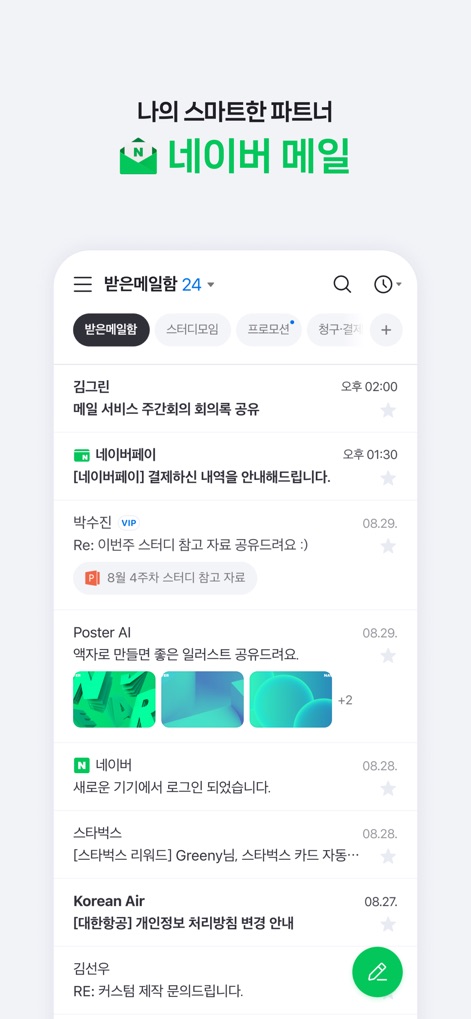
The app presents an intelligently organized inbox with prominent categorization tabs such as 'Promotions' and 'Billing/Payment' for quick email access.
Smart Inbox View
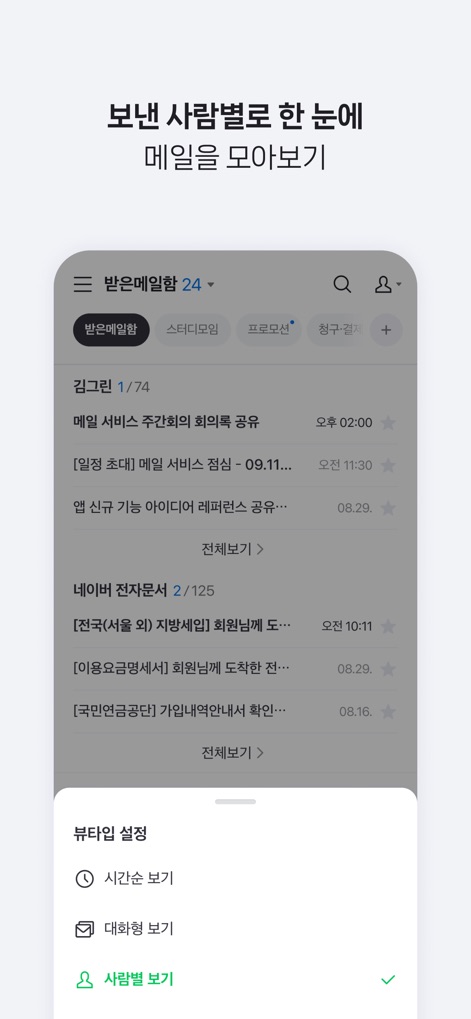
Users can customize their inbox display with dynamic sorting options, including a 'Conversational View' and 'Per Person View', for enhanced readability.
Dynamic Mail Sorting
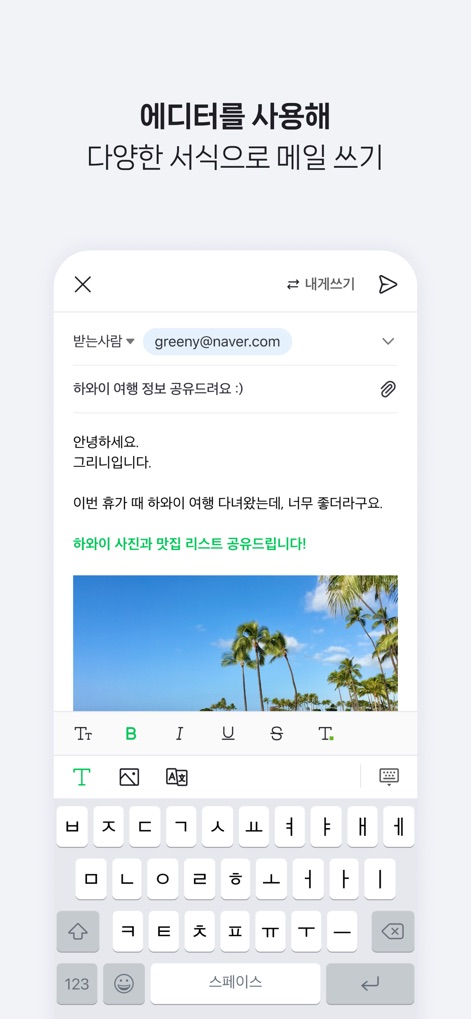
This tool empowers users with an expressive email composer, featuring rich text formatting controls like bold and underline, and the ability to embed images directly.
Expressive Email Composer
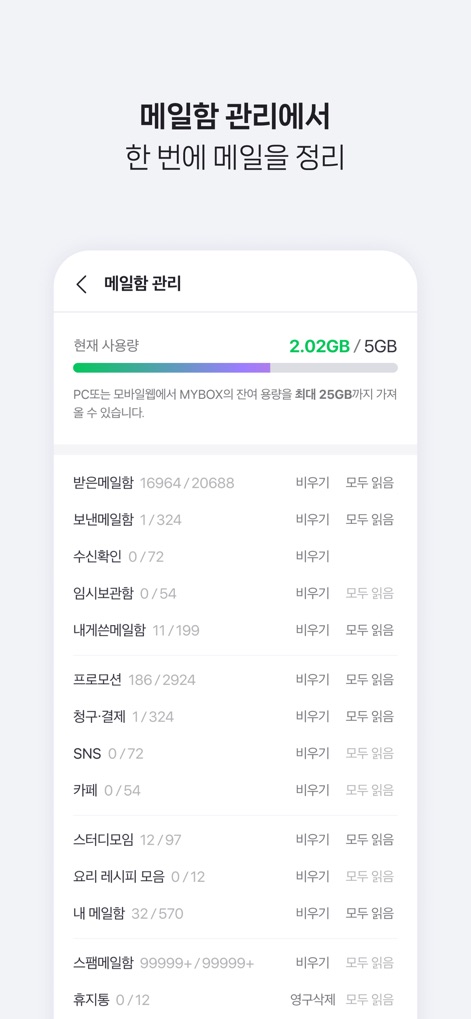
The app provides a holistic mail management interface, displaying detailed folder breakdowns such as 'Promotions' and 'Spam', alongside options to 'Empty' folders.
Holistic Mail Management
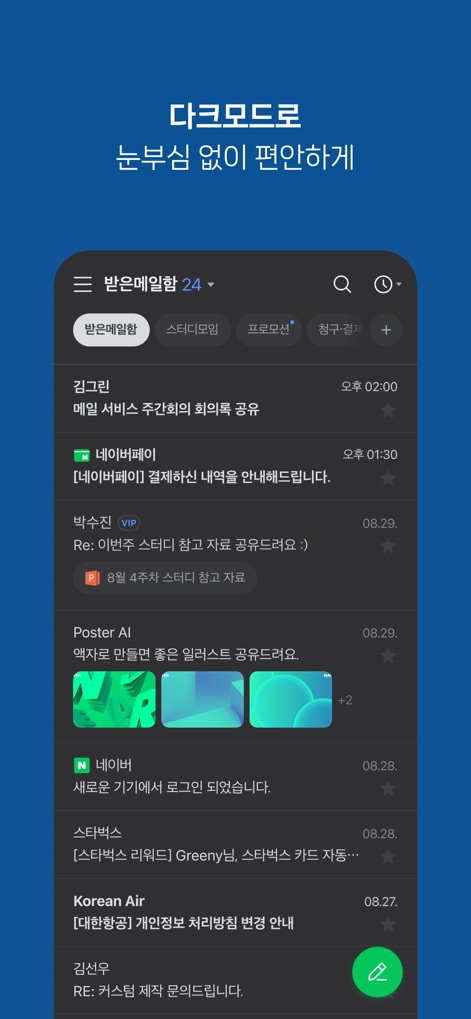
Users can enjoy enhanced visual comfort with the app's dedicated dark mode, providing a soothing interface for viewing emails in various lighting conditions.
Enhanced Visual Comfort

The tool ensures universal access and a consistent experience across devices, showcasing the responsive design on both mobile and desktop interfaces.
Universal Access
Description
Download
More Like This
Apps with similar features and user experience

Microsoft Outlook
Microsoft Corporation

Mail: Email, Cloud, Calendar
V Kontakte OOO

Yandex Mail: Email & Cloud
DIRECT CURSUS COMPUTER SYSTEMS TRADING LLC

Gmail - Email by Google
Google LLC

Yahoo Mail
Yahoo Inc.

Proton Mail - Encrypted Email
Proton AG

Email - Edison Mail
Edison Software Inc.

Zoho Mail - Email and Calendar
Zoho Corporation

GMX - Mail & Cloud
1&1 Mail & Media GmbH
This page is not an official page of the app or its developer, but an independent editorial publication created for informational and commentary purposes. Unless expressly stated otherwise, neither the app nor its developer is affiliated with, endorsed by, sponsored by, authorized by, or otherwise officially connected with MWM, Apple, Google Play, the app publisher, or the app's developer, and nothing on this page implies that the app was developed using MWM's services. Any trademarks, logos, screenshots, and other content remain the property of their respective owners.