
This page is not an official page of the app or its developer, but an independent editorial publication created for informational and commentary purposes. Unless expressly stated otherwise, neither the app nor its developer is affiliated with, endorsed by, sponsored by, authorized by, or otherwise officially connected with MWM, Apple, Google Play, the app publisher, or the app's developer, and nothing on this page implies that the app was developed using MWM's services. Any trademarks, logos, screenshots, and other content remain the property of their respective owners.


Noteshelf 3: AI Digital Notes
Mind upload, activated. This app turns raw input into structured, intelligent thought, letting users offload mental clutter with AI-driven precision.
Downloads
1M+User Rating
Total Ratings
13.7KPublisher
Category
ProductivityLocales
9Latest Version
6.11Size
400.9 MBFirst Released
Aug 18, 2023A deep dive into its core functionalities and user benefits
Key Features of Noteshelf 3: AI Digital Notes
AI-Powered Note Generation and Summarization
The app provides advanced AI capabilities to generate handwritten notes, summarize content, translate text, and explain complex terms, significantly boosting productivity and comprehension for diverse users.
Seamless Cross-Device Synchronization and Cloud Backup
It offers robust iCloud synchronization across iPad, iPhone, and Mac, alongside automatic backups to popular cloud services like Google Drive and Dropbox, ensuring notes are always accessible and secure across all Apple devices.
Advanced Handwritten Note-taking and PDF Annotation
This tool features lifelike pens and highlighters for creating beautiful handwritten notes, and allows for precise annotation, highlighting, and markup of PDFs, DOCs, and PPTs, catering to detailed document review.
Intelligent Handwriting Recognition and Search
The app enables conversion of handwritten notes into text and provides powerful search functionality across handwritten content in 65 languages, making information retrieval highly efficient for students and professionals.
Comprehensive Note Organization System
It supports robust organization with folders, subfolders, customizable tags, smart folders that automatically collect specific content, and internal linking between notes to effectively manage vast amounts of information.
Integrated Audio Recording with Notes
Users can record audio simultaneously while taking notes, a valuable feature for capturing lectures, meetings, and interviews without missing critical details, enhancing the richness of notes.
Frequently Asked Questions
Everything you need to know about Noteshelf 3: AI Digital Notes
What is Noteshelf 3?
Noteshelf 3 is a digital note-taking app that allows users to create handwritten notes, annotate PDFs, record audio, and utilize AI features for an enhanced note-taking experience.
Does Noteshelf 3 support AI features?
Yes, Noteshelf 3 incorporates Noteshelf AI to enhance note-taking, summarizing, translating, and explaining complex terms.
Can users personalize handwriting tools in Noteshelf 3?
Yes, Noteshelf 3 offers a range of lifelike pens and highlighters, including a fountain pen, to customize handwriting and enhance the aesthetic of digital notes.
Does Noteshelf 3 offer different paper types for notes?
Yes, Noteshelf 3 provides options for lined, dotted, or grid papers, allowing users to customize color and line spacing for their notes.
Can Noteshelf 3 users customize notebook covers?
Yes, Noteshelf 3 allows users to personalize digital notebooks with multiple cover options, including classic designs or custom images and artwork.
Is the toolbar in Noteshelf 3 customizable?
Yes, Noteshelf 3 features a fully customizable toolbar where users can add, remove, or rearrange tools to match their unique workflow preferences.
Does Noteshelf 3 provide note-taking templates?
Yes, Noteshelf 3 offers a vast library of over 200 exclusive templates for various purposes, such as study planners, class notes, and bullet journals.
Does Noteshelf 3 include digital diaries and journals?
Yes, Noteshelf 3 allows users to plan and organize daily tasks with configurable digital diaries and journals.
Can Noteshelf 3 automatically convert strokes into shapes?
Yes, Noteshelf 3 can transform handwritten strokes into flawless shapes and allows users to choose geometric shapes for creating flowcharts and diagrams.
What typing and formatting options are available in Noteshelf 3?
Noteshelf 3 offers various typing styles, formatting options, bulleted/numbered lists, and checklists to enhance text-based note-taking.
Does Noteshelf 3 allow audio recording during note-taking?
Yes, Noteshelf 3 enables users to record audio simultaneously while taking notes, which is beneficial for lectures and meetings.
Does Noteshelf 3 support handwriting recognition?
Yes, Noteshelf 3 converts handwriting into text and allows searching of handwritten notes using recognition technology across 65 supported languages.
How can users organize notes in Noteshelf 3?
Noteshelf 3 allows users to organize notebooks into folders and subfolders, and sort them in their preferred order for efficient paperless management.
Does Noteshelf 3 support multi-tasking with multiple notebooks?
Yes, Noteshelf 3 supports multi-tasking, allowing users to work on two notebooks simultaneously with its multiple windows feature.
What file types can Noteshelf 3 annotate?
Noteshelf 3 allows users to import and precisely highlight, underline, or annotate PDFs, DOCs, PPTs, and images.
Does Noteshelf 3 include a document scanner?
Yes, Noteshelf 3 features a built-in document scanner to quickly digitize physical documents.
How can users export notes from Noteshelf 3?
Users can export and share their notes from Noteshelf 3 as images and PDFs.
Can Noteshelf AI generate handwritten notes?
Yes, Noteshelf AI can effortlessly generate handwritten notes on any given topic.
What capabilities does Noteshelf AI offer?
Noteshelf AI can summarize pages, translate text into various languages, and explain complex terms, among other features.
How does Noteshelf 3 secure user notes?
Noteshelf 3 secures notes using passwords, Face ID, or Touch ID to protect user information.
Does Noteshelf 3 sync notes across devices?
Yes, Noteshelf 3 syncs notes across iPad, iPhone, and Mac devices using iCloud, ensuring accessibility from anywhere.
Can Noteshelf 3 automatically back up notes to cloud storage?
Yes, Noteshelf 3 supports auto-backup of notes to popular cloud storage services including Google Drive, OneDrive, Dropbox, and WebDAV.
Does Noteshelf 3 integrate with Evernote?
Yes, Noteshelf 3 can auto-publish notes to Evernote, allowing users to access them from any location.
Does Noteshelf 3 have a presentation mode?
Yes, Noteshelf 3 includes a presentation mode that allows users to project notes and slides via an external display, utilizing a laser pointer and markers.
Is Noteshelf 3 a free app?
Yes, Noteshelf 3 is free to use with some limits. A premium subscription unlocks features like unlimited notebooks, handwriting recognition, and advanced backup options.
What features are included with Noteshelf 3 Premium?
Noteshelf 3 Premium provides unlimited notebooks, handwriting recognition and search, auto-backup to cloud services, access to templates and digital diaries, and 100 monthly AI credits.
Can Noteshelf 3 help organize daily tasks?
Yes, Noteshelf 3 allows users to create priority lists, to-do lists with checkboxes, and notes for organizing daily tasks, as shown in the interface.
Does Noteshelf 3 support checklists in notes?
Yes, Noteshelf 3 supports checklists within notes, as indicated by the "To Do" section with selectable checkboxes visible in the interface.
Can Noteshelf AI explain complex topics?
Yes, Noteshelf AI can explain complex topics, as demonstrated by its ability to generate text explaining "The Form and Function of Comets" in response to a user prompt.
How many templates are available in Noteshelf 3?
Noteshelf 3 offers over 1000 templates, planners, and diaries, categorized into sections like Goal Planners, Mind Maps, Trackers, and Lists, for diverse note-taking needs.
Are tools on the Noteshelf 3 toolbar adjustable?
Yes, the toolbar in Noteshelf 3 is fully customizable, allowing users to add, remove, or re-arrange tools to suit their workflow, as shown by the various visible icons.
Can users highlight text within PDFs in Noteshelf 3?
Yes, Noteshelf 3 allows users to highlight text within imported PDFs, as indicated by the "Highlight" option in the context menu when interacting with a document.
Does Noteshelf 3 record audio?
Yes, Noteshelf 3 supports seamless audio recordings directly within notes, as evidenced by the visible recording interface showing "REC 00:05" in the screenshot.
Is Noteshelf 3 compatible with multiple Apple devices?
Yes, Noteshelf 3 syncs across multiple Apple devices, including iPad, iPhone, and Apple Watch, as visually confirmed by the app running on all three.
The following screenshots and description are sourced directly from the app's official store listing and are the property of the app developer.
App Store
Screenshots
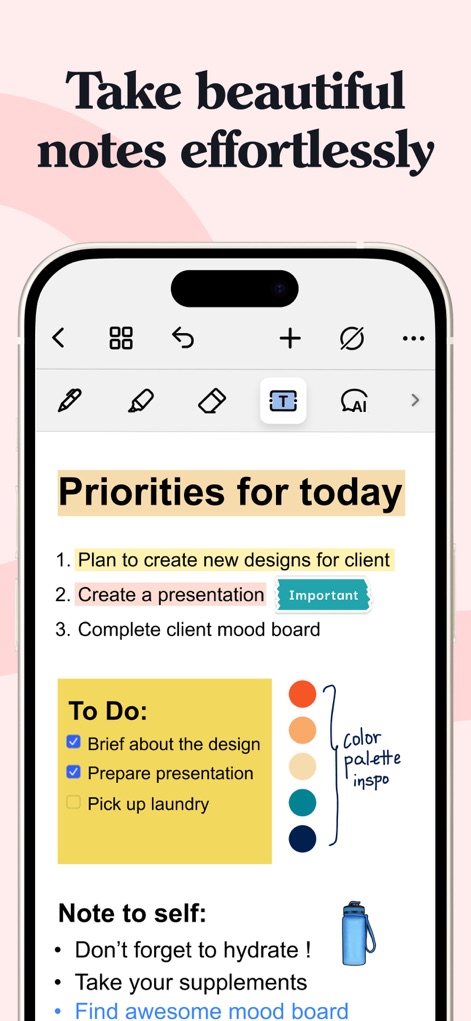
This tool streamlines daily tasks with clear priority lists and customizable to-do sections, showcasing effective visual organization and interactive elements like checkboxes.
Organize Your Day
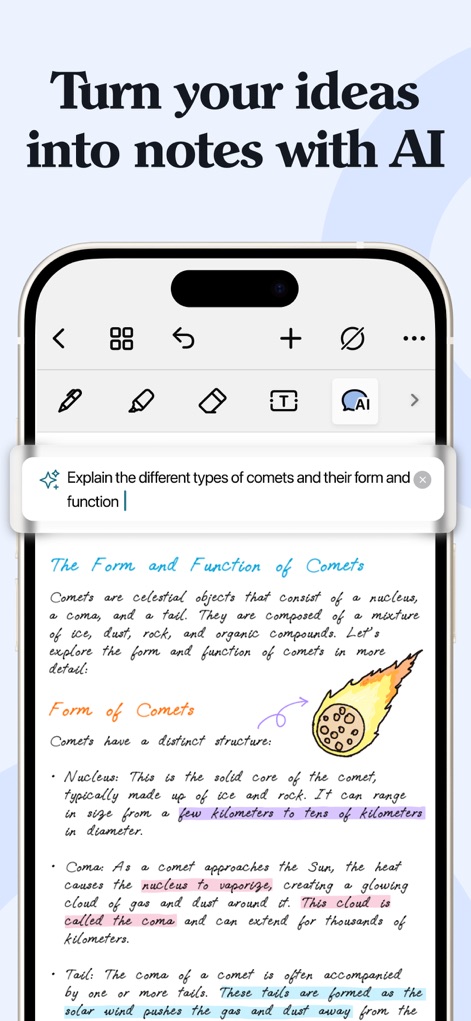
Users can effortlessly generate detailed explanations for complex topics using the integrated AI prompt, enhancing handwritten notes with intelligent assistance and visual clarity through integrated diagrams.
AI-Powered Insights
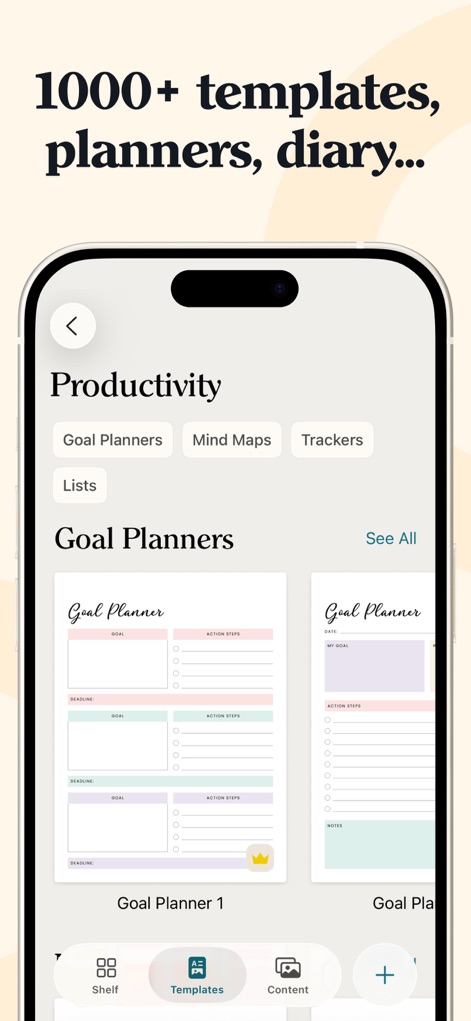
The app provides access to an extensive library of professional templates like "Goal Planners," making it easy to start new projects, and the intuitive "Templates" navigation tab simplifies content discovery.
Curated Templates Library
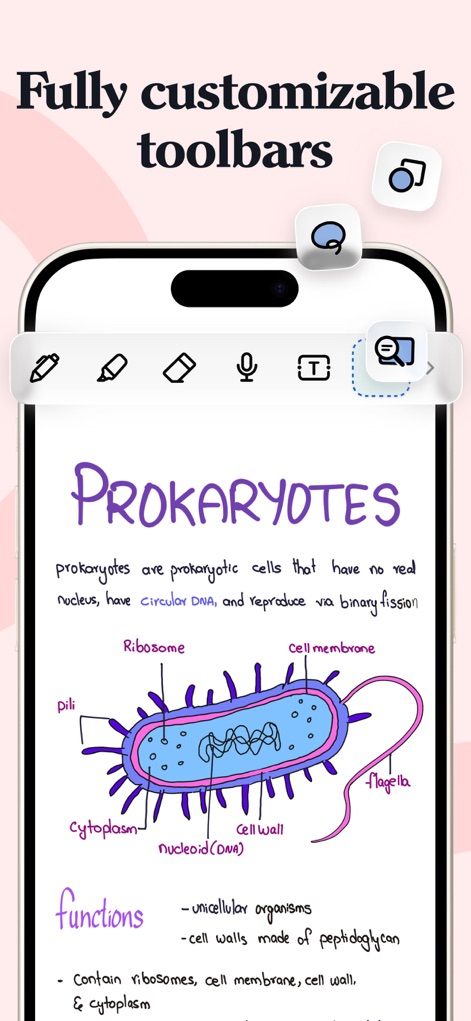
Users benefit from a fully customizable toolbar for quick access to essential tools, facilitating the creation of intricate handwritten diagrams and organized notes on subjects like prokaryotes.
Tailored Toolbars
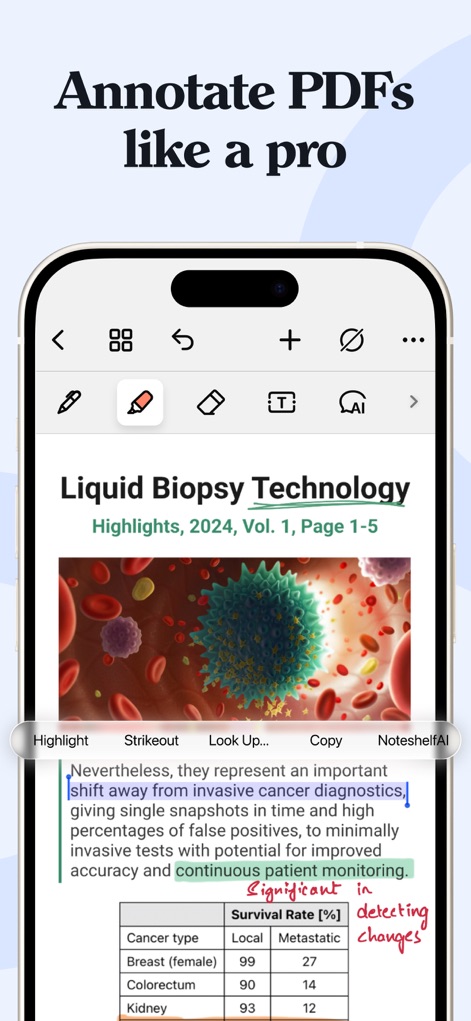
This tool allows for expert PDF annotation, featuring precise highlighting capabilities for key information and a comprehensive contextual menu for advanced text manipulation.
Pro PDF Annotation
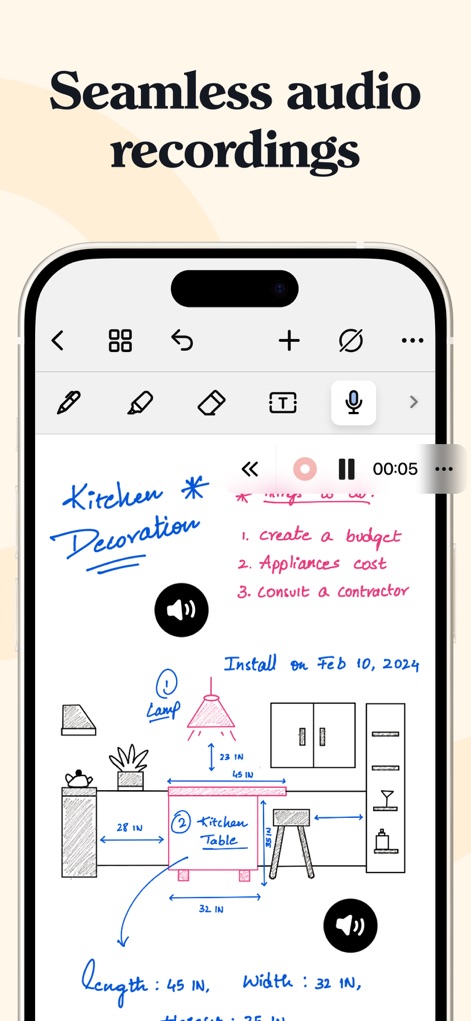
Users can seamlessly record audio directly within their notes, enhancing visual content like "Kitchen Decoration" diagrams with spoken explanations and linked audio playback indicators.
Integrated Audio Notes
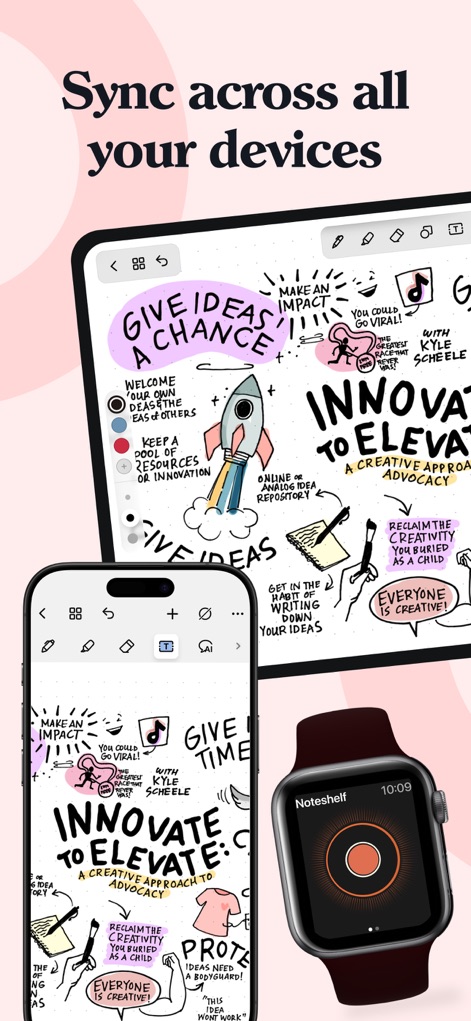
The app ensures a consistent and synchronized note-taking experience across all Apple devices, from detailed views on iPad and iPhone to quick access on the Apple Watch for effortless continuity.
Cross-Device Sync
Description
Download
More Like This
Apps with similar features and user experience

Notion: Notes, Tasks, AI
Notion Labs, Incorporated

Freenotes®: AI Notes Taking
Hangzhou Free Notes Technology Co., Ltd

Structured - Daily Planner
unorderly GmbH

Google Tasks: Get Things Done
Google LLC

TickTick:To-Do List & Calendar
Appest Limited

Noteful: Notes & PDF Markup
Noteful Technologies Ltd

Todoist: To Do List & Calendar
Doist Inc.

To do list MinimaList & Widget
Inner Grow Limited

monday.com - Work Platform
monday.com Ltd.
This page is not an official page of the app or its developer, but an independent editorial publication created for informational and commentary purposes. Unless expressly stated otherwise, neither the app nor its developer is affiliated with, endorsed by, sponsored by, authorized by, or otherwise officially connected with MWM, Apple, Google Play, the app publisher, or the app's developer, and nothing on this page implies that the app was developed using MWM's services. Any trademarks, logos, screenshots, and other content remain the property of their respective owners.