
This page is not an official page of the app or its developer, but an independent editorial publication created for informational and commentary purposes. Unless expressly stated otherwise, neither the app nor its developer is affiliated with, endorsed by, sponsored by, authorized by, or otherwise officially connected with MWM, Apple, Google Play, the app publisher, or the app's developer, and nothing on this page implies that the app was developed using MWM's services. Any trademarks, logos, screenshots, and other content remain the property of their respective owners.


Offline Map Navigation
No signal? No problem. This app hands users untethered exploration, putting control back in their pockets.
Downloads
1M+User Rating
Total Ratings
366Publisher
Category
NavigationLocales
47Latest Version
6.2.0Size
91.9 MBFirst Released
Apr 14, 2016A deep dive into the core functionalities supporting independent travelers and professionals.
Analytical Overview of Offline Map Navigation Features
Downloadable Offline Maps
It enables users to download comprehensive maps for specific regions, ensuring access to navigation and location data without an internet connection, crucial for remote areas and international travel.
Offline Turn-by-Turn Navigation
The app provides precise, voice-guided turn-by-turn directions even when offline, allowing travelers to navigate routes confidently without relying on mobile data.
Offline Points of Interest (POI) Discovery
It allows users to locate nearby hotels, restaurants, ATMs, hospitals, and other essential services even in areas without network coverage, enhancing preparedness and convenience.
Route Optimization & Waypoints
It enables users to add multiple waypoints to their journey and receive an optimized route, helping to plan trips more effectively and save time.
Multi-Modal Route Planning
This tool features directions optimized for various travel modes, including car, motorbike, bicycle, and walking, offering versatile navigation solutions for diverse user needs.
Automatic Rerouting
The app provides instant, automatic rerouting if a user deviates from the planned path, ensuring continuous and seamless navigation without manual intervention.
Saved Locations & Favorites
It allows users to save frequently visited or important locations for quick access, streamlining future navigation and planning.
Route Sharing
The app facilitates sharing route instructions with contacts, improving coordination for group travel or informing others of one's travel plans.
Frequently Asked Questions
Everything you need to know about Offline Map Navigation
What is Offline Map Navigation?
Offline Map Navigation is an application that provides turn-by-turn route instructions, real-time navigation, and offline maps. It allows users to search, get directions, and explore locations even without an internet connection, saving on roaming charges.
Does Offline Map Navigation work without an internet connection?
Yes, Offline Map Navigation functions fully without an internet connection. Users can search, navigate, and access downloaded maps and features in both online and offline modes.
Can I get directions for different travel modes using Offline Map Navigation?
Yes, Offline Map Navigation provides directions for multiple travel modes. It supports navigation for cars, motorbikes, bicycles, and walking, offering optimized routes for each.
Can I add multiple stops or way-points to my route in Offline Map Navigation?
Yes, users can add way-points in Offline Map Navigation to plan their travel more effectively. The app then provides an optimized path based on the added stops.
Does Offline Map Navigation offer voice guidance during navigation?
Yes, Offline Map Navigation provides accurate driving routes and includes voice guidance during navigation. This enhances the user experience by giving auditory instructions.
What is the cost of the Premium Subscription for Offline Map Navigation?
The Premium Subscription for Offline Map Navigation costs $29.99 annually or $4.99 monthly. This price may vary by location. Subscriptions are charged through iTunes.
What features are included with the Offline Map Navigation Premium Subscription?
The Premium Subscription for Offline Map Navigation includes an ad-free experience and unlimited offline map downloads. It allows users to manage downloaded maps without credit restrictions.
How do I cancel my Offline Map Navigation Premium Subscription?
To cancel an Offline Map Navigation subscription, disable auto-renewal at least 24 hours before the current period ends. Immediate cancellation is not possible; the current period must conclude.
Does Offline Map Navigation support multiple map styles?
Yes, Offline Map Navigation supports multiple map styles. Users can switch between different map visualizations, including clear day and night modes, for a personalized navigation experience.
Can I find nearby points of interest (POIs) using Offline Map Navigation?
Yes, Offline Map Navigation allows users to find nearby Hotels, Restaurants, Hospitals, ATMs, Banks, Public, and Shopping places. This feature works even when offline.
Does Offline Map Navigation have a privacy policy?
Yes, Offline Map Navigation has a privacy policy. It is accessible via the link provided in the app's description: https://virtualmaze.com/omn/privacypolicy.html.
The following screenshots and description are sourced directly from the app's official store listing and are the property of the app developer.
App Store
Screenshots

See how the app provides clear turn-by-turn directions and a prominent real-time speed indicator for informed travel.
Dynamic Route Guidance

Discover how users can easily add multiple waypoints and view the optimized route path for personalized navigation.
Flexible Journey Planning
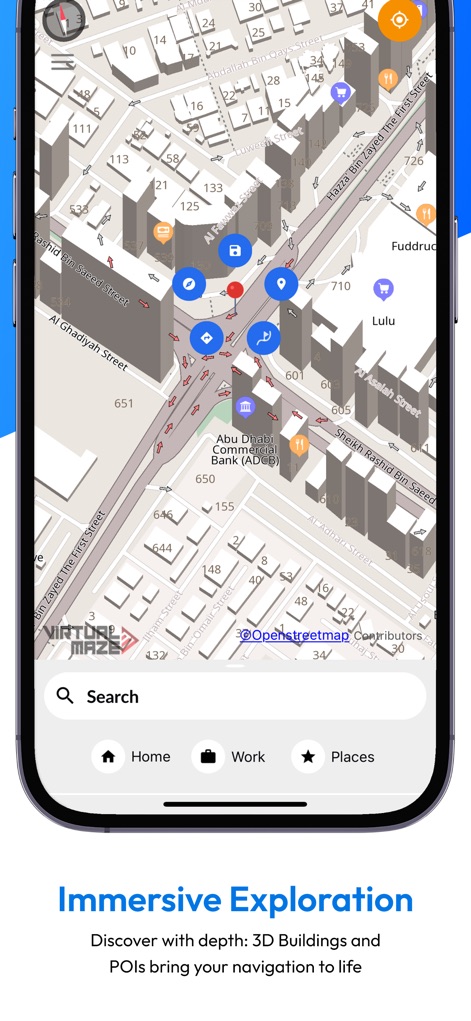
Explore detailed 3D building renditions and an array of categorized Points of Interest to enhance urban exploration.
Immersive Local Discovery

Observe the app's advanced compass display, showcasing cardinal directions and real-time magnetic field strength for accurate orientation.
Precision Compass Tools

Witness the immediate feedback provided by the app's speedometer overlay and clear, concise upcoming turn prompts for safer journeys.
Real-time Driving Insights

Learn how users can utilize the "Search this area" function and view nearby points of interest in a convenient "Show List" format.
Effortless Location Search

Discover the array of distinct map style options available and the simple 'Apply' button for personalizing the navigation experience.
Customizable Map Views

This screenshot highlights the "Downloaded" map status, confirming offline functionality, and the extensive range of categorized Points of Interest available without a signal.
Comprehensive Offline Access
Description
Download
More Like This
Apps with similar features and user experience

MAPS.ME: Offline Maps, GPS Nav
Convexity Holdings AG

CoMaps
Anton Wenemoser

GPS Navigation & Path Finder
Muhammad Asad Khan

MapFactor Navigator - GPS Maps
MAPFACTOR, s.r.o.

Guru Maps Pro & GPS Tracker
Evgen Bodunov

Karta GPS - Offline Maps Nav
Karta Software Technologies lda

Genius Maps: GPS Navigation
Mireo d.d.

NaviMaps: 3D GPS Navigation
CE Info Systems Limited

MetroView GPS Navigation
MetroView Systems Pty Ltd
This page is not an official page of the app or its developer, but an independent editorial publication created for informational and commentary purposes. Unless expressly stated otherwise, neither the app nor its developer is affiliated with, endorsed by, sponsored by, authorized by, or otherwise officially connected with MWM, Apple, Google Play, the app publisher, or the app's developer, and nothing on this page implies that the app was developed using MWM's services. Any trademarks, logos, screenshots, and other content remain the property of their respective owners.