
This page is not an official page of the app or its developer, but an independent editorial publication created for informational and commentary purposes. Unless expressly stated otherwise, neither the app nor its developer is affiliated with, endorsed by, sponsored by, authorized by, or otherwise officially connected with MWM, Apple, Google Play, the app publisher, or the app's developer, and nothing on this page implies that the app was developed using MWM's services. Any trademarks, logos, screenshots, and other content remain the property of their respective owners.


Painter Eye: AR Drawing App
This app transforms tracing into a legitimate art form.
Downloads
1M+User Rating
Total Ratings
25.1KPublisher
Category
Graphics & DesignLocales
16Latest Version
4.2.1Size
121.1 MBFirst Released
Mar 1, 2021An Analytical Review for Aspiring Digital Artists and Hobbyists
Key Feature Overview: Painter Eye
AR Drawing & Tracing
The app provides an innovative augmented reality (AR) mode that allows users to trace real-world objects and scenes directly on their device's screen, making complex drawings approachable.
Photo to Stencil Creation
This tool features the ability to convert personal photos into traceable stencils, simplifying the process of replicating intricate details from reference images.
Rich Color & Style Options
It allows users to personalize their artwork with a wide spectrum of colors and various drawing styles, including options for monochrome transformations, fostering creative expression.
Photo & Stencil Import
The app provides seamless functionality to import images from the device's memory or utilize pre-defined basic stencils as a foundation for new artworks.
Customizable Reference Images
This tool features intuitive sliders to adjust parameters like rotation, size, and transparency of imported images, offering precise control over the drawing reference.
Diverse Drawing Tools
It allows users access to an array of built-in brushes and canvases, providing fundamental tools for digital sketching and drawing.
Frequently Asked Questions
Everything you need to know about Painter Eye: AR Drawing App
What is the main function of Painter Eye: AR Drawing App?
Painter Eye is an iOS app that converts your iPhone into a powerful canvas. It primarily allows users to create sketches and trace real-world images using augmented reality (AR) technology directly on the phone's screen.
How can I trace images using augmented reality with Painter Eye?
Painter Eye utilizes augmented reality (AR) technology to enable real-world image tracing. Users simply position their iPhone, and the app overlays the image on the screen, allowing for direct tracing onto physical paper.
Does Painter Eye offer pre-made drawing templates?
Yes, Painter Eye provides a selection of basic stencils and over 500+ built-in templates. These templates include various categories like animals, transport, and holiday themes to assist users in their creative process.
Can Painter Eye transform existing photos into sketches?
Yes, Painter Eye can transform any photo into a sketch. Users load images from their device, apply them as stencils, and adjust parameters like contrast or brightness using sliders to create stylized monochrome or colored drawings.
Does Painter Eye include AI for generating drawings from text?
Yes, Painter Eye integrates AI capabilities for text-to-drawing generation. Users type desired text, and the AI instantly creates corresponding images, with options to produce sketches, animations, or illustrations based on the input.
Where can I find the Terms of Use for Painter Eye?
The Terms of Use for Painter Eye are provided via Apple's standard EULA. The link is specified in the app description: https://www.apple.com/legal/internet-services/itunes/dev/stdeula/.
Is there a privacy policy for the Painter Eye app?
Yes, Painter Eye has a privacy policy. It is accessible at https://www.appodeal.com/home/privacy-policy/, as clearly stated in the application's description on the App Store.
The following screenshots and description are sourced directly from the app's official store listing and are the property of the app developer.
App Store
Screenshots

This tool transforms real-world surfaces into a canvas, showcasing AR tracing in action with a cute cat stencil and the intuitive camera/gallery controls at the top.
AR Tracing Unleashed

The app provides essential drawing functionalities, featuring a clear sketch of an elephant and a comprehensive top toolbar with options like Reset and Filters for refinement.
Core Drawing Toolkit

Users can dive into an extensive collection of over 500 built-in templates, conveniently categorized with themes such as Transport and Holiday for endless creative inspiration.
Template Library Explored

The app seamlessly converts typed text into artistic drawings, demonstrating the transformation of the word "LOVE" into a stylized graphic and offering flexible size adjustments via intuitive controls.
Text to Art

Users gain immediate access to millions of images, displayed as a diverse grid of cat-themed visuals, easily discoverable through the integrated search bar and filter options.
Image Search Power

This tool allows for instant photo-to-sketch conversion, evident in the detailed drawing of a girl with headphones, alongside precise adjustments available through sliders for effects like contrast and brightness.
Photo to Sketch
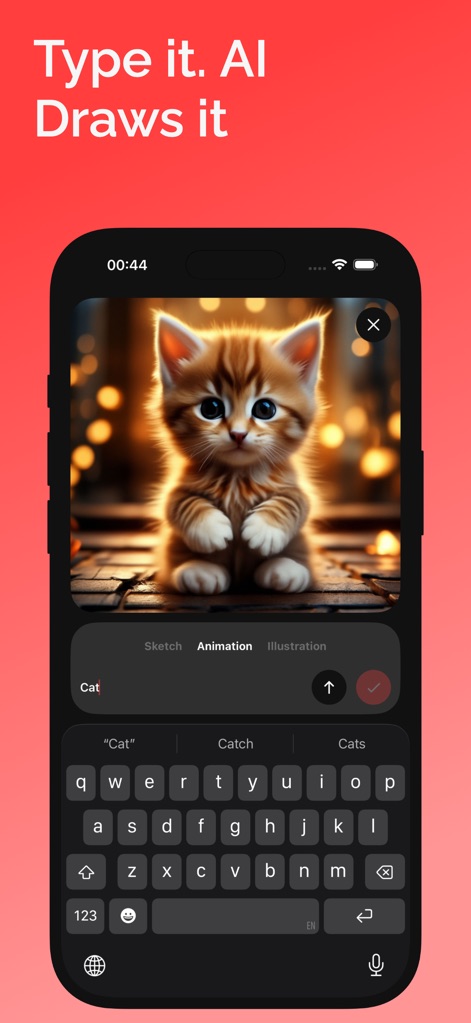
The app leverages advanced AI to generate art from text prompts, showcasing a fluffy kitten illustration created from the word "Cat" and providing style options such as 'Sketch' and 'Animation'.
AI Art Generation
Description
Download
More Like This
Apps with similar features and user experience

AR Drawing Paint Sketch Trace
DROIDFUN LIMITED

Camera Lucida™: AR Drawing
Big Idea Design LLC

AR Drawing Sketch App: ArtEasy
SMDA GROUP SP Z O O SP KOMANDYTOWA

PicTrace: AR Drawing & Sketch
ANDROID VIETNAM TECHNOLOGY CORPORATION

AR Draw: Sketching & Painting
EIGEN SOFTWARE LIMITED

AR Drawing How to Draw Sketch
Magomed Dzhamalov

Da Vinci Eye: AR Trace & Draw
Da Vinci Eye LLC

AR Drawing - AR Sketch
Ketanbhai Khokhani

HEY CLAY®
HEY CLAY LTD
This page is not an official page of the app or its developer, but an independent editorial publication created for informational and commentary purposes. Unless expressly stated otherwise, neither the app nor its developer is affiliated with, endorsed by, sponsored by, authorized by, or otherwise officially connected with MWM, Apple, Google Play, the app publisher, or the app's developer, and nothing on this page implies that the app was developed using MWM's services. Any trademarks, logos, screenshots, and other content remain the property of their respective owners.