
This page is not an official page of the app or its developer, but an independent editorial publication created for informational and commentary purposes. Unless expressly stated otherwise, neither the app nor its developer is affiliated with, endorsed by, sponsored by, authorized by, or otherwise officially connected with MWM, Apple, Google Play, the app publisher, or the app's developer, and nothing on this page implies that the app was developed using MWM's services. Any trademarks, logos, screenshots, and other content remain the property of their respective owners.


Palu - Handwriting Calendar -
Bring the warmth of a hand-drawn planner to your digital life. Coordinate with family and friends through notes, photos, and stamps—all without the need for registration or accounts.
Downloads
1M+User Rating
Total Ratings
1K+Publisher
Category
LifestyleLocales
2Latest Version
3.4.9Size
13.4 MBFirst Released
Nov 21, 2012A Calendar That Feels Like Home
Escape the sterile look of standard planners. Palu combines the warmth of handwritten notes with the convenience of a shared digital space—no sign-ups required.
Personalized Handwriting
Ditch boring text for your own handwriting and creative stamps. It is the perfect digital canvas for visual thinkers and bullet journal lovers.
Privacy Without the Fuss
Enjoy total peace of mind with zero registration. No email or personal data required—just download the app and start planning instantly.
Frequently Asked Questions
Everything you need to know about Palu - Handwriting Calendar -
Is Palu - Handwriting Calendar - a free application?
Yes, Palu - Handwriting Calendar - is free and requires no registration. Optional in-app purchases are available to remove ads or expand features like the number of calendars.
Do I need to register to use Palu - Handwriting Calendar -?
No, Palu - Handwriting Calendar - does not require user registration. You do not need to provide an email address or any personal information to use the app.
How can I share my calendar with others using Palu - Handwriting Calendar -?
Palu - Handwriting Calendar - enables simple sharing with friends and family. Users can select between full access and view-only modes for shared calendars.
Can I add pictures to my calendar entries in Palu - Handwriting Calendar -?
Yes, Palu - Handwriting Calendar - allows users to paste images directly into their calendar. This feature helps customize and visualize daily content.
What content options does Palu - Handwriting Calendar - offer for customization?
Palu - Handwriting Calendar - provides handwritten notes, image pasting, and colorful "Stamps" for customizing calendar entries. This allows for rich and personalized daily planning.
What is the maximum number of calendars I can use in Palu - Handwriting Calendar -?
Users can access three calendars for free in Palu - Handwriting Calendar -. An optional in-app purchase allows expanding the maximum number of calendars to thirty.
Does Palu - Handwriting Calendar - include advertisements?
Yes, the free version of Palu - Handwriting Calendar - includes advertisements. An optional in-app purchase is available to remove these ads for an improved screen experience.
How do I backup my data in Palu - Handwriting Calendar -?
Palu - Handwriting Calendar - supports data backup and restoration through iCloud Drive. This feature ensures your calendar content is securely stored.
What happens to shared data when I stop sharing a Palu - Handwriting Calendar -?
When sharing is deactivated in Palu - Handwriting Calendar -, the corresponding data is deleted from the server. This immediately stops the calendar from being shared with others.
Does Palu - Handwriting Calendar - support different screen orientations?
Yes, Palu - Handwriting Calendar - supports both portrait and landscape orientations on iPhone. Portrait displays a month view, while landscape shows a two-week view.
The following screenshots and description are sourced directly from the app's official store listing and are the property of the app developer.
App Store
Screenshots
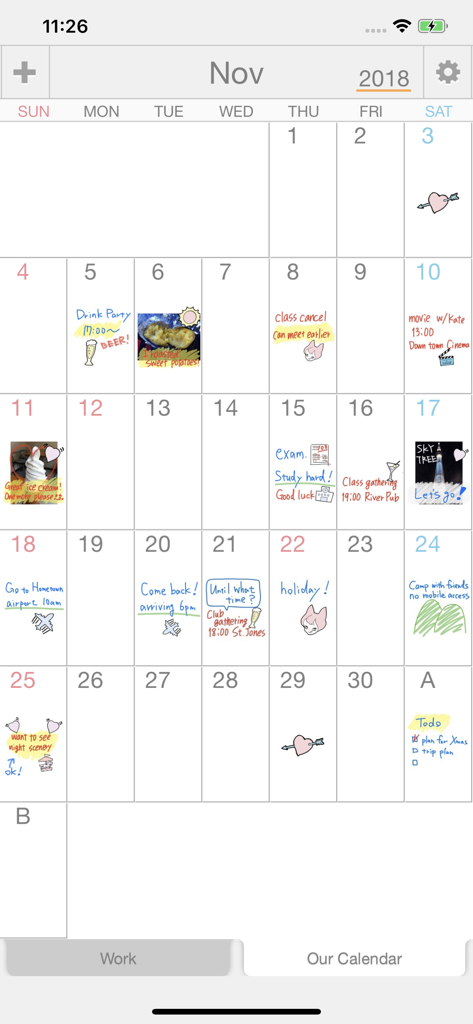
Monthly calendar view of the Palu app featuring handwritten notes doodles and photo entries
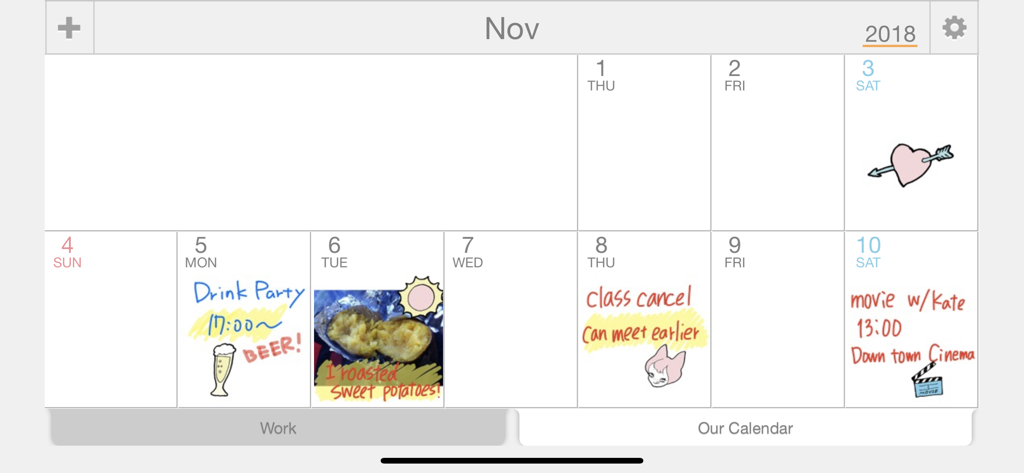
A digital calendar view featuring handwritten notes, drawings, and photos for a personal schedule.
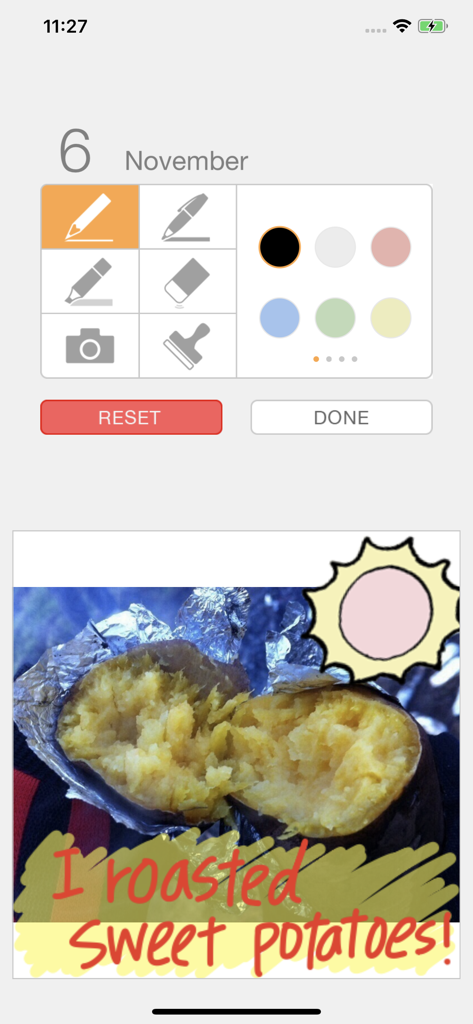
Editing screen of Palu calendar with a photo of roasted sweet potatoes and handwritten text
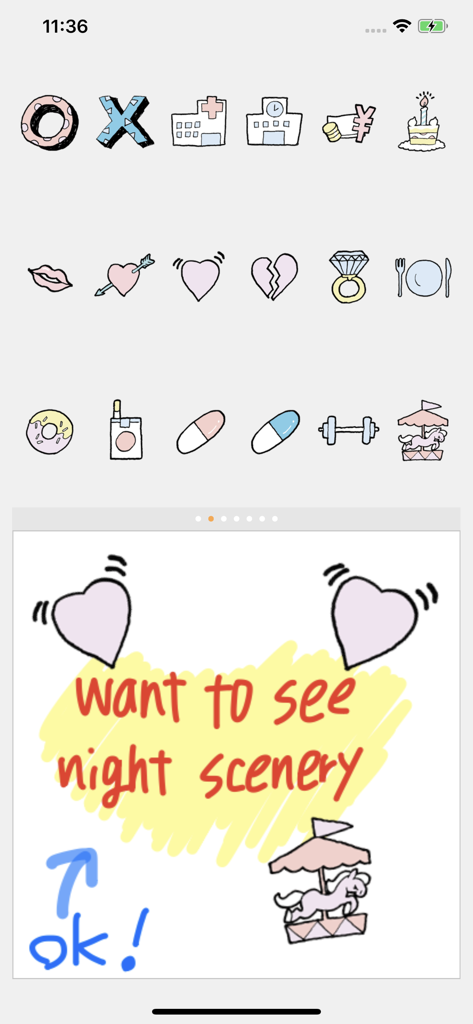
A selection of colorful hand-drawn stamps and a handwritten note within the Palu app interface.
Description
Download
More Like This
Apps with similar features and user experience

Howbout: shared calendar
Howbout Ltd.
Teamup Calendar
Teamup Solutions AG

TimeTree: Shared Calendar
TimeTree, Inc.

Cupla: Shared Couples Calendar
Cupla Limited

Chouseisan
Mixtend Inc.

みんなの縦型カレンダー
Funeasy Soft, Inc.

OurCal: Group Calendar Share
ONIN LTD.

게더링 : 함께 쓰는 공유 캘린더
HUSTLERS Corp

不揪?- 儲存、分享課表
HSIN-CHE CHUNG
This page is not an official page of the app or its developer, but an independent editorial publication created for informational and commentary purposes. Unless expressly stated otherwise, neither the app nor its developer is affiliated with, endorsed by, sponsored by, authorized by, or otherwise officially connected with MWM, Apple, Google Play, the app publisher, or the app's developer, and nothing on this page implies that the app was developed using MWM's services. Any trademarks, logos, screenshots, and other content remain the property of their respective owners.