
This page is not an official page of the app or its developer, but an independent editorial publication created for informational and commentary purposes. Unless expressly stated otherwise, neither the app nor its developer is affiliated with, endorsed by, sponsored by, authorized by, or otherwise officially connected with MWM, Apple, Google Play, the app publisher, or the app's developer, and nothing on this page implies that the app was developed using MWM's services. Any trademarks, logos, screenshots, and other content remain the property of their respective owners.


TimeTree: Shared Calendar
Scheduling friction ends here. The app grants users total command over group calendars, making joint plans effortless.
Downloads
25M+User Rating
Total Ratings
1.6MPublisher
Category
ProductivityLocales
13Latest Version
15.7.0Size
182.2 MBFirst Released
Mar 19, 2015Core Collaborative Features of TimeTree
An analytical overview of the key functionalities driving shared schedule management and communication.
Seamless Shared Calendars
The app provides easy calendar sharing, enabling seamless coordination for families, couples, workgroups, and other collaborative entities to manage schedules collectively.
Proactive Notifications & Reminders
It keeps users informed of new events, updates, and messages through timely notifications and reminders, eliminating the need for constant app checking.
Device Calendar Synchronization
This tool facilitates immediate setup by allowing users to copy or sync with their device's existing calendars, such as Google Calendar, for a unified schedule view.
Event-Specific Chat
It allows users to discuss event details like time and location directly within each event, fostering clear communication and streamlining collaborative planning.
Shared Memos & To-Do Lists
The app enables sharing of notes and creation of to-do lists with other members, or for noting events without a fixed date, enhancing shared planning.
Categorized Multiple Calendars
This tool allows users to create and manage various calendars for different purposes, ensuring organized planning for diverse aspects of their lives.
Convenient Widgets
It offers widgets for easy access to daily schedules directly from the device's home screen, providing convenience without opening the application.
Web Browser Accessibility
It allows users to access their calendars conveniently from any web browser, ensuring flexibility across different devices.
Shared Photo Albums
The app provides the ability to create and share photo albums within each group, allowing users to document shared memories.
Event Photo Attachments
The app allows users to enrich event details by posting images directly within the event entries.
Frequently Asked Questions
Everything you need to know about TimeTree: Shared Calendar
What is TimeTree: Shared Calendar?
TimeTree: Shared Calendar is an award-winning app used by over 70 million users worldwide. It enables sharing calendars for families, couples, and work, offering features like notifications, chat, and shared albums.
Can I share my calendar with others using TimeTree?
Yes, TimeTree allows easy calendar sharing for families, couples, work, and other groups. You can share calendars with family, partners, or coworkers to coordinate schedules effectively.
Does TimeTree provide notifications for events?
Yes, TimeTree provides real-time notifications and reminders for new events, updates, and messages. This ensures users stay informed about all calendar activities without constant app checks.
Can I create multiple calendars in the TimeTree app?
Yes, TimeTree supports the creation of multiple calendars for various purposes. Users can organize different aspects of their lives, such as family, work, and personal schedules, within the app.
Does TimeTree allow chatting about specific events?
Yes, TimeTree includes a chat feature within events. Users can discuss details like "What time?" or "Where?" directly inside each event, simplifying coordination.
Can I sync TimeTree with my existing Google Calendar?
Yes, TimeTree allows syncing with device calendars such as Google Calendar. Users can start immediately by copying or synchronizing their existing calendars into TimeTree.
Are there any required permissions for TimeTree: Shared Calendar?
No, TimeTree: Shared Calendar states that there are no required permissions for the app to function. All listed permissions, such as Calendar or Location, are optional.
Does TimeTree offer a web version?
Yes, TimeTree provides a web version, allowing users to access and manage their calendars from a web browser. The official website and a dedicated PC web link are available.
Can I share photos in TimeTree?
Yes, TimeTree features Shared Albums where users can create albums and share photos within each group. Users can also post images directly into events for more detailed planning.
Does TimeTree have widgets for quick schedule checking?
Yes, TimeTree includes widgets. These allow users to easily check their daily schedule directly from their device's home screen without needing to open the app, providing quick access.
The following screenshots and description are sourced directly from the app's official store listing and are the property of the app developer.
App Store
Screenshots
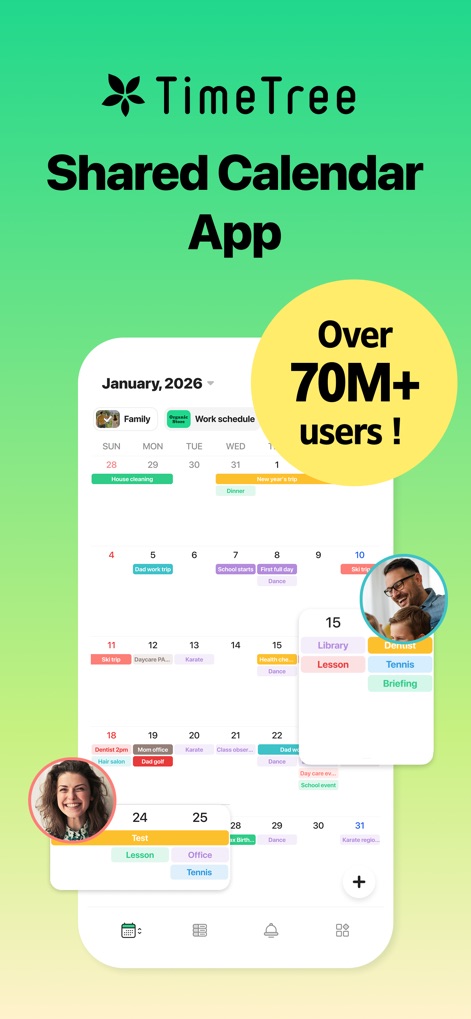
Global Collaboration Hub
See how the app's intuitive calendar grid integrates seamlessly with user profile previews and highlights its vast user community.

Streamlined Scheduling
Observe the app's clean monthly calendar display, showcasing color-coded events and indicating shared calendar participants.

Instant Updates
This screenshot illustrates the app's real-time notification system, featuring immediate alerts for new events and clear timestamp indicators.

Tailored Calendars
Explore the app's ability to manage multiple distinct calendars, each featuring unique group members and categorizations for diverse needs.

Event Communication
Witness the app's integrated event chat, facilitating direct discussions through message bubbles and allowing for media sharing within event details.

Shared Memories
Discover the app's dedicated photo album feature, enabling users to share multiple images and preserve memories collaboratively with integrated sharing options.
Description
Download
More Like This
Apps with similar features and user experience

Howbout: shared calendar
Howbout Ltd.
Teamup Calendar
Teamup Solutions AG

Cupla: Shared Couples Calendar
Cupla Limited

Chouseisan
Mixtend Inc.

みんなの縦型カレンダー
Funeasy Soft, Inc.

OurCal: Group Calendar Share
ONIN LTD.

게더링 : 함께 쓰는 공유 캘린더
HUSTLERS Corp

不揪?- 儲存、分享課表
HSIN-CHE CHUNG

Palu - Handwriting Calendar -
MetaMoJi Corporation
This page is not an official page of the app or its developer, but an independent editorial publication created for informational and commentary purposes. Unless expressly stated otherwise, neither the app nor its developer is affiliated with, endorsed by, sponsored by, authorized by, or otherwise officially connected with MWM, Apple, Google Play, the app publisher, or the app's developer, and nothing on this page implies that the app was developed using MWM's services. Any trademarks, logos, screenshots, and other content remain the property of their respective owners.