
This page is not an official page of the app or its developer, but an independent editorial publication created for informational and commentary purposes. Unless expressly stated otherwise, neither the app nor its developer is affiliated with, endorsed by, sponsored by, authorized by, or otherwise officially connected with MWM, Apple, Google Play, the app publisher, or the app's developer, and nothing on this page implies that the app was developed using MWM's services. Any trademarks, logos, screenshots, and other content remain the property of their respective owners.


Teamup Calendar
Get control. This app offers the ultimate command center for managing team logistics, stripping away the chaos of shared schedules.
Downloads
1M+User Rating
Total Ratings
14.1KPublisher
Category
BusinessLocales
20Latest Version
2.21.0Size
35.8 MBFirst Released
Jan 4, 2016An analytical overview of core functionalities designed for professional teams and organizational resource management.
Key Collaborative Scheduling Features of Teamup Calendar
Granular Access Permissions
This tool features granular access permissions with 9 levels, allowing administrators to precisely control user and group access to specific calendars and events, ensuring data security and role-based functionality.
Multiple Sub-Calendar Management
The app provides a centralized view, allowing users to view and update multiple sub-calendars for various people and resources simultaneously on a single page, simplifying complex scheduling.
Powerful Timezone Support
It offers powerful timezone support, which streamlines collaboration for users located in different geographical regions, eliminating common scheduling conflicts and ensuring accurate timing.
Double-Booking Prevention
This tool automatically prevents double-bookings, ensuring efficient resource allocation and avoiding scheduling conflicts for both personnel and equipment.
Custom Fields for Events
It allows users to add custom fields with various data types, such as text, numbers, and choice fields, enabling detailed event tracking and tailored information management.
Event Sign-up Capabilities
The app provides functionality for users to sign up for events directly within the calendar, simplifying attendance management and engagement for team activities or training sessions.
Event-Specific Discussions
It enables discussions around calendar events through integrated comments, fostering direct communication and contextual collaboration for specific schedules and tasks.
Assign Events to Multiple Sub-Calendars
This tool allows for assigning a single event to multiple sub-calendars, streamlining the process of scheduling activities that involve various teams or resources simultaneously.
Frequently Asked Questions
Everything you need to know about Teamup Calendar
What is Teamup Calendar?
Teamup Calendar is a shared calendar for groups, designed to organize people, schedule work, manage availability, and share events efficiently. It helps teams and individuals collaborate effectively.
Is Teamup Calendar free to use?
Yes, Teamup Calendar offers a basic version for free. This version works well for small companies, teams, families, clubs, or for initial evaluation of the app.
Can I access Teamup Calendar on my phone?
Yes, Teamup Calendar is accessible via mobile apps and web browsers from any device. The mobile app functions as a companion to the browser-based version.
Can I attach images or documents to events in Teamup Calendar?
Yes, Teamup Calendar allows users to attach images and documents directly to calendar events. This enriches event details and supports better communication among participants.
How are user permissions managed in Teamup Calendar?
Teamup Calendar supports 9 levels of access permissions, which are controlled by the calendar administrator through the browser-based administration interface. This ensures granular user access.
Does Teamup Calendar have a dark mode option?
Yes, Teamup Calendar supports dark mode. This feature allows users to switch to a darker interface theme for improved visibility or personal preference.
Does Teamup Calendar prevent double-bookings?
Yes, Teamup Calendar includes functionality to prevent double-bookings. This feature helps ensure efficient scheduling and avoids conflicts when assigning resources or events.
How do I create a new Teamup Calendar?
To create a new Teamup Calendar, visit https://www.teamup.com on a web browser. The full administration and configuration interface is exclusively available on the web version.
What are the core features of Teamup Calendar?
Teamup Calendar's key features include centralized management, sub-calendar views, customizable access permissions, custom fields, file attachments, and powerful timezone support for global teams.
Does Teamup Calendar support Single Sign-On (SSO)?
Yes, Teamup Calendar offers single sign-on (SSO) as an enterprise-level feature. This streamlines the authentication process for large organizations.
The following screenshots and description are sourced directly from the app's official store listing and are the property of the app developer.
App Store
Screenshots
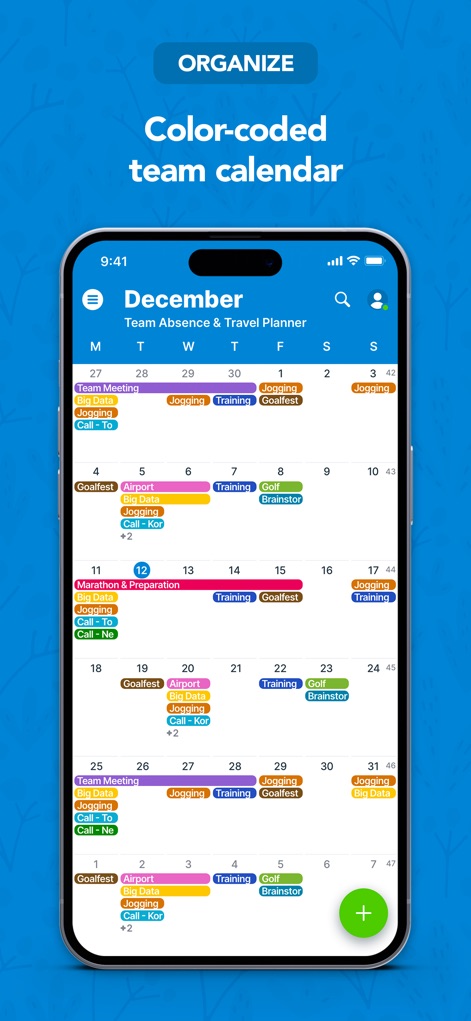
Users can quickly grasp complex schedules with a color-coded team calendar and see all events in a comprehensive monthly view.
Dynamic Team Overview

This tool offers granular control with a detailed daily agenda and provides flexible scheduling options for individual events.
Focused Daily View

The app allows users to enrich event information with visually engaging image attachments and assign events to specific sub-calendars for clarity.
Rich Event Details

Users benefit from diverse calendar views, such as the multi-day column layout, to effectively manage complex overlapping activities and schedules.
Dynamic View Options

The app provides a comfortable user experience with its integrated dark mode support and a clear, chronological event list for easy review.
Sleek Dark Mode

This tool empowers administrators with granular control panels, allowing them to group and filter schedules by staff, and toggle visibility for focused management.
Customizable Resource Views
Description
Download
More Like This
Apps with similar features and user experience

Howbout: shared calendar
Howbout Ltd.

TimeTree: Shared Calendar
TimeTree, Inc.

Cupla: Shared Couples Calendar
Cupla Limited

Chouseisan
Mixtend Inc.

みんなの縦型カレンダー
Funeasy Soft, Inc.
OurCal: Group Calendar Share
ONIN LTD.

게더링 : 함께 쓰는 공유 캘린더
HUSTLERS Corp

不揪?- 儲存、分享課表
HSIN-CHE CHUNG

Palu - Handwriting Calendar -
MetaMoJi Corporation
This page is not an official page of the app or its developer, but an independent editorial publication created for informational and commentary purposes. Unless expressly stated otherwise, neither the app nor its developer is affiliated with, endorsed by, sponsored by, authorized by, or otherwise officially connected with MWM, Apple, Google Play, the app publisher, or the app's developer, and nothing on this page implies that the app was developed using MWM's services. Any trademarks, logos, screenshots, and other content remain the property of their respective owners.