Password Manager Secure Vault

Password Manager Secure Vault

Download on App Store
Logo of Password Manager Secure Vault

Password Manager Secure Vault: Your Data Stays 100% Offline

Eliminate password stress with military-grade AES-256 encryption. Protect your credentials with local storage—no cloud, no breaches, just ultimate privacy for your digital life.

Download on App Store

Publisher

Masaki Sato

Category

Business

Downloads

711K+

User Rating

4.4/5

Total Ratings

46K+

Locales

5

Security at a Glance

Discover the interface used by 711K+ users.

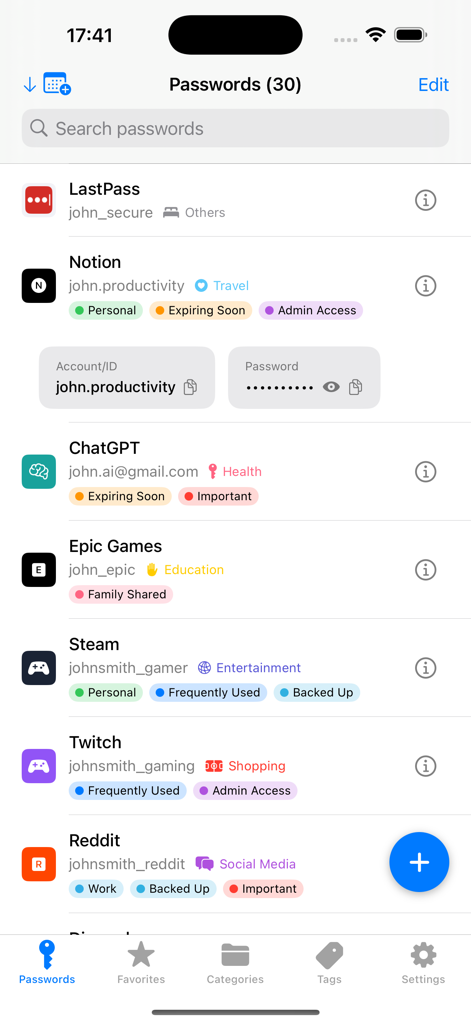
A list of saved passwords in the Secure Vault app interface with colored tags for categories like personal and important
A list of saved passwords in the Secure Vault app interface with colored tags for categories like personal and important

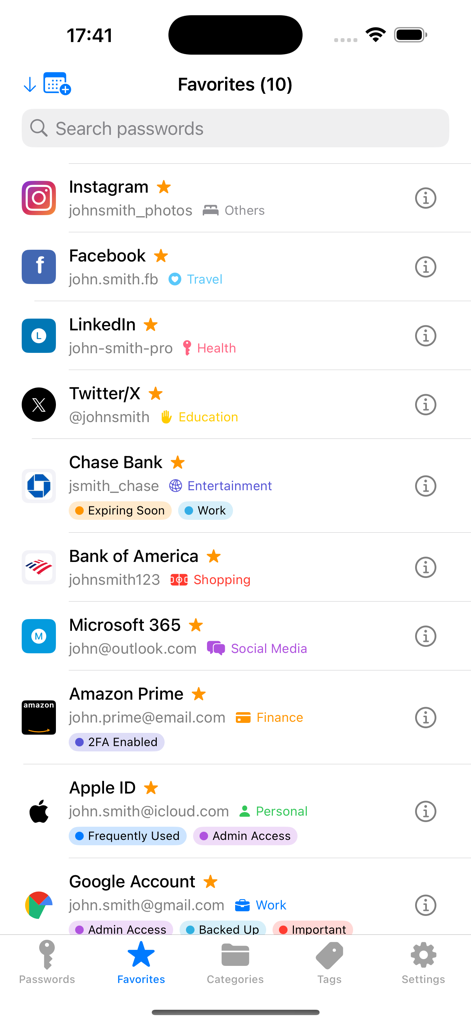
Favorites screen in the Password Manager Secure Vault app showing a list of saved social media and banking accounts with custom tags
Favorites screen in the Password Manager Secure Vault app showing a list of saved social media and banking accounts with custom tags

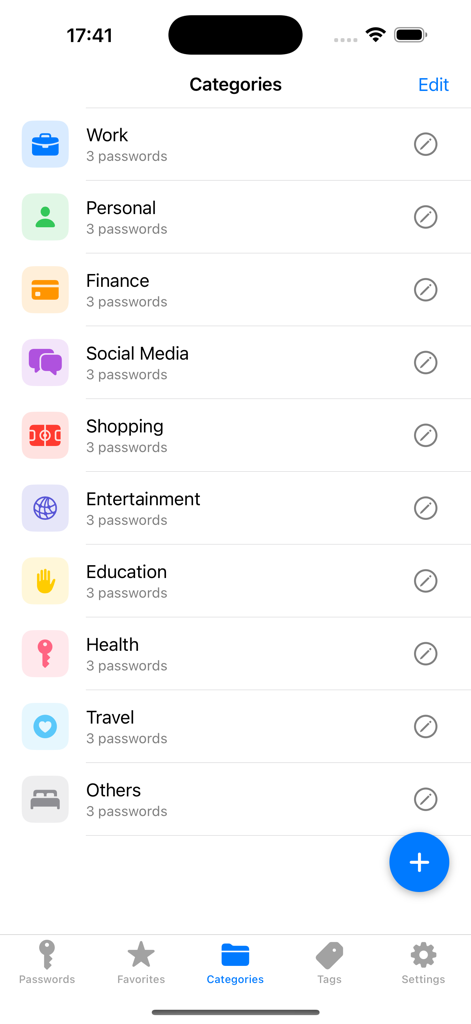
Mobile app interface showing organized password categories including work personal finance and social media
Mobile app interface showing organized password categories including work personal finance and social media

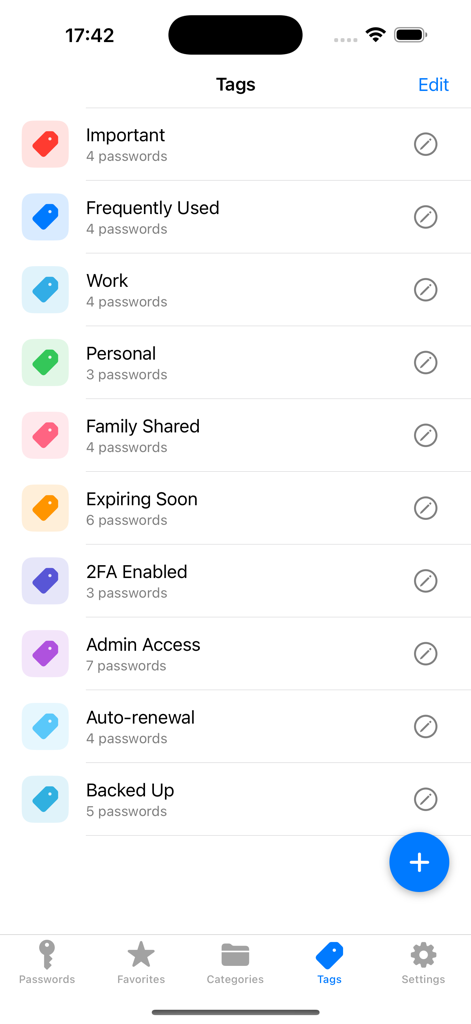
Interface of the Password Manager Secure Vault app showing a list of custom tags like Work and Personal to organize credentials.
Interface of the Password Manager Secure Vault app showing a list of custom tags like Work and Personal to organize credentials.

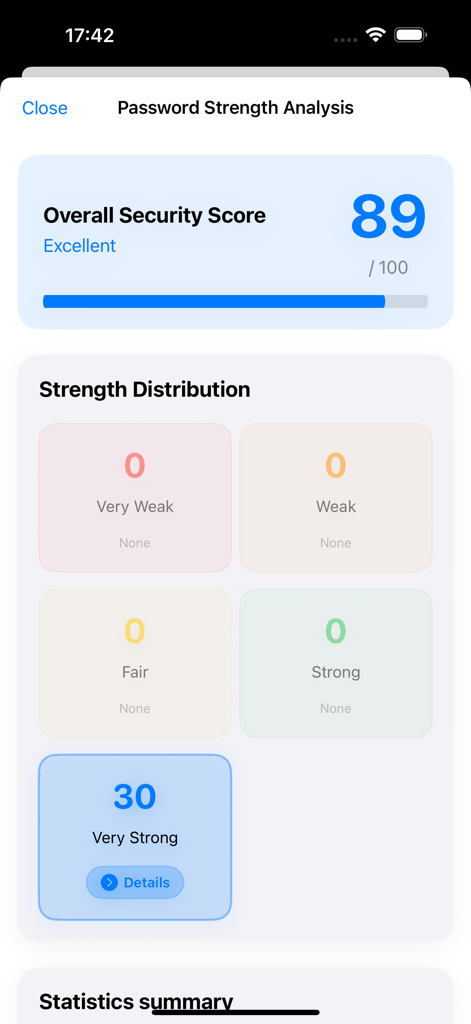
Password strength analysis interface showing an excellent security score of 89 with 30 very strong passwords
Password strength analysis interface showing an excellent security score of 89 with 30 very strong passwords

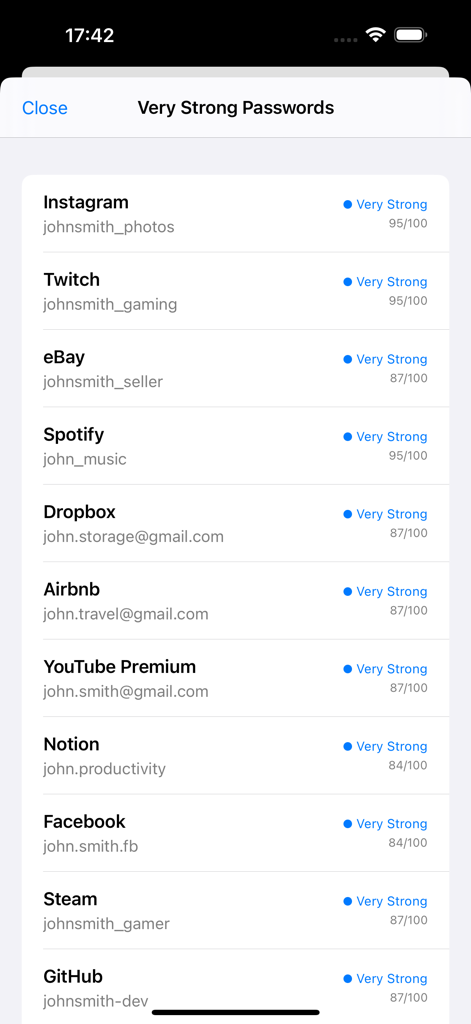
A list of digital accounts with high security strength scores in the password vault application
A list of digital accounts with high security strength scores in the password vault application

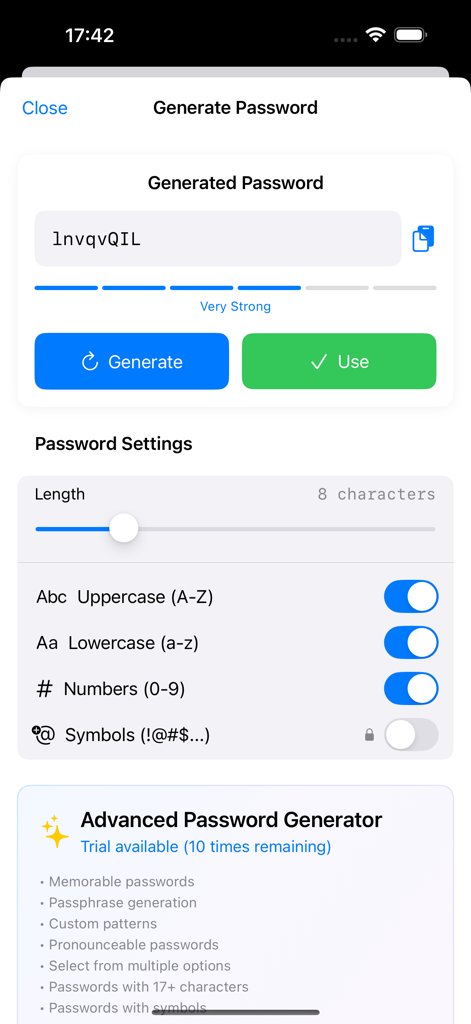
Interface for generating a secure password with adjustable length and character type settings.
Interface for generating a secure password with adjustable length and character type settings.

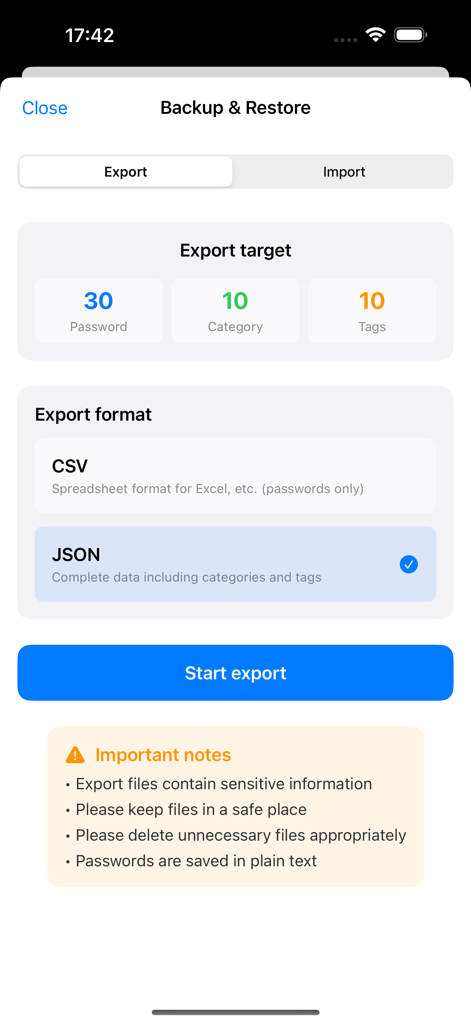
The Backup and Restore screen of the app showing data export options for passwords and categories in JSON or CSV format.
The Backup and Restore screen of the app showing data export options for passwords and categories in JSON or CSV format.

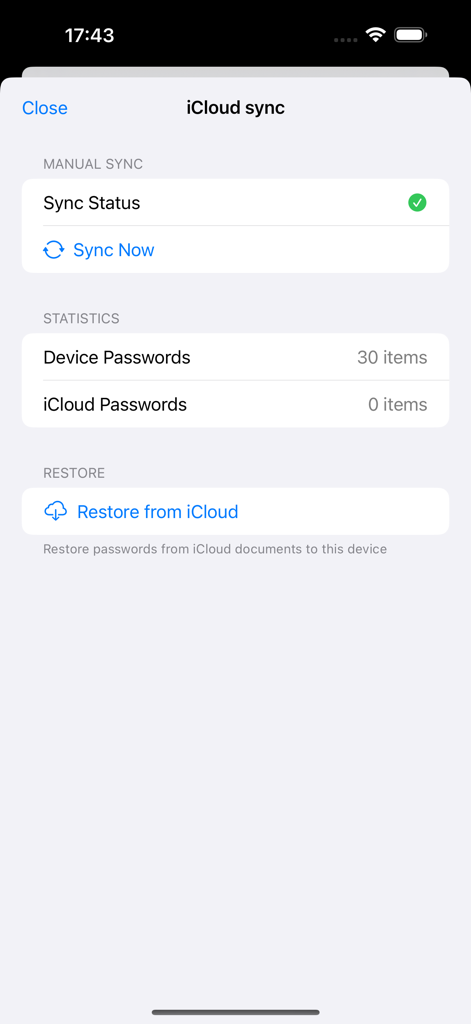
iCloud synchronization and restore settings interface in Password Manager Secure Vault
iCloud synchronization and restore settings interface in Password Manager Secure Vault

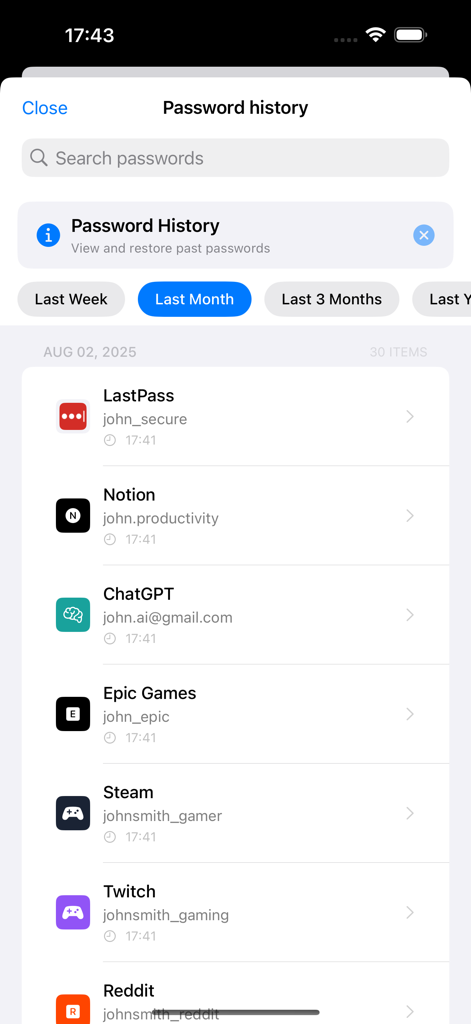
Password history screen showing a chronological list of stored credentials for various apps and services.

Password history screen showing a chronological list of stored credentials for various apps and services.

Security That Stays Under Your Control

The tools that make this app stand out, trusted by 711K+ users.

🔒

Zero-Cloud Privacy

Your data is stored 100% locally on your device. It's invisible to hackers and immune to the massive cloud breaches seen in the news.

🚀

Instant Secure Access

Stop the 'Forgot Password' loop. Unlock your entire vault with Face ID and use one-tap copy to log in to any site in seconds.

🛡️

Military-Grade Defense

Utilize AES-256 encryption and built-in security audits to instantly identify and fix weak or reused passwords across your accounts.

Review Analysis

Insights from user reviews.

Sentiment Score

6%
Negative

Summary

This app has seen a significant decline in user satisfaction following major updates around August 2025, specifically versions 1.8.0 and 1.8.4. Users widely criticize the new user interface, describing it as visually unappealing, harder to navigate, and lacking previously enjoyed functionalities like custom sorting and icon assignment. A predominant complaint is the introduction of a paywall, limiting free password entries to 20 or 30 and imposing an expensive annual subscription, which has prompted many long-term users to seek alternative solutions. Furthermore, critical issues such as data loss, corrupted categories, and app launch failures have been reported, severely eroding user trust and overall reliability.

Common Themes

Old User Interface(26)
Free Features (previous)(13)
Data Management (past)(2)
Customization (visual)(2)
Ease of Use (general)(2)
Developer Responsiveness(1)

About the app

Everything you need to know about Password Manager Secure Vault.

Description

#1 Password Manager - 1.2M+ Downloads, 30K Daily Active Users! Stop Password Chaos! One Master Password = Access Everything Military-Grade AES-256 Encryption + Face ID/Touch ID = Ultimate Security 100% Offline Storage = Your Data Never Leaves Your Device The most secure, user-friendly password manager that actually makes your life easier. 【Why Users Love Our Password Manager】 ■ Smart Password Management ・Custom Fields - Add any information beyond passwords ・Password History - View and restore previous passwords ・Trash - Recover deleted passwords within 30 days ・Advanced Sorting - Organize by frequency, date, or category ・Favorites - Quick access to frequently used passwords ■ Bank-Level Security ・Password Strength Analysis - Identify weak passwords ・Duplicate Detection - Alerts for reused passwords ・Security Audit - Comprehensive safety evaluation ・AES-256 Encryption - Military-grade protection ・Complete Offline - Data stored only on device ■ Intelligent Password Generator ・Smart Generator - Create optimal passwords ・Templates - Save frequently used formats ・Bulk Updates - Change multiple passwords at once ・Password Notes - Store security questions ・One-Tap Copy - Instantly copy passwords ■ Beautiful & Intuitive Design ・Dark Mode - Eye-friendly dark theme ・Color Themes - Customize appearance ・Intuitive Interface - Simple management ・Fast Search - Find passwords instantly ■ Seamless Data Management ・CSV/JSON Export - Easy backup ・Import Function - Seamless migration ・Automatic Backup - Protect passwords 【Perfect For You If You】 • Use the same password everywhere (dangerous!) • Forget passwords constantly • Manage work & personal accounts • Want military-grade security • Need family password sharing 【Premium Features - Unlock Everything】 LIMITED TIME OFFER • Monthly: $7.99/month • Annual: $79.99/year (Save 17%!) • 7-14 Day FREE Trial ●Benefits ・No ads ・Unlimited passwords ・Password history ・Advanced search ・Security audit ・Custom fields ・Trash (30 days) ・14 themes ・iCloud sync ・Priority support ●Auto-Renewal Automatically renews unless canceled 24 hours before period end. ●Manage Subscription Settings > Subscriptions > Password Manager ●Free Trial 3 days free for new users. ●Restore Purchases Settings → Premium → Restore 【Security Features】 ・Face ID/Touch ID ・Passcode Lock ・Auto-Lock ・Clipboard Auto-Clear 【User Reviews】 "Best password manager!" "So easy to use" "Perfect security" "No more password stress" "Essential app" 【Why We're #1】 • 1.2M+ Happy Users • 100% Offline = 100% Secure • 5-Star Average Rating • Lightning Fast Performance • Award-Winning Design Download NOW and Never Forget a Password Again! Get Premium for 7 Days - No Credit Card Required! 【Notes】 ・Remember master password ・Backup for device changes ・Local storage only ・iTunes billing 【Support】 https://web-app-e823f.web.app/support.html 【Legal】 Privacy: https://web-app-e823f.web.app/privacy.html Terms: https://web-app-e823f.web.app/terms.html Terms of Use (EULA): https://www.apple.com/legal/internet-services/itunes/dev/stdeula/

Latest Version

1.9.8

Size

14.9 MB

First Released

Apr 5, 2019

Join 1.2M+ Users and End Password Stress Today

Experience military-grade security that stays 100% offline. Download now to keep your digital vault in your pocket—not in the cloud—and start your 7-day free trial.

Download on App Store

App information, icons, screenshots, and descriptions displayed on this page are sourced from the Apple App Store and are the property of their respective developers. Download estimates and rankings are based on MWM's proprietary models and may not reflect actual figures. This page is provided for informational and analytical purposes only.

Believe this page infringes your intellectual property? File a dispute