
This page is not an official page of the app or its developer, but an independent editorial publication created for informational and commentary purposes. Unless expressly stated otherwise, neither the app nor its developer is affiliated with, endorsed by, sponsored by, authorized by, or otherwise officially connected with MWM, Apple, Google Play, the app publisher, or the app's developer, and nothing on this page implies that the app was developed using MWM's services. Any trademarks, logos, screenshots, and other content remain the property of their respective owners.


Photo Collage Maker PicJointer
Generic photo dumps vanish unnoticed. The app empowers users to architect visual impact, turning ordinary snaps into shareable, curated statements.
Downloads
25M+User Rating
Total Ratings
319.3KPublisher
Category
Photo & VideoLocales
5Latest Version
7.4.61Size
73.4 MBFirst Released
Mar 20, 2012App Feature Analysis: Photo Collage Maker PicJointer
Evaluating key functionalities for social media-savvy users.
Direct Social Sharing
It provides one-tap sharing functionality directly to popular social media platforms like Facebook and Instagram, streamlining the content distribution process.
Extensive Collage Layouts
The app provides a vast selection of stylish layouts, enabling users to effortlessly arrange multiple photos into visually appealing collages for social sharing.
Layout Customization
It allows users to customize collage layouts by adjusting frames, colors, and patterns, offering significant creative control over the final aesthetic.
Intuitive Photo Editor
This tool features intuitive photo editing capabilities, including filters and basic adjustments, to perfect images before integrating them into collages or sharing.
Rich Sticker Library
The app offers a wide array of categorized stickers, empowering users to add playful and thematic elements to their collages.
Customizable Text & Fonts
This tool features colorful text options and a selection of funky fonts, allowing users to add expressive messages and captions to their creations.
Frequently Asked Questions
Everything you need to know about Photo Collage Maker PicJointer
What is Photo Collage Maker PicJointer?
Photo Collage Maker PicJointer is an app that combines photo editing tools with effects to create photo collages. It includes features for filters, frames, stickers, text, and layout customization.
Can I edit photos within the PicJointer app?
Yes, PicJointer includes easy photo editing tools to perfect pictures. Users can zoom, pan, rotate, and mirror photos within their collages, enhancing their visual appeal.
How do I create a collage using Photo Collage Maker PicJointer?
Users create collages by choosing among hundreds of stylish layouts. They then edit the layout by adjusting frames, colors, and patterns, and adding stickers and colorful text.
Does PicJointer offer filters for photos?
Yes, Photo Collage Maker PicJointer offers basic and natural filters to make photos more special. These filters are applied to individual images within the collage creation process.
What customization options are available for collages in PicJointer?
PicJointer provides hundreds of frames, stickers, and fonts. Users customize layouts by adjusting frames, colors, and patterns, and add colorful texts with funky fonts.
Can I share my collages directly from Photo Collage Maker PicJointer?
Yes, PicJointer allows users to share their created masterpieces with one tap. Direct sharing options are available for platforms like Facebook and Instagram.
How does the subscription for Photo Collage Maker PicJointer work?
PicJointer operates on a weekly subscription basis. The payment charges to your iTunes Account upon purchase confirmation. The app requires an auto-renewable In-App Purchase for access.
How do I cancel my PicJointer subscription?
Users manage subscriptions and turn off auto-renewal from their Account Settings after purchase. Auto-renewal must be turned off at least 24 hours before the current period ends.
Does Photo Collage Maker PicJointer offer a free trial?
PicJointer states that any unused portion of a free trial period, if offered, is forfeited when purchasing a subscription. The app's full access requires an auto-renewable In-App Purchase.
Is Photo Collage Maker PicJointer a popular app?
Yes, Photo Collage Maker PicJointer is a popular app. It has more than 5 million installs worldwide and is described as the best photo collage app on the store.
The following screenshots and description are sourced directly from the app's official store listing and are the property of the app developer.
App Store
Screenshots

Diverse Layout Options
The app presents a comprehensive selection of classic and stylish layouts, enabling users to arrange their photos into stunning visual compositions.

Precision Layout Adjustments
Users can meticulously edit their collage layouts by adjusting the aspect ratio and selecting from a vibrant color palette for personalized designs.

Seamless Photo Selection
This tool features an intuitive photo picker for rapid image selection from the gallery, complemented by dynamic layout previews for immediate visual feedback.

Custom Background Designs
Elevate collages by selecting from a rich array of background patterns and a diverse spectrum of solid colors, providing extensive creative freedom.
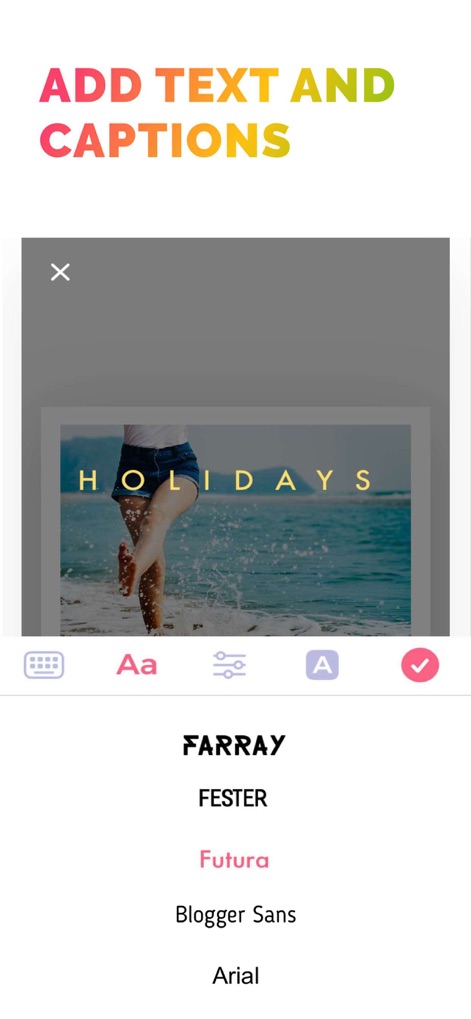
Personalized Text & Fonts
The app allows for expressive text overlays on collages and offers a wide variety of funky fonts to enhance messages and captions.

Engaging Sticker Collection
Users can decorate their creations with hundreds of categorized stickers and a playful selection of expressive emojis, adding character to any collage.
Description
Download
More Like This
Apps with similar features and user experience

SCRL: Photo Collage Maker
Appostrophe AB

PhotoGrid: Video Collage Maker
JUPITER PALACE PTE. LTD.

Layout for Instagram: Collage
Shamble, Inc.

Photo Collage Maker: InCollage
SHANTANU PTE. LTD.

TicPic
Zhuhai Kuxiong Network Technology Co., Ltd.

Collage Maker: CollagePlus
Shamble, Inc.

Photo Collage Montage Maker
Honk Honk Punch Pty Ltd

Photo Collage Maker & Creator
Honk Honk Punch Pty Ltd

Photo Collage Montage & Layout
Honk Honk Punch Pty Ltd
This page is not an official page of the app or its developer, but an independent editorial publication created for informational and commentary purposes. Unless expressly stated otherwise, neither the app nor its developer is affiliated with, endorsed by, sponsored by, authorized by, or otherwise officially connected with MWM, Apple, Google Play, the app publisher, or the app's developer, and nothing on this page implies that the app was developed using MWM's services. Any trademarks, logos, screenshots, and other content remain the property of their respective owners.