
This page is not an official page of the app or its developer, but an independent editorial publication created for informational and commentary purposes. Unless expressly stated otherwise, neither the app nor its developer is affiliated with, endorsed by, sponsored by, authorized by, or otherwise officially connected with MWM, Apple, Google Play, the app publisher, or the app's developer, and nothing on this page implies that the app was developed using MWM's services. Any trademarks, logos, screenshots, and other content remain the property of their respective owners.


Protake - Mobile Cinema Camera
Mobile filmmaking just got a serious upgrade. The app turns your device into a cinema powerhouse, delivering film-grade control without the heavy gear.
Downloads
2.5M+User Rating
Total Ratings
15.1KPublisher
Category
Photo & VideoLocales
3Latest Version
4.2.4Size
75.0 MBFirst Released
Apr 26, 2020An in-depth look at the capabilities transforming mobile devices into professional filmmaking tools.
Protake - Mobile Cinema Camera: Feature Analysis
Advanced Wi-Fi Video Transmission
This innovative system allows users to transmit video from one mobile device acting as a 'camera' to up to four 'monitors' (iPhones/iPads), and conversely, monitor up to four 'cameras' from a single screen. It also enables wireless start/stop recording control and monitoring of HDR/SDR streams, offering an end-to-end mobile recording and monitoring experience.
Professional Mode (PRO)
The app provides a dedicated PRO mode, meticulously designed for professional filmmakers. It offers comprehensive camera information and manual control settings, all intuitively aligned on the screen for precise adjustments.
Industry-Standard LOG Gamma Curve
It features a genuine LOG gamma curve, strictly matching the mobile device's color output to the industrial standard ALEXA Log C. This maximizes dynamic range and provides a flat image, essential for professional color grading workflows.
Diverse Cinematic Looks
This tool offers a rich selection of cinematic looks, categorized into Neutral Styles, Film Emulations (classic Kodak and Fuji cinema films), Movie Inspired grades, and ALEXA Looks, empowering users to achieve professional visual aesthetics instantly.
Professional Monitoring Tools
The app integrates essential monitoring tools such as Waveform, Parade, Histogram, RGB Histogram, and Audio Meter, providing real-time visual feedback for precise exposure, color balance, and audio level control.
Consistent Frame Rate Normalization
Protake fundamentally addresses the variable frame rate issue common in mobile devices by ensuring strictly constant FPS values (e.g., 24, 25, 30, 60, 120). This is critical for smooth, professional-grade video editing.
Dual Camera Recording Mode
It allows users to record video using two cameras simultaneously, either merged into a single Picture-in-Picture file or saved as two separate files. This feature is ideal for dynamic vlogging, interviews, or creative multi-perspective shots.
Real-time Portrait Mode Video
With compatible iPhone Pro and iPad Pro models, this app utilizes LiDAR sensors to record 'portrait mode video' with real-time blurred backgrounds, providing a professional, shallow depth-of-field aesthetic directly on mobile.
Comprehensive Exposure Assistants
This tool features a suite of exposure aids, including Zebra Strips, False Color, Exposure Compensation, and Auto Exposure, helping users achieve perfectly exposed footage consistently.
Detailed Metadata Recording
The app meticulously records comprehensive metadata, including device model, ISO, shutter angle, white balance, lens information, connected accessories, and location, directly into the video files. This is invaluable for professional post-production and asset management.
Frequently Asked Questions
Everything you need to know about Protake - Mobile Cinema Camera
What is Protake?
Protake transforms mobile devices into professional cinema cameras, offering advanced filmmaking features for vloggers, commercial directors, and well-established filmmakers to enhance their productions.
Does Protake support wireless video monitoring?
Yes, Protake features a Wi-Fi Video Transmission system. It allows transmitting video from one "camera" to four "monitors" and watching up to four "cameras" on one "monitor" with wireless recording control.
What shooting modes are available in Protake?
Protake offers AUTO mode for vloggers, PRO mode for professional filmmakers with aligned controls, DUAL mode for simultaneous dual-camera recording, and PORTRAIT mode with real-time blurred backgrounds using LiDAR sensors.
Does Protake offer LOG recording for color grading?
Yes, Protake features a genuine LOG gamma curve strictly matched to the industrial standard ALEXA Log C. It also provides a dozen of cinematic looks, including film emulation and movie-inspired styles.
What filmmaking assistance tools does Protake provide?
Protake provides extensive filmmaking assistants including monitoring tools (Waveform, Histogram), composition aids (Aspect Ratios, Thirds), exposure tools (Zebra Strips, False Color), and focus assistants (Focus Peaking, Auto Focus).
How does Protake manage video data and file organization?
Protake manages video data through Frame Rate Normalization for constant FPS, a standard file-naming system (Camera Unit + Reel Number + Clip Count + Date + Suffix), and comprehensive metadata recording for various details.
What features are included with Protake+ membership?
Protake+ membership unlocks all advanced features, including Pro mode, LOG gamma curve, Protake Cinematic Looks, all assistant tools, data management, and support for 3rd-party accessories.
How much does Protake+ membership cost?
A 1-year Protake+ membership costs USD 19.99. Payment is charged to your iTunes Account and automatically renews unless auto-renew is turned off at least 24 hours before the current period ends.
How do I cancel my Protake+ subscription?
Users can cancel their Protake+ subscription and manage auto-renewal by accessing their Account Settings after purchase. Auto-renewal must be switched off at least 24-hours before the current period ends.
Does Protake collect user data?
Yes, Protake handles all personal data according to its terms and conditions and privacy policy. More details are available via the provided privacy policy link in the app description.
The following screenshots and description are sourced directly from the app's official store listing and are the property of the app developer.
App Store
Screenshots
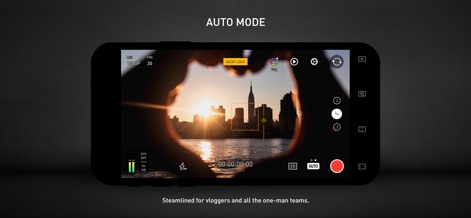
This mode offers streamlined controls and an AE/AF Lock feature for quick, single-handed content creation, perfect for vloggers.
Intuitive Auto Mode

Users can establish a wireless monitoring network, viewing up to four cameras simultaneously with both HDR and SDR streams on a single device.
Multi-Camera Monitoring
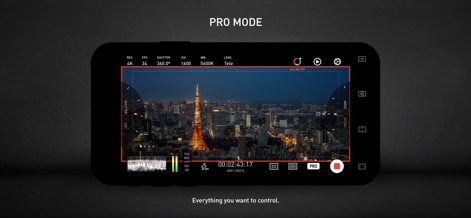
The PRO mode gives professional filmmakers comprehensive control over settings like Shutter angle and ISO, with all essential camera information clearly aligned on the screen.
Advanced Pro Controls
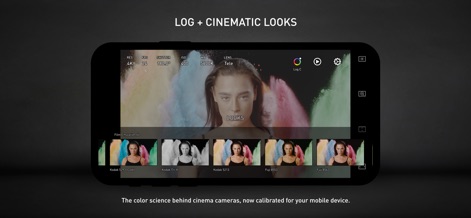
Explore the app's LOG gamma curve, strictly matched to ALEXA Log C, and apply a dozen cinematic looks, including classic film emulations.
Cinematic Color Science
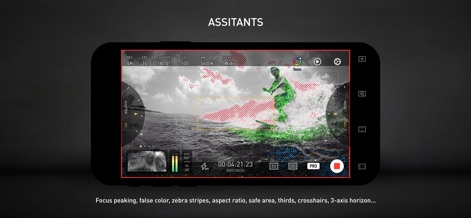
This tool provides crucial visual aids such as Focus Peaking and Zebra Strips to ensure accurate exposure and sharp focus in challenging conditions.
Precision Assistant Tools
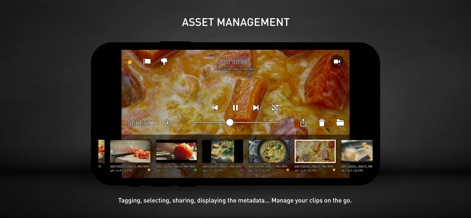
Manage clips on the go with intuitive tagging and selection features, allowing users to organize and share their recordings efficiently.
Efficient Asset Management
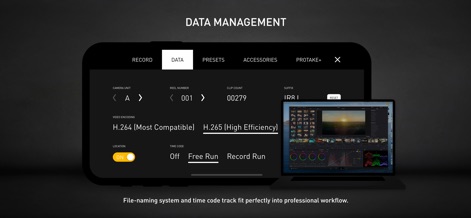
The app supports robust data management, offering H.265 encoding and industry-standard time code options like Free Run for seamless post-production workflows.
Professional Data Handling
Description
Download
More Like This
Apps with similar features and user experience

Blackmagic Camera
Blackmagic Design Inc

飓风相机
Hangzhou Ostar Media Co.,Ltd.

ProMovie Recorder
Panda Apps Limited

ReLens Camera-DSLR Portrait
Pixl Concerto Technology Limited

Leica LUX - Pro Manual Camera
Leica Camera AG

FotorGear - Camera in Pocket
Shenzhen Fotorgear Technology Co., Ltd.

Unsharp
北北 宋

ProCam:Professional RAW Camera
BRAND CELLAR HOLDINGS PTE LTD

Vibe Cam - Moments Never Fade
森 林
This page is not an official page of the app or its developer, but an independent editorial publication created for informational and commentary purposes. Unless expressly stated otherwise, neither the app nor its developer is affiliated with, endorsed by, sponsored by, authorized by, or otherwise officially connected with MWM, Apple, Google Play, the app publisher, or the app's developer, and nothing on this page implies that the app was developed using MWM's services. Any trademarks, logos, screenshots, and other content remain the property of their respective owners.