
This page is not an official page of the app or its developer, but an independent editorial publication created for informational and commentary purposes. Unless expressly stated otherwise, neither the app nor its developer is affiliated with, endorsed by, sponsored by, authorized by, or otherwise officially connected with MWM, Apple, Google Play, the app publisher, or the app's developer, and nothing on this page implies that the app was developed using MWM's services. Any trademarks, logos, screenshots, and other content remain the property of their respective owners.


ProMovie Recorder
Stop relying on algorithms. ProMovie Recorder equips serious creators with deep manual control, turning an iPhone into a finely tuned cinematic instrument.
Downloads
12.5M+User Rating
Total Ratings
224.3KPublisher
Category
Photo & VideoLocales
5Latest Version
v1.11.10Size
4.3 MBFirst Released
May 27, 2016Comprehensive Analysis of ProMovie Recorder's Core Capabilities
Evaluating key features for professional mobile videographers and content creators.
Granular Manual Camera Control
The app provides comprehensive manual control over essential camera parameters such as exposure, shutter speed, ISO, focus, and white balance, empowering users with creative precision.
High Frame Rate & Resolution Recording
It allows users to capture high frame rate video at resolutions up to 4K at 120FPS and 1080p at 240FPS, enabling stunning slow-motion and cinematic effects.
Advanced Audio Control & Support
This tool features extensive audio capabilities, including external microphone support, stereo recording, real-time audio monitoring, and gain control, ensuring professional-grade sound capture.
High Bitrate Video Encoding
The app enables high-quality video recording with an adjustable bitrate reaching up to 224Mbps, preserving fine details and optimizing footage for post-production.
Precision Camera Parameter Adjustments
It offers advanced camera controls such as separate exposure and focus points, exposure compensation, and white balance calibration, providing granular adjustment for image fidelity.
Multi-Camera System Integration
This tool facilitates seamless switching between the device's Ultra Wide, Wide, and Telephoto cameras, expanding creative composition and shooting versatility.
Professional Accessory Compatibility
The app supports various professional accessories, including anamorphic adapters, external displays, and Bluetooth remotes, enhancing its integration into advanced mobile filmmaking setups.
Integrated Video Stabilization
It includes both Standard and Cinematic stabilization modes, assisting users in capturing smoother and more professional-looking footage directly within the app.
Frequently Asked Questions
Everything you need to know about ProMovie Recorder
What are the video recording capabilities of ProMovie Recorder?
ProMovie Recorder supports 4K video recording up to 120FPS and 1080p video recording up to 240FPS on compatible devices. It offers high-quality recording at up to 224Mbps bitrate.
Does ProMovie Recorder offer manual camera controls?
Yes, ProMovie Recorder provides manual controls for exposure, shutter speed, ISO, focus, and white balance. Users can also lock parameters and utilize white balance presets for precise adjustments.
How can I remove the watermark in ProMovie Recorder?
An In-App Purchase is required to record videos with ProMovie Recorder without the 'ProMovie Recorder' watermark. This purchase unlocks full, unbranded recording functionality.
Can ProMovie Recorder use external microphones?
Yes, ProMovie Recorder supports external microphones via Lightning/3.5 mm headphone jack or Bluetooth. It also offers stereo audio recording, monitoring, and gain control on supported devices.
What devices support 4K 60FPS recording with ProMovie Recorder?
ProMovie Recorder supports 4K @60FPS on iPhone 8/8 Plus/X and newer, iPad (2022), iPad Mini (2021 and newer), iPad Air (2020 and newer), and specific iPad Pro models.
Does ProMovie Recorder have stabilization modes?
Yes, ProMovie Recorder includes both Standard and Cinematic stabilization modes. These features help users capture smoother video footage and improve overall video quality.
Can ProMovie Recorder adjust exposure and focus separately?
Yes, ProMovie Recorder allows for separate Exposure Point and Focus Point adjustments. This offers precise control over video composition and image quality within the recording interface.
What encoding formats does ProMovie Recorder support?
ProMovie Recorder supports both HEVC and H.264 encoding. This provides flexibility for video file size and compatibility with various platforms and devices for recorded content.
The following screenshots and description are sourced directly from the app's official store listing and are the property of the app developer.
App Store
Screenshots

Precise Exposure Control
See how ProMovie Recorder displays the "4K 60 FPS" recording status and offers detailed exposure compensation for perfect lighting.
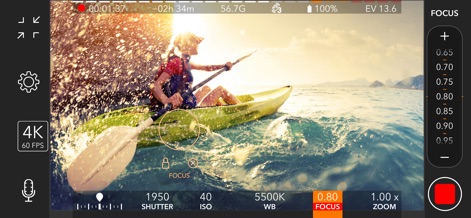
Dynamic Focus Adjustment
Observe the app's intuitive manual focus adjustment slider and the focus lock indicator, ensuring sharp, professional-grade video.

Framing & Composition
This tool provides precise zoom control for framing shots and features customizable grid overlays for perfect composition.

Advanced Video Settings
Users can fine-tune their output with comprehensive resolution options up to 4K and select precise frame rate settings for cinematic capture.

Unlocking Pro Features
Discover the benefits of unlocking premium features, removing the app watermark for a fully professional production.
Description
Download
More Like This
Apps with similar features and user experience

Blackmagic Camera
Blackmagic Design Inc

飓风相机
Hangzhou Ostar Media Co.,Ltd.

ReLens Camera-DSLR Portrait
Pixl Concerto Technology Limited

Leica LUX - Pro Manual Camera
Leica Camera AG

FotorGear - Camera in Pocket
Shenzhen Fotorgear Technology Co., Ltd.

Unsharp
北北 宋

ProCam:Professional RAW Camera
BRAND CELLAR HOLDINGS PTE LTD

Vibe Cam - Moments Never Fade
森 林
Final Cut Camera
Apple Inc.
This page is not an official page of the app or its developer, but an independent editorial publication created for informational and commentary purposes. Unless expressly stated otherwise, neither the app nor its developer is affiliated with, endorsed by, sponsored by, authorized by, or otherwise officially connected with MWM, Apple, Google Play, the app publisher, or the app's developer, and nothing on this page implies that the app was developed using MWM's services. Any trademarks, logos, screenshots, and other content remain the property of their respective owners.