
This page is not an official page of the app or its developer, but an independent editorial publication created for informational and commentary purposes. Unless expressly stated otherwise, neither the app nor its developer is affiliated with, endorsed by, sponsored by, authorized by, or otherwise officially connected with MWM, Apple, Google Play, the app publisher, or the app's developer, and nothing on this page implies that the app was developed using MWM's services. Any trademarks, logos, screenshots, and other content remain the property of their respective owners.


Final Cut Camera
Unleash true directorial power. The app offers granular control over your iPhone’s camera, transforming it into a pro-grade video capture device.
Downloads
7.5M+User Rating
Total Ratings
12.8KPublisher
Category
Photo & VideoLocales
31Latest Version
2.2Size
86.3 MBFirst Released
Jun 20, 2024An analytical overview of features designed to empower advanced videographers and filmmakers within the Apple ecosystem.
Key Capabilities of Final Cut Camera for Professional Production
ProRes RAW Open Gate Capture
The app supports capturing ProRes RAW in open gate, delivering maximum resolution and superior editing performance for high-end cinematic projects.
Full Manual Camera Controls
It allows users to precisely control capture settings such as ISO, shutter speed, white balance, and manual focus, essential for professional-grade footage.
Genlock Synchronization
This tool provides Genlock capabilities for precise frame alignment across multiple video sources, critical for complex multi-camera productions.
ProRes and Apple Log Codec Support
The app enables recording in professional codecs like ProRes and Apple Log, offering extensive latitude for color grading and post-production workflows.
Live Multicam Integration with Final Cut Pro for iPad
It allows users to connect and control up to four devices for multi-angle recording, seamlessly integrating and syncing footage directly into Final Cut Pro for iPad.
Advanced Monitoring Tools
The tool offers professional monitoring features such as focus peaking, zebra stripes, and LUT preview to ensure perfect exposure and sharp focus during shooting.
Frequently Asked Questions
Everything you need to know about Final Cut Camera
What is Final Cut Camera?
Final Cut Camera provides professional controls for video production. It enables Live Multicam sessions with Final Cut Pro for iPad, allowing users to preview, record, and sync multiple video angles. It offers powerful manual settings like shutter speed, ISO, and white balance.
How does Live Multicam work in Final Cut Camera?
Live Multicam connects up to four devices running Final Cut Camera to Final Cut Pro for iPad. Users can remotely preview, adjust controls, initiate recording on all connected devices, and instantly edit synced multicam clips. Background media transfer replaces preview media with originals.
What recording formats does Final Cut Camera support?
Final Cut Camera supports recording in a range of resolutions, frame rates, and codecs, including ProRes and Apple Log. It also captures ProRes RAW in open gate for full-frame resolution and editing performance on compatible devices.
Does Final Cut Camera offer manual controls for video capture?
Yes, Final Cut Camera offers full manual control over video capture. Users can set exposure with ISO and shutter speed, adjust white balance, pull focus, and customize resolution, frame rate, and color space.
What monitoring tools are available in Final Cut Camera?
Final Cut Camera provides focus peaking, zebra indicators for exposure, tilt and roll indicators, crosshairs, and aspect ratio guides. Users can also preview Apple Log video in SDR or HDR with LUTs, and monitor recording time and audio meters.
How can users transfer and store media from Final Cut Camera?
Users can save videos directly to Files or record onto a connected external storage device. Final Cut Camera allows browsing and reviewing footage in its browser. Media can also be transferred directly into a Final Cut Pro for iPad project.
Which devices support ProRes RAW capture in Final Cut Camera?
ProRes RAW capture in open gate with Final Cut Camera requires an iPhone 17 Pro. Other advanced features like ProRes and Apple Log are available on iPhone 15 Pro or later.
Is a Final Cut Pro for iPad subscription required to use Final Cut Camera?
A Final Cut Pro for iPad subscription is required to utilize the Live Multicam feature with Final Cut Camera. The core camera app features do not explicitly state a subscription requirement.
The following screenshots and description are sourced directly from the app's official store listing and are the property of the app developer.
App Store
Screenshots
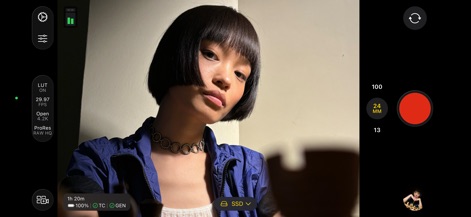
Users can fine-tune their capture settings using the detailed manual controls on the left and monitor key recording parameters like ProRes RAW HQ and SSD storage.
Pro Control Interface
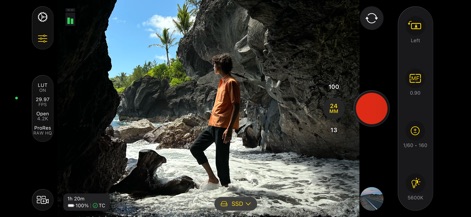
The app provides precise manual focus capabilities, allowing users to adjust the MF dial and set custom white balance with 5600K for optimal color accuracy.
Manual Focus Precision
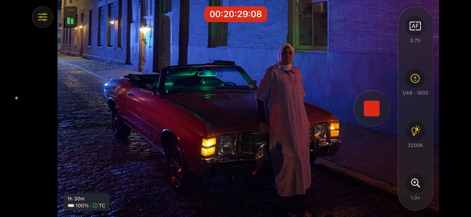
Professionals can track their shoot with real-time timecode display and utilize autofocus alongside manual exposure adjustments for dynamic scenes.
Advanced Monitoring & TC
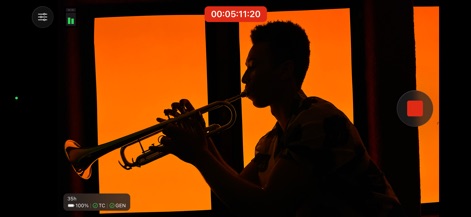
This view prioritizes the composition, featuring a prominent timecode for critical timing and a streamlined interface for distraction-free shooting.
Clean Shooting View
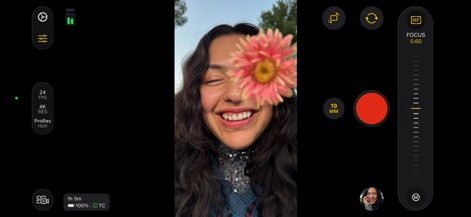
This tool supports vertical video capture, offering a precise focus slider and displaying critical settings such as 24 FPS and ProRes HDR recording.
Vertical Capture Control
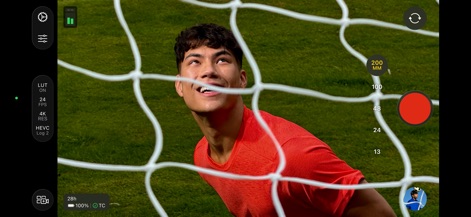
Users can swiftly switch between various focal lengths, indicated by the 200 MM selection, while recording in high-quality HEVC Log 2 for post-production flexibility.
Dynamic Focal Lengths
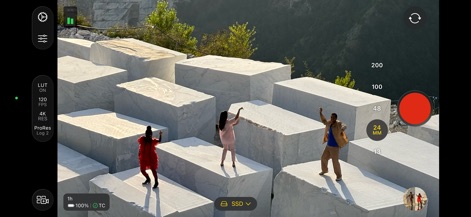
The app enables capturing stunning slow-motion footage with 120 FPS and supports professional ProRes Log 2 recording, with an SSD indicator for external storage.
High Frame Rate Filming
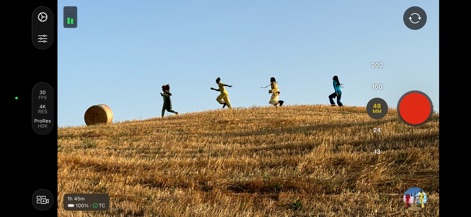
Optimize landscape shots with specific focal length selections like 48 MM, ensuring high-quality capture at 30 FPS in ProRes HDR.
Optimized Landscape Shooting
Description
Download
More Like This
Apps with similar features and user experience

Blackmagic Camera
Blackmagic Design Inc

飓风相机
Hangzhou Ostar Media Co.,Ltd.

ProMovie Recorder
Panda Apps Limited

ReLens Camera-DSLR Portrait
Pixl Concerto Technology Limited

Leica LUX - Pro Manual Camera
Leica Camera AG

FotorGear - Camera in Pocket
Shenzhen Fotorgear Technology Co., Ltd.

Unsharp
北北 宋

ProCam:Professional RAW Camera
BRAND CELLAR HOLDINGS PTE LTD

Vibe Cam - Moments Never Fade
森 林
This page is not an official page of the app or its developer, but an independent editorial publication created for informational and commentary purposes. Unless expressly stated otherwise, neither the app nor its developer is affiliated with, endorsed by, sponsored by, authorized by, or otherwise officially connected with MWM, Apple, Google Play, the app publisher, or the app's developer, and nothing on this page implies that the app was developed using MWM's services. Any trademarks, logos, screenshots, and other content remain the property of their respective owners.