
This page is not an official page of the app or its developer, but an independent editorial publication created for informational and commentary purposes. Unless expressly stated otherwise, neither the app nor its developer is affiliated with, endorsed by, sponsored by, authorized by, or otherwise officially connected with MWM, Apple, Google Play, the app publisher, or the app's developer, and nothing on this page implies that the app was developed using MWM's services. Any trademarks, logos, screenshots, and other content remain the property of their respective owners.


Blackmagic Camera
The mobile device is no longer a compromise. It equips users with direct digital film camera controls, enabling professional cinematic capture and live-sync editing.
Downloads
12.5M+User Rating
Total Ratings
105.0KPublisher
Category
Photo & VideoLocales
9Latest Version
3.2Size
180.0 MBFirst Released
Sep 14, 2023Key Features of Blackmagic Camera for Professional Production
An analytical overview of the application's core functionalities designed for cinematic content creation and collaborative workflows.
Industry-Standard Recording Formats
It allows users to record in high-quality, industry-standard formats such as 10-bit Apple ProRes up to 4K, ensuring broadcast-ready footage compatible with professional post-production workflows.
Professional Cinematic Controls
The app provides comprehensive controls over crucial cinematic parameters like frame rate, shutter angle, ISO, and white balance, enabling users to achieve a professional filmic look directly from their device.
Cloud-Based Collaborative Workflow
This tool facilitates real-time collaboration by enabling direct recording and syncing to Blackmagic Cloud, allowing multiple team members to access and work on DaVinci Resolve projects simultaneously from anywhere.
Proxy Workflow with Live Cloud Sync
The app supports an accelerated post-production workflow by instantly uploading proxy files to Blackmagic Cloud, allowing editors to begin working immediately while original files upload in the background.
Intuitive Interactive HUD
The app features an interactive Heads Up Display (HUD) that provides immediate access to essential camera controls and real-time monitoring tools like histograms, focus peaking, and levels, streamlining on-set adjustments.
Advanced Image & Audio Customization
It offers extensive customization options, including support for 3D LUTs, anamorphic de-squeeze, lens correction settings, and professional audio controls with external microphone compatibility, providing granular creative control.
Frequently Asked Questions
Everything you need to know about Blackmagic Camera
What is the Blackmagic Camera app?
Blackmagic Camera transforms an iPhone or iPad into a digital film camera. It provides professional controls and an operating system, enabling cinematic video production on mobile devices.
What advanced camera controls does Blackmagic Camera offer?
Blackmagic Camera offers digital film controls for frame rate, shutter angle, white balance, and ISO. Users adjust these settings with a single tap through the interactive interface and HUD.
Can Blackmagic Camera record 4K video?
Yes, Blackmagic Camera records industry-standard 10-bit Apple ProRes files up to 4K resolution. This ensures high-quality cinematic video capture on supported iPhone and iPad devices.
Does Blackmagic Camera support cloud collaboration?
Yes, Blackmagic Camera supports cloud collaboration by recording directly to Blackmagic Cloud. This feature allows users to work on DaVinci Resolve projects with editors globally.
What video recording formats are available in Blackmagic Camera?
Blackmagic Camera supports industry-standard Apple ProRes, H.264, and H.265 recording formats. Users manage video resolution and format through the dedicated settings menu.
How does Blackmagic Camera create cinematic video?
Blackmagic Camera provides professional features required for feature film, television, and documentaries. It enables users to achieve a cinematic look and broadcast quality for their content.
Does Blackmagic Camera feature an on-screen display (HUD)?
Yes, Blackmagic Camera features a Heads Up Display (HUD). This display shows status, record parameters, histogram, focus peaking, levels, and frame guides, which users can show or hide.
Can Blackmagic Camera record video vertically?
Yes, Blackmagic Camera allows recording in 16:9 or vertical aspect ratios. It also supports shooting 16:9 while holding the phone vertically for discrete recording.
How can I manage my media files within Blackmagic Camera?
Blackmagic Camera's media tab allows browsing, scrubbing, searching, and sorting clips. Users view upload status and can save files locally, to Blackmagic Cloud, or project libraries.
Does Blackmagic Camera support external microphones?
Yes, Blackmagic Camera supports external microphones. It offers professional audio options like AAC and PCM formats, with VU or PPM audio metering for precise sound control.
Can 3D LUTs be used with Blackmagic Camera?
Yes, Blackmagic Camera allows users to add 3D LUTs. This feature integrates specific film looks, providing creative control for achieving desired visual styles in recordings.
Does Blackmagic Camera offer live media syncing to the cloud?
Yes, Blackmagic Camera provides live sync to Blackmagic Cloud Storage. It instantly uploads proxy files, followed by camera originals, streamlining the workflow for quick editing access.
The following screenshots and description are sourced directly from the app's official store listing and are the property of the app developer.
App Store
Screenshots

Live Camera Controls
The app presents a comprehensive heads-up display showing critical parameters like shutter angle and ISO, alongside real-time histogram and audio level meters.
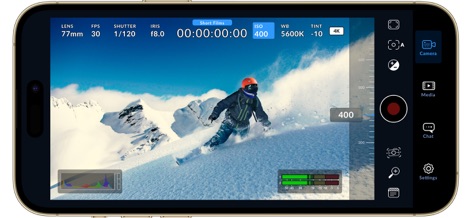
Precision Exposure Control
Users gain granular control over exposure with an interactive ISO slider, directly adjusting sensitivity within the live view alongside detailed HUD information.

Critical Focus Assist
This tool offers clear focus peaking indicators and an adjustable intensity slider, ensuring sharp footage by highlighting in-focus areas.

Professional Digital Slate
Efficiently organize shoots with the integrated digital slate, allowing users to log essential metadata like reel numbers and lens data before recording.

Media Management Hub
The app streamlines media workflows by presenting a clear clip gallery for browsing and offering seamless integration with Blackmagic Cloud for project access.

Project-Based Organization
Organize footage efficiently within dedicated project folders like 'Short Films' and 'Documentary', making media review and collaboration straightforward.
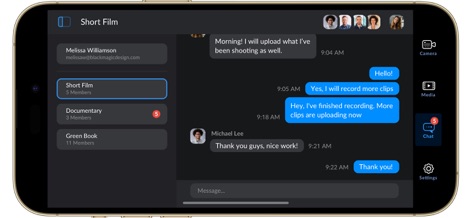
Real-Time Collaboration
Facilitate team communication with the integrated chat feature, allowing project members to share updates and coordinate within specific project groups.
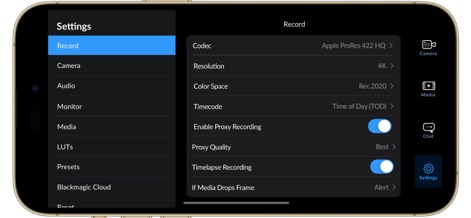
Advanced Recording Options
This section provides extensive control over recording parameters, from selecting professional codecs like Apple ProRes to enabling efficient proxy recording.

Flexible Aspect Ratios
The app seamlessly adapts to vertical shooting, maintaining a complete heads-up display with vital camera parameters and audio monitoring levels.

Intuitive Vertical Controls
Users can easily fine-tune exposure in vertical mode using the interactive ISO slider, with all essential settings instantly accessible on screen.
Description
Download
More Like This
Apps with similar features and user experience

飓风相机
Hangzhou Ostar Media Co.,Ltd.

ProMovie Recorder
Panda Apps Limited

ReLens Camera-DSLR Portrait
Pixl Concerto Technology Limited

Leica LUX - Pro Manual Camera
Leica Camera AG

FotorGear - Camera in Pocket
Shenzhen Fotorgear Technology Co., Ltd.

Unsharp
北北 宋

ProCam:Professional RAW Camera
BRAND CELLAR HOLDINGS PTE LTD

Vibe Cam - Moments Never Fade
森 林
Final Cut Camera
Apple Inc.
This page is not an official page of the app or its developer, but an independent editorial publication created for informational and commentary purposes. Unless expressly stated otherwise, neither the app nor its developer is affiliated with, endorsed by, sponsored by, authorized by, or otherwise officially connected with MWM, Apple, Google Play, the app publisher, or the app's developer, and nothing on this page implies that the app was developed using MWM's services. Any trademarks, logos, screenshots, and other content remain the property of their respective owners.