
This page is not an official page of the app or its developer, but an independent editorial publication created for informational and commentary purposes. Unless expressly stated otherwise, neither the app nor its developer is affiliated with, endorsed by, sponsored by, authorized by, or otherwise officially connected with MWM, Apple, Google Play, the app publisher, or the app's developer, and nothing on this page implies that the app was developed using MWM's services. Any trademarks, logos, screenshots, and other content remain the property of their respective owners.


QQ邮箱
Email sprawl is real. This app cuts through it, enabling users to effortlessly command every account, translate languages, and handle attachments of any size.
Downloads
100M+User Rating
Total Ratings
138.9KPublisher
Category
ProductivityLocales
3Latest Version
7.1.5Size
166.8 MBFirst Released
Oct 24, 2011Key Features Analysis: QQ Mail
Evaluating QQ Mail's core functionalities for professionals and organized individuals.
Email Translation
It allows users to translate foreign language emails into Chinese, facilitating communication across linguistic barriers for international correspondence.
Multi-Account Management
The app provides comprehensive support for general email protocols, allowing users to integrate and manage various email accounts beyond just QQ Mail within a single, unified interface.
Advanced Mail Management & Aggregation
The app provides synchronous receipt and management of mails across multiple accounts, alongside intelligent aggregation of ad mails and optimized subscription reading experiences for reduced clutter.
Large File Transfer Station
The app includes a Transfer Station for temporary network storage of large files, streamlining the sharing of substantial documents or media without relying on external services.
Customizable Mail Notifications
It allows users to tailor mail notifications, including options for starred contacts, account-specific alerts, diverse sound effects, and a Night Mode to mute alerts during specific hours.
Comprehensive Attachment Preview
This tool features online preview capabilities for a wide range of attachment types, including documents, images, audio, video, and compressed files, enhancing productivity by reducing download needs.
Integrated Calendar
It allows users to manage events efficiently through an integrated calendar, aiding in organization and scheduling directly within the email application.
Integrated Contacts Management
This tool features an efficient and convenient Contacts management system, allowing users to organize contacts and quickly access recent conversations.
Built-in Notepad
This tool features a built-in Notepad, enabling users to record thoughts and information spontaneously and conveniently within the email environment.
Digital Greeting Cards
The app provides a feature to select and send digital greeting cards, allowing users to convey blessings to friends directly from their phone.
Frequently Asked Questions
Everything you need to know about QQ邮箱
What is QQ Mail?
QQ Mail is an email application that supports various mail protocols, allowing users to manage multiple mailboxes. It provides features like mail synchronization, attachment preview, and notification customization.
Does QQ Mail support multiple email accounts?
Yes, QQ Mail supports multiple email accounts. It offers full support for general mail protocols, allowing users to add and manage various mailboxes beyond QQ Mail, including Gmail and Outlook.
Can I preview attachments directly in the QQ Mail app?
Yes, QQ Mail supports online preview of various attachment types. This includes documents, images, audio and video files, compressed packages, and eml files.
How much does QQ Mail VIP auto-renewal cost monthly?
The QQ Mail VIP Monthly Auto-Renewal subscription costs RMB 22 per month. This amount is charged to your Apple iTunes account within 24 hours before expiration.
How do I cancel my QQ Mail VIP auto-renewal subscription?
To cancel your QQ Mail VIP subscription, go to Settings > Apple ID > Subscriptions, select the QQ Mail VIP subscription, and tap Cancel Subscription. You must do this at least 24 hours before the billing period ends.
Does QQ Mail offer translation services for emails?
Yes, QQ Mail offers a translation feature. It can translate mails in foreign languages into Chinese, enhancing user convenience for international communication.
What is QQMail Drive and its features?
QQMail Drive is a feature for file storage with no expiration date. It supports multi-device synchronization and facilitates easy sharing of files within the QQ Mail app.
Can QQ Mail help manage calendar events?
Yes, QQ Mail can help manage calendar events. It includes a Calendar plug-in to efficiently manage events and offers flexible event management capabilities.
What types of email accounts can I add to QQ Mail?
QQ Mail supports adding various email accounts, including QQ Mail, Tencent Exmail, 163 Mail, 126 Mail, Gmail, Outlook, Microsoft 365, and Exchange, among others.
Does QQ Mail provide options for temporary storage of large files?
Yes, QQ Mail includes a Transfer Station plug-in. This feature allows for the temporary storage of large files on the network, accessible within the application.
The following screenshots and description are sourced directly from the app's official store listing and are the property of the app developer.
App Store
Screenshots

Cloud Storage Hub
Discover how QQ Mail offers a comprehensive cloud drive for file storage and a dedicated Transfer Station for large files, ensuring users can manage and share documents effortlessly.

Enhanced Email Composition
Explore the versatile email composer, allowing users to embed events and locations directly, alongside one-click access to translation and document attachment options.

Integrated Calendar View
Witness the app's efficient calendar integration, showcasing event management capabilities and visual indicators for scheduled activities directly within the interface.
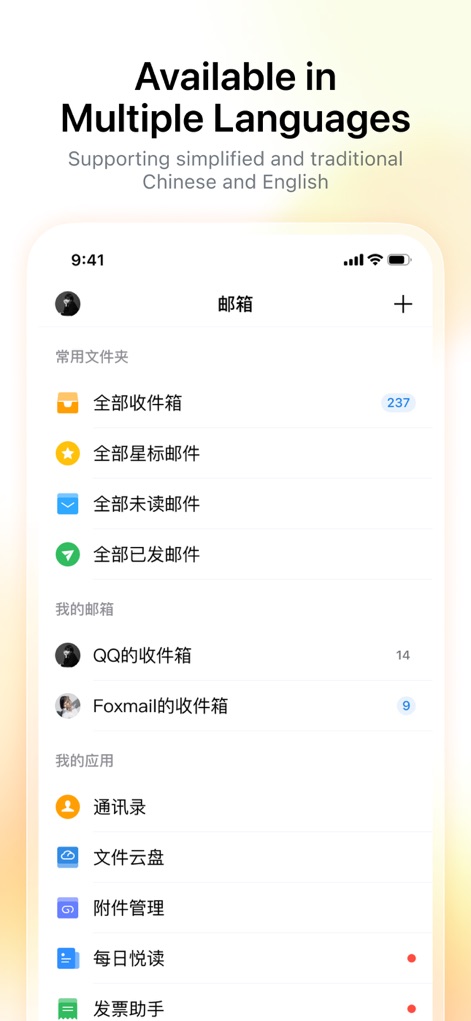
Multilingual Interface
Observe the app's robust multilingual support, evident in the clear display of mail folders and integrated application shortcuts in diverse language settings.
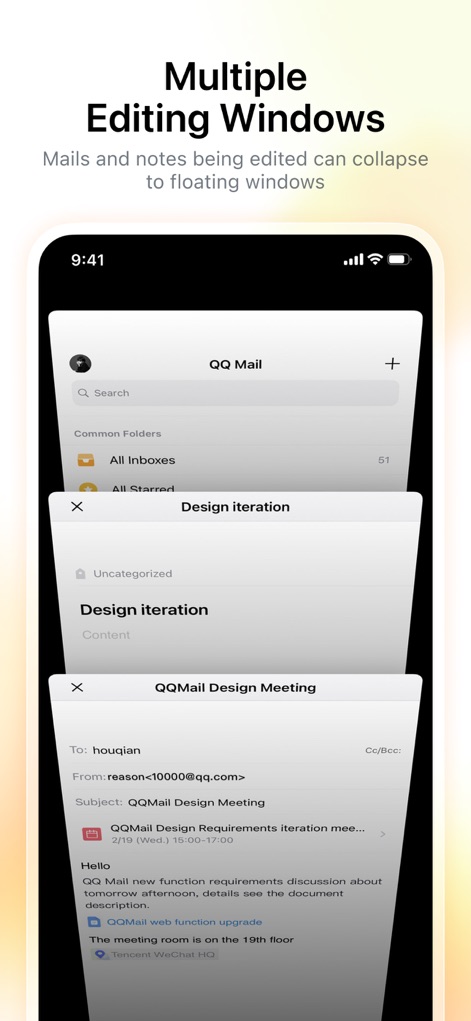
Multitasking Efficiency
See how the app enhances productivity with multiple floating windows for ongoing drafts, allowing users to easily switch between composing emails and managing notes.

Universal Account Integration
Discover the seamless multi-account management feature, where users can effortlessly integrate various email providers and general mail protocols into a unified inbox.
Description
Download
More Like This
Apps with similar features and user experience

Microsoft Outlook
Microsoft Corporation

Mail: Email, Cloud, Calendar
V Kontakte OOO

Yandex Mail: Email & Cloud
DIRECT CURSUS COMPUTER SYSTEMS TRADING LLC

Gmail - Email by Google
Google LLC

Yahoo Mail
Yahoo Inc.

Proton Mail - Encrypted Email
Proton AG

Email - Edison Mail
Edison Software Inc.

Zoho Mail - Email and Calendar
Zoho Corporation

GMX - Mail & Cloud
1&1 Mail & Media GmbH
This page is not an official page of the app or its developer, but an independent editorial publication created for informational and commentary purposes. Unless expressly stated otherwise, neither the app nor its developer is affiliated with, endorsed by, sponsored by, authorized by, or otherwise officially connected with MWM, Apple, Google Play, the app publisher, or the app's developer, and nothing on this page implies that the app was developed using MWM's services. Any trademarks, logos, screenshots, and other content remain the property of their respective owners.