Quiet - Filter Spam SMS & Call
Download on App Store

This page is not an official page of the app or its developer, but an independent editorial publication created for informational and commentary purposes. Unless expressly stated otherwise, neither the app nor its developer is affiliated with, endorsed by, sponsored by, authorized by, or otherwise officially connected with MWM, Apple, Google Play, the app publisher, or the app's developer, and nothing on this page implies that the app was developed using MWM's services. Any trademarks, logos, screenshots, and other content remain the property of their respective owners.

Logo of Quiet - Filter Spam SMS & Call
Download on App Store

Quiet - Filter Spam SMS & Call

Reclaim your digital peace with the spam filter that never touches the cloud. No AI, no data collection, and no tracking—just powerful, user-defined rules that stay on your device.

Key Figures

Downloads

0

User Rating

1.0/5

Total Ratings

0

Publisher

Ping Yan

Category

Utilities

Locales

77

Latest Version

11.0.1

Size

4.0 MB

First Released

Dec 7, 2020
Features

Reclaim Your Peace of Mind

The only 100% offline spam filter designed for those who value data sovereignty. No servers, no AI models—just total control over your SMS and calls.

100% On-Device Privacy

Your texts and calls never leave your phone. Because we operate entirely offline, your personal data remains yours—no servers, no tracking, no leaks.

Deterministic Filtering

Skip the 'black box' AI algorithms. Set precise, rule-based keywords to silently divert marketing spam while ensuring you never miss an important message.

The following screenshots and description are sourced directly from the app's official store listing and are the property of the app developer.

App Store

Screenshots
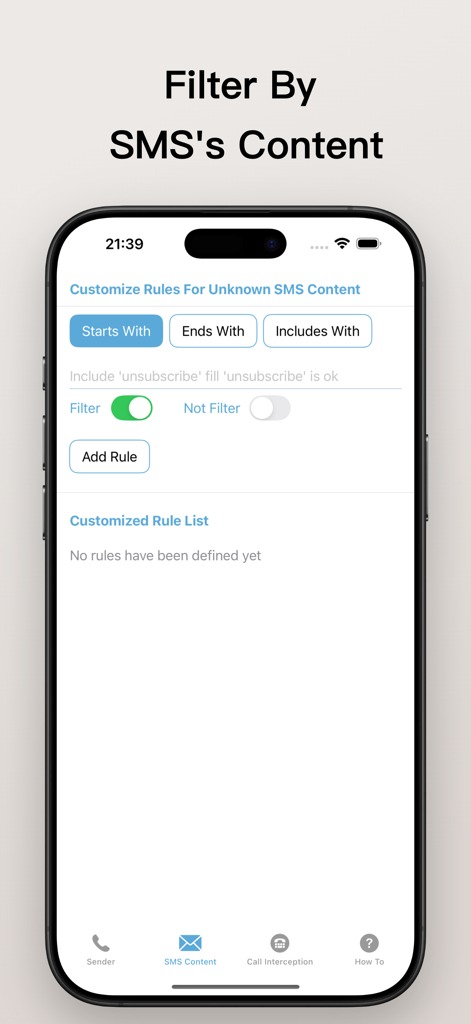
Quiet - Filter Spam SMS & Call - Interface of the Quiet app showing how to create custom rules to filter spam SMS based on message content keywords
Interface of the Quiet app showing how to create custom rules to filter spam SMS based on message content keywords

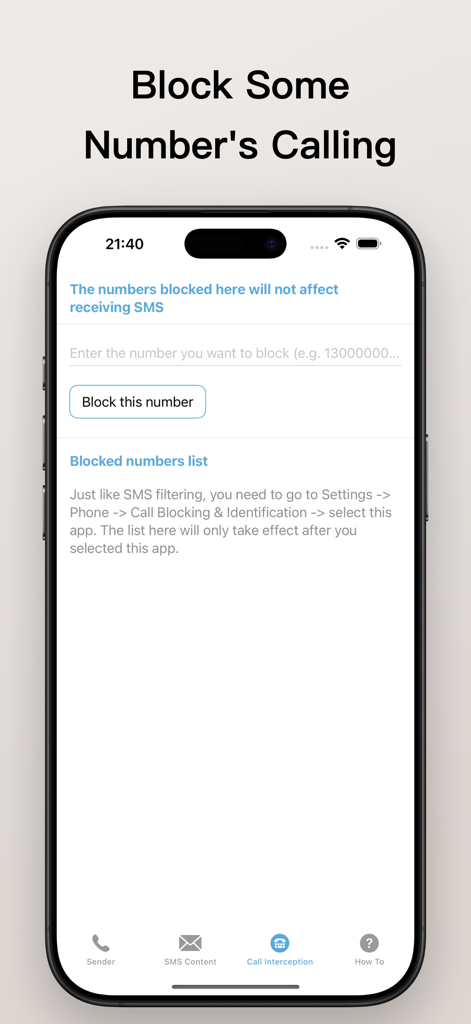
Quiet - Filter Spam SMS & Call - Interface of Quiet app showing the feature to block specific phone numbers from calling while still allowing SMS.
Interface of Quiet app showing the feature to block specific phone numbers from calling while still allowing SMS.

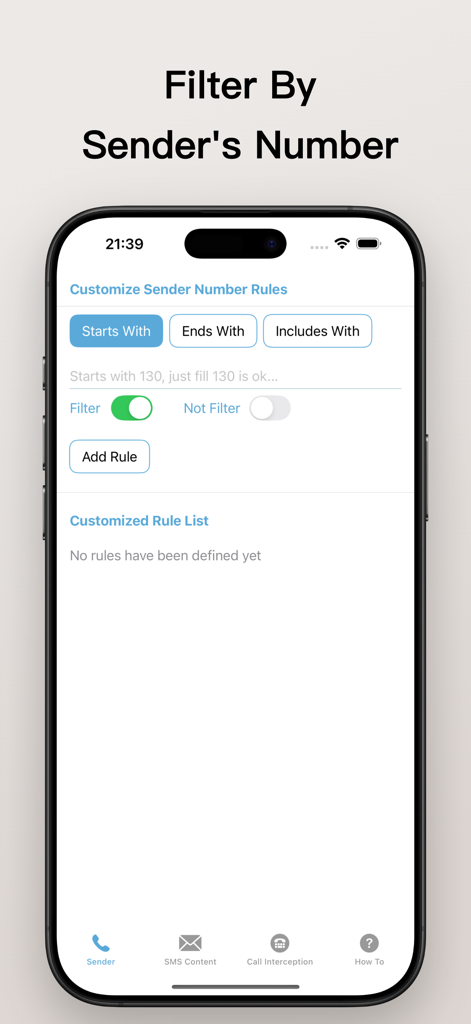
Quiet - Filter Spam SMS & Call - The sender number rule customization screen in the Quiet app showing options to filter by starts with ends with or includes digits.

The sender number rule customization screen in the Quiet app showing options to filter by starts with ends with or includes digits.

Description

Do you know what offline mode without internet connection means? This means that your data belongs only to you and exists only on your device. No one else can get any of your data because the data cannot be transmitted. We believe that information such as text messages and phone calls should be considered highly private, so there should be no servers for any purpose or form. Even if it claims that AI big data requires it, we should not be careless and allow the data to collect our information as so-called sample data. It is with this in mind that the developers decided to abandon all AI models. What you will get is 100% data security. Your data will only belong to you and will not be transmitted in any form. The SMS filtering rules and operating mechanism are as follows: When a text message is about to arrive at your phone, it will first enter the system plug-in, here is Quiet, and start filtering according to the preset rules. If a certain rule is matched, such as the text message number contains a certain mobile phone number, or the text message content contains a specific word, such as "unsubscribe", the text message will be blocked. Note: Blocked text messages will not disturb you in the form of notifications. They will silently enter the spam message category. Even in the spam message category, you can still see all the text message contents. The developer has personally tested that this method can block almost all marketing text messages because their content is so characteristic that with just a little refinement, characteristic words such as "unsubscribe" can be found. The entire SMS filtering process does not require the Internet. As for call interception, it works like this: When a call comes into your phone, the system will first determine whether the number has been blacklisted by you. If it is not on the blacklist, it will proceed to the next step. The next step is to call the system plug-in, here it is Quiet. It is allowed to enable multiple plug-ins, and the interception judgment will be made in order. When adding a number to the blocking list, you don't need to enter the international area code, just enter the number. I have personally tested it and successfully blocked the test number without entering the area code. Only if the number is not in the blocking list can it successfully dial into your phone. What is commendable is that the phone numbers added to the blocking list will not affect the reception of text messages from these numbers. Careful students may have discovered how important this feature is. For some numbers, if you block them, you will completely lose contact with them. This is unacceptable because these numbers are very important, but at the same time you don’t want to be harassed by their marketing calls. At this time, add them to the blocked number list, and your world will be much quieter from then on. Don't worry, if they can't find you by phone when they encounter critical information, they will definitely send you a text message, and you can still receive the text message. You will not fail to receive text messages from that number just because you blocked the phone number. This is a better operation than blacklisting the phone number. Although Quiet spam message filtering is simple, it is safe and reliable. It can meet your rule requirements without any additional operations. Choosing Quiet will give you peace of mind!

Download

Download on App Store

This page is not an official page of the app or its developer, but an independent editorial publication created for informational and commentary purposes. Unless expressly stated otherwise, neither the app nor its developer is affiliated with, endorsed by, sponsored by, authorized by, or otherwise officially connected with MWM, Apple, Google Play, the app publisher, or the app's developer, and nothing on this page implies that the app was developed using MWM's services. Any trademarks, logos, screenshots, and other content remain the property of their respective owners.