
This page is not an official page of the app or its developer, but an independent editorial publication created for informational and commentary purposes. Unless expressly stated otherwise, neither the app nor its developer is affiliated with, endorsed by, sponsored by, authorized by, or otherwise officially connected with MWM, Apple, Google Play, the app publisher, or the app's developer, and nothing on this page implies that the app was developed using MWM's services. Any trademarks, logos, screenshots, and other content remain the property of their respective owners.

RoughAnimator - animation app
The animator's go-to for frame-by-frame creativity. Powerful enough for professionals, simple enough for beginners, and perfectly designed for iPad and Apple Pencil.
Downloads
552K+User Rating
Total Ratings
2K+Publisher
Category
Graphics & DesignLocales
1Latest Version
4.21Size
31.7 MBFirst Released
Jan 21, 2015Animate Your Vision, Frame by Frame
The power of a professional animation studio in a mobile-first interface. Designed by animators to give you total control over every line, movement, and timing.
Natural Hand-Drawn Feel
Unlock your creativity with unlimited layers and advanced onion skinning. Built to feel as responsive as paper with the precision of the Apple Pencil.
Lip-Sync & Rotoscoping
Bring characters to life by importing audio for precise timing or use video references for fluid, realistic motion with rotoscoping tools.
Frequently Asked Questions
Everything you need to know about RoughAnimator - animation app
What is the RoughAnimator app?
RoughAnimator is a fully featured hand-drawn animation application designed for iPad. It supports traditional frame-by-frame animation, catering to both beginners and professional animators for creating detailed projects.
Does the RoughAnimator animation app support onion skinning?
Yes, the RoughAnimator app includes onion skinning as a core feature. This functionality assists animators by displaying semi-transparent previous and next frames, streamlining the frame-by-frame drawing process.
What key animation features are included in RoughAnimator?
RoughAnimator provides a timeline with unlimited layers, adjustable drawing exposure, and custom brushes. It also features preview playback, timeline scrubbing, and controls for framerate and resolution, supporting detailed animation workflows.
Can RoughAnimator import audio or video, and what are its export options?
Yes, RoughAnimator handles various media types. It imports audio for lip syncing and video for rotoscoping. Users can export finished animations to Quicktime video, GIF, or as an image sequence.
Is RoughAnimator compatible with Apple Pencil?
Yes, RoughAnimator is compatible with Apple Pencil for drawing. It also extends support to Logitech Crayon, providing users with responsive and precise input options for their animation work.
Can RoughAnimator projects be imported into Adobe Flash or After Effects?
Yes, RoughAnimator projects are compatible with other professional animation software. They can be imported into Adobe Flash/Animate, After Effects, and Toon Boom Harmony for advanced editing and integration.
On which devices is the RoughAnimator app available?
The RoughAnimator animation app is primarily available on iPad. Additionally, it is offered as a desktop application, allowing animators flexibility to work on their projects across different platforms.
Does the RoughAnimator app offer brush pressure sensitivity?
Yes, the RoughAnimator app supports pressure sensitivity for brushes. This feature is enabled within the 'Tool options' panel, allowing animators to create varied line weights and styles based on stylus pressure.
The following screenshots and description are sourced directly from the app's official store listing and are the property of the app developer.
App Store
Screenshots
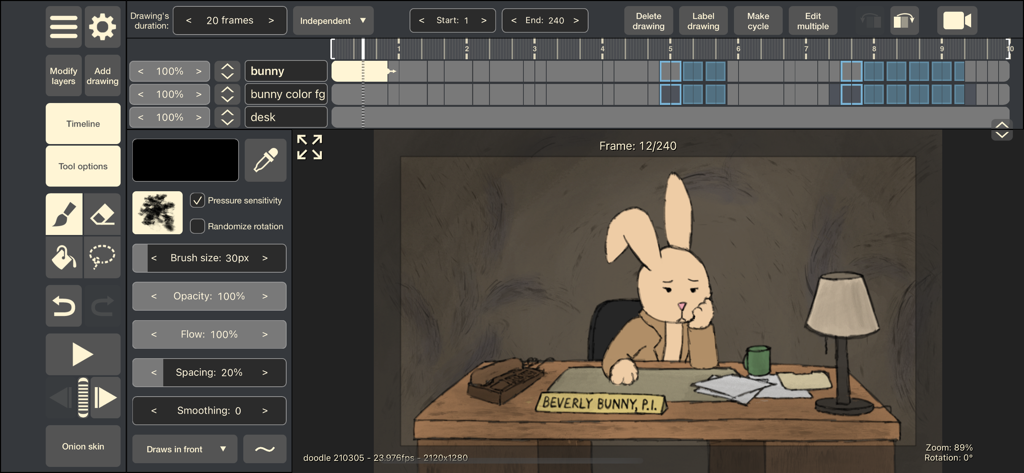
Interface of the RoughAnimator animation app featuring a timeline and a hand-drawn rabbit character.
Description
Download
More Like This
Apps with similar features and user experience





This page is not an official page of the app or its developer, but an independent editorial publication created for informational and commentary purposes. Unless expressly stated otherwise, neither the app nor its developer is affiliated with, endorsed by, sponsored by, authorized by, or otherwise officially connected with MWM, Apple, Google Play, the app publisher, or the app's developer, and nothing on this page implies that the app was developed using MWM's services. Any trademarks, logos, screenshots, and other content remain the property of their respective owners.