
This page is not an official page of the app or its developer, but an independent editorial publication created for informational and commentary purposes. Unless expressly stated otherwise, neither the app nor its developer is affiliated with, endorsed by, sponsored by, authorized by, or otherwise officially connected with MWM, Apple, Google Play, the app publisher, or the app's developer, and nothing on this page implies that the app was developed using MWM's services. Any trademarks, logos, screenshots, and other content remain the property of their respective owners.


ShootingPlus V3
Mobile gaming just got serious. This app turns your phone into a precision gaming rig, giving competitive players the edge they demand.
Downloads
1M+User Rating
Total Ratings
4.1KPublisher
Category
UtilitiesLocales
17Latest Version
3.1.380Size
58.4 MBFirst Released
Dec 21, 2018Evaluating essential functionalities for competitive mobile gaming advantage.
Core Analytical Features of ShootingPlus V3
Keyboard & Mouse Conversion
This tool features an essential function for converting keyboard and mouse inputs, enabling PC-style controls on mobile devices, which is a critical advantage for accuracy and quick reactions in FPS and MOBA games.
Gamepad Integration
The app provides robust support for connecting various gamepads, offering a console-like control scheme that significantly enhances precision and responsiveness in competitive mobile titles.
Seamless Bluetooth Peripheral Management
It allows users to efficiently manage and connect external Bluetooth peripherals, streamlining the setup process for their preferred gaming hardware.
Dedicated iOS Mode Support
The app ensures compatibility with iOS devices by guiding users through specific 'iOS mode' activation for their peripherals, broadening access to a significant segment of the mobile gaming market.
Frequently Asked Questions
Everything you need to know about ShootingPlus V3
What is ShootingPlus V3?
ShootingPlus V3 is a Bluetooth tool that functions as a gamepad, keyboard, and mouse converter for mobile gaming. It allows users to connect various input devices to their mobile phone.
How do I connect a keyboard and mouse converter to ShootingPlus V3?
To connect a keyboard and mouse converter, first cancel Bluetooth pairing, disconnect and reconnect power, then press Left Ctrl + 2 (on W button) to switch to iOS mode, connect Bluetooth, and finally open the ShootingPlus V3 app.
How do I connect a gamepad to ShootingPlus V3?
To connect a gamepad, cancel Bluetooth pairing, turn off the gamepad, then long-press Y + Home to power it on in iOS mode. After that, connect to Bluetooth and open the ShootingPlus V3 app.
Does ShootingPlus V3 support iOS devices?
Yes, ShootingPlus V3 supports iOS devices. Both keyboard/mouse converters and gamepads require switching to an iOS mode before connecting via Bluetooth for proper functionality.
Can I customize controls with ShootingPlus V3?
Yes, ShootingPlus V3 allows extensive control customization. Users can map keyboard, mouse, and gamepad buttons, adjust button sizes, transparency, and configure recoil settings for games.
What games are compatible with ShootingPlus V3?
ShootingPlus V3 is compatible with a variety of mobile games. The app displays game icons for popular titles such as League of Legends Mobile, Peace Elite, Honor of Kings, and Call of Duty Mobile.
Does ShootingPlus V3 offer recoil adjustment features?
Yes, ShootingPlus V3 offers recoil adjustment features. Users can access "Recoil Settings" to fine-tune recoil amplitude using sliders for specific functions like F4, F5, F6, and F7.
How can I get support for ShootingPlus V3?
For any questions regarding ShootingPlus V3, users can contact the support team directly via email at shootingplus@shootingplus.com.cn.
The following screenshots and description are sourced directly from the app's official store listing and are the property of the app developer.
App Store
Screenshots
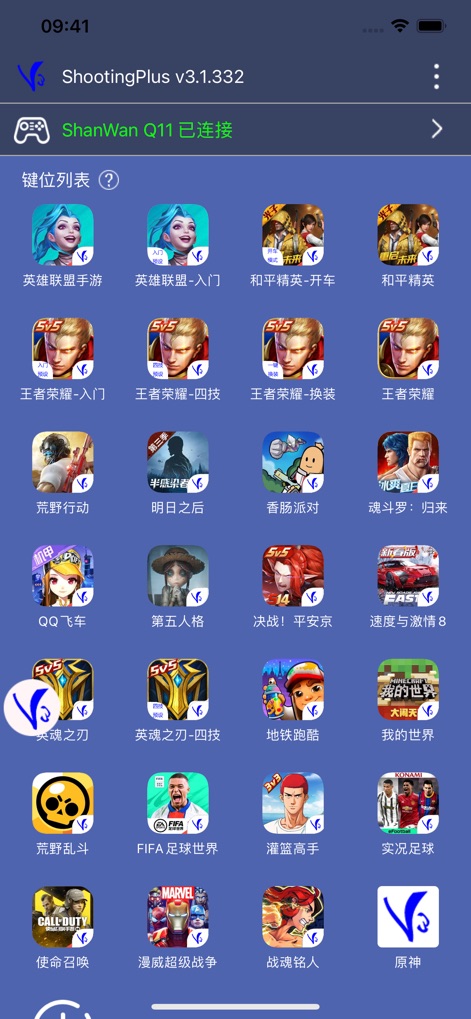
Explore the comprehensive game library interface and view the status of connected Bluetooth devices like the ShanWan Q11 for seamless setup.
Game Library Hub

Discover the advanced key mapping interface, allowing users to customize button positions and adjust their size and transparency for optimal gameplay.
Precision Key Mapping

Delve into the detailed recoil control settings, where users can fine-tune 'pressure amplitude' sliders and utilize options to save or restore default configurations.
Recoil Control Customization
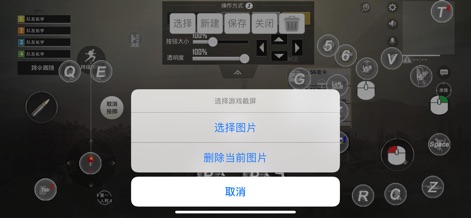
Manage your custom mapping backgrounds with ease, offering options to select new pictures or delete the current background for a personalized visual experience.
Background Management

Visualize the intuitive grid-based layout for precise control placement, showcasing essential action buttons like Q, E, R and numerical hotkeys.
Grid Mapping Precision
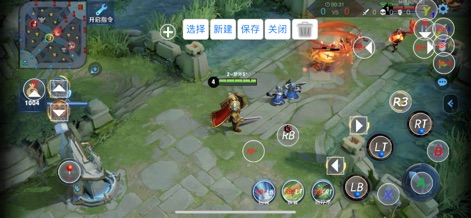
Experience seamless gamepad integration within popular MOBA titles, with on-screen representations of controller buttons like R3 and LT for intuitive command execution.
Gamepad Integration
Description
Download
More Like This
Apps with similar features and user experience
Game Controller Tester Gamepad
Emoji Apps GmbH

8BitDo Ultimate Software
SHENZHEN 8BITDO TECH CO., LTD.

GameSir
Guangzhou Chicken Run Network Technology Co.,Ltd.

KeyLinker
ShenZhen ZhiXu Technology Co., Ltd

Flydigi Game Center
Shanghai Flydigi Electronics Tech Co., Ltd.

墨将助手
Shenzhen Warsong Technology Co., Ltd.
This page is not an official page of the app or its developer, but an independent editorial publication created for informational and commentary purposes. Unless expressly stated otherwise, neither the app nor its developer is affiliated with, endorsed by, sponsored by, authorized by, or otherwise officially connected with MWM, Apple, Google Play, the app publisher, or the app's developer, and nothing on this page implies that the app was developed using MWM's services. Any trademarks, logos, screenshots, and other content remain the property of their respective owners.