思联三维看图-CAD看图纸
思联三维看图-CAD看图纸
Download on App Store

This page is not an official page of the app or its developer, but an independent editorial publication created for informational and commentary purposes. Unless expressly stated otherwise, neither the app nor its developer is affiliated with, endorsed by, sponsored by, authorized by, or otherwise officially connected with MWM, Apple, Google Play, the app publisher, or the app's developer, and nothing on this page implies that the app was developed using MWM's services. Any trademarks, logos, screenshots, and other content remain the property of their respective owners.


Logo of 思联三维看图-CAD看图纸
Download on App Store

思联三维看图-CAD看图纸

View, measure, and share complex 3D models and 2D drawings on the go. Seamlessly support SolidWorks, CATIA, NX, and more—no expensive CAD workstations required.

Key Figures

Downloads

0

User Rating

4.7/5

Total Ratings

0

Publisher

Nanjing Wiss Software Co., Ltd.

Category

Utilities

Locales

2

Latest Version

8.0.0

Size

102.0 MB

First Released

Jun 19, 2020
Features

Your Workspace, Anywhere: Professional 3D Visualization

Access, analyze, and share complex 3D models and 2D drawings directly from your mobile device. No high-end workstation required.

Universal Format Support

Eliminate format friction. Instantly open and convert files from SolidWorks, CATIA, NX, STEP, and DWG without specialized software.

Precision Field Tools

Take accurate 3D measurements and explode complex assemblies on-site to verify designs and guide assembly without returning to your desk.

The following screenshots and description are sourced directly from the app's official store listing and are the property of the app developer.

App Store

Screenshots
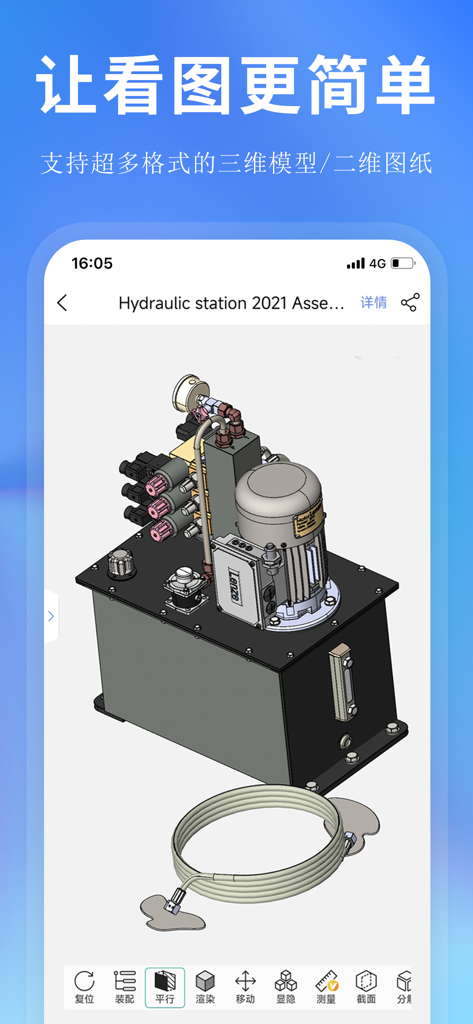
思联三维看图-CAD看图纸 - Silian 3D Viewer app displaying a 3D mechanical assembly of a hydraulic station on a smartphone
Silian 3D Viewer app displaying a 3D mechanical assembly of a hydraulic station on a smartphone

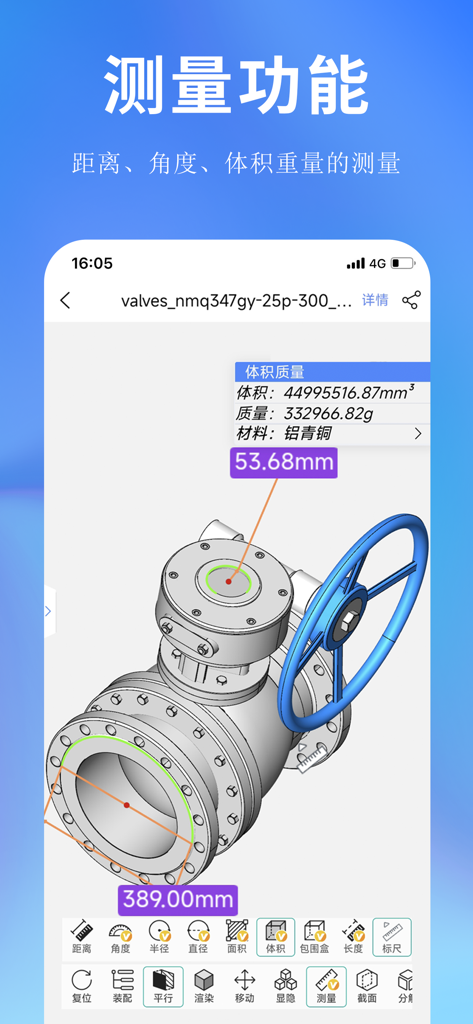
思联三维看图-CAD看图纸 - Silian 3D Viewer mobile app interface showing a 3D valve model with measurement callouts for distance and volume
Silian 3D Viewer mobile app interface showing a 3D valve model with measurement callouts for distance and volume

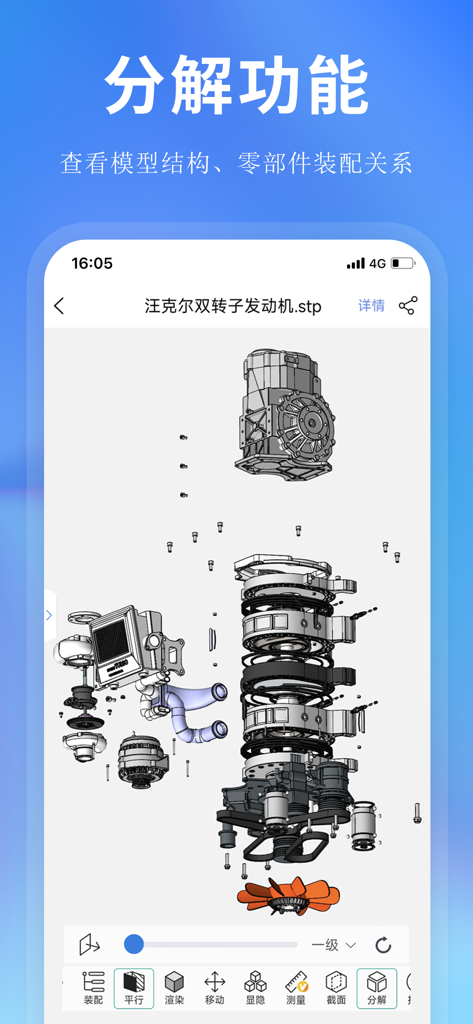
思联三维看图-CAD看图纸 - Silian 3D Viewer mobile app interface displaying an exploded view of a 3D mechanical engine model

Silian 3D Viewer mobile app interface displaying an exploded view of a 3D mechanical engine model
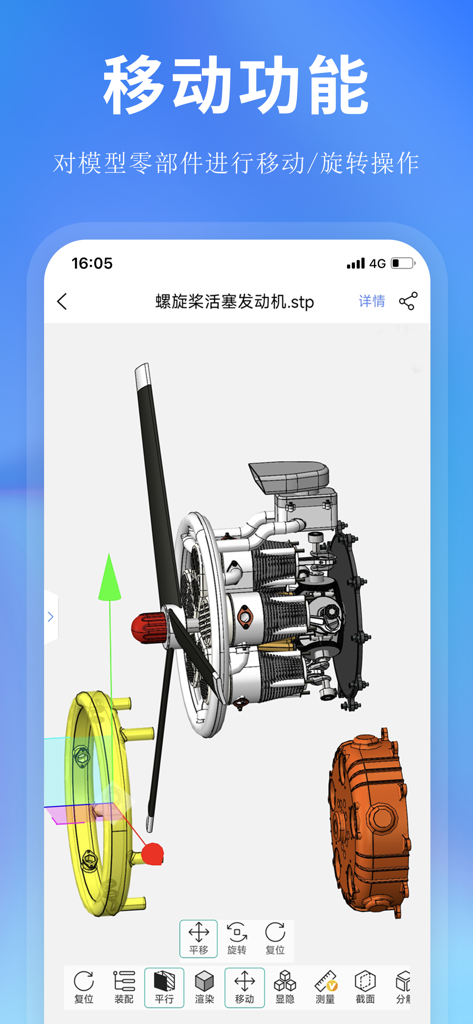
思联三维看图-CAD看图纸 - A mobile app interface of Silian 3D Viewer showing a 3D engine model being manipulated with move and rotate tools

A mobile app interface of Silian 3D Viewer showing a 3D engine model being manipulated with move and rotate tools

思联三维看图-CAD看图纸 - A list of trending 3D models for download in the Silian 3D Viewer app model library

A list of trending 3D models for download in the Silian 3D Viewer app model library

Description

Silian 3D Viewer is a light-weight mobile phone for viewing drawings, sharing drawings, and team collaboration. It supports 3D visualization functions such as online 3D browsing of 3D drawings, 3D measurement, and 3D model decomposition. Support mobile APP, tablet, applet, web terminal, PC terminal and various application terminal data sharing, and realize drawing on the whole platform. special function: 1. Lightweight 3D model browsing: No need to install CAD software, you can quickly browse 3D models such as JT, UG, CATIA, Pro/E, STEP, etc. on your mobile phone, support 3D model assembly structure viewing, 3D measurement, 3D part manipulation, 3D model decomposition, 3D view saving, Add annotations and other 3d visualization features. 2. Supports 3d models in multiple formats: Office(*.doc;*.docx;*.xsl;*.xslx;*.ppt;*.pptx); PDF(*.pdf); 3D model in CATIA V5 (*CATPart;*.CATProduct) format; IGES(*.igs; *.iges) format 3D model; JT(*.jt) format 3D model; STEP(*.stp ;*.step) format 3D model; Parametric (*.prt;*.prt.*;*.asm;*.asm.*) format 3D model; SolidWorks (*.sldprt;*.sldasm) format 3D model; 3DMXL (*.3dmxl) format 3D model; 3D model in UG/NX(*.prt) format; 3D model in WisViewer/WisMockup (*.lite) format; 3D model in compressed package (*.zip) format. 3. Support 3D model online format conversion: Support mainstream 3D model format conversion, such as mutual conversion between NX, Proe, Catia, SolidWorks, IGES formats. 4. Browsing 2D drawings: You can view DWG, DXF files, browse dwg, dxf files on your mobile phone. 5. Encrypted sharing, small program code Encrypted sharing: You can set a limited time limit for the sharing link of the shared file, set the extraction code of the file, and make the sharing more secure. Share applet code: Generate the applet code of the model, scan it on WeChat on your mobile phone, and you can browse the model. 6. Mobile phone to view 3D drawings more conveniently: For the 3D drawings received in WeChat, QQ and DingTalk, you can view the 3D drawings by opening the association. 7. Support to set the display precision of 3D model: The display precision of the model can be set according to the size of the model, low, medium and high precision. 8. Project collaborative office: Support the creation of internal projects, share files in projects among members, and support multi-person and multi-terminal online real-time editing of documents. 9. Support a variety of application terminals: It supports the use of mobile APP, tablet, WeChat applet, web page and PC, realizes multi-terminal data synchronization, meets the needs of engineers to view 3D models in various scenarios, and meets the needs of users to view 3D models on all platforms. 【contact us】 Customer service phone: 400-0306-871 18005183173 (same as WeChat) Customer Service QQ: 3548443184 Company official website: https://www.wis3d.com

Download

Download on App Store

This page is not an official page of the app or its developer, but an independent editorial publication created for informational and commentary purposes. Unless expressly stated otherwise, neither the app nor its developer is affiliated with, endorsed by, sponsored by, authorized by, or otherwise officially connected with MWM, Apple, Google Play, the app publisher, or the app's developer, and nothing on this page implies that the app was developed using MWM's services. Any trademarks, logos, screenshots, and other content remain the property of their respective owners.