
This page is not an official page of the app or its developer, but an independent editorial publication created for informational and commentary purposes. Unless expressly stated otherwise, neither the app nor its developer is affiliated with, endorsed by, sponsored by, authorized by, or otherwise officially connected with MWM, Apple, Google Play, the app publisher, or the app's developer, and nothing on this page implies that the app was developed using MWM's services. Any trademarks, logos, screenshots, and other content remain the property of their respective owners.


Slideshow Maker & Music Video
Stop settling for static photos. This app hands you the power to transform them into dynamic, shareable stories.
Downloads
2.5M+User Rating
Total Ratings
24.8KPublisher
Category
Photo & VideoLocales
1Latest Version
4.1.2Size
104.2 MBFirst Released
Nov 29, 2013An evaluation of core functionalities designed for quick, personalized content creation and sharing.
Key Features Analysis: Slideshow Maker & Music Video
High-Quality Export & Sharing
The app allows users to export slideshows in high resolution and up to 60 FPS, save projects for later editing, and supports various aspect ratios for versatile sharing across platforms.
Instant Slideshow Creation
The app allows users to combine photos, videos, and background music to quickly generate personalized slideshow videos in minutes.
Dynamic Audio Control
The app provides a dedicated audio timeline for adding background music from a library or iTunes, recording voiceovers, adjusting volume, trimming tracks, and precisely positioning audio within the slideshow.
Intuitive Video Timeline
This tool features a user-friendly video timeline that enables effortless management of slides, including editing, deleting, inserting new media, re-ordering, and customizing transitions between clips.
Customizable Text Overlay
This tool features a text timeline that allows users to add text to videos, customize fonts, colors, styles, and animations, and control the text's duration and appearance time.
Advanced Slide Customization
It allows users to control the duration of photo slides, trim and adjust playback speed for video slides, and apply dynamic start-to-end animations for images.
Frequently Asked Questions
Everything you need to know about Slideshow Maker & Music Video
What is PicMusic: Slideshow Maker?
PicMusic: Slideshow Maker combines photos, videos, and background music to create unique slideshow videos. The app offers easy-to-use editing tools for quick creation and customization.
How can I create a slideshow video using PicMusic?
Yes, you can create a slideshow by selecting photos and/or videos. PicMusic automatically generates a slideshow which you can then export or edit using various tools.
Can I add music to my slideshows in PicMusic?
Yes, PicMusic allows adding background music, loading songs from iTunes Library, or recording your voice. You can also trim the song, adjust its volume, and set its play position.
What video editing options are available for slides in PicMusic?
PicMusic offers slide editing with duration control for photos. Video slides can be trimmed and their playing speed adjusted to 0.5x, 1x, 2x, or 4x.
Can I add text to videos with the PicMusic app?
Yes, PicMusic allows adding text, customizing its font, color, and styles. You can animate text and manage its duration within the slideshow timeline, similar to audio items.
What are the export options for slideshows created with PicMusic?
PicMusic slideshows export in high resolution and up to 60 FPS. The app supports multiple aspect ratios for sharing, including 1:1, 16:9, 9:16, 4:3, and 3:4.
What are the subscription options for Pic Music Pro?
Pic Music Pro offers two subscription options: $5.99 Weekly and $29.99 Annually. Prices may vary depending on the user's location.
Does a Pic Music Pro subscription automatically renew?
Yes, Pic Music Pro subscriptions automatically renew. Auto-renewal must be turned off at least 24 hours before the current period ends to avoid being charged.
How do I cancel my Pic Music Pro subscription?
You can manage and cancel your Pic Music Pro subscription by accessing 'Manage App Subscriptions' within your iTunes Account settings.
Where can I find the privacy policy for PicMusic: Slideshow Maker?
The Privacy Policy for PicMusic: Slideshow Maker is available on the app's official terms page, specifically at http://typimage.com/terms.html#privacy.
Does PicMusic offer templates for creating slideshows?
Yes, PicMusic offers various templates for quick slideshow creation, including themes for birthdays, celebrations, and anniversaries. These templates are fully customizable.
Can I create video collages using PicMusic: Slideshow Maker?
Yes, PicMusic functions as a video collage maker. It supports 'Crossover collages', allowing users to arrange multiple images within their video projects effectively.
The following screenshots and description are sourced directly from the app's official store listing and are the property of the app developer.
App Store
Screenshots

Users can effortlessly initiate video projects by tapping on project thumbnails and watching the immediate playback preview.
Start New Projects

This tool offers a comprehensive 'Choose Template' interface, providing diverse template categories to kickstart any creative vision.
Diverse Templates Await
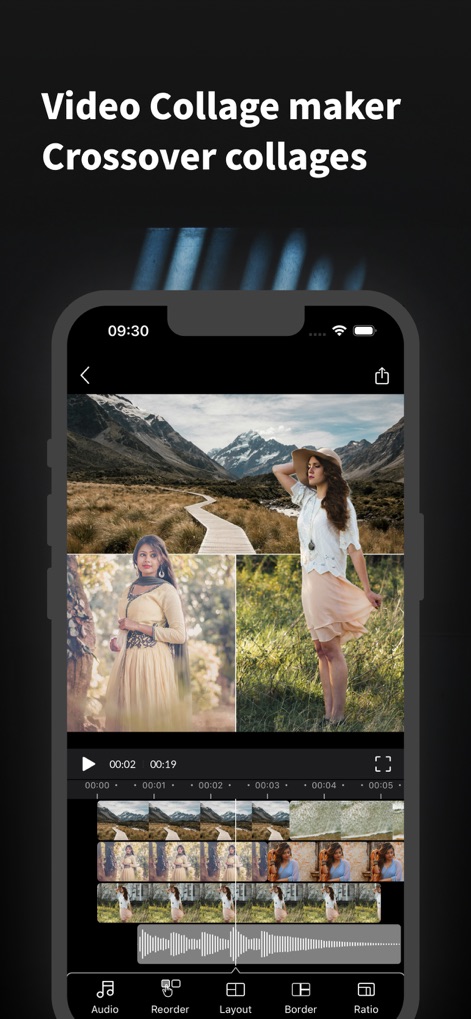
Discover powerful video collage capabilities with a multi-panel collage display and a detailed video timeline for precise editing.
Video Collage Mastery

The app facilitates rapid content creation, showcasing a playback timeline and individual slide previews for streamlined editing.
Quick Custom Creation

Enhance visual flow using the transition selection panel and interactive transition icons positioned between video segments.
Smooth Transitions Defined

Effortlessly integrate audio with a visual audio waveform timeline and a precise volume control slider for perfect sound balance.
Mastering Audio Tracks

Add expressive text overlays directly onto videos, utilizing customizable text styles and animation options for dynamic messaging.
Dynamic Text Overlays

Optimize videos for any platform by selecting from a range of ratio selection options, with a live preview of canvas sizes.
Flexible Canvas Ratios
Description
Download
More Like This
Top-ranked apps in the same category

CapCut: Photo & Video Editor
BYTEDANCE PTE. LTD.

Instagram, Inc.

YouTube
Google LLC

Canva: AI Photo & Video Editor
Canva Pty Ltd

Snapchat
Snap, Inc.

快手
Beijing Kwai Technology Co., Ltd.

Edits: Video Editor
Instagram, Inc.

Meitu- AI Photo & Video Editor
Xiamen Meitu Technology Co., Ltd.

Google Photos: Backup & Edit
Google LLC
This page is not an official page of the app or its developer, but an independent editorial publication created for informational and commentary purposes. Unless expressly stated otherwise, neither the app nor its developer is affiliated with, endorsed by, sponsored by, authorized by, or otherwise officially connected with MWM, Apple, Google Play, the app publisher, or the app's developer, and nothing on this page implies that the app was developed using MWM's services. Any trademarks, logos, screenshots, and other content remain the property of their respective owners.