
This page is not an official page of the app or its developer, but an independent editorial publication created for informational and commentary purposes. Unless expressly stated otherwise, neither the app nor its developer is affiliated with, endorsed by, sponsored by, authorized by, or otherwise officially connected with MWM, Apple, Google Play, the app publisher, or the app's developer, and nothing on this page implies that the app was developed using MWM's services. Any trademarks, logos, screenshots, and other content remain the property of their respective owners.


Slideshow Maker w Music
Forget clunky editing. This app offers the power to transform still photos into dynamic, musical narratives, instantly.
Downloads
2.5M+User Rating
Total Ratings
2.8KPublisher
Category
Photo & VideoLocales
1Latest Version
6.5Size
104.9 MBFirst Released
Jun 23, 2016An evaluation of core functionalities tailored for casual content creators seeking engaging, personalized musical photo slideshows for social media.
Key Features Analysis: Slideshow Maker w Music
Personalized Music Integration
The app allows users to import their own music, providing ultimate personalization to evoke specific emotions and create truly unique auditory experiences for their slideshows.
Integrated Voice-over Narration
It allows users to record and add their own voice-overs, enriching the storytelling with personal commentary, explanations, or emotional messages.
Curated Premium Soundtrack Library
This tool features a selection of premium music tracks, enabling users to easily choose high-quality, professional-sounding audio to complement their visual stories without external sourcing.
Precise Music Start Point Control
The app offers the ability to precisely adjust the starting position of music tracks, ensuring perfect synchronization with the visual flow and enhancing the overall aesthetic polish of the slideshow.
Diverse Thematic Templates
It provides a variety of pre-designed themes, offering casual creators a quick and easy way to apply a consistent and aesthetically pleasing visual style to their slideshows.
Multi-Platform Aspect Ratio Options
This tool allows users to select various output aspect ratios, ensuring their slideshows are perfectly optimized for sharing across different social media platforms like Instagram, TikTok, or YouTube.
Effortless Photo Sequence Management
The app enables users to easily reorder photos via drag-and-drop, giving them full control over the narrative flow and sequencing of their visual story.
Dynamic Pacing Control with Presets
It features adjustable speed presets, allowing users to quickly set the pace of their slideshows to match the mood or desired tempo, from fast-paced energetic to slow and reflective.
Descriptive Photo Captioning
The app provides the functionality to add descriptive captions to individual slides, enhancing storytelling and offering additional context or personal messages for viewers.
Extended Photo Inclusion Limit
This tool, with a subscription, significantly increases the number of photos that can be included in a single slideshow (up to 100), enabling more comprehensive and detailed visual narratives.
The following screenshots and description are sourced directly from the app's official store listing and are the property of the app developer.
App Store
Screenshots

Discover how the app streamlines creation with an easy-to-use navigation bar and visually appealing theme preview cards.
Intuitive Theme Selection

This tool empowers users to personalize their slideshows with custom voiceovers, clearly displayed through the intuitive waveform and dedicated record button.
Narrate Your Story

Elevate visual narratives by adding custom text captions directly onto individual photos, easily edited via the prominent text input fields and 'T' icon.
Personalized Photo Captions
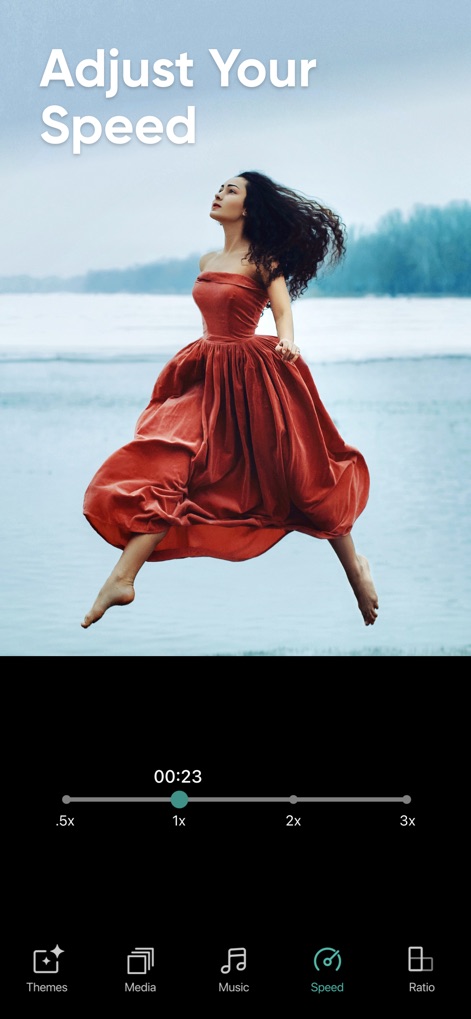
Control the pace of your slideshow with precision, utilizing the intuitive speed adjustment slider and quick-select presets for perfect timing.
Dynamic Speed Control

Prepare your creations for any platform by selecting the ideal aspect ratio, choosing from various ratio selection buttons and clearly labeled options.
Flexible Output Ratios

Distribute your finished slideshows seamlessly across your favorite platforms, leveraging the 'Share Anywhere' feature and diverse social media platform icons.
Effortless Social Sharing
Description
Download
More Like This
Top-ranked apps in the same category

CapCut: Photo & Video Editor
BYTEDANCE PTE. LTD.

Instagram, Inc.

YouTube
Google LLC

Canva: AI Photo & Video Editor
Canva Pty Ltd

Snapchat
Snap, Inc.

快手
Beijing Kwai Technology Co., Ltd.

Edits: Video Editor
Instagram, Inc.

Meitu- AI Photo & Video Editor
Xiamen Meitu Technology Co., Ltd.

Google Photos: Backup & Edit
Google LLC
This page is not an official page of the app or its developer, but an independent editorial publication created for informational and commentary purposes. Unless expressly stated otherwise, neither the app nor its developer is affiliated with, endorsed by, sponsored by, authorized by, or otherwise officially connected with MWM, Apple, Google Play, the app publisher, or the app's developer, and nothing on this page implies that the app was developed using MWM's services. Any trademarks, logos, screenshots, and other content remain the property of their respective owners.