
This page is not an official page of the app or its developer, but an independent editorial publication created for informational and commentary purposes. Unless expressly stated otherwise, neither the app nor its developer is affiliated with, endorsed by, sponsored by, authorized by, or otherwise officially connected with MWM, Apple, Google Play, the app publisher, or the app's developer, and nothing on this page implies that the app was developed using MWM's services. Any trademarks, logos, screenshots, and other content remain the property of their respective owners.

Smart Switch: Copy & Move Data
Device migration is a nightmare. This app turns data transfer into a non-event.
Downloads
100k+User Rating
Total Ratings
1.7KPublisher
Category
ProductivityLocales
22Latest Version
1.8Size
64.4 MBFirst Released
Aug 29, 2025Evaluating essential functionalities for seamless mobile data migration.
Analysis of 'Smart Switch: Copy & Move Data' Key Features
Direct Device-to-Device Transfer
The app facilitates direct data migration between two mobile devices, essential for users transitioning to a new smartphone without intermediary steps.
Cable-Free Data Migration
It allows users to transfer data wirelessly over Wi-Fi, removing the need for physical cables and enhancing user convenience during device transitions.
Comprehensive Data Type Support
This tool supports the transfer of various data types including photos, videos, contacts, and calendars, ensuring a complete migration of personal information.
Cloud-Independent Data Transfer
It enables direct transfers between devices, eliminating the reliance on cloud storage services and offering enhanced data privacy and control.
High-Speed & Secure Transfers
The app ensures rapid data transfer combined with encryption, providing both efficiency and protection for sensitive user information.
Intuitive User Interface
It features a clean and intuitive design, simplifying the data transfer process and ensuring a smooth user experience for all technical levels.
Frequently Asked Questions
Everything you need to know about Smart Switch: Copy & Move Data
What is Smart Switch: Copy & Move Data?
Smart Switch: Copy & Move Data is an app that facilitates secure and fast data transfer between devices. It helps users move photos, contacts, videos, and calendars wirelessly when upgrading phones or backing up files.
How does Smart Switch: Copy & Move Data transfer files?
Smart Switch: Copy & Move Data transfers files wirelessly using Wi-Fi. It connects devices over the same local network, eliminating the need for cables or cloud storage for data transfer.
What types of data can Smart Switch: Copy & Move Data transfer?
Smart Switch: Copy & Move Data can transfer multiple file types, including photos, videos, contacts, and calendars. The app supports comprehensive data migration between devices.
Is the data transfer with Smart Switch: Copy & Move Data secure?
Yes, data transfer with Smart Switch: Copy & Move Data is secure. The app features high-speed transfer with data encryption to ensure user privacy and protection of transferred files.
Does Smart Switch: Copy & Move Data require a subscription?
Yes, Smart Switch: Copy & Move Data requires a subscription. Payment is charged to the iTunes Account upon purchase, and subscriptions automatically renew unless turned off 24 hours prior to the next period.
How do I manage my subscription for Smart Switch: Copy & Move Data?
Users manage their subscription for Smart Switch: Copy & Move Data through their Account Settings after purchase. Auto-renewal can be turned off there at least 24-hours before the current period ends.
Can Smart Switch: Copy & Move Data transfer data between different phone operating systems?
Yes, Smart Switch: Copy & Move Data can transfer data between different phone operating systems. The app supports connections from an 'Old Phone' to an 'iPhone', indicating cross-platform capability like Android to iOS.
Is a cloud service needed to use Smart Switch: Copy & Move Data?
No, Smart Switch: Copy & Move Data does not require a cloud service. It transfers data directly between devices, ensuring that external storage is not necessary for the process.
The following screenshots and description are sourced directly from the app's official store listing and are the property of the app developer.
App Store
Screenshots

The app streamlines your transfer journey with clear 'Wi-Fi Transfer' options for sending or receiving and an accessible 'How to use' guide for immediate assistance.
Effortless Data Start

Users can quickly connect devices as the app displays a central Wi-Fi icon during 'Searching device' and lists available phones like 'iPhone 17' for pairing.
Seamless Device Discovery

This tool facilitates effortless cross-platform data migration, visibly indicating the transfer from 'Old Phone to iPhone 17' with an intuitive 'Transfer in progress' status bar showing real-time data flow.
Cross-Platform Migration
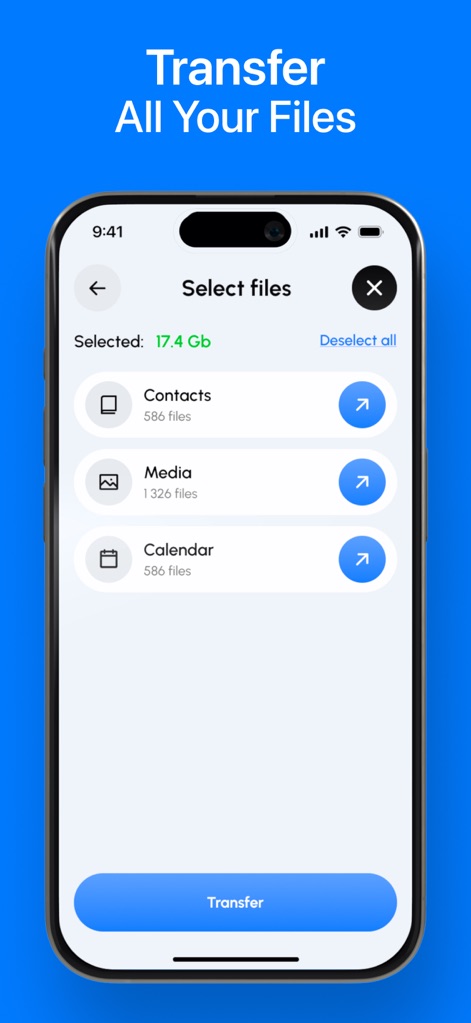
The app empowers users to customize transfers by presenting clearly categorized options like 'Contacts' and 'Media', alongside a summary of the 'Selected: 17.4 Gb' for precise control.
Custom Data Selection
Description
Download
More Like This
Apps with similar features and user experience

Data Transfer - Copy My Data
Simple Health Limited

互传 - 快速换机数据迁移智能助手
家呈 郭

Copy My Data - Smart Transfer
Red Sky Labs, SOCIEDAD LIMITADA
Smart Switch - Copy My Data
学斌 林
Copy My Data - Mobile Transfer
KHD Plaza LLC

Phone Clone - Smart Switch .
俊杰 刘

Smart Switch: Data Transfer
Zadore Tracy
手机同步传输-同步转移数据文件
冰 杜

Smart Switch - Phone Clone .
晓珍 胡
This page is not an official page of the app or its developer, but an independent editorial publication created for informational and commentary purposes. Unless expressly stated otherwise, neither the app nor its developer is affiliated with, endorsed by, sponsored by, authorized by, or otherwise officially connected with MWM, Apple, Google Play, the app publisher, or the app's developer, and nothing on this page implies that the app was developed using MWM's services. Any trademarks, logos, screenshots, and other content remain the property of their respective owners.