Solartelligent: PV Planner
Download on App Store

This page is not an official page of the app or its developer, but an independent editorial publication created for informational and commentary purposes. Unless expressly stated otherwise, neither the app nor its developer is affiliated with, endorsed by, sponsored by, authorized by, or otherwise officially connected with MWM, Apple, Google Play, the app publisher, or the app's developer, and nothing on this page implies that the app was developed using MWM's services. Any trademarks, logos, screenshots, and other content remain the property of their respective owners.

Logo of Solartelligent: PV Planner
Download on App Store

Solartelligent: PV Planner

Take control of your energy future with advanced AR shading simulations and detailed output predictions. Whether you are an independent contractor or a data-driven homeowner, get the professional insights needed to maximize your solar investment and achieve energy independence.

Key Figures

Downloads

3K+

User Rating

3.9/5

Total Ratings

0

Publisher

Thomas Moder

Category

Utilities

Locales

3

Latest Version

3.3

Size

13.7 MB

First Released

Jan 30, 2025
Features

Master Your Solar Potential

From high-precision AR shading analysis to detailed financial ROI projections, get the professional data you need to invest in solar with total confidence.

Real-Time AR Shading Analysis

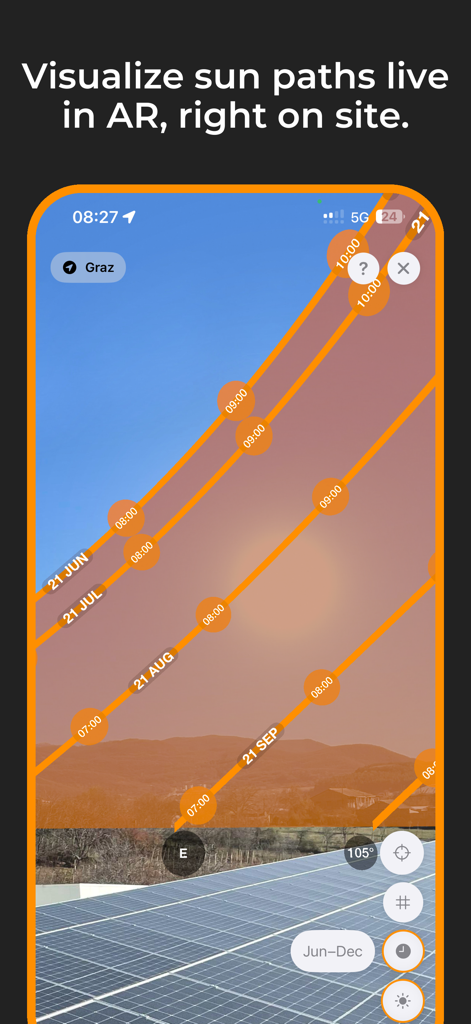
Use Augmented Reality to visualize sun paths and instantly detect shadows from trees or nearby structures, ensuring your panels are placed for maximum sunlight.

Data-Driven ROI Projections

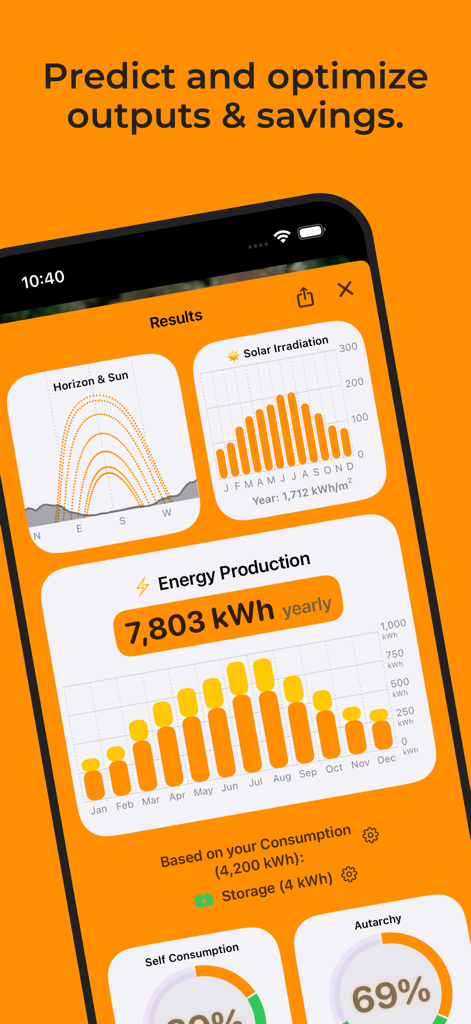
Stop guessing your savings. Calculate precise break-even times, lifetime revenue, and self-consumption rates based on your specific location and energy needs.

The following screenshots and description are sourced directly from the app's official store listing and are the property of the app developer.

App Store

Screenshots
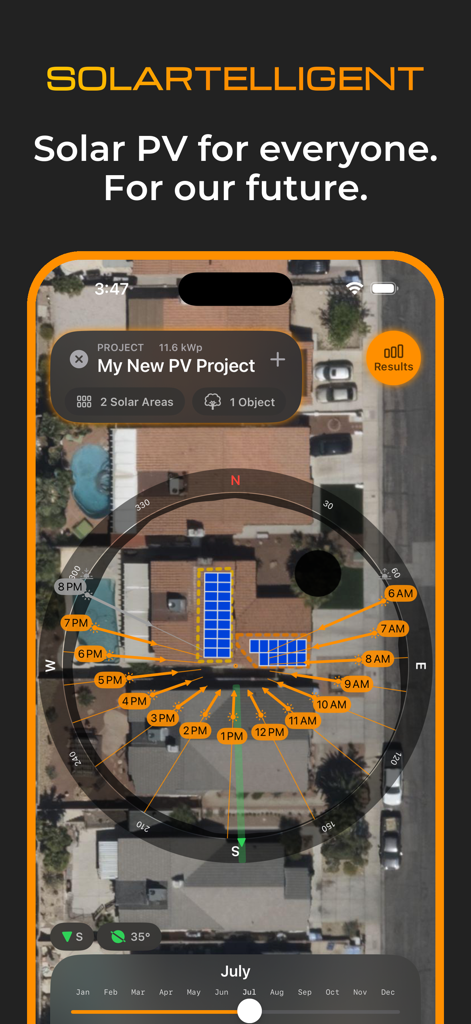
Solartelligent: PV Planner - Solartelligent app interface showing solar panel layout and sun path analysis on a residential rooftop satellite view
Solartelligent app interface showing solar panel layout and sun path analysis on a residential rooftop satellite view

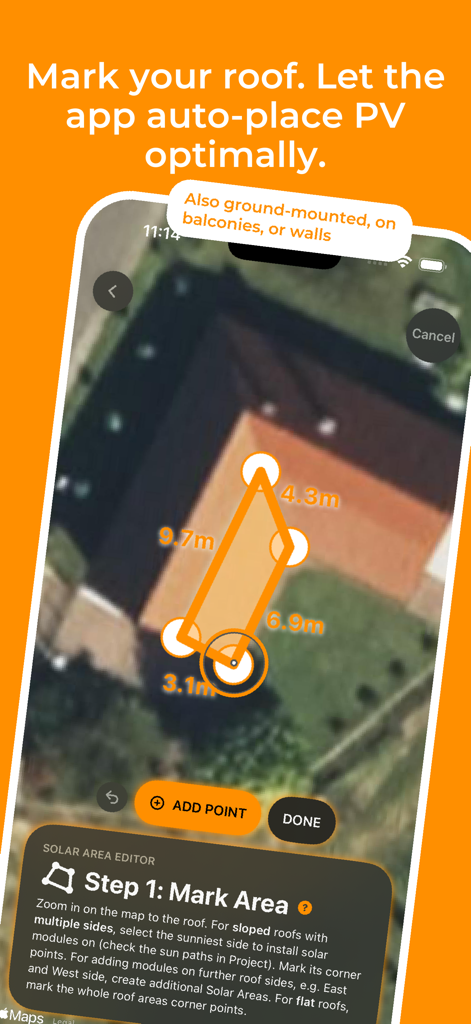
Solartelligent: PV Planner - Interface of the Solartelligent app showing a user marking a roof area for solar panels on a satellite map
Interface of the Solartelligent app showing a user marking a roof area for solar panels on a satellite map

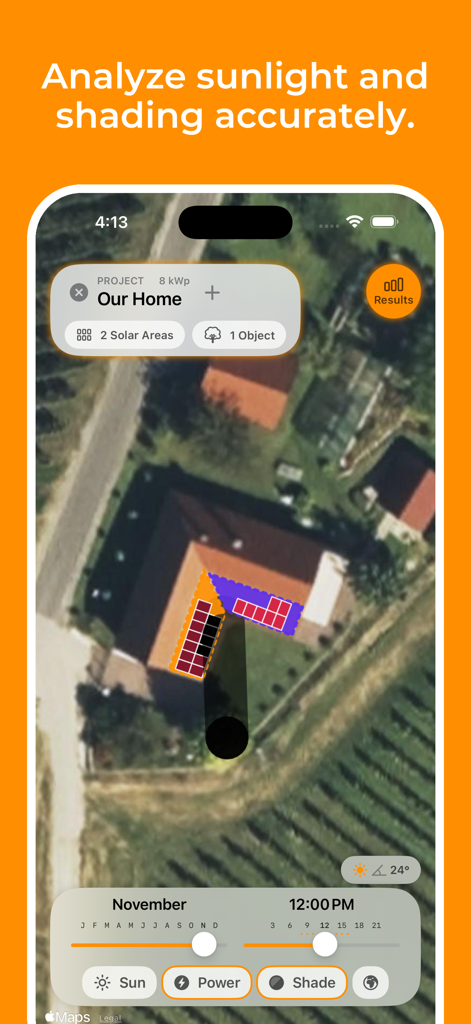
Solartelligent: PV Planner - Solartelligent PV Planner app interface showing solar panel mapping and shading simulation on a residential rooftop.
Solartelligent PV Planner app interface showing solar panel mapping and shading simulation on a residential rooftop.

Solartelligent: PV Planner - Augmented reality view showing sun paths over solar panels on a roof
Augmented reality view showing sun paths over solar panels on a roof

Solartelligent: PV Planner - Solartelligent app results screen showing solar irradiation, yearly energy production, and autarchy metrics
Solartelligent app results screen showing solar irradiation, yearly energy production, and autarchy metrics

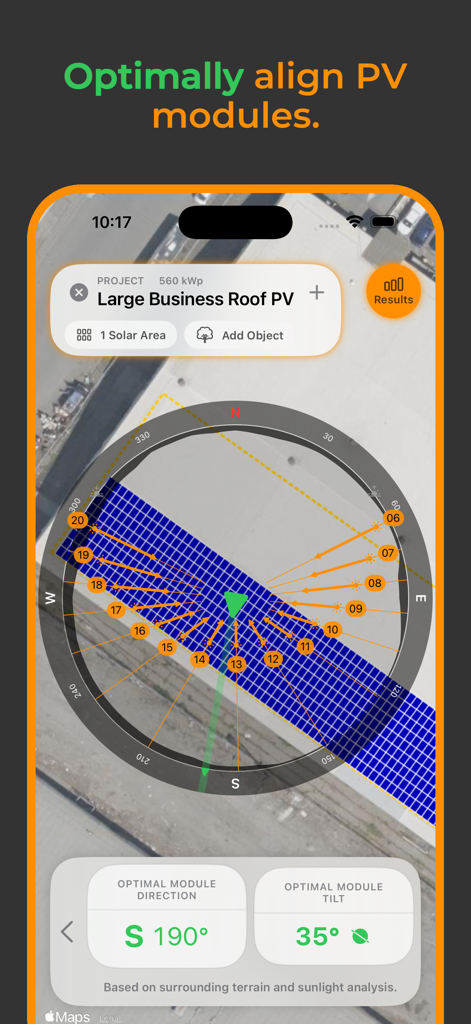
Solartelligent: PV Planner - Mobile app interface showing optimal solar module direction and tilt for a rooftop project
Mobile app interface showing optimal solar module direction and tilt for a rooftop project

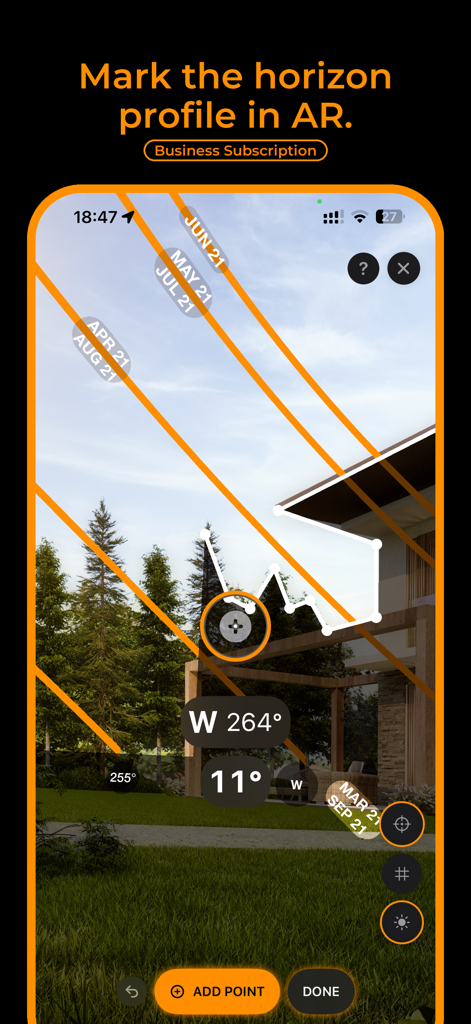
Solartelligent: PV Planner - Augmented reality interface showing sun path analysis and horizon profile marking for solar energy planning.
Augmented reality interface showing sun path analysis and horizon profile marking for solar energy planning.

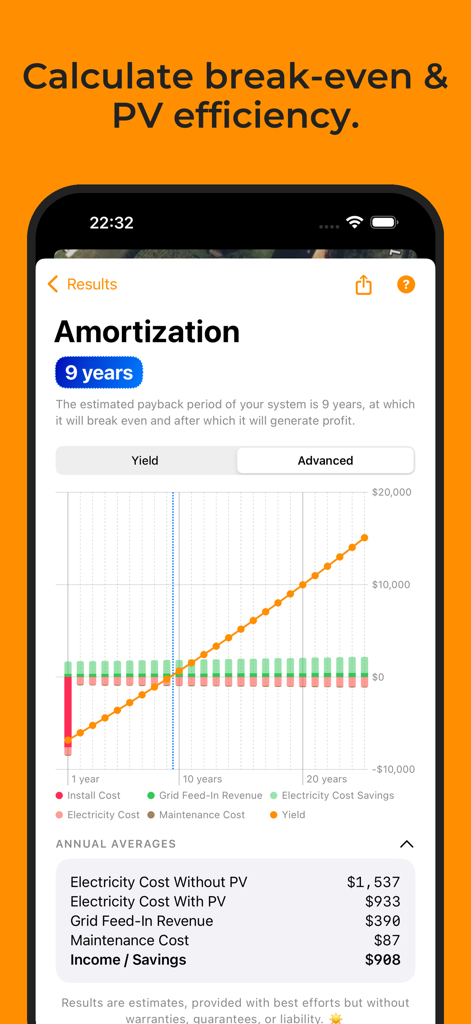
Solartelligent: PV Planner - Solar PV amortization screen showing a 9 year payback period and financial performance graph
Solar PV amortization screen showing a 9 year payback period and financial performance graph

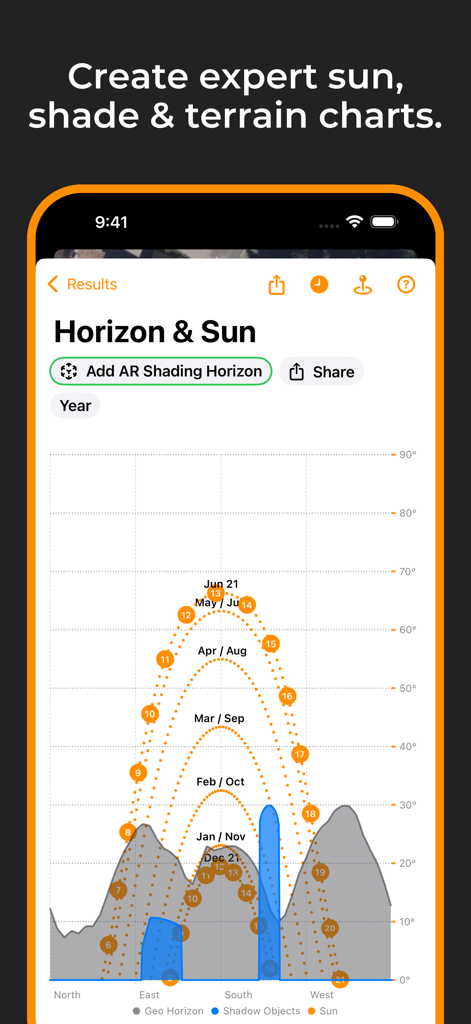
Solartelligent: PV Planner - Interactive sun path and horizon shading chart for solar energy planning
Interactive sun path and horizon shading chart for solar energy planning

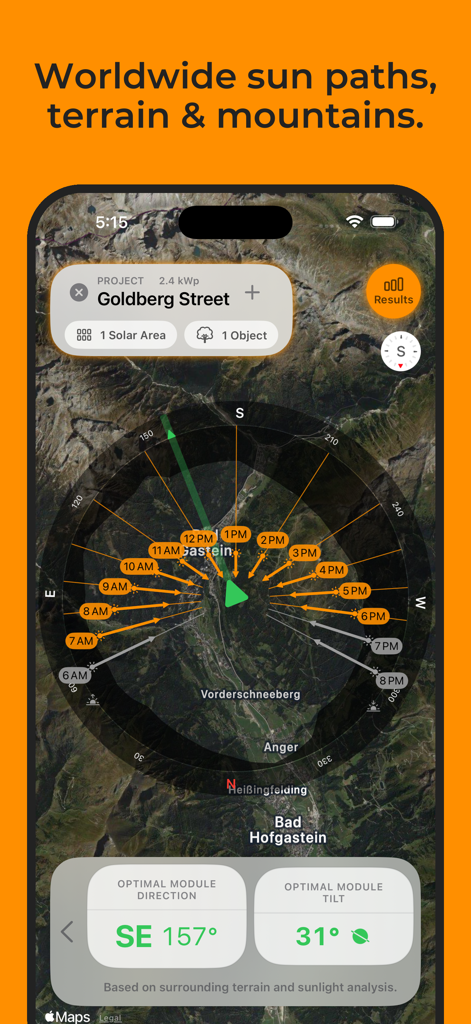
Solartelligent: PV Planner - Solartelligent app screen displaying sun path analysis and optimal solar module tilt and direction on a satellite terrain map.

Solartelligent app screen displaying sun path analysis and optimal solar module tilt and direction on a satellite terrain map.

Description

Discover Solartelligent: The Ultimate Solar Planning Tool. Whether you’re a curious homeowner or a solar expert, Solartelligent makes solar energy planning, simulation, and installation simple, precise, and effective. Easy for beginners with integrated step-by-step guidance, and indispensable for professionals with advanced calculations, sun and shadow simulations, output predictions, and powerful utilities. For rooftop systems, ground-mounted panels, balconies, or walls. For Homeowners: • Determine if solar energy is right for your location. • Predict PV energy output and savings. • Save money and evaluate installation offers with confidence. For Professionals: • Plan and manage detailed projects with ease. • Use (AR) tools for real-time shading and sun path analysis. • Amaze clients with professional and innovative insights on-site. Key Features: • Select any location worldwide and analyze its solar potential. • Plan PV projects with integrated utilities for design, shading, and energy optimization. • Use Augmented Reality (AR) to visualize sun paths and mark precise horizon lines on-site. • Simulate energy outputs, shading, and system efficiency for any month or time of day. • Add solar areas for rooftops, ground-mounted panels, balconies, or walls to your projects. • Use automatic, optimal PV module placement on a solar area based on best sunlight conditions. • On flat surfaces, PV Modules can also be tilted or dual-tilted (e.g., east-west) for maximum efficiency. • Adjust row spacing or add additional walkways between module rows or modules. • Manually mark custom shadow objects like nearby houses or trees on the map for precise shadow analysis. • Calculate optimal angles for PV modules based on sunlight and shadows. • Incorporate energy consumption, storage (batteries), and grid data to predict self-consumption and savings. • Generate detailed project reports, including yield, break-even time and lifetime revenue predictions. • Generate accurate sun path and horizon diagrams for any location. • Export results as PDF for easy sharing. • Export horizon data for mountains and shadow objects in projects as a CSV or horizon file. • Measure tilt or align modules to optimal orientation and tilt with the Inclinometer tool. • Sync projects via iCloud to seamlessly share them between iPhone and iPad. • Works anywhere in the world. Solartelligent Business Features: Unlock advanced functionality with a subscription: • Manage multiple projects seamlessly. • Use AR shading horizons to mark exact site conditions quickly and for maximum precision. No need to add shadow objects manually. • Calculate outputs and revenues based on AR inputs. • Add your logo on all reports and exported PDFs. With Solartelligent, you can plan, optimize, and install solar energy systems confidently and efficiently. Solar energy for everyone. For our future. Let’s start! Terms of Use (EULA): https://www.apple.com/legal/internet-services/itunes/dev/stdeula/

Download

Download on App Store

This page is not an official page of the app or its developer, but an independent editorial publication created for informational and commentary purposes. Unless expressly stated otherwise, neither the app nor its developer is affiliated with, endorsed by, sponsored by, authorized by, or otherwise officially connected with MWM, Apple, Google Play, the app publisher, or the app's developer, and nothing on this page implies that the app was developed using MWM's services. Any trademarks, logos, screenshots, and other content remain the property of their respective owners.








