
This page is not an official page of the app or its developer, but an independent editorial publication created for informational and commentary purposes. Unless expressly stated otherwise, neither the app nor its developer is affiliated with, endorsed by, sponsored by, authorized by, or otherwise officially connected with MWM, Apple, Google Play, the app publisher, or the app's developer, and nothing on this page implies that the app was developed using MWM's services. Any trademarks, logos, screenshots, and other content remain the property of their respective owners.


TimePlanner :专注番茄钟自习室学习课程表
Stop time's silent drain; this app hands users the reins of their day.
Downloads
2.5M+User Rating
Total Ratings
153.1KPublisher
Category
ProductivityLocales
3Latest Version
9.1.4Size
337.4 MBFirst Released
Jul 4, 2018Evaluating core functionalities designed for proactive individuals seeking enhanced time management and personal growth.
TimePlanner: A Comprehensive Analysis of Key Productivity Features
Comprehensive Task Management
It allows users to effectively organize daily and weekly tasks, set priorities, and receive smart reminders, ensuring no important deadlines are missed.
Habit Tracking with Gamification
The app supports habit formation through daily check-ins, positive reinforcement via streaks and badges, and data insights to track progress and refine personal development goals.
Detailed Time Logging & Visual Reports
It allows users to easily log time spent on different activities and visualize their time distribution through intuitive charts, enabling them to identify areas for optimization.
Integrated Pomodoro Timer
The app provides a scientific Pomodoro timer to enhance focus and manage work-rest cycles effectively, complemented by detailed statistics on accumulated focus time.
Minimalist & Customizable Design
The app provides a clean, ad-free, and highly customizable interface with various themes and personalized settings, ensuring a distraction-free and aesthetically pleasing user experience.
Immersive Focus with White Noise
This tool features a white noise mode with various natural sounds, helping users block distractions and quickly enter a state of deep concentration.
Frequently Asked Questions
Everything you need to know about TimePlanner :专注番茄钟自习室学习课程表
What is TimePlanner and what does it do?
TimePlanner is an intelligent GTD partner designed for time management and personal growth. It helps users capture inspiration, execute tasks efficiently, and achieve self-discipline through elegant design and powerful features.
How does TimePlanner organize tasks and reminders?
TimePlanner helps manage tasks by allowing users to easily create daily and weekly tasks, set priorities, and receive smart reminders. It also provides categorized views by project or scenario like work and study.
Does TimePlanner feature a Pomodoro timer for focus?
Yes, TimePlanner includes a Pomodoro Technique timer. Users can set focus and rest durations, utilize white noise modes for concentration, and track their accumulated focus time to monitor progress.
Can TimePlanner assist with habit tracking and formation?
Yes, TimePlanner helps form habits through its habit check-in feature. Users can set good habits, track daily progress, and receive positive reinforcement via continuous check-in days and achievement badges.
What are the subscription costs for TimePlanner VIP?
TimePlanner's VIP subscription costs 15 CNY per month for the continuous monthly package, and 68 CNY per year for the continuous annual package. Both are auto-renewing subscriptions.
How do I cancel my TimePlanner VIP auto-renewal?
To cancel a TimePlanner VIP subscription, users must manually disable the auto-renewal function in their iTunes/Apple ID settings management. This must be done at least 24 hours before the current subscription period ends.
Is user data secure with TimePlanner?
Yes, TimePlanner ensures data security by storing all user data safely and protecting privacy. The app provides a detailed privacy policy for user review.
What customization options does TimePlanner provide?
TimePlanner offers high customization, including multiple theme colors, personalized tags, and reminder ringtones. This allows users to create a time assistant tailored to their preferences.
Does TimePlanner track and report time spent on activities?
Yes, TimePlanner includes "时光足迹" (Time Footprint) to record time spent on activities like reading or working. It generates visual reports and charts for clear insight into time allocation.
Does TimePlanner offer home screen widgets?
Yes, TimePlanner provides powerful widgets. These widgets allow users to complete schedules and habit check-ins directly from their device's home screen for quick access and convenience.
Can TimePlanner synchronize across multiple devices?
Yes, TimePlanner supports multi-device synchronization. This enables users to access and manage their schedules and tasks across various devices, including phones, tablets, and desktops, meeting different scenario needs.
Does TimePlanner allow for multi-person collaboration?
Yes, TimePlanner supports multi-person collaboration. This feature facilitates work coordination, sharing among couples, and various other scenarios that require shared task management and scheduling.
The following screenshots and description are sourced directly from the app's official store listing and are the property of the app developer.
App Store
Screenshots

The app provides a comprehensive monthly calendar view, allowing users to effortlessly track appointments and visualize tasks with distinct color-coded event blocks.
Calendar Overview

This tool supports personal growth by enabling users to set daily habits and monitor progress through an intuitive check-in list and a visual count of completed days.
Habit Tracker
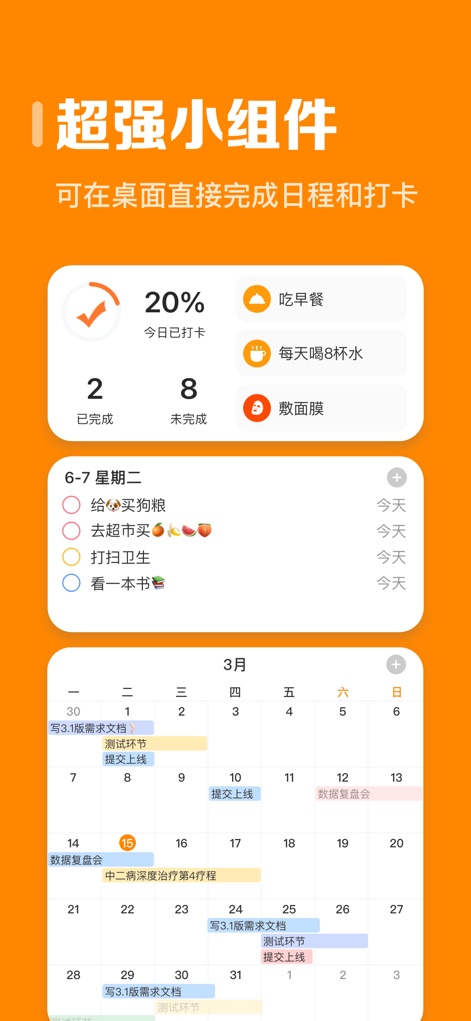
Users can enhance productivity with customizable widgets that display daily progress statistics and integrate immediate task management directly from the home screen.
Dynamic Widgets

The app offers a variety of engaging themes, allowing users to personalize their calendar interface with playful cartoon backgrounds and diverse visual styles.
Personalized Aesthetics

This tool empowers users to effectively organize their workload by categorizing tasks into custom lists and prioritizing items using an intuitive urgency-importance matrix.
Smart Task Management

The app facilitates teamwork and shared responsibilities through a shared calendar view, enabling users to coordinate schedules and manage joint projects with visible participant avatars.
Collaborative Planning
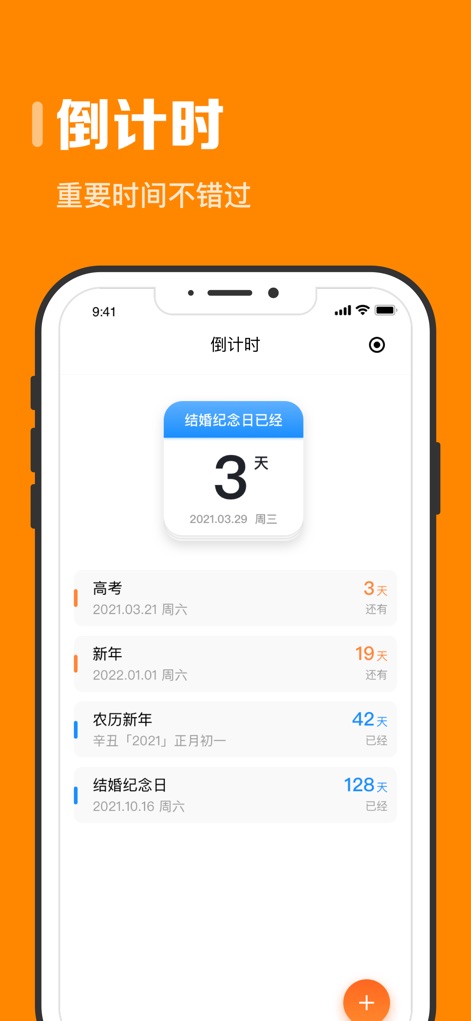
Users can keep track of important milestones and upcoming events with a dedicated countdown feature, clearly displaying the remaining days for various personal deadlines.
Event Countdown

This tool integrates a Pomodoro timer, helping users maintain concentration with structured focus sessions and guided break intervals to optimize work efficiency.
Focused Productivity

The app ensures consistent access and management across devices, providing a unified experience where schedules and tasks are synchronized between mobile and desktop interfaces.
Seamless Synchronization
Description
Download
More Like This
Apps with similar features and user experience

番茄ToDo-极简高效自律番茄钟
Shanghai Paitui Technology Co., Ltd.
Focus To-Do: Focus Timer&Tasks
Shenzhen Tomato Software Technology Co., Ltd.

Focus: Pomodoro Study Timer
bondavi Inc.
Focus Keeper - Pomodoro Timer
PIXO Incorporation

Ultimate Focus - Visual Timer
StonicSolution
Focus timer - time keeper
翠玲 施
Flow: Focus & Pomodoro Timer
Yugen GmbH
Study Timer: Focus & Pomodoro
Thomson Inc.
Be Focused Pro - Focus Timer
Denys Ievenko
This page is not an official page of the app or its developer, but an independent editorial publication created for informational and commentary purposes. Unless expressly stated otherwise, neither the app nor its developer is affiliated with, endorsed by, sponsored by, authorized by, or otherwise officially connected with MWM, Apple, Google Play, the app publisher, or the app's developer, and nothing on this page implies that the app was developed using MWM's services. Any trademarks, logos, screenshots, and other content remain the property of their respective owners.