
This page is not an official page of the app or its developer, but an independent editorial publication created for informational and commentary purposes. Unless expressly stated otherwise, neither the app nor its developer is affiliated with, endorsed by, sponsored by, authorized by, or otherwise officially connected with MWM, Apple, Google Play, the app publisher, or the app's developer, and nothing on this page implies that the app was developed using MWM's services. Any trademarks, logos, screenshots, and other content remain the property of their respective owners.


Timestamp Camera -AI Timestamp
Get irrefutable proof. This app transforms mere images into undeniable records, stamping every detail for total verification.
Downloads
100k+User Rating
Total Ratings
4.2KPublisher
Category
Photo & VideoLocales
27Latest Version
1.2.6Size
184.7 MBFirst Released
Apr 3, 2025An analytical overview of essential functionalities for verifiable media capture.
Key Features of Timestamp Camera - AI Timestamp
Comprehensive Timestamp Customization
It allows users to select and combine various data points like Date, Time, GPS coordinates, Weather, and custom text, providing highly detailed and verifiable context for each capture.
Professional Export & Sharing
The app provides professional-grade export options (MP4, MOV, JPG) for sharing photos and videos with embedded timestamps, making them ideal for official documentation, reports, and social media.
Real-time Timestamp Overlays
This tool features live timestamp overlays directly on the camera's viewfinder, ensuring immediate accuracy and eliminating the need for post-capture editing or guesswork.
Intelligent Media Organization
It offers smart media organization capabilities, automatically sorting albums by embedded metadata and enabling quick searches based on timestamp data, streamlining photo and video retrieval.
Live Preview & Instant Application
The app allows users to preview different timestamp templates instantly within the camera view, facilitating quick design choices and enhancing the user experience.
AI-Powered Template Recommendations
The app provides AI-driven recommendations for timestamp templates, analyzing scene lighting and subject to suggest optimal designs for readability and aesthetic integration.
Advanced Timestamp Styling Options
This tool features extensive styling controls for timestamps, including font, size, color, opacity, and position, allowing for subtle integration or prominent display tailored to user preferences.
Timestamp-Integrated Artistic Filters
It allows users to apply artistic filters while simultaneously previewing their timestamp overlay, ensuring that stylistic choices complement the verifiable data.
Frequently Asked Questions
Everything you need to know about Timestamp Camera -AI Timestamp
How does Timestamp Camera's AI Timestamp feature work?
Timestamp Camera's AI analyzes the scene in real time, identifying lighting, colors, and subject matter. It then recommends the perfect timestamp template, tailored to each moment, ensuring precise proof of capture for photos and videos.
Can users customize the data displayed in the Timestamp Camera overlay?
Yes, Timestamp Camera allows extensive customization of data stamp overlays. Users can mix and match elements such as Date, Time, Location Name, GPS Coordinates, Altitude, Compass Heading, and Weather for their proof of capture.
Does Timestamp Camera allow adding timestamps to videos?
Yes, Timestamp Camera enables adding timestamps to videos. The application supports capturing video with real-time data overlays, ensuring documented proof of capture for every recorded moment.
What styling options are available for timestamps in Timestamp Camera?
Timestamp Camera offers fully adjustable timestamp styling. Users can change the font, size, color, opacity, shadow, stroke, and position of their timestamps. AI-recommended templates also enhance images seamlessly.
What scenes does Timestamp Camera's AI recognize for template recommendations?
Timestamp Camera's AI recognizes diverse scenes including beach, sunset, cityscape, food, sports, travel, and events. It uses this analysis to instantly suggest the most suitable timestamp template from its extensive library.
Are artistic filters included in Timestamp Camera?
Yes, Timestamp Camera includes artistic filters and effects. It provides instant presets such as “Vintage Fade” and “Crisp Monochrome” with real-time previews, designed to complement images and timestamps.
How does Timestamp Camera organize photos and videos?
Timestamp Camera uses Smart Media Organization. It automatically sorts photos and videos into albums based on embedded metadata, including scene type, date, and location. Users can also search specific data.
Does Timestamp Camera require a subscription?
Timestamp Camera offers an optional subscription service. Weekly and yearly options unlock all AI templates, premium filters, and priority updates. Pricing and trial details are in the In-App Purchase section.
Where can I find the official privacy policy for Timestamp Camera?
The official privacy policy for Timestamp Camera is located at https://zonghong-chronomark-pro-privacypolicy.pages.dev/. This document outlines data handling practices for the application.
Can Timestamp Camera users adjust the camera's focal length and focus?
Yes, Timestamp Camera provides adjustable focal length and focus. Users can smoothly transition between 0.5×, 1×, and 15× zoom, and use tap-to-refocus or a dedicated focus slider for precise depth of field.
The following screenshots and description are sourced directly from the app's official store listing and are the property of the app developer.
App Store
Screenshots

The app displays a live, customizable timestamp overlay showing precise date/time, GPS coordinates, and weather details directly on the viewfinder.
Live Timestamp View

Users can precisely tailor timestamp elements, such as adjusting the display of time, date, latitude/longitude, and other data through an intuitive editing menu.
Customize Timestamps

This tool seamlessly integrates customizable timestamps into video recordings, allowing users to capture moments with real-time embedded date/time and duration tracking.
Video Timestamp Capture
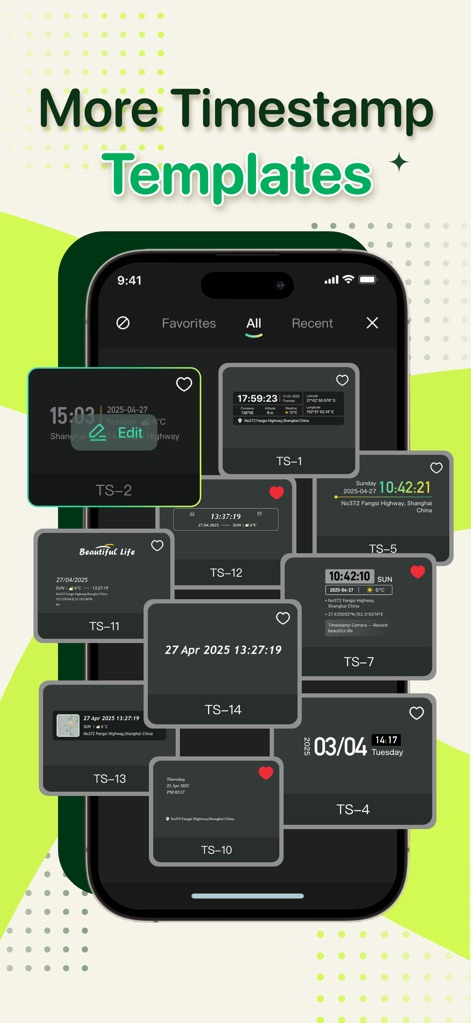
Explore a rich library of timestamp templates, ranging from subtle to bold, and effortlessly browse them via 'All' or 'Favorites' filters.
Template Gallery

The app provides dynamic, real-time timestamp updates, including precise location refreshing and environmental details like compass heading and altitude.
Dynamic Location Data

This tool embeds a small GPS map thumbnail and a full address into the timestamp, ensuring verifiable location data for every captured image.
Geotagged Proof

The app empowers users to capture diverse moments, from personal events to professional tasks, with customizable text and precise date/time stamps.
Versatile Capture

Users can apply artistic filters, such as 'F6' shown in the split-screen preview, to enhance images while maintaining the integrity of the timestamp overlay.
Enhance with Filters
Description
Download
More Like This
Apps with similar features and user experience

Timestamp Camera - Date Stamp
Artify Inc.

Timestamp Camera: Time & GPS
Practical Apps from Sweden AB

Timestamp camera - gps cam
Guangzhou Siyue Network Technology Co., Ltd.

DateStamper
Jordan Hipwell

Timestamp Camera Basic
玉彬 陈

GPS Map Camera : Geo Photos
Chirag Gabani

Timestamp Camera: Time stamp
燕倩 费

Timestamp Camera - Time & GPS
Shaanxi Ruidebao Technology Co.,Ltd
Timestamp Camera - Aio GPS Cam
周萍 黄
This page is not an official page of the app or its developer, but an independent editorial publication created for informational and commentary purposes. Unless expressly stated otherwise, neither the app nor its developer is affiliated with, endorsed by, sponsored by, authorized by, or otherwise officially connected with MWM, Apple, Google Play, the app publisher, or the app's developer, and nothing on this page implies that the app was developed using MWM's services. Any trademarks, logos, screenshots, and other content remain the property of their respective owners.