
This page is not an official page of the app or its developer, but an independent editorial publication created for informational and commentary purposes. Unless expressly stated otherwise, neither the app nor its developer is affiliated with, endorsed by, sponsored by, authorized by, or otherwise officially connected with MWM, Apple, Google Play, the app publisher, or the app's developer, and nothing on this page implies that the app was developed using MWM's services. Any trademarks, logos, screenshots, and other content remain the property of their respective owners.


Timestamp Camera Basic
Eliminate doubt. The app embeds precise temporal and location details, turning mere captures into authentic records.
Downloads
12.5M+User Rating
Total Ratings
267.4KPublisher
Category
Photo & VideoLocales
16Latest Version
1.155Size
24.2 MBFirst Released
Mar 25, 2014Timestamp Camera Basic: Core Feature Analysis
An evaluation of key functionalities for professionals and dedicated hobbyists requiring verifiable visual documentation.
Millisecond-Accurate Video Timestamp
This tool features the unique ability to record video with time watermarks accurate to the millisecond (0.001 second), crucial for highly precise temporal verification in critical applications.
Real-time Timestamp & Geotagging
The app automatically embeds the current time, date, and location directly onto photos and videos as they are captured. This ensures immediate and verifiable documentation for professionals.
Integrated Map Overlay
The app features an integrated map display directly on the camera interface, providing visual geographic context alongside the recorded media.
Custom Text & Tag Overlays
The app allows users to input and display custom text or tags directly on the camera feed, which can also be embedded into the Exif data for enhanced metadata.
High-Resolution Media Capture
It supports capturing photos at the camera's maximum resolution and offers various video resolutions (up to 4K) and frame rates (up to 60fps), ensuring high-quality visual evidence.
Altitude & Speed Display
It can display real-time altitude and speed information directly on the camera feed, offering additional contextual data for field-based professionals.
Custom Logo Watermarking
The app enables the import and display of a custom logo image as a watermark, facilitating brand identity or official verification on visual records.
Customizable Timestamp Formats
It provides extensive customization options for timestamp formats, allowing users to select from 81 different styles to match specific documentation requirements.
Compass Overlay
It allows users to display a compass on the camera screen, providing directional context for photos and videos captured in the field.
Flexible Timestamp Placement
It enables precise positioning of the timestamp overlay in one of six predefined locations on the screen, preventing obstruction of critical visual information.
Frequently Asked Questions
Everything you need to know about Timestamp Camera Basic
What is the primary function of Timestamp Camera Basic?
Timestamp Camera Basic adds real-time timestamp watermarks, including current time and address, to photos and videos captured with the camera.
Can Timestamp Camera Basic add custom text to photos and videos?
Yes, Timestamp Camera Basic supports inputting and displaying custom text on the camera feed for both photos and videos.
Does Timestamp Camera Basic record video with millisecond accuracy?
Yes, Timestamp Camera Basic records video with time watermarks accurate to the millisecond (0.001 second). It is the only app with this feature.
How many timestamp formats does Timestamp Camera Basic support?
Timestamp Camera Basic supports 81 different timestamp formats for displaying time on photos and videos.
Can users change the font and color of the timestamp in Timestamp Camera Basic?
Yes, users can change the font, font color, and font size of the timestamp displayed in Timestamp Camera Basic.
What resolution options are available for video recording in Timestamp Camera Basic?
Timestamp Camera Basic supports video resolutions of 540P, 720P, 1080P, and 4K, with frame rates of 30fps and 60fps.
Can I display a map on the camera view using Timestamp Camera Basic?
Yes, Timestamp Camera Basic supports displaying a map directly on the camera view. This feature is toggleable in settings.
Does Timestamp Camera Basic have a battery saver mode?
Yes, Timestamp Camera Basic includes a "Battery saver mode" which adjusts the screen brightness to conserve power.
Can Timestamp Camera Basic import a custom logo as a watermark?
Yes, Timestamp Camera Basic allows users to import a custom watermark logo image to display on the camera feed.
What camera modes are available in Timestamp Camera Basic?
Timestamp Camera Basic offers four modes: Video, Photo, Square, and Timelapse. Video, Square, and Timelapse support both video recording and photo capture.
Can Timestamp Camera Basic record video without audio?
Yes, Timestamp Camera Basic supports recording video without audio. This option is available in the app's settings.
Does Timestamp Camera Basic support pausing and resuming video recordings?
Yes, Timestamp Camera Basic allows users to pause and continue recording fragments, compiling them into a single video.
Where are photos and videos saved after being captured with Timestamp Camera Basic?
Photos and videos captured using Timestamp Camera Basic are saved directly to the device's Camera roll.
The following screenshots and description are sourced directly from the app's official store listing and are the property of the app developer.
App Store
Screenshots
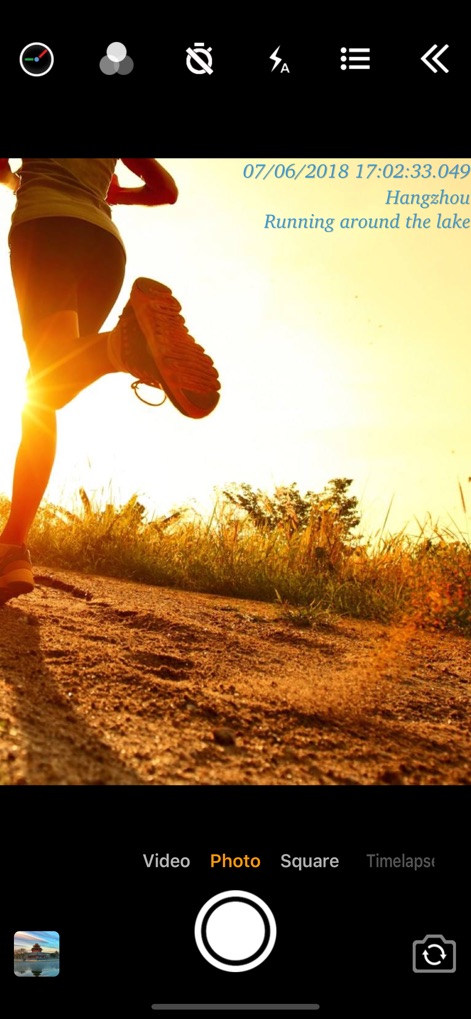
Precision Timestamping
Observe how the app seamlessly embeds real-time timestamps with millisecond accuracy and user-defined custom text overlays onto visuals.
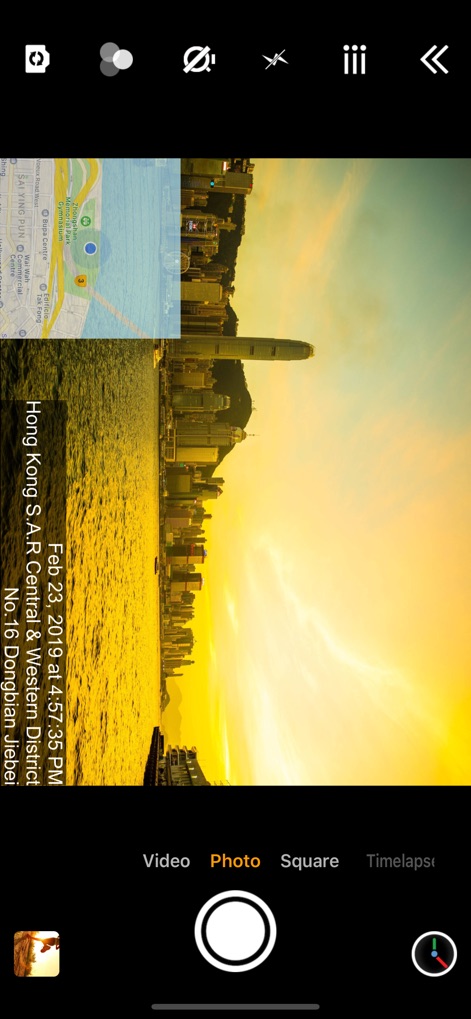
Location Context
This view demonstrates the app's integrated map overlay feature, adding geographic context, alongside a vertically oriented timestamp detailing the precise date and address.
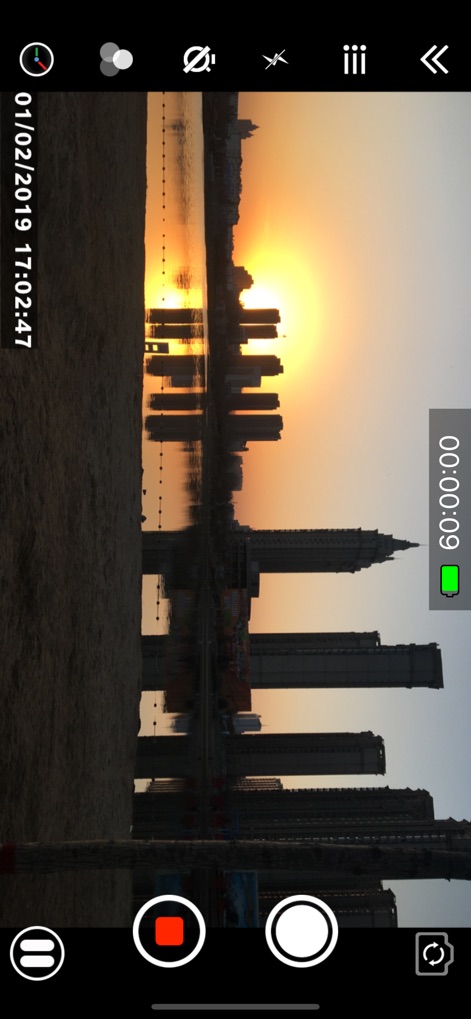
Dynamic Video Capture
This screenshot illustrates the app's robust video recording capability, featuring a prominent on-screen recording timer and a real-time timestamp overlay.
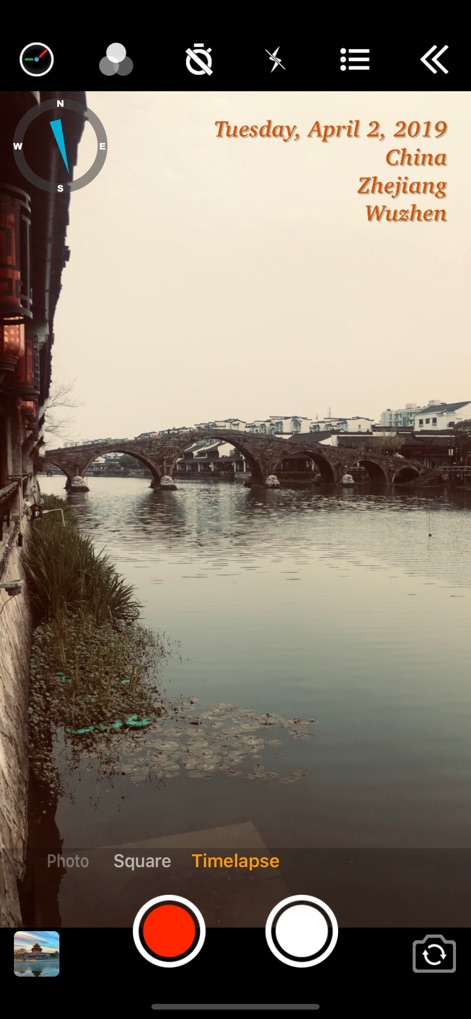
Directional & Temporal
Users can utilize the integrated compass overlay for directional insights, alongside a flexibly formatted timestamp, ideal for 'Timelapse' photography and videography.
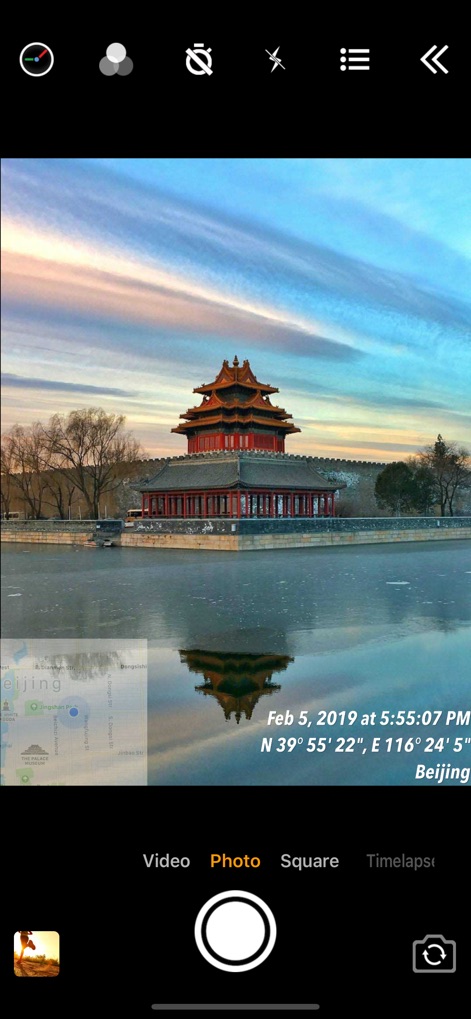
Geographic Precision
This visual emphasizes the app's capability to display precise GPS coordinates and an interactive map overlay, delivering comprehensive geographical context for documentation.
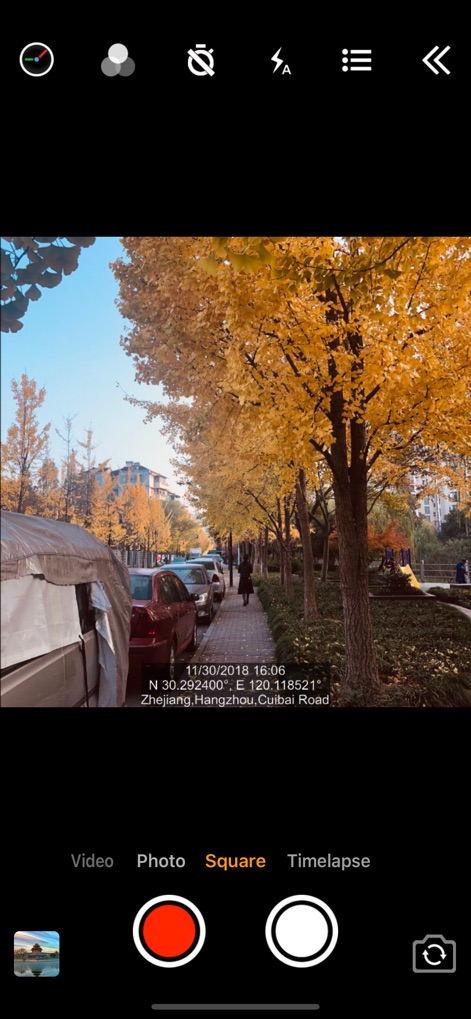
Location-Rich Records
The app offers a dedicated 'Square' capture mode, which seamlessly integrates detailed address and coordinate information, perfect for social sharing or specific documentation needs.
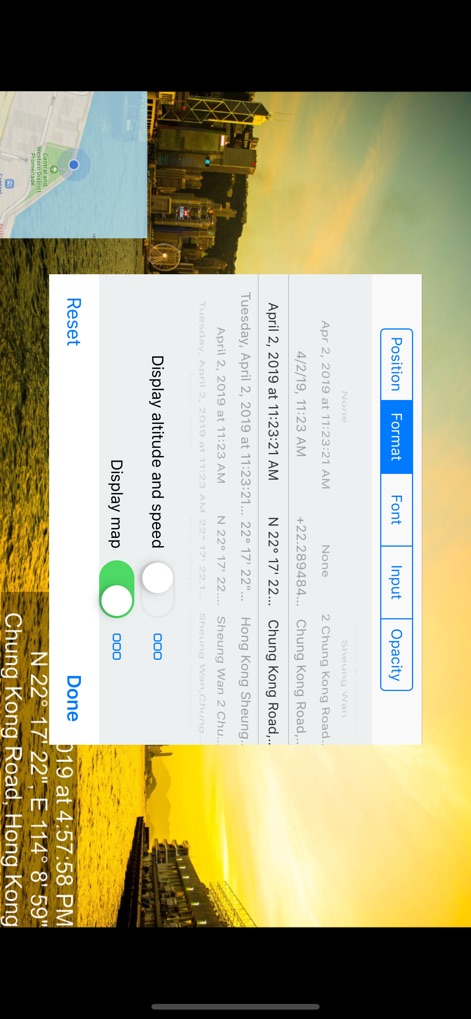
Comprehensive Customization
This panel reveals the app's comprehensive customization features, allowing users to precisely adjust timestamp position and format, as well as enabling optional altitude and speed displays.
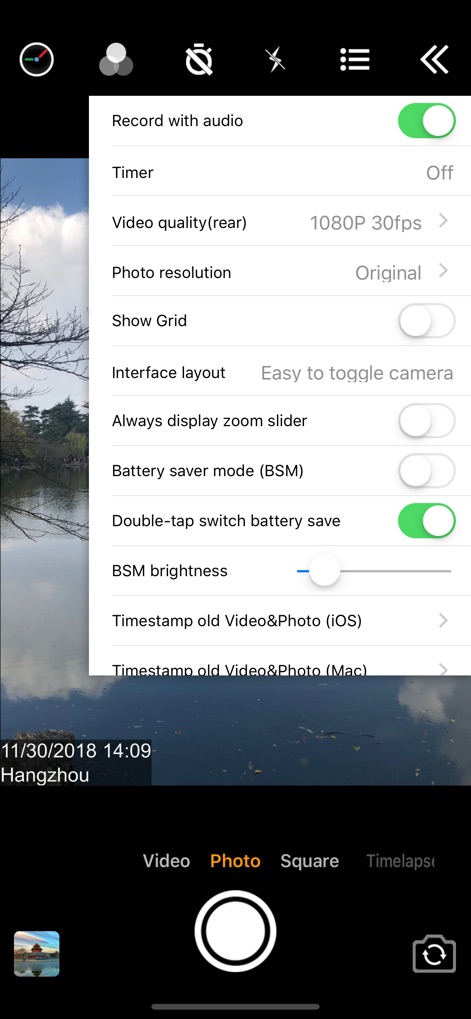
Performance Optimization
Users can fine-tune their capture experience with advanced camera settings such as video quality and photo resolution controls, complemented by an effective 'Battery saver mode'.
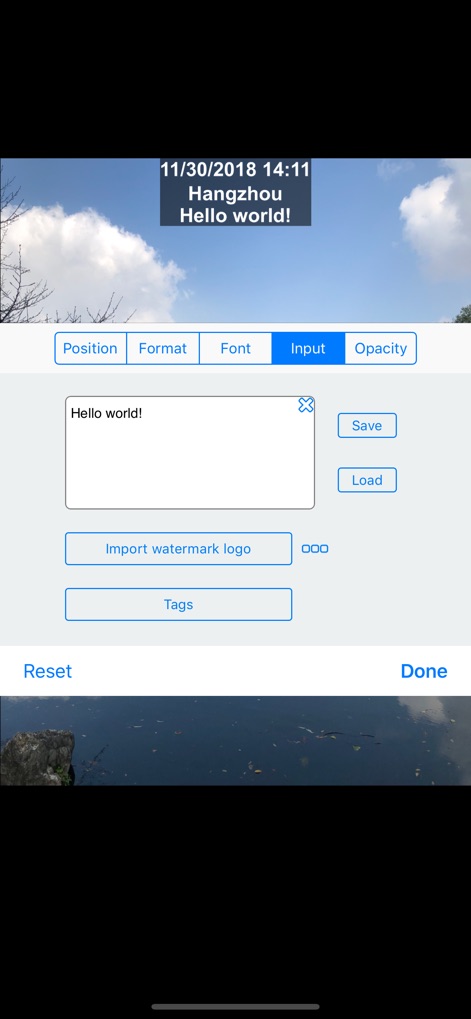
Custom Content Integration
The app empowers users with custom text input for personalized messaging or notes, and the ability to import a unique watermark logo directly onto their visuals.
Description
Download
More Like This
Apps with similar features and user experience

Timestamp Camera -AI Timestamp
Shanghai Zongchong Information Technology Co., Ltd

Timestamp Camera - Date Stamp
Artify Inc.

Timestamp Camera: Time & GPS
Practical Apps from Sweden AB

Timestamp camera - gps cam
Guangzhou Siyue Network Technology Co., Ltd.

DateStamper
Jordan Hipwell

GPS Map Camera : Geo Photos
Chirag Gabani

Timestamp Camera: Time stamp
燕倩 费

Timestamp Camera - Time & GPS
Shaanxi Ruidebao Technology Co.,Ltd
Timestamp Camera - Aio GPS Cam
周萍 黄
This page is not an official page of the app or its developer, but an independent editorial publication created for informational and commentary purposes. Unless expressly stated otherwise, neither the app nor its developer is affiliated with, endorsed by, sponsored by, authorized by, or otherwise officially connected with MWM, Apple, Google Play, the app publisher, or the app's developer, and nothing on this page implies that the app was developed using MWM's services. Any trademarks, logos, screenshots, and other content remain the property of their respective owners.