
This page is not an official page of the app or its developer, but an independent editorial publication created for informational and commentary purposes. Unless expressly stated otherwise, neither the app nor its developer is affiliated with, endorsed by, sponsored by, authorized by, or otherwise officially connected with MWM, Apple, Google Play, the app publisher, or the app's developer, and nothing on this page implies that the app was developed using MWM's services. Any trademarks, logos, screenshots, and other content remain the property of their respective owners.


Tower - Clipstack Manager
Stop losing ideas. The app ensures every copied thought, link, or code snippet becomes instantly retrievable power.
Downloads
25k+User Rating
Total Ratings
5Publisher
Category
UtilitiesLocales
1Latest Version
1.1Size
11.3 MBFirst Released
Feb 6, 2026An in-depth look at its core functionalities and user benefits.
Tower - Clipstack Manager: Key Feature Analysis
On-Device Privacy and Security
This tool features strong privacy and security measures, including optional biometric locking, content hiding in the app switcher, and exclusively on-device data storage with no cloud sync or tracking, ensuring sensitive information remains private.
Unlimited, Automatic Clipboard History & Organization
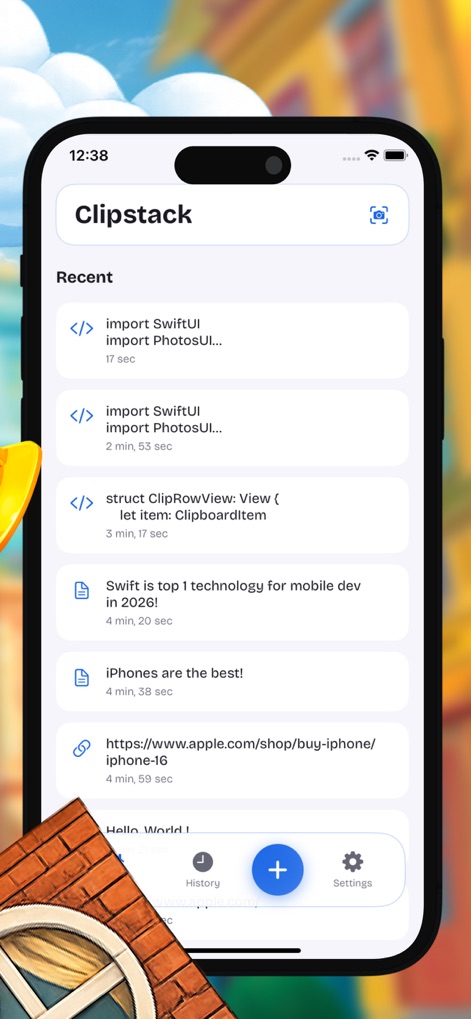
The app provides an unlimited clipboard history, automatically saving various content types such as text, URLs, numbers, and code snippets, and offering robust organization with tags and categories, along with timestamps and duplicate detection for efficient management.
Ubiquitous Access via Extensions & Widgets
It allows users to access and manage clips from anywhere on their iPhone through a convenient keyboard extension with optional Face ID, and a home screen widget, enabling quick pasting and viewing without opening the main app.
Smart Clip Management & Actions
The app offers comprehensive smart actions for managing clips, including pinning, favoriting for quick access, searching by content or tags, editing content and tags, sharing to other apps, and options for automatic or manual deletion.
Optical Character Recognition (OCR)
The app integrates Optical Character Recognition (OCR), enabling users to extract text directly from images with a single tap, with results saved as tagged clips on-device, powered by Apple's Vision framework.
User-Centric Design & Export Capabilities
This tool features a user-centric design with light and dark themes, a clear, modern layout, smooth animations, and easy navigation, complemented by the ability to export all clips as text for backup or sharing.
The following screenshots and description are sourced directly from the app's official store listing and are the property of the app developer.
App Store
Screenshots
See how the app showcases an unlimited clipboard history with clear timestamps and smart duplicate detection for effortless clip management.
Clipboard History At a Glance

Discover how users can efficiently pin and favorite clips, alongside robust organization features like customizable tags and categories.
Seamless Organization

Explore the intelligent OCR functionality to convert images to text, complemented by versatile smart actions for quick clip editing and management.
Intelligent Clip Actions
Witness the convenient keyboard extension for instant access to clips, secured by optional Face ID or Touch ID for enhanced privacy protection.
Privacy & Accessibility
Description
Download
More Like This
Top-ranked apps in the same category

Google LLC

Google Chrome
Google LLC

中国移动(手机营业厅)
China Mobile Online Services Co., Ltd.

Google Authenticator
Google LLC

gov.br
Servicos e Informacoes do Brasil

Super VPN Fly 2026
YUNFAN TECHNOLOGY CO., LIMITED

Cleanup: Phone Storage Cleaner
DEEP FLOW SOFTWARE SERVICES - FZCO

百度-AI智能搜索
Beijing Baidu Netcom Science & Technology Co.,Ltd

Microsoft Edge: AI Browser
Microsoft Corporation
This page is not an official page of the app or its developer, but an independent editorial publication created for informational and commentary purposes. Unless expressly stated otherwise, neither the app nor its developer is affiliated with, endorsed by, sponsored by, authorized by, or otherwise officially connected with MWM, Apple, Google Play, the app publisher, or the app's developer, and nothing on this page implies that the app was developed using MWM's services. Any trademarks, logos, screenshots, and other content remain the property of their respective owners.