
This page is not an official page of the app or its developer, but an independent editorial publication created for informational and commentary purposes. Unless expressly stated otherwise, neither the app nor its developer is affiliated with, endorsed by, sponsored by, authorized by, or otherwise officially connected with MWM, Apple, Google Play, the app publisher, or the app's developer, and nothing on this page implies that the app was developed using MWM's services. Any trademarks, logos, screenshots, and other content remain the property of their respective owners.


Unlock-r
Security just got an upgrade. This app puts online account protection back in the user's hands, making complex digital safety effortless.
Downloads
1M+User Rating
Total Ratings
4.0KPublisher
Category
UtilitiesLocales
1Latest Version
1.3.4Size
22.0 MBFirst Released
Sep 18, 2024Evaluating core capabilities for enhanced digital security and privacy.
Unlock-r: A Comprehensive Feature Analysis
Privacy-Focused Data Protection
It ensures that user data stays private with no third-party access, aligning with the target audience's priority for digital safety without compromising privacy.
Secure Access Code Generation
The app provides a fast, seamless, and reliable way to generate secure access codes, enhancing online account protection.
Intuitive Design & Management
This tool features an intuitive design that makes managing account security straightforward and hassle-free for users.
Unlimited Secure Code Access
The app offers unlimited access to secure codes, providing seamless, safe, and reliable authentication for all user accounts.
Frequently Asked Questions
Everything you need to know about Unlock-r
What is Unlock-r?
Unlock-r is an app that generates secure access codes for online accounts, ensuring fast, seamless, and reliable protection of personal information.
What are the key benefits of using Unlock-r?
Unlock-r offers secure access code generation, intuitive design for easy management, and prioritization of user data privacy with no third-party access.
Is unlimited access to secure codes available in Unlock-r?
Yes, Unlock-r offers unlimited access to secure codes. This feature is included as part of its subscription model for continuous data protection.
How does Unlock-r protect user privacy?
Unlock-r protects user privacy by ensuring data stays private with no third-party access. The app prioritizes security for confident scanning.
Can I view my past redeemed codes in Unlock-r?
Yes, Unlock-r allows users to view past redeemed codes under the "Redeemed Codes" section. It displays the date and associated URL for each.
How do I get more details about a redeemed code in Unlock-r?
To get more details about a redeemed code in Unlock-r, tap on the "TAP FOR DETAILS" option. This reveals the redeem time and the full redeemed URL.
Can redeemed code history be deleted in Unlock-r?
Yes, redeemed code history can be deleted in Unlock-r. The option "DELETE FROM HISTORY" is available when viewing the detailed information of a specific code.
How do I copy a generated code in Unlock-r?
To copy a generated code in Unlock-r, simply tap the "TAP TO COPY" prompt displayed below the code. This action copies the secure access code.
Where can I find the Terms and Conditions for Unlock-r?
The Terms and Conditions for Unlock-r are available on the app's dedicated page. A direct link is provided: https://unlockr.app/terms.
The following screenshots and description are sourced directly from the app's official store listing and are the property of the app developer.
App Store
Screenshots

Users can effortlessly generate secure access codes, visualized by the dynamic progress ring and the clearly displayed 'TAP TO COPY' instruction.
Instant Code Generation
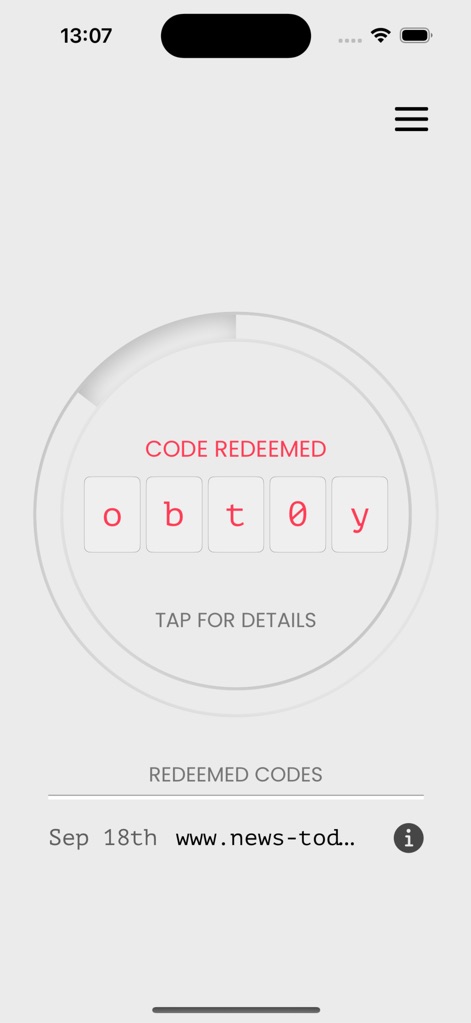
This view highlights the successful code redemption status with the 'CODE REDEEMED' alert and provides a clear list of previously redeemed codes, including the date and associated URL.
Redemption History
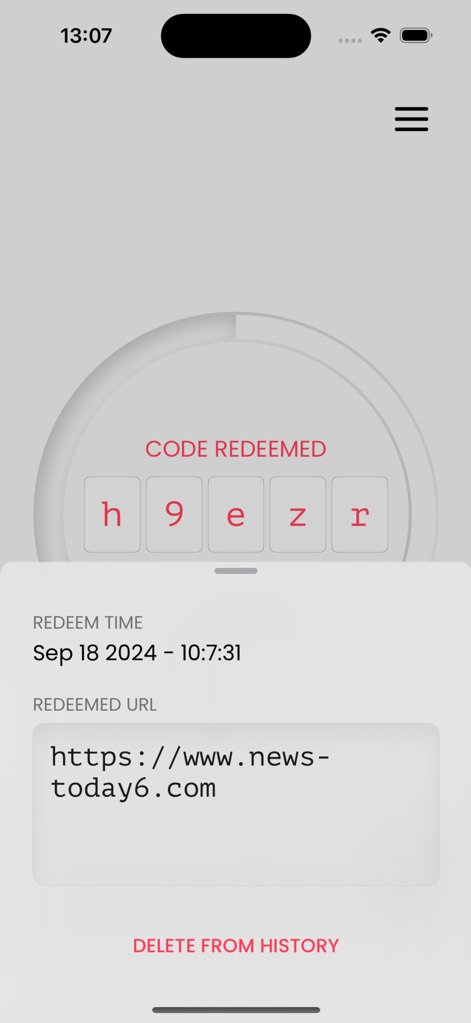
The app offers detailed redemption logs, showing the precise 'REDEEM TIME' and 'REDEEMED URL', alongside an option to 'DELETE FROM HISTORY' for enhanced privacy control.
Code Details & Management
Description
Download
More Like This
Apps with similar features and user experience

Google Authenticator
Google LLC

Duo Mobile
Duo Security LLC

Authenticator App - 2FA &. MFA
APPLY DIJITAL HIZMETLER TICARET LIMITED SIRKETI

authenticator . app
Mustafa Uz

SafeNet MobilePASS+
Thales DIS (Singapore) Pte Ltd

Čítačka
Tatra banka, a.s.

Authenticator App - SafeAuth
Brilliant App Limited

Authenticator App - 2FA Auth
UNIVERSE DIJITAL HIZMETLER LIMITED SIRKETI

Authenticator App : Scan & 2FA
XSOFT GLOBAL LIMITED
This page is not an official page of the app or its developer, but an independent editorial publication created for informational and commentary purposes. Unless expressly stated otherwise, neither the app nor its developer is affiliated with, endorsed by, sponsored by, authorized by, or otherwise officially connected with MWM, Apple, Google Play, the app publisher, or the app's developer, and nothing on this page implies that the app was developed using MWM's services. Any trademarks, logos, screenshots, and other content remain the property of their respective owners.