
This page is not an official page of the app or its developer, but an independent editorial publication created for informational and commentary purposes. Unless expressly stated otherwise, neither the app nor its developer is affiliated with, endorsed by, sponsored by, authorized by, or otherwise officially connected with MWM, Apple, Google Play, the app publisher, or the app's developer, and nothing on this page implies that the app was developed using MWM's services. Any trademarks, logos, screenshots, and other content remain the property of their respective owners.


VictronConnect
Stop guessing. This app puts the full command of your Victron hardware directly in your hand.
Downloads
1M+User Rating
Total Ratings
927Publisher
Category
BusinessLocales
-Latest Version
6.32Size
160.2 MBFirst Released
Mar 6, 2015An analytical overview of key functionalities empowering technically proficient users and integrators.
VictronConnect: Essential Features for Advanced Power System Management
Device Configuration
It allows users to precisely customize and optimize Victron devices for specific system requirements, which is crucial for professionals to fine-tune performance and adapt to diverse energy setups.
Real-time System Monitoring
The app provides instant, live data from connected Victron products, offering critical insights into system performance for immediate operational awareness and rapid troubleshooting.
Historical Performance Data
This tool features the ability to access and analyze historical operational data, enabling long-term performance evaluation, trend identification, and comprehensive diagnostic troubleshooting for system optimization.
Firmware Management
It allows users to update Victron device firmware, ensuring access to the latest features, performance enhancements, and critical security updates for system longevity and reliability.
Wireless Connectivity (Bluetooth LE)
The app provides seamless Bluetooth Low Energy connectivity, simplifying device setup, monitoring, and configuration without the need for physical access or wired connections.
Interactive Demo Mode
This tool features an interactive demo mode, allowing users to explore product interfaces and app functionalities without requiring physical hardware, which is beneficial for learning and product familiarization.
Frequently Asked Questions
Everything you need to know about VictronConnect
What is VictronConnect?
VictronConnect is an app that provides live status information and configuration capabilities for Victron products equipped with built-in Bluetooth or a VE.Direct Bluetooth LE dongle.
Can VictronConnect display real-time data from my devices?
Yes, VictronConnect displays instant live data from your connected solar charger or battery monitor, including voltage, current, and power metrics in real-time.
Does VictronConnect allow me to configure Victron products?
Yes, VictronConnect enables users to configure their Victron devices. You can navigate configuration pages, edit settings, and changes apply instantly to your device.
How does VictronConnect handle firmware updates?
VictronConnect includes the latest firmware versions and prompts you to update outdated firmware. Manual firmware updates are also possible within the application.
Which Victron products are compatible with VictronConnect?
VictronConnect supports various products including BMV 70x Battery Monitors, BlueSolar & SmartSolar MPPT Chargers, VE.Direct Phoenix Inverters, and Blue Smart Chargers.
Can I see historical data using the VictronConnect app?
Yes, VictronConnect allows you to read history records for diagnostic purposes. BlueSolar MPPT chargers provide thirty days of history records at a glance.
Does VictronConnect have a demo mode?
Yes, VictronConnect includes a demo mode. Users can select products from a built-in library to explore all app features without needing a physical device.
What are the system requirements for VictronConnect?
VictronConnect requires Bluetooth Low Energy. It is supported on iPhone 4S and newer, iPad Air, and iPad Mini (3rd and 4th generation).
Can VictronConnect monitor battery state of charge?
Yes, VictronConnect displays the battery's state of charge. For example, Screenshot #1 shows 'State of charge 85%' for a connected battery monitor.
Does VictronConnect provide cell-level battery status?
Yes, VictronConnect provides detailed cell status information. It shows individual voltages for each cell in compatible battery systems, as seen in Screenshot #4.
What information does VictronConnect show for solar chargers?
VictronConnect displays real-time solar panel data including power, voltage, and current. It also shows battery voltage, current, and charging state for connected solar chargers.
Is it possible to see charging phase details in VictronConnect?
Yes, VictronConnect displays charging phase details like 'Bulk charge' with explanations. It also shows a graphical representation of charging states over time.
Can VictronConnect monitor inverter status?
Yes, VictronConnect monitors inverter status. It displays load, AC output voltage, and the operating state, such as 'Inverting', as shown in Screenshot #7.
Does VictronConnect show battery temperature?
Yes, VictronConnect displays the battery temperature for compatible devices. Screenshot #4 shows a 'Temperature 22°C' reading for a connected battery.
The following screenshots and description are sourced directly from the app's official store listing and are the property of the app developer.
App Store
Screenshots
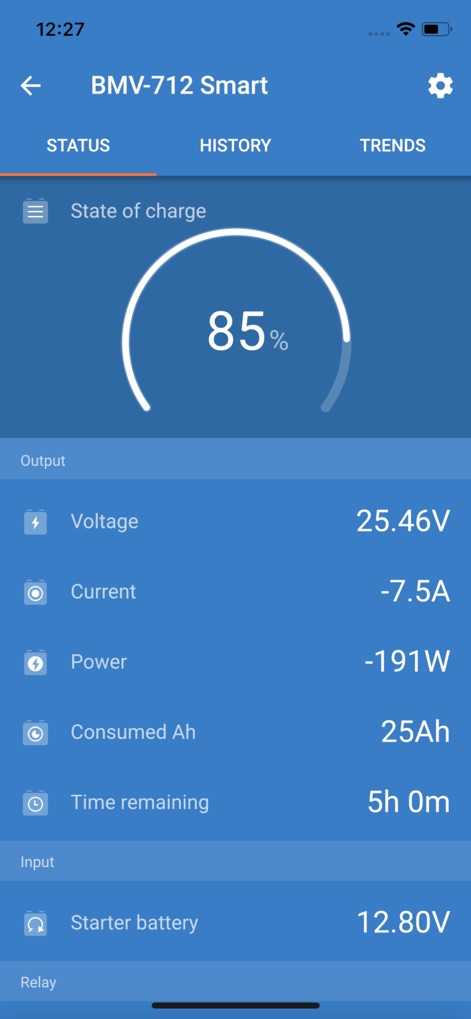
Users can precisely track the State of charge percentage and monitor critical metrics like Voltage and Consumed Ah for informed power management.
Battery Monitor Status
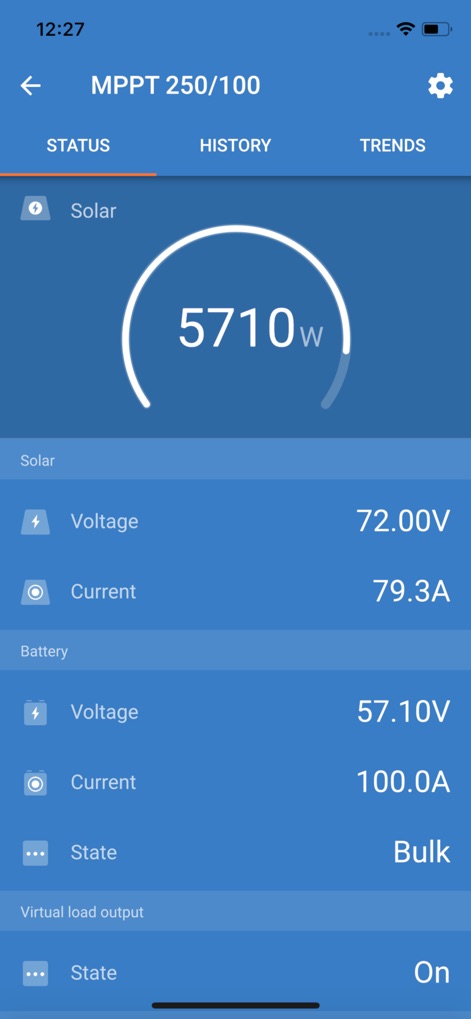
The app provides real-time solar panel Voltage and Current readings, along with the Battery's State, to optimize energy harvesting.
Solar Charger Overview
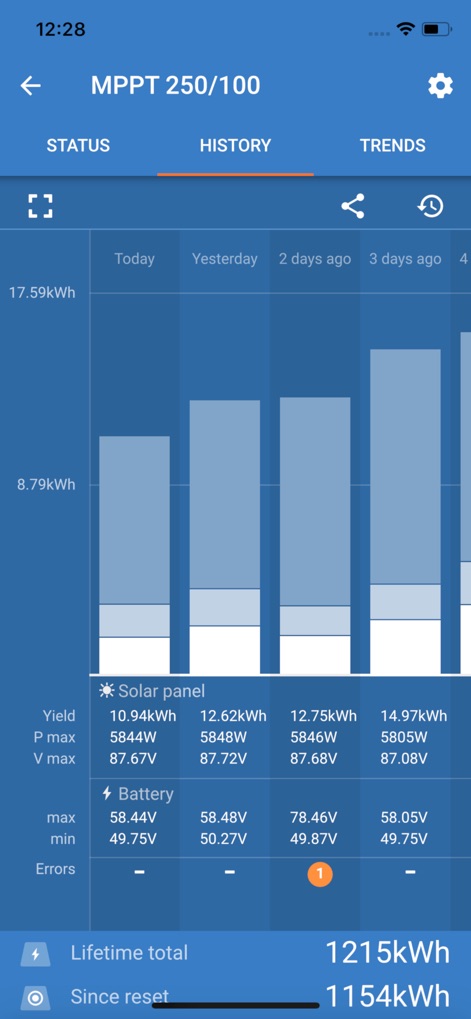
This tool displays detailed yield data across days, including daily kWh production and max/min Battery voltages, for comprehensive system evaluation.
Performance History Analysis
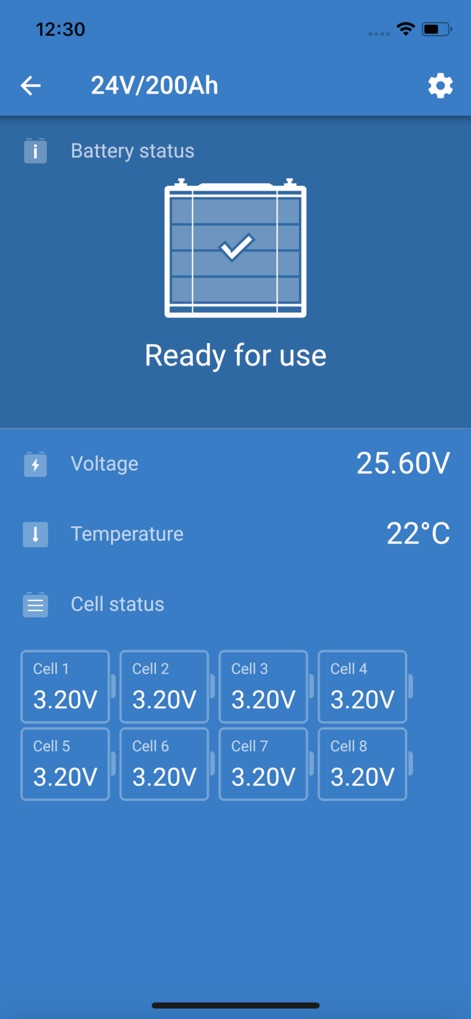
Users gain insights into overall Battery status and can view individual Cell voltages, ensuring balanced and healthy battery operation.
Individual Cell Monitoring
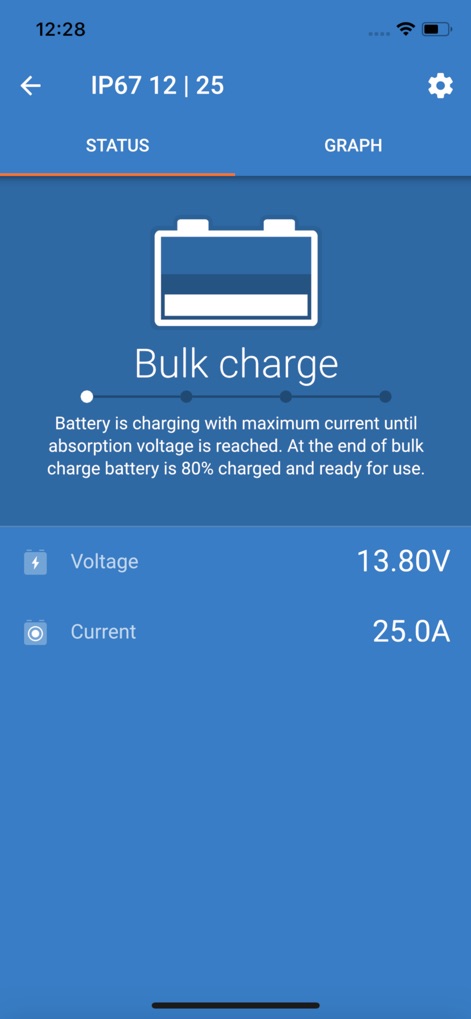
The app clearly indicates the current charge state, such as 'Bulk charge', and shows real-time Voltage and Current values during the charging process.
Smart Charging Insight
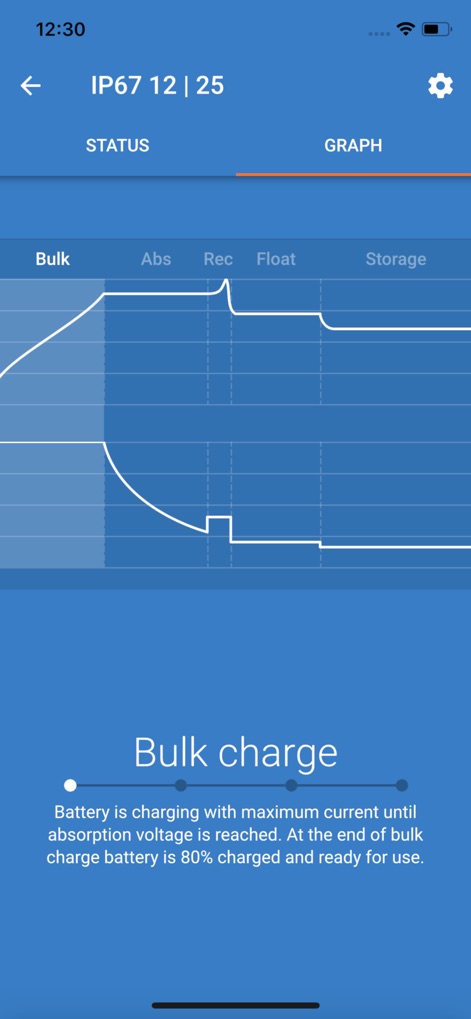
This interface presents a clear graphical representation of the charging stages (Bulk, Abs, Rec, Float, Storage) and their corresponding Voltage and Current profiles.
Charging Cycle Visualization
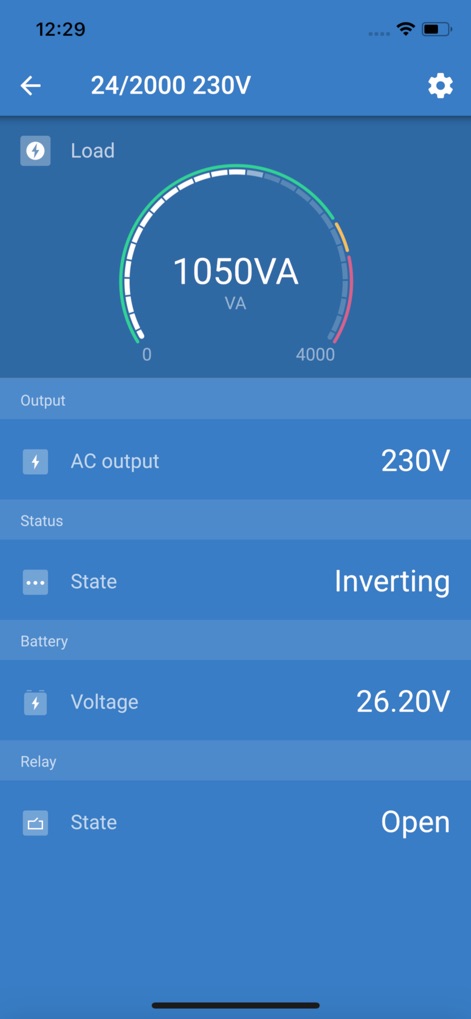
The tool shows the current Load in VA and the AC output Voltage, providing immediate feedback on inverter performance and power delivery.
Inverter Output Control
Description
Download
More Like This
Apps with similar features and user experience

小米音箱
Beijing Xiaomi Co., Ltd

Starlink
Space Exploration Technologies Corp.

Bambu Handy
Shanghai Lunkuo Technology Co., Ltd

DREO
HESUNG INNOVATION LIMITED

My Verisure
Securitas Direct

Whisker
Automated Pet Care Products Inc.

geeni
Merkury Innovations LLC

ADT+
ADT LLC

X-Sense Home Security
X-Sense USA LLC.
This page is not an official page of the app or its developer, but an independent editorial publication created for informational and commentary purposes. Unless expressly stated otherwise, neither the app nor its developer is affiliated with, endorsed by, sponsored by, authorized by, or otherwise officially connected with MWM, Apple, Google Play, the app publisher, or the app's developer, and nothing on this page implies that the app was developed using MWM's services. Any trademarks, logos, screenshots, and other content remain the property of their respective owners.